 How to...
This chapter introduces job schedules and explains how they are used in Revolve.
Batch jobs are an important part of most mainframe applications. In Revolve you can gain a partial understanding of the batch components of an application by analyzing JCL statements that control batch jobs. However, there is important higher-level information that can not be obtained from the JCL.
A batch system may consist of tens or hundreds of individual batch jobs, however, these jobs do not run in isolation; they are interrelated, and must be run in the correct sequence. An obvious example is that a job that outputs a file which contains a particular data set, must run before a job that prints a report containing information from that file. In practice, the dependencies among jobs form a complex network.
Revolve job schedule support helps you understand how information flows through a batch processing system by focussing on the dependencies between individual batch jobs. Getting a grip on these dependencies is essential to gaining an overall understanding of a batch system. By being able to see relationships between the batch jobs you can more easily understand the movement of control and data through the batch application.
In Revolve, the term job schedule to refers to a collection of job executions and their dependencies. All of the job executions within a Revolve project are considered to be part of a single schedule.
The jobs within a schedule usually fall into natural clusters based on their function, and as such are usually scheduled together as a unit. For example, for most analysis purposes, it is helpful to deal with the jobs relating to the institution's payroll application separately from those relating to the purchasing application. Revolve uses the concept of a job stream to represent these logically-related groupings. Most commercial job scheduling packages have the same concept, though they may use different terminology.
The job schedule support provided by Revolve is not intended to address the needs of operations or operations support personnel who are responsible for scheduling and monitoring batch job execution.
Revolve supports the following job schedule formats:
The XML format is described in the sections XML Job schedule format and Revolve job schedule object model.
All reports need to be in a particular format before they are loaded into Revolve. See the section Preparing schedules for use in Revolve.
All the supported types of schedules are translated into XML format when they are imported. If you use a job schedule format that is not currently supported, you can translate it into an XML schedule yourself for use in Revolve. The format of the XML file is described in the section XML Job schedule format.
In order to use the job schedules from your mainframe environment, the information they contain has to be in a form that Revolve can recognize. In the case of CA-7 LJOB and TWS (OPC) reports, some processing may be required before they are loaded. The nature of the processing involved depends upon the system being used. See the sections Preparing CA-7 schedules and Preparing TWS (OPC) schedules.
For other systems you need to translate your schedule information into the XML format understood by Revolve. See XML Job schedule format.
Job schedule input reports should be prepared with the following extensions:
If you use these extensions, Revolve will automatically understand the content.
The CA-7 job schedule information required for Revolve has to be contained in a single LJOB report file. You need to arrange for the report to be generated on the mainframe system and made available as a single file with the extension .ca7.
The report can be generated in the mainframe environment using the LJOB command, specifying LIST=NODD as a parameter.
For use in Revolve, the report needs to be created with the ANSI carriage control characters in column 1. You can do this by including an A in the RECFM DCB parameter. In JCL for example, you can specify DCB=RECFM=FBA.
Note the name and location of the file produced for when you import it into the project.
The TWS job schedule comprises two reports:
Contains most of the information about the jobs and how they are scheduled.
Identifies which components carry out what tasks. It is used to discriminate between manual operations and operations that run jobs.
You need to arrange for the information in these reports to be provided in a suitable form as explained below.
TWS mainframe environment provides two utility programs that create the reports:
The application description report file should be given the extension .adr
The workstation description report file should be given the extension .wdr
Use the utilities above to produce the two reports.
For use in Revolve, the reports need to be created as files with the ANSI carriage control characters in column 1. You do this by specifying DCB=RECFM=FBA (or FA) in the JCL used to run the utility.
Note the name and location of the two files produced for when you import them into the project.
All job schedules imported into Revolve are ultimately translated into an XML format. You can use this feature to import any type of job schedule that is not recognized by Revolve. By either translating the contents manually, or writing a script to do the processing, you can create an XML file and load it into Revolve.
The example code demonstrates how the XML file is structured.
If you use the XML format to import your own job schedules, you have to decide what Revolve users will see when they navigate to view source code for the schedule. By default, Revolve will display the source code of the XML document. To force Revolve to display the code from the original schedule you can include source references in the XML file. To achieve this, use the:
See the example code for more details.
When you create and name a file, the extension you use depends on which viewing arrangement you coded:
The rest of this section contains an example of how an XML job stream is structured so it can be loaded into Revolve. You may need to use this method if your mainframe does not use one of the supported job schedule formats. See the topic Supported job schedule formats. For an overview of the XML format see the topic XML job schedule format.
<?xml version="1.0" ?>
<!--
    This is an annotated sample job schedule definition.

    The main purpose of this file is to document the format.
    It is not suitable for testing, as no attempt was made to keep
    it internally consistent.

    The document-level element is the job-schedule. This element is
    required, though the domain reference and name are ignored by
    the Revolve job schedule processing.

    domain          (required) - name of domain.
                                 Ignored by Revolve.
    name            (required) - name of the job schedule.
                                 Ignored by Revolve.
    source-ref-type (optional) - default is internal.
                                 Specify "external" if this document
                                 contains references to source
                                 locations in external source files.
                                 Otherwise the schedule loader
                                 generates source reference to this
                                 document.
-->
<job-schedule domain="SP1" name="mainJobSchedule" source-ref-type="external">
    <!--
        source-lib elements define libraries or directories that
        contain source files.

        source files are used here for two purposes.

        - if this file refers to external source files, e.g., reports
          from a job scheduling system, the source files must be
          identified by source-lib and source-file elements.

        - if jcl-lib elements are used to specify JCL source
          libraries, the libraries must be identified by
          source-lib elements.

        For use in Revolve, the form using path is used.

        Either path must be specified or both domain and name must
        be specified.

        id     (required)  - unique identifier for the source-lib.
                             The id attribute must be unique among
                             all id attributes in this document.
        path   (see above) - path to a directory containing source
                             files.

    -->
    <source-lib id="sl1" domain="SP1" name="SYS1.PROCLIB"/>
    <source-lib id="sl2" domain="SP1" name="APPL1.JCLLIB"/>
    <source-lib id="sl3" path="c:\source\jcl\sys1.proclib"/>

    <!--
         Source files are identified by name and refer to the
         containing library.

         Source file elements must appear before any source-ref
         elements that reference them.

         id     (required) - unique identifier for the source file.
                             The id attribute must be unique within
                             all id attributes in this document.
         libref (required) - id of the associated source-lib element.
                             The source-lib element must appear before
                             any source-file elements that
                             reference it.
         name   (required) - name of the source file.
    -->
    <source-file id="sf1" libref="sl2" name="report.ctm"/>

    <!--
        jcl-libs (and the nested jcl-lib elements identify an order
        list of source libraries that are to be searched to resolve
        references to JCL.

        jcl-lib element are not used in this release of Revolve. We plan to add this support in an
        upcoming release. These elements are included here
        for completeness.
    -->
    <jcl-libs>
        <jcl-lib libref="sl1"/>
        <jcl-lib libref="sl2"/>
    </jcl-libs>

    <!--
        job-stream element starts a job stream definition.

        name - name of the job stream. It must
               be unique within all job stream names within the
               schedule.
        desc - description.
    -->
    <job-stream name="DAILYOP" desc="Daily order processing">

        <!--
            The documentation nested element can be used with
            job-schedule, job-stream, job-exec, predecessor,
            event, and manual-operation elements to provied more
            extensive documentation than is provided by the desc
            attribute.
        -->
        <documentation>
            This element can be nested under other elements and is
            used to provide more extensive information than is
            included in the description field.
        </documentation>

        <!--
            source-ref (source reference) elements can appear as
            nested elements for job-schedule, job-stream, job-exec,
            predecessor, manual-operation, and external-predecessor
            elements.

            refid     - (required) id of a source-file element.
            line      - (required) starting line number in source
                        file (first line is 1).
            col       - (optional) starting column number within the
                        line (first column is 1).
                        If omitted, column 1 is assumed.
            endline   - (optional) end line. if omitted, starting
                        line is assumed.
            endcolumn - (optional) end column. If omitted, last
                        character of endline is assumed.
        -->
        <source-ref refid="sf1" line="100" col="1" endline="102" endcol="70"/>

        <!--
            job-exec (job execution) element. defines the execution of a job
            within a job stream.

            name    - (required) name of the job execution. Must
                      be unique among all job executions,
                      manual operations, and events within the job
                      stream, within the schedule.
            jobname - (required) name of the JCL member to be
                      executed.
            desc    - (optional) description of the job execution.
        -->
        <job-exec name="job1" jobname="job1" desc="Description">

            <!--
                The predecessor nested element specifies a
                dependency on another job stream operation
                (another job-exec, external-predecessor, manual
                operation, or event.
            -->
            <predecessor name="mo1">

                <!--
                    attr elements can be nested within most other
                    elements. Specifically, attr elements can be
                    contained by predecessor, external-predecessor,
                    job-exec, manual-operation, and event. attr
                    elements are never required but can be used to
                    provide values that are, for example, specific
                    to a particular job scheduling system.

                    The exact processing of these values varies with
                    the specific implementation. The XML schedule
                    loader keeps these values as named attributes of
                    the parent object.

                    The dep.type nested element for predecessor can
                    have one of the following values: GENERAL,
                    EXCLUSION, TRIGGER.
                -->
                <attr name="dep.type" value="GENERAL"/>
            </predecessor>

            <!--
                External predecessor elements can be nested under
                job-exec and manual-operation elements to indicate
                a predecessor that is not in the current job stream.

                All attributes are required, though some may be
                ignored by Revolve.

                name     - name of this external-predecessor. Must
                           be unique among all job-exec manual-
                           operation, event, and external-predecessor
                           elements in the job stream.
                domain   - containing domain. Ignored by Revolve.
                sched    - containing schedule. Ignored by Revolve.
                stream   - containing job stream.
                opername - name of the operation (job-exec,
                           manual-operation, or event) in the external
                           job stream.
            -->
            <external-predecessor name="ep1" domain="dom1" sched="sch1" stream="strname" opername="ref1"/>
        </job-exec>

        <!--
            The manual-operation element defines a manual operation.

            It can have predecessor and external-predecessor
            nested elements.

            name - (required). The name of the operation must be
                   unique within manual-operation, job-exec, and
                   even elements within the job stream.
        -->
        <manual-operation name="JobPrep" desc="Description">
        </manual-operation>

        <event name="Event1" desc="description" type="evtype">
        </event>
    </job-stream>
</job-schedule>
Job schedules from different suppliers do not use the same structure or terminology. The rest of this section briefly explains the structures and terminology used in different examples and how they equate to the object model used in Revolve. Also see the sections Revolve job schedule object model and XML Job schedule format.
CA7 is quite different in approach from the Revolve object model as it does not explicitly support the notion of a job stream.
In CA-7, individual jobs are scheduled. Triggers are defined so that when a scheduled job completes, another job will be automatically started. Each instance of a particular job being scheduled is assigned a schedule ID. Triggers are associated with a particular schedule ID.
When a job is started by the scheduler a particular schedule ID is "in effect". When the job completes, triggers associated with that schedule ID are executed [see note]. Those jobs can in turn trigger other jobs and so forth. In effect, each job that is explicitly scheduled is the beginning of a job stream. By following the chain of triggers Revolve can construct a map of the job flow. It is also possible to start a job manually, in which case the operator must specify a schedule ID that is to be in effect. This determine which triggers will activate when it is completed.
The Revolve import process for CA-7 creates job streams for each scheduled job and schedule ID combination. Job streams are created by starting with each scheduled job and schedule ID combination, and then tracing triggers and dependencies to determine what will run.
Revolve also tries to identify jobs that are run manually. To achieve this it analyzes triggers in order to locate jobs that trigger other jobs with a particular schedule ID, but which are not triggered or scheduled using that ID. This implies that those jobs are run manually with that schedule ID, so Revolve creates corresponding job streams.
Note: Schedule ID "000" is treated specially. While jobs can not be started with schedule ID "000," triggers (and dependencies) associated with schedule ID "000" are active regardless of the schedule ID in effect.
This object model corresponds quite closely to that used in Revolve, however, with TWS the terminology is slightly different.
TWS shares the concept of a schedule but, in TWS terms, a group of related jobs and associated manual operations is called an application. In Revolve we use the term job stream because the term application is very overloaded.
TWS defines three types of workstations:
In Revolve we do not explicitly model workstations, but we use the TWS workstation type to distinguish between job executions, which are run on computer workstations, and other operations. If the operation is run on a computer workstation it is considered a JobExecution; otherwise it is treated as a ManualOperation.
The figure below shows the conceptual data structure of how job schedules are stored in Revolve. Also see the section XML Job schedule format.
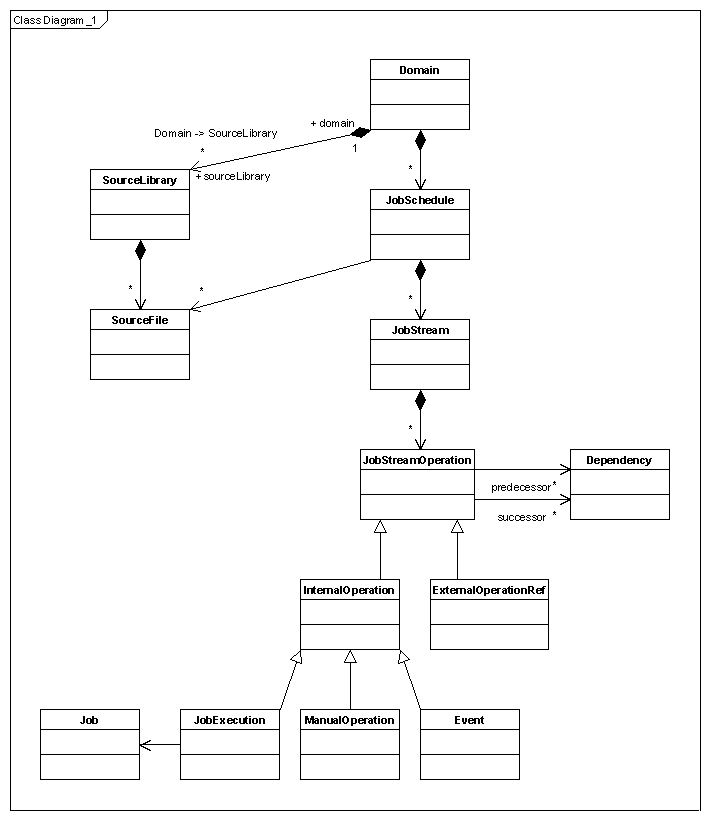
Figure 10-1: Job schedule object model diagram
Copyright © 2006 Micro Focus (IP) Ltd. All rights reserved.