

| Post Installation Activities | Restrictions | |

Mainframe Access Product Suite servers provide record-by-record read-write access to data on an MVS mainframe from applications running on network attached workstations. These client applications are standard COBOL applications using COBOL I/O statements.
Mainframe Access Product Suite operates in two separate environments on the mainframe, either as a MVS application or as a CICS transaction. The CICS server provides record-by-record access to VSAM datasets that can be shared with other CICS transactions. The MVS server provides record-by-record access to VSAM and sequential datasets as well as members of partitioned datasets (PDS). The MVS server also provides Library Services Connectivity (LSC) support for access of source code and test data files.
This chapter gives details of the record-by-record access support in each environment. The Library Services Connectivity chapter gives details of what is supported by that function.
Dataset allocation is the mechanism whereby file references in client applications are associated with MVS datasets. Allocation does not imply creation of datasets. In most cases datasets will be created before they are accessed by MFA. This is always the case for the CICS environment. In the VTAM environment, it is possible to dynamically invoke VSAM Access Method Services to create either a VSAM or non-VSAM file just before it is opened.
VSAM datasets used by MFA in the CICS environment can be pre-allocated by including MVS JCL "DD" statements in the CICS start-up jobstream, or allocated dynamically by including a DSNAME in the CICS resource definition of the file. Datasets that are to be accessed in the CICS environment must be defined to CICS as file resources. An entry is also required in the CICS Server Database Reference File for each filename that either does not conform to CICS filename conventions or for which a dynamic association of workstation filename to CICS filename is desired.
VSAM datasets must exist prior to being accessed through the CICS server. No provision exists in the CICS environment for dynamically creating datasets.
Connecting from a workstation-based COBOL application to a host-based dataset through the CICS server can involve multiple filename mappings. Table 1 indicates the required and optional mappings that take place on the workstation and Table 2 indicates the mappings that occur on the CICS host. You must ensure that the required definitions are in place before attempting to access VSAM datasets through the CICS server.
Table 1: Filename Mapping Occurring on the Workstation
| Filename Mapper | Required / Optional | From | To |
|---|---|---|---|
| COBOL Application | Required | COBOL filename | External filename |
| Environment variable or External File Mapper | Optional | Logical filename | Physical filename |
Note: Logical filename and physical filename are the terms used by the External File Mapper. For workstation-only applications, these correspond, roughly, to DDNAME and workstation (PC) filename. When used with the CICS server, this is merely a translation that can be further modified on the server (or host).
Table 2: Filename Mappings Occurring on the Host (CICS)
| Filename Mapper | Required / Optional | From | To |
|---|---|---|---|
| CICS server Database Reference File | Optional | Workstation filename | CICS filename |
| CICS File Control Table (FCT) or CICS Start-up JCL | Required | CICS filename | MVS VSAM dataset name |
Note: An entry in the Database Reference File is required if the filename passed from the workstation does not conform to CICS file naming conventions.
Example
The following extracts from a COBOL application, MFEXTMAP.DAT
file, Database Reference File and CICS start-up JCL provide an example of
dataset allocation in the CICS environment.
In the COBOL application:
SELECT TRANSACTION-FILE ASSIGN ACCTFIL INDEXED
.
.
OPEN I/O TRANSACTION-FILE
in the MFEXTMAP.DAT file:
ACCTFIL G:\TX\SAMPREGN\FILES\USR\ACCTFIL
in the Database Reference File:
/F G:\TX\SAMPREGN\FILES\USR\ACCTFIL /AF MFAACCT
and in the CICS start-up JCL:
//MFAACCT DD DSN=ACCOUNT.MASTER.FILE,DISP=SHR
In the MVS environment datasets can either be pre-allocated via MVS JCL "DD" statements (Job Step allocation) or dynamically allocated by the MVS server. In general, datasets must already exist on the mainframe before they can be accessed via the MVS server from a workstation; however, the MVS server makes special provision for creating both VSAM and non-VSAM datasets by invoking VSAM Access Method Services before the dataset is accessed.
Connecting from a workstation-based COBOL application to a host-based VSAM dataset through the MVS server can involve multiple filename mappings. Table 1 indicates the required and optional mappings that take place on the workstation. These mappings apply to both the CICS and MVS environments because the activities involved take place on the workstation prior to communication with the host system. Table 3 indicates the mappings that occur on a MVS host. You must ensure that the required definitions are in place before attempting to access datasets through the MVS server.
5.1.2.1 Table 3: Filename Mapping Occurring on Host (MVS)
| Filename Mapper | Required / Optional | From | To |
|---|---|---|---|
| MVS server FSTAB | Optional (1) | Workstation filename | MVS DDNAME or DSNAME |
| MVS server FSTAB or VCTL entry | Required | Workstation filename with alternate index | MVS Alternate Index DDNAME or DSNAME |
| MVS server start-up JCL | Optional (2) | MVS DDNAME | MVS DSNAME |
Notes:
Pre-allocated datasets require that dataset definition (DD) statements be included in the MVS server start-up jobstream. Access to pre-allocated datasets is requested whenever the Client passes a DDNAME to the MVS server or when the server translates the workstation filename to a DDNAME using FSTAB. For details of FSTAB, see Configuring MFA in the Installation chapter.
Dynamic dataset allocation occurs whenever a host dataset name (DSNAME) is passed to the MVS server from the workstation or when server translates the workstation filename to a dataset name (DSNAME) using FSTAB. For details of FSTAB, see Configuring MFA in the Installation chapter.
The MVS server uses the following criteria to determine if the filename passed to it should be interpreted as a DDNAME or as a DSNAME.
Example
The following extracts from a COBOL application, MFEXTMAP.DAT
file and FSTAB entry provide an example of dataset allocation in the MVS
environment.
In the COBOL application:
SELECT TRANSACTION-FILE ASSIGN ACCTFIL INDEXED
RECORD KEY IS ACCT-KEY
.
.
OPEN I/O TRANSACTION-FILE
In MFEXTMAP.DAT:
ACCTFIL G:\TX\SAMPREGN\FILES\USR\ACCTFIL
In FSTAB:
   FSTAB 'G:\TX\SAMPREGN\FILES\USR\ACCTFIL',              X
         DSN=ACCOUNT.MASTER.FILE
The above example dynamically allocates an existing VSAM file. There is no need to specify the dataset in the MVS server start-up JCL.
Client applications can be connected to MVS Partitioned Dataset (PDS) members by referring to the PDS member name either on the workstation or on the host. On the workstation, a PDS member reference can be specified in the program, in an environment variable or in the MFEXTMAP.DAT file. In each case, the reference takes the form:
MVS.DATASET.NAME(MEMBER)
or:
DDNAME(MEMBER)
Example
An example of a COBOL program reference to a PDS member using a
dataset name is shown below.
SELECT anyname ASSIGN 'CSI01.FSHOST.DIST.INSTLIB(VERIFY)'
An example using a DDNAME would be:
SELECT anyname ASSIGN 'VSAMCTL(TSTALLOC)'
A PDS member can be referenced on the host through MVS JCL (pre-allocation) or by allocating it dynamically using FSTAB translation. An example FSTAB entry specifying a PDS member is shown below:
   FSTAB 'workstation-name',           X
         DSN=mvs.dataset.name,         X
         MEM=member
MVS sequential datasets to be created as output must be pre-allocated unless one of the following situations applies:
SYSOUT files can be pre-allocated or you can specify a filename of the form SYSOUTx to dynamically allocate them. You should replace the value x with a single letter or numeric digit specifying the SYSOUT class. The filename can be specified in your source program, an environment variable, the MFEXTMAP.DAT file or be the result of FSTAB translation.
VSAM alternate indexes can be pre-allocated or allocated dynamically. Pre-allocation is accomplished via MVS JCL; dynamic allocation via FSTAB. If you pre-allocate the base VSAM cluster, you must pre-allocate the alternate indexes. If you specify the base cluster in FSTAB, you must specify the alternate indexes there as well.
The following naming convention must be used when pre-allocating alternate indexes. Alternate index DDNAMEs must take the form ddnamen, where ddname is the DDNAME of the base VSAM cluster and n is a single numeric digit beginning with 1 and incrementing for each additional alternate index. If ddname is 8 characters, the last character must be replaced with the single digit. Numbers must be assigned in the order in which they are defined in the ALTERNATE RECORD KEY clauses in client COBOL programs. The MVS server currently limits the number of pre-allocated alternate indexes that can be specified in this manner to 9.
As an example, if the DDNAME used for the base VSAM cluster is specified as ACCOUNTS, then the first alternate index must be ACCOUNT1, the second ACCOUNT2 and so on.
Dynamic allocation of alternate indexes is accomplished by using the FSTAB macro to associate alternate indexes with a primary (base) cluster. When using FSTAB, the alternate index names specified are the VSAM path names defined in the VSAM catalog. The MVS server does not impose any additional naming conventions for these beyond what VSAM and MVS require. Alternate index references in the FSTAB entry must be in the same order as specified in the ALTERNATE RECORD KEY clauses in the client COBOL programs.
Example
An FSTAB entry with alternate indexes is shown below:
   FSTAB 'ACCT.FIL',                       X
         DSN=ACCOUNT.MASTER.FILE,          X
         AIX=(ACCOUNT.MASTER.BY.REGION,    X
         ACCOUNT.MASTER.BY.SALESMAN,       X
         ACCOUNT.MASTER.BY.CUSTOMER)
The MVS server dynamically allocates the alternate index file as required.
To ensure consistent behavior between COBOL applications running on the workstation and client COBOL applications accessing VSAM datasets through the MVS server, alternate indexes should always be defined to VSAM as being part of the UPGRADE set.
As an alternative to specifying a static set of alternate indecies with a VSAM file in the FSTAB, you may now define this same information in a more dynamic method by using members in the VSAMCTL library to create dynamic FSTAB entries for VSAM files which have alternate indexes. Each member in the VSAMCTL library defines a VSAM file and its indexes. Only one VSAM file can be specified in each member. The control records within a member are 80 bytes long and begin with a keyword followed by its value. All member names for this facility must begin with a '$' or whatever keyboard character maps to a X'5C'.
The keywords are VSAM= and AIXn=, when n is a value from 1 to 9. Following VSAM= is the MVS VSAM dataset name. This record must be the first record in the member. The keywords AIX1 through AIX9 identify the alternate index PATH files. They must be specified in the same order as in the COBOL program.
For example:
FILE-CONTROL.
SELECT CLAIM-FILE
ASSIGN TO PATCLMX
ORGANIZATION IS INDEXED
ACCESS IS RANDOM
RECORD KEY IS PATIENT-CLIAM-NUMBER
ALTERNATE RECORD KEY IS MEDICARE DUPLICATES
ALTERNATE RECORD KEY IS MEDICAID-KEY DUPLICATES
ALTERNATE RECORD KEY IS PRIVATE-INS-KEY DUPLICATES
ALTERNATE RECORD KEY IS PATIENT-NAME
ALTERNATE RECORD KEY IS CONTROL-NUMBER
ALTERNATE RECORD KEY IS PAYMENT-ID
STATUS IS VSAM-FILE-STATUS.
As an FSTAB entry:
FSTAB 'PATCLMX',
      DSN=CSI01V.PATCLM.PATIENT.BILLING,
      AIX=(CSI01V.PATCLM.BY.MEDICARE.PATH,
           CSI01V.PATCLM.BY.MEDICAID.PATH,
           CSI01V.PATCLM.BY.INS.POLICY.PATH,
           CSI01V.PATCLM.BY.NAME.PATH,
           CSI01V.PATCLM.BY.CONTROL.PATH,
           CSI01V.PATCLM.BY.PAYMENT.PATH)
As a VCTL library member:
VSAM=CSI01V.PATCLM.PATIENT.BILLING
AIX1=CSI01V.PATCLM.BY.MEDICARE.PATH
AIX2=CSI01V.PATCLM.BY.MEDICAID.PATH
AIX3=CSI01V.PATCLM.BY.INS.POLICY.PATH
AIX4=CSI01V.PATCLM.BY.NAME.PATH
AIX5=CSI01V.PATCLM.BY.CONTROL.PATH
AIX6=CSI01V.PATCLM.BY.PAYMENT.PATH
Assume that the name of the VCTL member for the above control statements is $PATCLM6, then the MFEXTMAP.DAT entry would be:
PATCLMX ($PATCLM6)
Note, the parentheses are required because FHREDIR uses the $ as a special name indicator.
The above FSTAB and VCTL member are functionally equivalent.
Dataset allocation is the mechanism whereby file references in client applications are associated with MVS datasets. With few exceptions, datasets are expected to exist when opened by client applications. A dataset being opened by a client application need not already exist if one of the following conditions is met:
To preprocess datasets using Access Method Services or the dynamic allocation MVS Supervisor Call (SVC99), you must establish a PDS with 80 byte records, either blocked or unblocked. The PDS must be specified in a DD statement in the MVS server start-up jobstream and use the DDNAME VSAMCTL. The members of this PDS contain the Access Method Services (IDCAMS) or TSO commands you wish to have invoked to preprocess your datasets. This dataset and its JCL statement is created by the installation procedure.
Your applications can refer to the members of the VSAMCTL PDS by specifying filenames of the form @member for VSAM files and #member for non-VSAM datasets. As before, this form of file reference can be specified in your client application, in an environment variable, in the MFEXTMAP.DAT file or be the result of FSTAB translation. Regardless of the method used to specify the file reference, the MVS server dynamically invokes Access Method Services or SVC99, passing it the contents of the referenced PDS member when the client application performs either a COBOL OPEN or a DELETE FILE for the specified file. A COBOL OPEN performs the specified Access Method Services functions and then opens the file referenced by the Access Method Services commands. DELETE FILE simply causes the Access Method Services functions to be performed without further processing.
You must create the members of the VSAMCTL PDS, placing the desired Access Method Services commands in 80 byte card images. Members can consist of any Access Method Services command, or series of commands that is valid in your environment. This includes the TSO ALLOCATE command which can be used to create non-VSAM datasets.
Example
An example of using Access Method Services to preprocess a dataset is
given below.
In your COBOL application:
SELECT TRANSACTION-FILE ASSIGN '@TRANFIL'
.
.
OPEN OUTPUT TRANSACTION-FILE
VSAMCTL PDS member @TRANFIL:
DELETE TRANS.ESDS PURGE CLUSTER
SET MAXCC EQ 0   /* allow dataset to not exist */
DEFINE CLUSTER (NAME(TRANS.ESDS) -
RECORDS(2000, 1000) -
VOLUMES(VSAM01) -
NONINDEXED -
RECORDSIZE(128 128)
This example creates, then opens a VSAM Entry Sequenced Dataset (ESDS) for output processing.
Access Method Services output is written to the FSMSGA message file defined during installation. You should check the FILE STATUS to ensure that 00 has been returned by Access Method Services. You can include a SET MAXCC EQ 0 if required.
Any IDCAMS control statements can be used. Therefore a REPRO statement could be used to load the VSAM file prior to its use. Also alternate indexes and path file can be created in this manner.
Please refer to the IBM document, Access Method Services for the Integrated Catalog Facility (SC26-4906) for details on the IDCAMS control statements.
Example
An example of using SVC99 to preprocess a dataset is given below.
In your COBOL application:
SELECT TRANSACTION-FILE ASSIGN '#MYLIB'
.
.
DELETE TRANSACTION-FILE
VSAMCTL PDS member #MYLIB:
DELETE    DATASET(CSI01.MY.LIBRARY)
ALLOCATE  DATASET(CSI01.MY.LIBRARY)
          CATALOG
          UNIT(9345)
          VOLUME(LIBS01)
          CYLINDERS
          PRI(005)
          SEC(001)
          DIR(075)
          EXPDT(97120)
This example creates a PDS library.
SVC99 output is written to the FSMSGA message file defined during installation. You should check the FILE STATUS to ensure that your commands were properly processed.
The following commands and options are be used by the SVC99 function to process non-VSAM datasets. Required coding for each command or option is shown in uppercase letters. All lowercase letters are optional.
To delete a non-VSAM dataset use the following command. The command and file name must be on the same line. The dataset name (xxxxxxxx) may optionally be enclosed within quotes.
DELete DAtaset(xxxxxxxx) or DSname(xxxxxxxx)
To allocate a non-VSAM dataset code use the following command and options. The command and file name must be on the same line. The dataset name (xxxxxxxx) may optionally be enclosed within quotes.
ALLOCate DAtaset(xxxxxxxx) or DSname(xxxxxxxx)
The following command options are available:
| Option | Required / Optional | Default | Description |
|---|---|---|---|
| KEEP or CATALOG | Optional | CATALOG | Full spelling only, no shortcut |
| Tracks or Cylinders | Optional | Tracks | . |
| Pri(###) | Optional | Pri(1) | Primary space allocation
Pri(0) is invalid |
| Sec(###) | Optional | Sec(0) | Secondary space allocation
Sec(0) is valid |
| Dir(###) | Optional | Dir(0) | Number of directory blocks for a PDS library
Dir(0) is valid |
| Recfm(v,b,s) or
Recfm(f,b) |
Optional | Recfm(fb) | Dataset record format, commas are optional
b (blocked) is optional s (spanned) is for v only |
| Lrecl(###) | Optional | Lrecl(80) | Maximum record length
1 to 32756 is valid |
| Blksize(###) | Optional | Blksize(0) | Maximum block size
0 to 32760 is valid 0 implies half track blocking if fixed and > 0 then must be a multiple of Lrecl if variable and not spanned then must not be < Lrecl+4 |
| Expdt(yyddd) | Optional | none | Dataset expiration date
numeric test only |
| Unit(xxxxxxxx) | Required | none | 1 to 8 characters is valid |
| Volume(xxxxxx) | Optional | none | 1 to 6 characters is valid
if omitted the Unit name must be a generic name. For example, Unit(sysallda) |
Line Sequential files are only supported by the MVS server.
The MVS server provides special file handling for line sequential files. For file types other than line sequential, all data passed between workstations and the server is assumed to use the EBCDIC code set. COBOL applications on the workstation must be coded with the Micro Focus COBOL Compiler directive CHARSET(EBCDIC) in order to properly handle the EBCDIC coded files on the host.
Because they can contain embedded formatting codes that are only meaningful in the ASCII code set, line sequential files on the workstation are always coded in ASCII, regardless of the CHARSET directive. While this arrangement is the most sensible for applications running solely on the workstation, mainframes generally expect data to be stored in EBCDIC. As a consequence, the MVS server provides translation between ASCII and EBCDIC when processing line sequential files, so that these files, while read or written in ASCII by the client application, are stored in EBCDIC on the host. In addition, the MVS server attempts to convert most line sequential formatting to the closest equivalent on the host.
For line sequential output files, records are translated from ASCII to EBCDIC as they are received by the host. COBOL WRITE controls such as BEFORE/ AFTER ADVANCING are translated into carriage control characters before the records are stored on the host.
For line sequential input files, records are translated from EBCDIC to ASCII as they are sent to the client. Carriage control characters are stripped out and the equivalent number of blank lines inserted.
As well as supporting the normal COBOL programs by compiling them with the CALLFH"FHREDIR" Compiler directive, MF/370 assembler programs are supported by issuing the command:
SET MF370EFH=FHREDIR
before the assembly is run.
The operations that the record-by-record service can perform are defined by action codes. For each COBOL I/O operation, there is an equivalent action code. In addition, the record-by-record service has some special functions which cannot be performed using COBOL syntax.
This section lists the action codes that the record-by-record service supports. It also documents any deviations from normal Fileshare Version 2 processing.
Normal COBOL I/O operations are identified by x'FA' in the first byte of the action code. The second byte indicates the operation, as shown in the following table. The operation codes are in hexadecimal format.
See the Callable File Handler in the Programmer's Guide to File Handling for full details on action codes.
File Types are abbreviated as follows:
| S | Record Sequential (VSAM ESDS - Entry Sequenced Dataset, QSAM, or PDS members allocated as sequential datasets). |
| R | Relative (VSAM RRDS - Relative Record Dataset). |
| I | Indexed (VSAM KSDS - Key Sequenced Dataset). |
| N/S | Not Supported |
Operation codes for line sequential files and byte stream processing are not supported for the CICS server.
Operation codes for lock processing are supported to the extent that the CICS server can simulate the lock behavior under CICS. Multiple locks cannot be obtained (although uncommitted write operations to CICS protected resources do result in the records being locked until a commit or rollback request is processed).
Table 4: Action Codes Supported
| Op | Description | File Type | MVS Notes: | CICS Notes: |
|---|---|---|---|---|
| 00 | Open input | S R I | . | . |
| 01 | Open output | S R I | . | Files are not created; the file must exist prior to opening it. Files are not cleared before writing to them. |
| 02 | Open I/O | S R I | File lock on all records | Files are not created; the file must exist prior to opening it. Files are not cleared before writing to them. |
| 03 | Open extend | S R I | . | Files are not created; the file must exist prior to opening it. Files are not cleared before writing to them. |
| 04 | Open input with no rewind | S | Same as 00 | . |
| 05 | Open output with no rewind | S | Same as 01 | Files are not created; the file must exist prior to opening it. Files are not cleared before writing to them. |
| 08 | Open input reversed | S | Same as 01.
VSAM only. |
The order in which records are returned is dictated by VSAM file processing. |
| 80 | Close | S R I | . | . |
| 81 | Close with lock | S R I | Treated as 80 | Treated as 80 |
| 82 | Close with no rewind | S | Treated as 80 | Treated as 80 |
| 84 | Close reel/unit | S | Treated as 80 | Treated as 80 |
| 85 | Close reel/unit for removal | S | Treated as 80 | Treated as 80 |
| 86 | Close reel/unit with no rewind | S | Treated as 80 | Treated as 80 |
| 8D | Read (sequential) with no lock | S R I | Lock ignored unless file opened I/O | . |
| D8 | Read (sequential) with lock | S R I | . | Only one record is locked at a time. |
| D9 | Read (sequential) with kept lock | S R I | . | Only one record is locked at a time. WITH KEPT LOCK is treated as WITH LOCK. |
| F5 | Read (sequential) | S R I | . | . |
| 8C | Read previous with no lock | R I | . | The order in which records are returned
is dictated by VSAM; the order may not be the reverse of the order
returned when the file is read sequentially forwards.
IBM VS COBOL II does not support this verb for VSAM file processing. |
| DE | Read previous with lock | R I | Read for update | Only one record is locked at a time.
The order in which records are returned is dictated by VSAM; the order may not be the reverse of the order returned when the file is read sequentially forwards. IBM VS COBOL II does not support this verb for VSAM file processing. |
| DF | Read previous with kept lock | R I | Read for update | Only one record is locked at a time. WITH
KEPT LOCK is treated as WITH LOCK.
The order in which records are returned is dictated by VSAM; the order may not be the reverse of the order returned when the file is read sequentially forwards. IBM VS COBOL II does not support this verb for VSAM file processing. |
| F9 | Read previous | R I | . | The order in which records are returned
is dictated by VSAM; the order may not be the reverse of the order
returned when the file is read sequentially forwards.
IBM VS COBOL II does not support this verb for VSAM file processing. |
| 8E | Read (random) with no lock | R I | . | . |
| DA | Read (random) with lock | R I | Read for update | Only one record is locked at a time. |
| DB | Read (random) with kept lock | R I | Read for update | Only one record is locked at a time. WITH KEPT LOCK is treated as WITH LOCK. |
| F6 | Read (random) | R I | . | . |
| F3 | Write | S R I | . | . |
| F4 | Rewrite | S R I | Switch to direct mode read for update, rewrite record, switch to original mode | . |
| E8 | Start equal to full length prime key | R | . | . |
| E9 | Start equal to (any key/record number) | R I | . | . |
| EA | Start greater than (>) | R I | . | . |
| EB | Start with not less than (>=) | R I | . | . |
| FE | Start with less than (<) | R I | . | IBM VS COBOL II does not support this verb for VSAM file processing. |
| FF | Start with less than or equal to (<=) | R I | . | IBM VS COBOL II does not support this verb for VSAM file processing. |
| 90 | Step next with no lock | N/S | Returns 9/100. | Returns 9/100. |
| D4 | Step next with lock | N/S | Returns 9/100. | Returns 9/100. |
| D5 | Step next with kept lock | N/S | Returns 9/100. | Returns 9/100. |
| CA | Step next | N/S | Returns 9/100. | Returns 9/100. |
| 92 | Step first with no lock | N/S | Returns 9/100. | Returns 9/100. |
| D0 | Step first with lock | N/S | Returns 9/100. | Returns 9/100. |
| D1 | Step first with kept lock | N/S | Returns 9/100. | Returns 9/100. |
| CC | Step first | N/S | Returns 9/100. | Returns 9/100. |
| F7 | Delete | R I | . | Duplicate records cannot be deleted from an alternate index of a base cluster. |
| 0E | Unlock | S R I | . | . |
| DC | Commit (unlocks all files) | S R I | N/S,
returns 0/0 |
Commit is only meaningful if the file is a CICS protected resource. |
| DD | Rollback (unlocks all files) | S R I | N/S,
returns 0/0 |
Rollback is only meaningful if the file is a CICS protected resource. |
| 8F | Read (direct) with no lock | R | Supported as read random. Only ESDS files support relative byte addressing. | N/S,
No relative byte processing |
| D6 | Read (direct) with lock | R | Supported as read random. Only ESDS files support relative byte addressing. | N/S,
No relative byte processing |
| D7 | Read (direct) with kept lock | R | Supported as read random. Only ESDS files support relative byte addressing. | N/S,
No relative byte processing |
| C9 | Read (direct) | R | Supported as read random. Only ESDS files support relative byte addressing. | N/S,
No relative byte processing |
| F1 | Read (position) | R | Supported with ESDS files only. | N/S,
No relative byte processing |
| E1 | Write before | L S | . | N/S,
No line sequential processing |
| E2 | Write after | L S | . | N/S,
No line sequential processing |
| E3 | Write before tab | N/S | treated as E1 | N/S,
No line sequential processing |
| E4 | Write after tab | N/S | treated as E2 | N/S,
No line sequential processing |
| E5 | Write before page | L S | . | N/S,
No line sequential processing |
| E6 | Write after page | L S | . | N/S,
No line sequential processing |
| F8 | Delete file | S R I | . | N/S,
No corresponding CICS command. |
Special operations are identified by x'00' in the first byte of the action code. The second byte contains the operation code. Refer to your Programmer's Guide to File Handling for a description of these operation codes.
Table 5: Special Action Codes Supported
| Op | Description | File Type |
|---|---|---|
| 0006 | Return file information. | S R I |
| 000f | Unlock record. Supported by MVS as FA0E unlock | N/S |
Table 6: Special Action Codes Not Supported
| Op | Description | File Type |
|---|---|---|
| 07 | Open new index | N/S |
| 08 | Get next record | N/S |
| 09 | Add key value | N/S |
The File Control Description (FCD) is a 100 byte area that describes a file. The structure of the FCD is explained in your Programmer's Guide to File Handling.
The following changes/additions have been added to support record-by-record functionality of the Mainframe Access Product Suite; all offsets are in decimal.
Table 7: FCD Modifications for MFA
| Offset | Size | Description of Field |
|---|---|---|
| 5 | 1 | File organization:
1 Sequential 2 Indexed (VSAM KSDS) 3 Relative (VSAM RRDS) |
| 34 | 1 | File Format:
File format 12 (x'0C') is returned by the record-by-record service for VSAM files. File format 18(x'12') is returned for QSAM files. |
| 72 | 4 | Relative Byte Address
The record-by-record services cannot return a reliable Relative Byte Address because this information is not available to the CICS and MVS servers. |
| 78 | 1 | Data compression routine indicator:
The CICS and MVS servers do not currently support data compression. Compression is available only through the CCIAPPC support. |
| 92 | 1 | Fileshare Flags:
The MVS server does not support commit/rollback processing. All updates applied to a file remain in effect. Rollback processing has no effect on these files. Data recovery for all MVS or CICS files is controlled by MVS or CICS restart/recovery procedures, not by the Mainframe Access servers. |
For functionality that the servers do not support, a file status of 9/100 is returned.
Because the CICS server executes under CICS, certain enhancements to native COBOL processing are possible. The most notable of these is the ability to support COMMIT and ROLLBACK processing (transaction processing) for CICS protected resources.
The possible enhancements are:
The CICS server supports COMMIT and ROLLBACK action codes and issues the corresponding CICS SYNCPOINT and CICS SYNCPOINT ROLLBACK commands as necessary. On the client side, Fileshare Version 2 transmits the COMMIT and ROLLBACK requests to the CICS server if the requesting program has defined the file using the WITH ROLLBACK clause.
For more information on COMMIT and ROLLBACK, see your Language Reference.
For protected CICS resources (those defined to CICS in the FCT with appropriate journalling and recovery parameters), the COMMIT request commits all outstanding updates and the ROLLBACK request causes the records with outstanding updates to revert to their former state. For unprotected resources, issuing a COMMIT or ROLLBACK request has no effect on the data updated in the file. For both types of resources, all outstanding record locks are automatically released when either COMMIT or ROLLBACK is issued.
The CICS Mainframe Access environment permits multiple CICS servers to execute within the same CICS region (see Figure 1). Each CICS server must have a unique transaction ID and that transaction ID must consist of three unique characters followed by 'F' (e.g. BETF). Each CICS server executing within a single CICS region behaves as a unique file access provider; thus, programs compiled for transaction processing accessing multiple servers in the same CICS region is permissible.
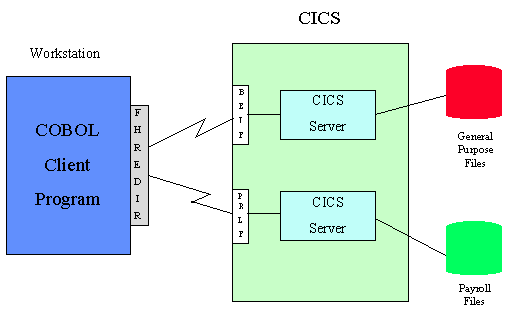
Figure 5-1: Multiple MFA CICS Servers
You may want to consider adding additional CICS servers when:
To create another CICS server within the same CICS region:
The IBM VS COBOL II run-time system returns a status code of '39' (program and file attributes are in conflict) when a program attempts to open a path to a KSDS (as opposed to opening the base cluster) for output processing. If, instead, the program were to open the same file for EXTEND processing, the IBM VS COBOL II run-time system would honor the request.
Copyright © 1999 MERANT International Limited. All rights reserved.
This document and the proprietary marks and names
used herein are protected by international law.
| Post Installation Activities | Restrictions | |