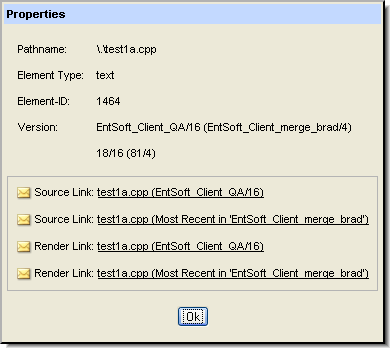
The Properties command displays a dialog box showing the element's AccuRev properties:
|
•
|
The AccuRev status of the element (for elements displayed in the File Browser only)
|
|
•
|
The version of the element being viewed and its real version, expressed numerically (for elements displayed in the Version Browser only)
|
|
•
|
Each of the links is prefaced with a mailto link button ( ). Clicking this button opens a new e-mail message using your system's default e-mail application. The body of the mail contains this version's AccuRev Web UI URL. Recipients can click the link, log into the Web UI, and view the same contents.
). Clicking this button opens a new e-mail message using your system's default e-mail application. The body of the mail contains this version's AccuRev Web UI URL. Recipients can click the link, log into the Web UI, and view the same contents. Note: The link to the current element source is permanent: it returns the same information no matter when it is used or what happens to the file later. See URL Permanence for more information.