Figure 10-1: Begin Database Access
Specifications
In this chapter, you learn about database access through Online Express, and define and customize database accesses.
In this section, you learn about accessing databases through Online Express, and transfer to the screen where you begin defining the database access specifications.
You do the following to define database access in Online Express:
An Online Express database call defines which record or records to read, and which database actions to perform on them. Each database function that you specify in your program definition has a corresponding database action that defines the function, as shown below:
|
Database Function |
Corresponding Action |
|---|---|
|
Query |
Obtain |
|
Update |
Modify |
|
Add |
Store |
|
Delete |
Erase |
You define a database call by completing a few Online Express screens that prompt you to do the following:
Start this procedure where the last one ended -- on the Field Mapping screen.
Figure 10-1: Begin Database Access
Specifications
You are ready to define the access methods for the database calls.
You should define the calls in the order in which you want to execute them, but you can rearrange the order and modify any call definition at any time.
Other functions you can perform in Online Express are:
Note that you already defined the savekey in the Screen Painter. You can define it in either place.
In this section, you specify the database accesses, and then you define selection criteria for obtaining the record.
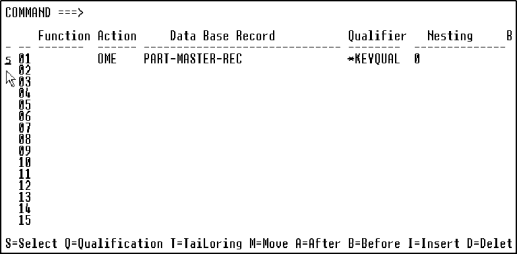
The Parts Update program queries, updates, and deletes a record, so you must define a call to obtain, modify, and erase that record. You do so by entering an action code next to the record that Online Express displays on the Database Record Selection screen.
Then, on the Database Qualification Selection screen, you define selection criteria for the Obtain access by entering an operator and a qualification value next to the field. In the Parts Update program, the part number of the record to be retrieved from the database must equal to the number entered by the end user in the PART-NBR field on the Parts Update screen.
Start this procedure where the last one ended -- on the Database Record Selection screen.

Figure 10-2: Specify the Database
Accesses
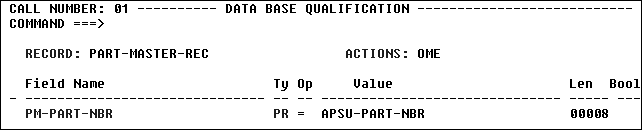
Figure 10-3: Qualify the Obtain Access
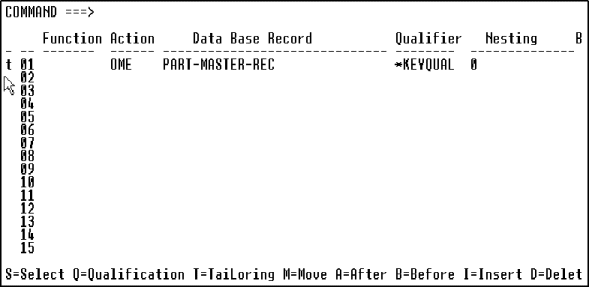
Figure 10-4: View Your Database Calls
You have defined the database accesses for the Parts Update program. Now you need to define custom logic for error handling.
On the Database Access Summary screen, you can rearrange, add to, and delete from the list as follows:
A qualification value can be a COBOL screen field, a Working-Storage name, or a literal enclosed in quotation marks. You can qualify the following types of fields, as shown below. Each field's type automatically displays in the Ty(pe) field on the screen.
|
Field Type |
Description |
|---|---|
|
KY |
Key field. To qualify on a partial key, type over the value in the Len(gth) field. |
|
PR |
Primary index. |
|
SR |
Non-unique search field. |
You can qualify data based on your database target, as follows:
|
Database |
Qualification Method |
|---|---|
|
IMS |
Qualify calls on any field, including:
Qualify calls on multiple fields and conditions using Boolean operators. |
|
SQL |
Qualify calls on any column. Qualify calls on multiple columns and conditions using Boolean operators. Qualify calls on multiple columns of multiple tables, using Union and Join calls. Qualify calls with Subselect specifications, including SQL column and scalar functions, and Exists, Group By, and Having clauses. |
|
VSAM |
Qualify calls on any field, including:
|
|
IDMS |
Qualify calls on any field, including:
|
In this section, you customize database access by overriding the default status code and error messages, and, by inserting obtain logic at a database access control point.
You can customize database call processing to override the status codes of Online Express status flags and the text of default error messages on the Database Call Tailoring screen.
Online Express provides five status flags. By default, all status flags except OK-ON-REC return the Error status code, as shown below:
|
Status Flag |
Default Status Code |
|---|---|
|
OK-ON-REC |
N(ormal) |
|
END-ON-REC |
N(ormal) |
|
NTF-ON-REC |
E(rror) |
|
DUP-ON-REC |
E(rror) |
|
VIO-ON-REC |
E(rror) |
When Online Express returns the Error status flag, the program aborts and performs the ERROR-SEND-AND-QUIT paragraph.
To override the default Error flag processing, you can change a status flag's status code from Error to Exception, and then write your own error routines at control points on the Call Tailoring screen.
To write your own error routine, you code a group of Procedure Division statements, known as a program stub, in the Specification Editor.
Start this procedure where the last one ended -- on the Database Access Summary screen.
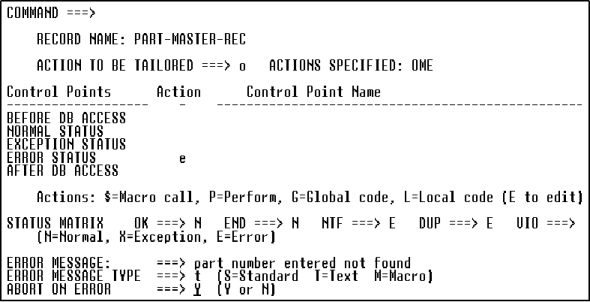
Figure 10-5: Customize Database Calls
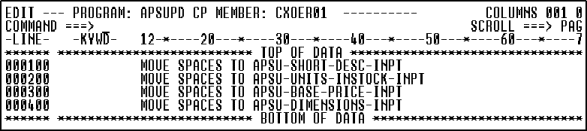
Figure 10-6: Write Program Code
You have completed all the development work for the Parts Update program and screen, and are ready to set some generation options and generate the application.
Control points are locations in the generated program where you can insert your own logic, in the form of program stubs.
A program stub can be local, applying only to the current program, or global, applying to any program in the application. You code local stubs in the Online Express Specification Editor, as you did in this procedure; you code global stubs in the Program Painter.
The Status control points on Database Call Tailoring let you insert a program stub to alter the standard error processing. This logic executes after the database access.
You can prevent the Error flag from aborting the program by specifying n for the Abort On Error field on the Database Call Tailoring screen.
Copyright © 2002 Micro Focus International Limited. All rights reserved.
This document and the proprietary marks and names
used herein are protected by international law.