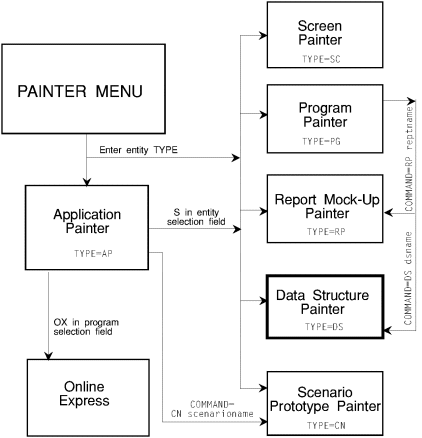
This chapter describes the navigation and use of the APS Application
Painter.
Application system entities are identified and entity relationships are
defined in the Application Painter. The Application Painter screen also serves
as a customized menu to transfer to another painter; print definition reports;
generate, compile, and link programs, screens, or the entire application.
Field
|
Description
and Values
|
|
mode field
|
If EDIT or blank, screen available for editing; if BROWSE
(default), screen available only as a menu.
|
|
prompt field
|
Displays short messages in upper right corner.
|
|
Author
|
Name to appear in AUTHOR statement of generated program and as
identifier on Application Definition Report.
|
|
Screen Size
|
Size of application
screens.
|
Value |
Screen Size |
Fits on Terminal Size |
|
MOD2 |
24 x 80 |
MOD2|3|4|5 |
|
MOD3 |
32 x 80 |
MOD 3|4 |
|
MOD4 |
43 x 80 |
MOD4 |
|
MOD5 |
27 x 132 |
MOD5 |
|
|
DC Target
|
Target
data communications environment:
|
ISPF (or TSO) |
For ISPF (default) |
|
IMS |
For IMS |
|
CICS (or CIC) |
For CICS |
|
DDS |
For OS400 |
|
DLG |
For ISPF Dialog |
|
MVS |
For batch processing |
|
|
DB Target |
Target
database environment:
|
VSAM (or VSM) |
For VSAM (default). |
|
DLI (or IMS) |
For IMS DB |
|
VSAM |
For SQL |
|
IDMS |
For IDMS DB |
|
|
selection fields |
Any of the following:
|
B |
Transfer to Browse mode to browse entity. |
|
BD |
BIND DB2 program. |
|
E |
Transfer to Edit mode to create or modify entity. |
|
G |
Generate, compile, and link entity. |
|
OX |
Create or modify Online Express program. |
|
R |
Print definition report. |
|
S |
Access entity. |
|
|
Programs |
1-8
char program name; 1st char alphabetic; remaining chars alphabetic, numeric, @,
$, or #.
|
|
Screens |
1-8 char
screen or screen name for IMS/MFS, PM, or ISPF Dialog, 1-7 char for ISPF
prototyping and CICS; 1st char alphabetic; remaining chars alphabetic or
numeric.
Enter *BATCH for batch program, *STUB for program stub.
Note: If global screen, enter * in adjacent Program
field.
|
|
IO |
Screen type:
|
I |
Input only |
|
O |
Output only |
|
IO |
Input and output |
|
|
Reports |
1-8 char
report mock-up name; 1st char alphabetic @, or #; remaining chars alphabetic,
numeric, @, $, or #.
|
|
Data Str |
1-8
char data structure name; 1st char alphabetic; remaining chars alphabetic or
numeric.
|
|
Type |
Data structure type:
|
WS |
Working-Storage Section (default) |
|
LK |
Linkage Section |
|
CA |
APS Commarea |
|
|
SBSC/PSB |
Name of subschema or PSB.
|
|
USERMACS |
USERMACS member name to be INCLUDEd in program.
|
Loc |
Location of MAC MBR INCLUDE statement: |
|
T |
Top of source file (default) |
|
IO |
Top of Input-Output Section |
|
FD |
Top of File Section |
|
LT |
Top of Linkage Section |
|
LK |
In Linkage Section after data structures or Customization
Facility symbols/user macro calls |
|
LB |
Bottom of Linkage Section |
|
RP |
Top of Report Section |
|
WT |
Top of Working-Storage Section |
|
WS |
In Working-Storage Section after data structures,
Customization Facility symbols/user macro calls, or SCRNLIST |
|
WB |
Bottom of Working-Storage |
|
CA |
Top of APS Commarea |
|
B |
Bottom of source file |
|
Enter any of the following commands in the Command field.
Command
|
Description
|
|
BIND [ALL] |
Submit a DB2 bind for all application programs found in
DBRMLIB.
|
|
BOPT |
Transfer to Bind Options.
|
|
CN|SCEN scenarioname |
Transfer to Scenario Prototype Painter; display scenario.
|
|
DS datastructurename |
Transfer to Data Structure Painter; display data structure.
|
|
GENERATE|GEN type name |
Generate, compile, and link.
Type=
|
MS |
Multiple map mapset |
|
PG |
Programs |
|
SC |
Screens |
|
blank |
Entire application |
Name= entityname, mapsetname, or ALL;
not applicable when type = blank.
|
|
HELP|F1|F13 |
Display Help Tutorial.
|
|
OPT [number] |
Transfer to APS Options Menu.
If specify number, transfer to submenu, as follows:
|
1 |
Generator Options |
|
2 |
Project Group Environment |
|
3 |
Precompiler Options |
|
4 |
Report Options |
|
5 |
Bind Options |
|
6 |
Job Control Cards |
|
7 |
IDMS DB Options |
|
|
PG programname |
Transfer to Program Painter; display program.
|
|
REPORT type name |
Print Definition reports.
Type=
|
CN |
Scenarios |
|
DS |
Data structures |
|
PG |
Programs |
|
RP |
Report mock-ups |
|
SC |
Screens |
|
blank |
Entire application |
Name= entityname, mapsetname, or ALL;
not applicable when type = CN or blank.
|
|
ROPT |
Transfer to Report Generator Options.
|
|
RP reportname |
Transfer to Report Mock-Up Painter; display mock-up.
|
|
RUN scenarioname |
Execute named scenario.
|
|
SC screenname |
Transfer to Screen Painter; display screen. |