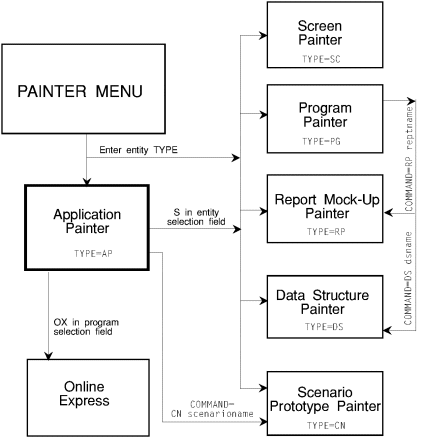
This chapter contains information on navigating using APS painters, coding data structures, and the data structures themselves.
Observe the following when coding data structures:
dataelementname PICformat
Dataelementname must be valid COBOL name, maximum 30 characters, or expression introduced by one of the macro default symbols, &, <, $, or ]. PICformat must be a valid COBOL or APS shorthand picture format.
* comment
/* comment
%* comment
66 anytext
88   dataname VALUE 'value1' [THRU 'value2']
...                        'value3' [THRU 'value4']
...                        'value5' [THRU 'value6']
  .
  .
...                        'valueN' [THRU 'valueN']
A P Z + - * B $ 0
  (number) [TIMES]
  (number1-number2)
  dataname (number1 TO number2)
  (&variable)
  (&variable1 TO &variable2)

[... DO|ODO dataname]
[... IX|IB|IXB|IXBY dataname]
[... ASCENDING KEY IS dataname]
[... DESCENDING KEY IS dataname]
 ... PICformat
|
APS Shorthand |
Generated
COBOL |
|---|---|
|
9 |
PIC 9. |
|
99 |
PIC 99. |
|
999 |
PIC 999. |
|
9999 |
PIC 9999. |
|
9(n) |
PIC 9(n). |
|
9n |
PIC 9(n). |
|
9&variable |
PIC 9(&variable). |
|
S&variable |
PIC S9(&variable). |
|
SYNC |
SYNCHRONIZED |
|
V(n) |
PIC V9(n). |
|
Vn |
PIC V9(n). |
|
V&variable |
PIC V9(&variable). |
|
Vvalueclause |
VALUE valueclause |
|
X |
PIC X. |
|
XX |
PIC XX. |
|
XXX |
PIC XXX. |
|
XXXX |
PIC XXXX. |
|
Xn |
PIC X(n). |
|
X(n) |
PIC X(n). |
|
X&variable |
PIC X(&variable). |
|
... |
Continuation of a data element. |
dataname REDEF[INES]|R PICformat
dataname PICformat
[...] [VALUE|V] 'valueclause'
Enter any of the following in the Command field.
|
CONVERT|CONV |
Convert shorthand format to valid COBOL format to preview results of generated code. |
|
GENERATE|GEN [number] |
Convert data structure to valid COBOL format and export it to copylib. Number = level number. |
|
UNCONV|UNC |
Cancel the effects of, or unconvert, the CONVERT command. Required after CONVERT. |
|
VALIDATE|VAL |
Validate syntax and display error messages. |
Copyright © 2002 Micro Focus International Limited. All rights reserved.
This document and the proprietary marks and names
used herein are protected by international law.