This chapter contains the following sections:
Specify
the physical report appearance
APS report writing features let you produce a report by specifying the
physical appearance of the report, rather than the detailed procedures
necessary to produce that report. Instead of writing COBOL statements that
determine the relationship of output lines, recognize page overflow, construct
headers and footers, recognize logical data groups, format output lines, map
data to output fields, and perform data calculations, APS sets up the routines
needed to produce the report in the requested format -- all you do is paint a
visual representation of the report and specify which items control the report
logic.
Paint
report mock-ups
First, you paint the report layouts, called mock-ups, in the Report
Painter, which provides a free-form definition facility. You can define the
mock-up by typing literals and output fields to visually represent the report
output. You can specify both floating numeric and alphanumeric output edit
masks directly within the report mock-up.
Reuse report mock-ups
APS for z/OS automatically stores mock-ups in the Application
Dictionary. The mock-ups are available as report templates or for use in
multiple programs.
Define report logic
After you create a mock-up, you define the report logic in the Program
Painter using APS Report Writer structures. Report Writer structures let you
automatically perform paging, calculate field values, test and execute control
breaks, generate multiple reports, and generate all logic necessary to map
fields between reports and databases or files. You can include multiple reports
in a single program.
Name
the input and output files
Using the Program Painter IO and FD keywords, you name the input data
file, the output report file, and the report itself.
Add
a Report Section
With the Program Painter RED, MOCK, and 01 keywords, you add a Report
Section naming the report and defining the format of each report named. There
are two types of format entries:
- Those that describe the physical aspects of the report format, such
as the maximum number of lines per page, where report lines appear on the page,
and which data items are controls.
- Those that describe the function, format, and characteristics of each
report line.
Determine
your report groups
APS categorizes the report lines into report groups, which are groups of
report lines that make up the headings, body, and footings of the report.
Report groups include the following:
- Report Heading - Header lines that print once at the beginning of a
report. Optionally, it can appear on a page by itself.
- Page Heading - Header lines that print at the top of each page.
- Control Heading - Header lines that print each time a control break
occurs.
- Detail - Detail lines that are the body of the report. Detail lines
are not required for summary reports.
- Control Footing - Line(s) of totals that print at the end of each
detail group, immediately following the detail lines.
- Page Footing - Footer lines that print at the bottom of each page.
- Report Footing - Footer lines that print once at the end of a report.
Types of Report Groups shows a sample mock-up with
the various report group types.
Types of Report Groups:
|
Report Heading |
WONDERFUL WIDGETS INCORPORATED STOCK REPORT XXXXXX XXX
|
|
Page Heading |
MID-ATLANTIC STOCK REPORT XXXXXX XXX
|
|
Control Heading |
LOCATION LAST COUNT QUANTITY QUANTITY QUANTITY DATE IN STOCK ISSUED RECEIVED
|
|
Detail Line |
XXXXXXXXXXXX 99/99/99 ZZZ,ZZ9 ZZZ,ZZ9 ZZZ,ZZ9 --------- --------- ---------
|
|
Control Footing |
TOTAL BY LOCATION: Z,ZZZ,ZZ9 Z,ZZZ,ZZ9 Z,ZZZ,ZZ9
|
|
Control Footing Final |
TOTAL NUMBER OF SALES BY LOCATION: ZZZ,ZZ9
TOTAL WONDERFUL WIDGETS IN STOCK: Z,ZZZ,ZZ9
TOTAL WONDERFUL WIDGETS ISSUED: Z,ZZZ,ZZ9
TOTAL WONDERFUL WIDGETS RECEIVED: Z,ZZZ,ZZ9
TOTAL WONDERFUL WIDGETS SOLD: Z,ZZZ,ZZ9
|
|
Page Footing |
PAGE ZZZ9
|
|
Report Footing |
***** END OF REPORT *****
|
Further
defining detail lines
Entries for the detail lines which make up the body of the report
describe the characteristics of the data items, such as the format, its
placement in relation to the other data items, and any control factors. You can
use the following statements to define the line contents:
- The
SOURCE statement maps a data item to the report output field, using the current
value of this data item each time the field prints.
- The
REFERENCE statement identifies a non-printing data item for summing in a
control footing.
- The
SUM statement totals the values in the named fields. When a SUM statement
executes, APS automatically:
- Creates a Working-Storage SUM accumulator field for each data
item.
- Increments the SUM accumulator.
- Prints the accumulated values at control break time.
- Resets the SUM accumulator to zero after printing.
- The
VALUE statement designates a literal value to print for the field each time the
line prints.
Set
control breaks
You use controls to specify how to arrange the data your report
displays. For example, you might want to display detail lines arranged by sales
territories within cities or states or both. You can have up to 28 control
breaks. APS processes controls from the most inclusive down to the least
inclusive, that is from major to minor. When a data item designated as a
control changes value, such as a monthly change in a date field, a control
break occurs, and APS does the following for you:
- Prints the detail line that caused the break.
- Prints control headings for any lower-level data items, followed by
the heading for the data item that caused the control break.
- Prints control totals for the current and lower-level data items.
- Clears all associated counters and accumulators.
Produce
the report in the Procedure Division
In the Procedure Division, you open your input and output files, execute
and print the report, and close the files, using the following three Report
Writer statements:
- The
INITIATE statement performs functions in the Report Writer analogous to the
OPEN statement for individual files. INITIATE Logic
Processing illustrates INITIATE processing.
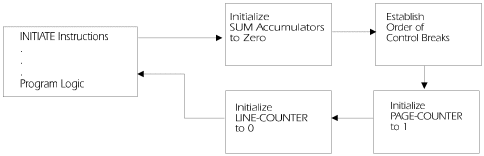
Figure 11-1: INITIATE Logic
Processing
- The
GENERATE statement produces the body of the report, and executes and prints the
entire report. APS automatically does the following for you:
- Prints specified headings and footings
- Increments and resets counters and accumulators as necessary
- Obtains source information
- Produces sum information
- Moves values to the data item(s) in the report group entries
- Tests controls
- Prints detail lines
- Pages the report
- Prints the all lines required when a control break occurs
GENERATE Logic Processing and GENERATE Logic Processing illustrate GENERATE processing.
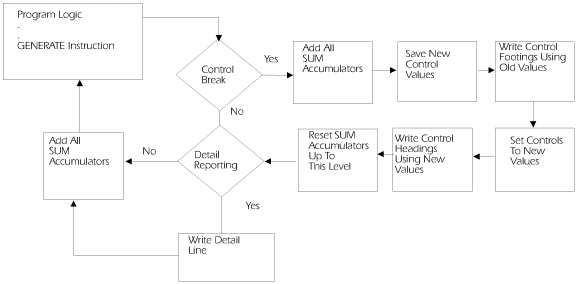
Figure 11-2: GENERATE Logic
Processing
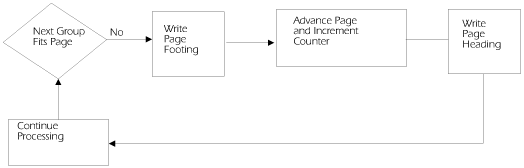
Figure 11-3: GENERATE Logic
Processing
- The
optional USE BEFORE REPORTING statement lets you specify any additional
processing you want done to a heading or footing report group, such as an
additional calculation or a line edit, prior to printing.
- The
TERMINATE statement completes the processing of a report. It is analogous to
the CLOSE statement for individual files. TERMINATE Logic
Processing below illustrates TERMINATE processing.
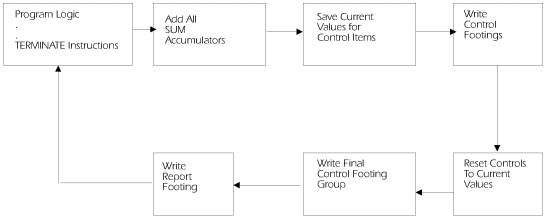
Figure 11-4: TERMINATE Logic
Processing
Use
special counters
APS Report Writer provides two special counters that you can use in any
Procedure Division statement:
- You can reference LINE-COUNTER to determine when to print a PAGE
HEADING or a PAGE FOOTING report group. The maximum value of the LINE-COUNTER
is based on the number of lines per page specified in the PAGE LIMIT(S) clause.
- You can reference PAGE-COUNTER in a SOURCE statement to print the
page number.
View sample reports
Sample Report Program Structure shows a sample
report program structure. Sample Program shows a report
mock-up, complete APS program code, generated COBOL source code, and printed
report.
Sample Report Program Structure
INPUT-OUTPUT SECTION
KYWD  12-*----20---*----30---*----40---*----50---*--
IO    SELECT statement
FILE SECTION
KYWD  12-*----20---*----30---*----40---*----50---*--
FD    inputfile FD clauses
01    recordname       PIC picclause
FD    reportfile FD clauses
      REPORT IS | REPORTS ARE clause
REPORT SECTION
KYWD  12-*----20---*----30---*----40---*----50---*--
RED   reportfilename
      CODE clause
      CONTROL clause
      WRITE ROUTINE clause
      PAGE LIMIT clause
      FIRST DETAIL clause
      LAST DETAIL clause
      FOOTING clause

MOCK  mockupreportname
Report Group Types:
PROCEDURE DIVISION
KYWD  12-*----20---*----30---*----40---*----50---*--
NTRY |
PROC
      .
      .
      .
      INITIATE statement
      .
      .
      .
      GENERATE statement
      .
      .
      .
      TERMINATE statement
      .
      .
      .
Sample Report Program Code
-KYWD- 12-*----20---*----30---*----40---*----50---*-
 IO    INPUT-FILE ASSIGN TO UT-S-FILEIN.
 IO    REPORT-OUTPUT-FILE ASSIGN TO UT-S-REPTOUT.

 FD    INPUT-FILE
       LABEL RECORDS ARE STANDARD
       BLOCK CONTAINS 0 CHARACTERS.
 01    PART-STOCK-REC                  PIC X(80).

 FD    REPORT-OUTPUT-FILE
       LABEL RECORDS ARE STANDARD
       REPORT IS STOCK-REPORT.
 RED   STOCK-REPORT
       CONTROLS ARE FINAL WS-LOCATION-CODE
       PAGE LIMIT IS 50
       FIRST DETAIL 10
       LAST DETAIL 40
       FOOTING 47.

 MOCK  STCKRPT

 01    TYPE IS REPORT HEADING NEXT GROUP NEXT PAGE
           LINE 20.
       MOCKUP LINES 1 THRU 6
       SOURCE WS-DATE

 01    TYPE IS PAGE HEADING.
       MOCKUP LINES 7 THRU 9
       SOURCE WS-DATE
       .
       .
       .
 NTRY
       OPEN INPUT INPUT-FILE
       ...OUTPUT REPORT-OUTPUT-FILE
       ACCEPT WS-DATE-HOLD FROM DATE
       .
       .
       .
To paint report mock-ups, perform the following steps:
- Access the Report Painter
To
access the Report Painter to create a new report mock-up or edit a current
mock-up, do one of the following:
- From the Application Painter:
- Enter a report mock-up name in the Reports field associated
with your program.
- Enter s in the selection field next to the name and press
Enter.
- From the APS Painter Menu:
- To edit a report mock-up, type rp in the Type field and the
report mock-up name in the Member field. Then press Enter.
- To browse a report mock-up, type b in the Command field, rp
in the Type field, and the mock-up name in the Member field. Then press Enter.
- To display a member list from which to select mock-ups, type
rp in the Type field, leave the Member field blank, and press Enter. Then
select the member from the member list.
- Paint the mock-up
To create a mock-up, type the
literals and output fields in columns 1 through 247, as follows.
- To
create a literal field, type the literal characters.
- To
create an output field, type a PIC character string, for example Z,ZZZ,ZZ9 or
XXXXX. You can use the following COBOL edit masks:
- Floating numeric formats, including: * $ + - S 9 Z
- Alphanumeric masks
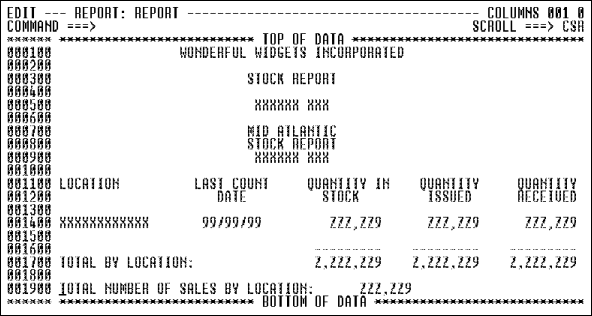
Figure 11-5: Creating a Prgram Mock-Up
- Use ISPF editor commands to edit the text. To view a mock-up larger
than your screen, press F10 and F11 to scroll left and right.
- When you add or delete a line from your report mock-up, always
renumber the line numbers, so you can accurately reflect them in your report
program code. To do so, type ren or renum in the Command line and press Enter.
- The
first character of the report mock-up name must be alphabetic, @, or #; the
remaining characters can be alphabetic, numeric, @, $, or #.
- Reports
can be a maximum of 200 lines and 247 columns.
- In
your program, the data field PIC strings on the mock-up must match the detail
line data item descriptions in your Report Section. Report Writer matches the
mock-up fields to the program field descriptions from left to right, from top
to bottom.
- The
report mock-up determines the columns where literals and data items print. Your
report program code determines the lines where they print.
- APS
stores report mock-ups in your APS Project Group APSREPT data set.
To create a batch report program in the Program Painter, follow these
steps:
- Specify DB and DC targets
To specify your DB and DC
targets in the Application Painter, follow steps 2 and 3 in
Creating Batch Programs.
- Access the program
To create or edit a program, do
one of the following:
- From the Application Painter, type the program name in the
Program field on the same line as its associated mock-up, and type s in the
selection field next to the program name. Then press Enter.
- From the APS Painter Menu, type the program name in the Member
field and press Enter. Or, leave the Member field blank, press Enter, and then
select the applicable member from the member list.
- Code the input/output statements
Specify
the FILE-CONTROL SELECT information with the Program Painter IO keyword. Use
the following format:
-KYWD- 12-*----20---*----30---*----40---*---50
 IO    filename ASSIGN [TO] systemname
       Applicable COBOL FILE-CONTROL clauses
- Code
the program input file description with the Program Painter FD keyword, as
follows:
-KYWD- 12-*----20---*----30---*----40---*----
 FD    inputfilename
       LABEL RECORDS clause
       BLOCK CONTAINS clause
       [Other applicable COBOL FD clauses]
 01    inputrecordname              PIC clause.
For example:
-KYWD- 12-*----20---*----30---*----40---*----
 FD    INPUT-FILE
       LABEL RECORDS ARE STANDARD
       BLOCK CONTAINS 0 CHARACTERS
 01    PART-STOC-REC              PIC X(80).
- Determine
the output record size. The default size is 133, the standard mock-up size of
132 plus 1 byte for the carriage control character. To define a different
report record size, calculate the size as follows:
Record Size = Report mock-up size (maximum 247 characters)
+ 1
byte for carriage control
+ 2 bytes for the CODE clause, if used.
- Then, code the program output file description with the Program
Painter FD keyword, as follows. To accept the default record size, omit the
RECORD CONTAINS clause.
-KYWD- 12-*----20---*----30---*----40---*----
 FD    outputfilename
       LABEL RECORDS clause
       [RECORD CONTAINS clause]
       [Other applicable COBOL FD clauses]
       REPORT IS|ARE reportname1 [... reportname15]
 01    outputrecordname              PIC clause.
For example:
-KYWD- 12-*----20---*----30---*----40---*----
 FD    REPORT-OUTPUT-FILE
       LABEL RECORDS ARE STANDARD
       REPORT IS STOCK-REPORT

 WS    WS-PART-STOC-REC.
       05  WS-LOCATION-CODE         PIC X(12)  VALUE SPACES.
       05  WS-LAST-COUNT-DATE.
           10  WS-LAST-COUNT-MONTH  PIC 99     VALUE 0.
           10  WS-LAST-COUNT-DAY    PIC 99     VALUE 0.
           10  WS-LAST-COUNT-YEAR   PIC 99     VALUE 0.
       05  WS-QTY-IN-STOCK          PIC 9(6)   VALUE 0.
       05  WS-QTY-ISSUED            PIC 9(6)   VALUE 0.
       05  WS-QTY-RECEIVED          PIC 9(6)   VALUE 0.
       05  WS-NO-OF-SALES           PIC 9(6)   VALUE 0.
       05  FILLER                   PIC X(40)  VALUE SPACES.
- Add Working-Storage entries
After
the output record description, add any Working-Storage entries needed for your
report at this point in your program. For example:
-KYWD- 12-*----20---*----30---*----40---*----
 WS    WS-DATE.
       05  WS-DATE-MM              PIC 9(2).
       05  WS-DATE-DD              PIC 9(2).
       05  WS-DATE-YY              PIC 9(2).
 WS    WS-DATE-HOLD.
       05  WS-DATE-YY-X            PIC 9(2).
       05  WS-DATE-MM-X            PIC 9(2).
       05  WS-DATE-DD-X            PIC 9(2).
- Identify the report
To
identify the report, code the RED keyword and the report name, as follows:
-KYWD- 12-*----20---*----30---*----40---*----
 RED   reportname
For example:
-KYWD- 12-*----20---*----30---*----40---*----
 RED   STOCK-REPORT
- Describe the printed page
Identify
the data items to test for a control break. The order in which you code the
data items creates the control hierarchy, where FINAL is the highest control,
the first data item is the major control, and the last data item is the minor
(lowest) control. Use the following syntax:
-KYWD- 12-*----20---*----30---*----40---*----
 RED   reportname
       [CONTROL [IS] | CONTROLS [ARE] [FINAL]
           dataname1 ... [datanameN]]
For example:
-KYWD- 12-*----20---*----30---*----40---*----
 RED   STOCK-REPORT
       CONTROLS ARE FINAL WS-LOCATION-CODE
- Optionally
specify the length and vertical subdivisions of the printed page, as follows:
- Code
the number of printable lines on each page in the PAGE LIMIT option.
- Code the line number where you want the first control heading
line or detail line of the report body to print on each page in the FIRST
DETAIL option. Remember to leave space at the top of the page for any report
heading and page heading lines when calculating the first detail line number.
- Code the line number where you want the last detail line of the
report body to print on each page in the LAST DETAIL option. Remember to leave
space at the bottom of the page for any control break lines, page footing
lines, and report footing lines when calculating the last detail line number.
- Code the line number where you want the last control footing line
to print for each page in the FOOTING option. Remember to leave space at the
bottom of the page for any page footing and report footing lines when
calculating the last control footing number.
Use the following syntax:
-KYWD- 12-*----20---*----30---*----40---*----
 RED   reportname
       [CONTROL [IS] | CONTROLS [ARE] [FINAL]
           dataname1 ... [datanameN]]
       [PAGE [LIMIT IS | LIMITS ARE] number [LINE|LINES]
           [FIRST DETAIL firstlinenumber]
           [LAST DETAIL lastlinenumber]
           [FOOTING footinglinenumber]].
For example:
-KYWD- 12-*----20---*----30---*----40---*----
 RED   STOCK-REPORT
       CONTROLS ARE FINAL WS-LOCATION-CODE
       PAGE LIMIT IS 50
       FIRST DETAIL 10
       LAST DETAIL 40
       FOOTING 47.
- Identify the mock-up
Specify
the mock-up named in the Application Painter and painted in the Report Painter
with the MOCK keyword, as follows:
-KYWD- 12-*----20---*----30---*----40---*----
 MOCK  reportmockupname
For example:
-KYWD- 12-*----20---*----30---*----40---*----
 MOCK  STOCKRPT
- Identify each report group
Identify
each report group with the Program Painter 01 keyword and the TYPE clause, as
follows:
- Code an 01 TYPE statement for each report group. Note that:
- You must assign an identifying data name for the DETAIL
report group, the report body. Identifiers for the other report groups are
optional. You use these identifying data names in the Procedure Division to
refer to the various report groups.
- The TYPE statements for CONTROL HEADING and CONTROL FOOTING
report groups must indicate the name of control break field that causes the
control break. This control data name must correspond to a data item specified
in the CONTROLS option of the RED statement.
- For each
report group, you can optionally designate the line number where the first line
of the report group prints, using the LINE option.
- For each report group, you can optionally designate the line
number where the first line of the next report group prints, using the NEXT
GROUP option.
Use the following syntax:
-KYWD- 12-*----20---*----30---*----40---*----
                          PAGE HEADING
                          PAGE FOOTING
                          REPORT HEADING
 01  [identifier] TYPE IS REPORT FOOTING
                          CONTROL HEADING [FINAL]|controlname
                          CONTROL FOOTING [FINAL]|controlname
                          DETAIL
                          number
         [LINE [NUMBER IS] PLUS number
                           NEXT PAGE       ]
                          number
         [NEXT GROUP [IS] PLUS number
                          NEXT PAGE       ]
For example:
-KYWD- 12-*----20---*----30---*----40---*----
 MOCK  STOCKRPT
 01    TYPE IS REPORT HEADING
           NEXT GROUP IS NEXT PAGE
 01    TYPE IS PAGE HEADING
           NEXT GROUP PLUS 3
 01    TYPE IS CONTROL HEADING WS-LOCATION-CODE
           NEXT GROUP PLUS 1
 01    PART-DETAIL TYPE IS DETAIL
           NEXT GROUP PLUS 1
 01    TYPE IS CONTROL FOOTING WS-LOCATION-CODE
 01    TYPE IS CONTROL FOOTING FINAL
 01    TYPE IS PAGE FOOTING
 01    TYPE IS REPORT FOOTING
           LINE PLUS 2
- Map report lines to the mock-up
To
map the each report group to the mock-up, follow each TYPE clause with a MOCKUP
clause, as follows:
-KYWD- 12-*----20---*----30---*----40---*----
       MOCKUP LINE[S] linenumber1 [THRU linenumberN]
For example, the following code:
-KYWD- 12-*----20---*----30---*----40---*----
 MOCK  STOCKRPT
 01    TYPE IS REPORT HEADING
           NEXT GROUP IS NEXT PAGE
       MOCKUP LINES 1 THRU 5
 01    TYPE IS PAGE HEADING
           NEXT GROUP PLUS 2
       MOCKUP LINES 6 THRU 8
 01    TYPE IS CONTROL HEADING WS-LOCATION-CODE
       MOCKUP LINES 10 THRU 12
 01    PART-DETAIL TYPE IS DETAIL
           NEXT GROUP PLUS 1
       MOCKUP LINE 13
 01    TYPE IS CONTROL FOOTING WS-LOCATION-CODE
       MOCKUP LINES 14 THRU 19
 01    TYPE IS CONTROL FOOTING FINAL
       MOCKUP LINES 20 THRU 24
 01    TYPE IS PAGE FOOTING
           LINE PLUS 2
       MOCKUP LINE 25
 01    TYPE IS REPORT FOOTING
           LINE PLUS 2
       MOCKUP LINE 27
Corresponds to the following mock-up:
****** ***************************TOP OF DATA*************************
=COLS> ----+----1----+----2----+----3----+----4----+----5----+----6---
000100                  WONDERFUL WIDGETS INCORPORATED
000200                          MID-ATLANTIC
000300                           STOCK REPORT
000400                            XXXXXX XXX
000500
000600                          MID-ATLANTIC
000700                          STOCK REPORT
000800                          XXXXXX XXX
000900
001000 LOCATION       LAST COUNT   QUANTITY   QUANTITY   QUANTITY
001100                   DATE      IN STOCK    ISSUED    RECEIVED
001200
001300 XXXXXXXXXXXX    99/99/99     ZZZ,ZZ9     ZZ,ZZ9    ZZZ,ZZ9
001400
001500                            ---------  ---------  ---------
001600 TOTAL BY LOCATION:         Z,ZZZ,ZZ9   Z,ZZZ,ZZ9  Z,ZZZ,ZZ9
001700
001800 TOTAL NUMBER OF SALES BY LOCATION:       ZZZ,ZZ9
001900
002000 TOTAL WONDERFUL WIDGETS IN STOCK:      Z,ZZZ,ZZ9
002100 TOTAL WONDERFUL WIDGETS ISSUED:        Z,ZZZ,ZZ9
002200 TOTAL WONDERFUL WIDGETS RECEIVED:      Z,ZZZ,ZZ9
002300 TOTAL WONDERFUL WIDGETS SOLD:          Z,ZZZ,ZZ9
002400
002500                              PAGE ZZZ9
002600
002700                     *****  END OF REPORT  *****
002800
002900
- Map report fields to the mock-up
For
the applicable report groups, indicate which data items supply values to output
fields with the SOURCE statement. Use the following guidelines:
- Map the data items within the report group from left to right,
top to bottom, as they will appear on the printed report.
- Include picture clauses if multiple fields are strung together on
the mock-up. A PIC clause indicates the next matching COBOL picture in the
mock-up is the COBOL picture for this data item. See also Special Considerations.
- Optionally print spaces when the value of the field is zero by
specifying the BLANK WHEN ZERO option.
- Optionally justify the field value with the JUSTIFIED RIGHT
option.
- Optionally print the value of the field only when it changes
value with the CHANGE INDICATE option.
- Optionally print the value of the field only on the first
occurrence of the report group after a control break or a page advance with the
GROUP INDICATE option.
Use the following syntax:
-KYWD- 12-*----20---*----30---*----40---*----
       SOURCE [IS] dataname [PIC picclause]
           [BLANK [WHEN] ZERO]
           [JUSTIFIED|JUST [RIGHT]
           [CHANGE INDICATE|GROUP INDICATE]
For example:
-KYWD- 12-*----20---*----30---*----40---*----50---*----60
 01    TYPE IS REPORT HEADING
           NEXT GROUP IS NEXT PAGE
       MOCKUP LINES 1 THRU 5
       SOURCE IS WS-DATE
 01    TYPE IS PAGE HEADING
           NEXT GROUP PLUS 3
       MOCKUP LINES 6 THRU 8
       SOURCE IS WS-DATE
 01    PART-DETAIL TYPE IS DETAIL
           NEXT GROUP PLUS 1
       MOCKUP LINE 13
       SOURCE WS-LOCATION-CODE    GROUP INDICATE
       SOURCE WS-LAST-COUNT-MONTH
       SOURCE WS-LAST-COUNT-DAY
       SOURCE WS-LAST-COUNT-YEAR
       SOURCE WS-QTY-IN-STOCK
       SOURCE WS-QTY-ISSUED
       SOURCE WS-QTY-RECEIVED
 01    TYPE IS PAGE FOOTING
           LINE PLUS 2
       MOCKUP LINE 24
       SOURCE IS PAGE-COUNTER
- Define
any non-printing detail items that you want Report Writer to sum and total for
control breaks, such as an employee count or the number of sales in a given
location, with the REFERENCE statement. A REFERENCE field value never displays
when the detail line prints. If you code a corresponding SUM statement (see the
next step), APS adds the field value to an internal sum accumulator.
Name the data item and define its format, as follows:
REFERENCE [IS] dataname PIC picclause
For example:
-KYWD- 12-*----20---*----30---*----40---*----50---*----60
 01    PART-DETAIL TYPE IS DETAIL
           NEXT GROUP PLUS 1
       MOCKUP LINE 13
       SOURCE WS-LOCATION-CODE    GROUP INDICATE
       SOURCE WS-LAST-COUNT-MONTH
       SOURCE WS-LAST-COUNT-DAY
       SOURCE WS-LAST-COUNT-YEAR
       SOURCE WS-QTY-IN-STOCK
       SOURCE WS-QTY-ISSUED
       SOURCE WS-QTY-RECEIVED
       REFERENCE WS-NO-OF-SALES   PIC 9999
See also Special Considerations.
- For
the CONTROL FOOTING report groups, sum the data items, previously identified
with a SOURCE or REFERENCE statement, for control breaks with the SUM
statement. Use the following guidelines:
- Sum the data items within the report group from left to right,
top to bottom, as they will appear on the printed report.
- If the report has more than one detail line, use the UPON option
to name the line where the summing takes place.
- To override the APS default of resetting SUM accumulators to zero
after each control break, use the RESET option to do a running total and
specify which control break should reset the accumulator.
- To automatically move the value in the Report Writer field
accumulator to a field you can reference in the Procedure Division, for
example, to test the field or do further calculations, create the field by
naming it in the DATA-NAME fieldname option.
- Include a picture clause for SUM statements if multiple fields
are strung together on the mock-up. A PIC clause indicates the next matching
COBOL picture in the mock-up is the COBOL picture for this data item. See also
Special Considerations.
Use the following syntax:
SUM dataname [dataname] ...
    [UPON detlineidentifier [detlineidentifier] ...]
    [RESET [FINAL] controlname]
    [DATA-NAME fieldname]
    [PICTURE picclause]
For example:
-KYWD- 12-*----20---*----30---*----40---*----50---*----60
 MOCK  STOCKRPT

 01    TYPE IS REPORT HEADING
           NEXT GROUP IS NEXT PAGE
       MOCKUP LINES 1 THRU 5
       SOURCE WS-DATE

 01    TYPE IS PAGE HEADING
           NEXT GROUP PLUS 3
       MOCKUP LINES 6 THRU 8
       SOURCE WS-DATE

 01    TYPE IS CONTROL HEADING WS-LOCATION-CODE
       MOCKUP LINES 10 THRU 12

 01    PART-DETAIL TYPE IS DETAIL
           NEXT GROUP PLUS 1
       MOCKUP LINE 13
       SOURCE WS-LOCATION-CODE    GROUP INDICATE
       SOURCE WS-LAST-COUNT-MONTH
       SOURCE WS-LAST-COUNT-DAY
       SOURCE WS-LAST-COUNT-YEAR
       SOURCE WS-QTY-IN-STOCK
       SOURCE WS-QTY-ISSUED
       SOURCE WS-QTY-RECEIVED
       REFERENCE WS-NO-OF-SALES   PIC 9999

 01    TYPE IS CONTROL FOOTING WS-LOCATION-CODE
       MOCKUP LINES 14 THRU 18
       MOCKUP LINES 19 THRU 22
       SUM WS-QTY-IN-STOCK
       SUM WS-QTY-ISSUED
       SUM WS-QTY-RECEIVED
       SUM WS-NO-OF-SALES

 01    TYPE IS CONTROL FOOTING FINAL
       MOCKUP LINES 19 THRU 22
       SUM WS-QTY-IN-STOCK
       SUM WS-QTY-ISSUED
       SUM WS-QTY-RECEIVED
       SUM WS-NO-OF-SALES

 01    TYPE IS PAGE FOOTING
           LINE PLUS 2
       MOCKUP LINE 24
       SOURCE IS PAGE-COUNTER

 01    TYPE IS REPORT FOOTING
           LINE PLUS 3
       MOCKUP LINE 26
- Code the report logic
Code
the Procedure Division logic under the NTRY (or PROC) keyword to produce and
generate the report, as follows:
- Initialize all report counters and set up control heading and
footing items with the INITIATE statement.
- Process the detail lines with a GENERATE statement. If the report
has multiple detail lines, code multiple GENERATE statements.
- End report processing with the TERMINATE statement.
Use the following structure:
-KYWD- 12-*----20---*----30---*----40---*----50---
 NTRY
            .
            .
       OPEN INPUT filename1
       ... OUTPUT filename2
            .
            .
       INITIATE reportname
            .
            .
       IF ................
           GENERATE detlineidentifier
            .
            .
       TERMINATE reportname
            .
            .
       CLOSE filename1 filename2
For example:
NTRY
     OPEN INPUT INPUT-FILE
     ...OUTPUT REPORT-OUTPUT-FILE
     ACCEPT WS-DATE-HOLD FROM DATE
     MOVE WS-DATE-YY-X TO WS-DATE-YY
     MOVE WS-DATE-MM-X TO WS-DATE-MM
     MOVE WS-DATE-DD-X TO WS-DATE-DD
     INITIATE STOCK-REPORT
     REPEAT
         READ INPUT-FILE INTO WS-PART-STOCK-REC
     UNTIL AT END ON INPUT-FILE
         GENERATE DETAIL-LINE
     TERMINATE STOCK-REPORT
     CLOSE INPUT-FILE
     ... REPORT-OUTPUT-FILE
- Repeat steps 7 through 17 for each report named in the File Section
REPORT clause.
- If
you define a report record with the WRITE ROUTINE clause, the default record
size is 248. If your RED keyword statement includes the CODE clause, the
default value is 250. For more information, see the APS Reference.
- Report
Writer treats each report group specified in the TYPE clause as a unit and
always prints the entire group on one page--it never begins the group on one
page and completes it on another.
- You
can add Working-Storage entries before the I/O description at the beginning of
the program, after the output record description, after an 01 TYPE statements,
and after yout Procedure Division code.
- When
identifing controls in the CONTROL clause, dataname must be an
elementary data name. In the following example, B cannot be used as a control
variable because it is a group data item. To make B into an elementary data
item, use the REDEFINES clause as shown below:
WS01  A                         PIC X(2).
WS01  B.
      02  B-1                   PIC 9(4).
      02  B-2                   PIC 9(4).
WS01  B-REDEF  REDEFINES B      PIC X(8).
   .
   .
   .
RED TEST-REPORT
    CONTROLS ARE A B-REDEF
- APS
creates an internal SUM accumulator field for each data item specified. The
name of this field is dataname-nnnn, where nnnn is a
4-digit number. Each time the detail line containing the data item prints, APS
adds its value to the accumulator. APS clears the accumulators either after
each control break (the default) or after a control break you specifiy with the
RESET option.
- If
a data item contains a PIC clause in a SOURCE or SUM statement, it indicates
that the next matching COBOL picture in the mock-up is the COBOL picture for
the statement. APS compares it with an equal number of the next unassigned
characters. If no match occurs, the comparison moves one position to the right
until a match is found. If no match is found, an error message is printed. For
example:
Report mock-up:
000001              A TEST PROGRAM
000002
000003      FIELD-1      FIELD-2      FIELD-3
000004      XXXX         XXXX         XXXX
Report program:
-KYWD- 12-*----20---*----30---*----40---*----
 01    DET-LINE TYPE DETAIL LINE.
       MOCKUP LINE 4
       SOURCE DATA-1
       SOURCE DATA-2
       SOURCE DATA-3     PIC X(2)
       SOURCE DATA-4
Report Writer matches DATA-1 and DATA-2 directly to the mock-up. It
then matches the PIC clause in the SOURCE statement for DATA-3 to the first two
X characters under FIELD-3, and the two remaining X characters to DATA-4. If
you omit the PIC clause on the DATA-3 SOURCE statement, an error occurs. If you
omit the DATA-4 SOURCE statement, APS considers the XX a literal, because there
are no source statements remaining.
- When
you code a REFERENCE statement, the PIC clause must match the PIC clause in the
record description. For example:
-KYWD- 12-*----20---*----30---*----40---*----
 01    COST-DETAIL TYPE DETAIL
       MOCKUP LINE 9
       SOURCE WS-DEPT
       SOURCE WS-EMPLOYEE
       SOURCE WS-CITY
       REFERENCE EMP-CTR   PIC 999
 01    TYPE CONTROL FOOTING
       MOCKUP LINE 9
       SOURCE WS-DEPT
       SUM EMP-CTR
 WS01  EMP-CTR     PIC 999   VALUE 1.
If one of the PIC clauses were PIC 9(3), Report Writer would not
find a match.
- In a REFERENCE statement, the data item referenced must be defined in
Working-Storage with a VALUE clause. The value in the VALUE clause tells Report
Writer the increment to add to the internal accumulator each time the detail
line prints. In the previous example, APS adds 1 to the internal accumulator
whenever the detail line prints.
Instead of coding individual statements to source or sum sequential
suffixed data items or array elements, APS provides an iterative expression
feature that lets you code only one SOURCE or SUM statement, which generates
multiple statements.
The iterative expression syntax for suffixed data elements is:
dataitem-#startnum[/endnum[/incnum]]
where the pound sign (#) indicates the starting number of an iteration;
startnum and endumn indicate the range of the iteration. The
slash (/) between them generates a THRU. The incnum is the number by
which the iteration is incremented (default is 1); its leading slash generates
a BY. For example:
SOURCE MONTH-#1/6 BLANK WHEN ZERO
generates an iteration of six SOURCE statements, suffixed numerically, 1
through 6, for example, MONTH-1 through MONTH-6. If you specify only one
number, the iteration assumes the starting number to be 1. For example, SOURCE
MONTH-#6 is equivalent to SOURCE MONTH-#1/6.
Without the iterative expression, you would code the above statement as
follows:
SOURCE MONTH-1 BLANK WHEN ZERO
SOURCE MONTH-2 BLANK WHEN ZERO
SOURCE MONTH-3 BLANK WHEN ZERO
SOURCE MONTH-4 BLANK WHEN ZERO
SOURCE MONTH-5 BLANK WHEN ZERO
SOURCE MONTH-6 BLANK WHEN ZERO
In the following example, the four SUM statements:
SUM MONTH-9-DATA
SUM MONTH-10-DATA
SUM MONTH-11-DATA
SUM MONTH-12-DATA
can instead be coded as:
SUM MONTH-#9/12-DATA
The following example increments an iteration of SOURCE statements by 2
instead of the default 1:
SOURCE ELEMENT-#6/12/2
which generates:
SOURCE ELEMENT-6
SOURCE ELEMENT-8
SOURCE ELEMENT-10
SOURCE ELEMENT-12
The PIC clause for each SUM or SOURCE statement generated by the
iterative expression is taken from the mock-up. APS matches the mock-up and
detail line data item descriptions as the increment statements generate.
The iterative expression syntax for a complex array is:
arrayitem (#startnum1[/endnum1[/incnum1]][)]
              [,#startnum2[/endnum2[/incnum2]]][)]
                  [,#startnum3[/endnum3[/incnum3]]])
Parentheses indicate an array. Use up to three # symbols to indicate
three dimensions of an array. Separate the subscript ranges with commas. All of
the symbols used for generating suffixed data items, above, apply to each array
range.
Each dimension is described by a separate Data Division entry with an
OCCURS clause.
The SOURCE statements in the following example, which reference a 2 by 3
array:
SOURCE ARRAY-ITEM (1, 1)
SOURCE ARRAY-ITEM (1, 2)
SOURCE ARRAY-ITEM (1, 3)
SOURCE ARRAY-ITEM (2, 1)
SOURCE ARRAY-ITEM (2, 2)
SOURCE ARRAY-ITEM (2, 3)
can, instead, be coded as:
SOURCE ARRAY-ITEM (#2, #3)
The following example produces SUM statements for each element of a
three dimensional array of 3 by 2 by 3.
SUM TABLE ELEMENT (#3, #2, #3)
The following iterative expressions are examples of ranges within a one
dimensional array:
SUM EXT-SALES-DOLLARS (#1/3)        PIC Z,ZZ9
     SUM QTR-1-SALES-DOLLARS        PIC ZZ,ZZ9
     SUM EXT-SALES-DOLLARS (#4/6)   PIC Z,ZZ9
     SUM QTR-2-SALES-DOLLARS        PIC ZZ,ZZ9
     SUM EXT-SALES-DOLLARS (#7/9)   PIC Z,ZZ9
     SUM QTR-3-SALES-DOLLARS        PIC ZZ,ZZ9
     SUM EXT-SALES-DOLLARS (#10/12) PIC Z,ZZ9
     SUM QTR-4-SALES-DOLLARS        PIC ZZ,ZZ9
     SUM YR-SALES-DOLLARS           PIC $$$$,$$$
The sequence in which mock-up fields are matched with the data item
descriptions is the same as a page of text is read--from left to right across
each line of the mock-up starting with the top line and continuing to the
bottom.
APS matches the report mock-up fields to the data item description
entries in your program according to the following rules:
- APS considers the following to be literals:
- The COBOL picture character A.
- Any one or more consecutive non-space, non-picture characters.
- Any single COBOL picture character, that is preceded and followed
by a space. Exception to this rule: 9 and X.
- A string of hyphens because of its frequent use for underlining.
- APS considers a single COBOL picture character, such as -, X, Z, or
9, that is embedded in a string of non-blank, non-picture characters as part of
a literal. For example, the following are literals:
1979
WXYZ
EXTRA
WIZARD
and the following are pictures beside literals:
#99     Literal is #, PIC is 99.
l999    Literal is l, PIC is 999.
Section-999  Literal is SECTION, PIC is -999.
- APS considers any legal COBOL picture longer than one character to be
a COBOL picture, except for the letter S and the hyphen (-), and matches it to
the next data item description in the program.
- APS generates a VALUE statement for each literal in the mockup, and
does not match the literal with the data item descriptions in the program.
- APS considers any consecutive PIC characters in the mock-up as one
PIC character string, unless the string is matched with PIC clauses in
multiple, consecutive SOURCE statements.
- APS assigns each PIC character string as the PIC for the next
sequential data item description, unless the next description contains a PIC
clause.
- When a data item description contains a PIC clause, APS compares it
with an equal number of characters in the mock-up, starting with the next
sequential, unassigned character in the mock-up.
- When comparing a data item description entry with a PIC clause to an
equal number of characters in the mock-up and a non-match occurs, APS continues
the comparison by moving one position to the right until it finds a match. APS
considers the non-matched characters from this process to be a literal, and
generates a VALUE entry that precedes the data item description with the PIC
clause that initiated the comparison.
- When a PIC clause in a data item description does not match any
series of mock-up characters from the start of a comparison to the end of the
mock-up, APS terminates processing and generates an error message.
This topic includes the report mock-up, complete program, the generated
source code, and the final printed report for the sample program illustrated in
the procedure for Creating Report Programs.
Program Painter source
KYWD 12--+--20--+---+-30+---+---40--+---+-50+---+---
 IO  INPUT-FILE ASSIGN TO UT-S-FILEIN.
 IO  REPORT-OUTPUT-FILE ASSIGN TO UT-S-REPTOUT.

 FD  INPUT-FILE
     LABEL RECORDS ARE STANDARD
     BLOCK CONTAINS 0 CHARACTERS.
 01  PART-STOCK-REC              PIC X(80).

 FD  REPORT-OUTPUT-FILE
     LABEL RECORDS ARE STANDARD
     REPORT IS STOCK-REPORT.

 WS  WS-PART-STOCK-REC.
     05  WS-LOCATION-CODE
         ... PIC X(12)  VALUE SPACES.
     05  WS-LAST-COUNT-DATE.
         10  WS-LAST-COUNT-MONTH PIC 99    VALUE 0.
         10  WS-LAST-COUNT-DAY   PIC 99    VALUE 0.
         10  WS-LAST-COUNT-YEAR  PIC 99    VALUE 0.
     05  WS-QTY-IN-STOCK         PIC 9(6)  VALUE 0.
     05  WS-QTY-ISSUED           PIC 9(6)  VALUE 0.
     05  WS-QTY-RECEIVED         PIC 9(6)  VALUE 0.
     05  WS-NO-OF-SALES          PIC 9(4)  VALUE 0.
     05  FILLER
         ...PIC X(40) VALUE SPACES.
 WS  WS-DATE.
     05  WS-DATE-MM              PIC 9(2).
     05  WS-DATE-DD              PIC 9(2).
     05  WS-DATE-YY              PIC 9(2).
 WS  WS-DATE-HOLD.
     05  WS-DATE-YY-X            PIC 9(2).
     05  WS-DATE-MM-X            PIC 9(2).
     05  WS-DATE-DD-X            PIC 9(2).
 RED STOCK-REPORT
     CONTROLS ARE FINAL WS-LOCATION-CODE
     PAGE LIMIT IS 50
     FIRST DETAIL 10
     LAST DETAIL 40
     FOOTING 47.
 MOCK STCKRPT
 01  TYPE IS REPORT HEADING NEXT GROUP
         NEXT PAGE
     MOCKUP LINES 1 THRU 6
     SOURCE WS-DATE

 01  TYPE IS PAGE HEADING.
     MOCKUP LINES 7 THRU 9
     SOURCE WS-DATE

 01  TYPE IS CONTROL HEADING WS-LOCATION-CODE.
     MOCKUP LINES 10 THRU 13

 01  DETAIL-LINE TYPE IS DETAIL.
     MOCKUP LINE 14
     SOURCE WS-LOCATION-CODE      GROUP INDICATE
     SOURCE WS-LAST-COUNT-MONTH  PIC 99
     SOURCE WS-LAST-COUNT-DAY    PIC 99
     SOURCE WS-LAST-COUNT-YEAR   PIC 99
     SOURCE WS-QTY-IN-STOCK
     SOURCE WS-QTY-ISSUED
     SOURCE WS-QTY-RECEIVED
     REFERENCE WS-NO-OF-SALES    PIC ZZZ9

 01  TYPE IS CONTROL FOOTING WS-LOCATION-CODE.
     MOCKUP LINES 15 THRU 21
     SUM WS-QTY-IN-STOCK
     SUM WS-QTY-ISSUED
     SUM WS-QTY-RECEIVED
     SUM WS-NO-OF-SALES

 01  TYPE IS CONTROL FOOTING FINAL.
     MOCKUP LINES 22 THRU 30
     SUM WS-QTY-IN-STOCK
     SUM WS-QTY-ISSUED
     SUM WS-QTY-RECEIVED
     SUM WS-NO-OF-SALES

 01  TYPE IS PAGE FOOTING.
     MOCKUP LINE 31
     SOURCE PAGE-COUNTER

 01  TYPE IS REPORT FOOTING LINE PLUS 2.
     MOCKUP LINES 32 THRU 33

 NTRY
     OPEN INPUT INPUT-FILE
     ...OUTPUT REPORT-OUTPUT-FILE
     ACCEPT WS-DATE-HOLD FROM DATE
     MOVE WS-DATE-YY-X TO WS-DATE-YY
     MOVE WS-DATE-MM-X TO WS-DATE-MM
     MOVE WS-DATE-DD-X TO WS-DATE-DD
     INITIATE STOCK-REPORT
     REPEAT
         READ INPUT-FILE INTO WS-PART-STOCK-REC
     UNTIL AT END ON INPUT-FILE
         GENERATE DETAIL-LINE
     TERMINATE STOCK-REPORT
     CLOSE INPUT-FILE
     ... REPORT-OUTPUT-FILE
******************* BOTTOM OF DATA *****************
Generated source
 %   &AP-GEN-VER = 3000
 %   &AP-PGM-D = "STOCK1"
 %   &AP-GEN-DC-TARGET = "MVS"
 %   &AP-TP-ENTRY-KYWD-SEEN = 1
 %   &AP-FILE-CONTROL-SEEN = 1

 IDENTIFICATION DIVISION.
 PROGRAM-ID.                      STOCK1.
 AUTHOR.                          AP-SYSTEM GENERATED.
 DATE-WRITTEN.                    910125.
 DATE-COMPILED.                   &COMPILETIME.

 ENVIRONMENT DIVISION.

 CONFIGURATION SECTION.
 SOURCE-COMPUTER.                 &SYSTEM.
 OBJECT-COMPUTER.                 &SYSTEM.

 INPUT-OUTPUT SECTION.
 FILE-CONTROL.
     SELECT INPUT-FILE ASSIGN TO UT-S-FILEIN.
     SELECT REPORT-OUTPUT-FILE ASSIGN TO UT-S-REPTOUT.

 DATA DIVISION.

 FILE SECTION.

 FD  INPUT-FILE
     LABEL RECORDS ARE STANDARD
     BLOCK CONTAINS O CHARACTERS.
 01  PART-STOCK-REC             PIC X(80).

 FD  REPORT-OUTPUT-FILE
     LABEL RECORDS ARE STANDARD
     REPORT IS STOCK-REPORT.

 WORKING-STORAGE SECTION.
 01  WS-PART-STOCK-REC.
     05  WS-LOCATION-CODE        PIC X(12) VALUE SPACES.
     05  WS-LAST-COUNT-DATE.
         10  WS-LAST-COUNT-MONTH PIC 99    VALUE O.
         10  WS-LAST-COUNT-DAY   PIC 99    VALUE O.
         10  WS-LAST-COUNT-YEAR  PIC 99    VALUE O.
     05  WS-QTY-IN-STOCK         PIC 9(6)  VALUE O.
     05  WS-QTY-ISSUED           PIC 9(6)  VALUE O.
     05  WS-QTY-RECEIVED         PIC 9(6)  VALUE O.
     05  WS-NO-OF-SALES          PIC 9(4)  VALUE O.
     05  FILLER                  PIC X(40) VALUE SPACES.
 01  WS-DATE.
     05  WS-DATE-MM              PIC 9(2).
     05  WS-DATE-DD              PIC 9(2).
     05  WS-DATE-YY              PIC 9(2).
 01  WS-DATE-HOLD.
     05  WS-DATE-YY-X            PIC 9(2).
     05  WS-DATE-MM-X            PIC 9(2).
     05  WS-DATE-DD-X            PIC 9(2).

 REPORT SECTION.
 RED STOCK-REPORT
     CONTROLS ARE FINAL, WS-LOCATION-CODE
     PAGE LIMIT IS 50
     FIRST DETAIL 10
     LAST DETAIL 40
     FOOTING 47.

                 WONDERFUL WIDGETS INCORPORATED

                          STOCK REPORT

                           XXXXXX XXX

                          MID-ATLANTIC
                          STOCK REPORT
                           XXXXXX XXX

LOCATION           LAST COUNT     QUANTITY IN    QUANTITY    QUANTITY
                      DATE          STOCK         ISSUED     RECEIVED

XXXXXXXXXXXX        99/99/99         ZZZ,ZZ9      ZZZ,ZZ9     ZZZ,ZZ9

                                   ---------     ---------  ---------
TOTAL BY LOCATION:                 Z,ZZZ,ZZ9     Z,ZZZ,ZZ9  Z,ZZZ,ZZ9

TOTAL NUMBER OF SALES BY LOCATION:       ZZZ,ZZ9

TOTAL WONDERFUL WIDGETS IN STOCK:      Z,ZZZ,ZZ9

TOTAL WONDERFUL WIDGETS ISSUED:        Z,ZZZ,ZZ9

TOTAL WONDERFUL WIDGETS RECEIVED:      Z,ZZZ,ZZ9

TOTAL WONDERFUL WIDGETS SOLD:          Z,ZZZ,ZZ9

                                                            PAGE ZZZ9
                             *****  END OF REPORT  *****

01  TYPE IS REPORT HEADING NEXT GROUP NEXT PAGE.
MOCKUP LINES 1 THRU 6
SOURCE WS-DATE

01  TYPE IS PAGE HEADING.
MOCKUP LINES 7 THRU 9
SOURCE WS-DATE

01  TYPE IS CONTROL HEADING WS-LOCATION-CODE.
MOCKUP LINES 10 THRU 13

01  DETAIL-LINE TYPE IS DETAIL.
MOCKUP LINE 14
SOURCE WS-LOCATION-CODE       GROUP INDICATE
SOURCE WS-LAST-COUNT-MONTH    PIC 99
SOURCE WS-LAST-COUNT-DAY      PIC 99
SOURCE WS-LAST-COUNT-YEAR     PIC 99
SOURCE WS-QTY-IN-STOCK
SOURCE WS-QTY-ISSUED
SOURCE WS-QTY-RECEIVED
REFERENCE WS-NO-OF-SALES      PIC zzz9
01  TYPE IS CONTROL FOOTING WS-LOCATION-CODE.
MOCKUP LINES 15 THRU 21
SUM WS-QTY-IN-STOCK
SUM WS-QTY-ISSUED
SUM WS-QTY-RECEIVED
SUM WS-NO-OF-SALES
01  TYPE IS CONTROL FOOTING FINAL.
MOCKUP LINES 22 THRU 30
SUM WS-QTY-IN-STOCK
SUM WS-QTY-ISSUED
SUM WS-QTY-RECEIVED
SUM WS-NO-OF-SALES

01  TYPE IS PAGE FOOTING.
MOCKUP LINE 31
SOURCE PAGE-COUNTER

01  TYPE IS REPORT FOOTING.
MOCKUP LINES 32 THRU 33

$TP-ENTRY
    OPEN INPUT INPUT-FILE
    ...OUTPUT REPORT-OUTPUT-FILE
    ACCEPT WS-DATE-HOLD FROM DATE
    MOVE WS-DATE-YY-X TO WS-DATE-YY
    MOVE WS-DATE-MM-X TO WS-DATE-MM
    MOVE WS-DATE-DD-X TO WS-DATE-DD
    INITIATE STOCK-REPORT
    REPEAT
        READ INPUT-FILE INTO WS-PART-STOCK-REC
    UNTIL AT END ON INPUT-FILE
        GENERATE DETAIL-LINE
    TERMINATE STOCK-REPORT
    CLOSE INPUT-FILE
    ... REPORT-OUTPUT-FILE
Printed report
                 WONDERFUL WIDGETS INCORPORATED

                          STOCK REPORT

                           01/25/91

                          MID-ATLANTIC
                          STOCK REPORT

LOCATION           LAST COUNT     QUANTITY IN    QUANTITY    QUANTITY
                      DATE          STOCK         ISSUED     RECEIVED

ALEXANDRIA          05/01/90             111          222         333
                    06/01/90             111          222         333
                    07/01/90             111          222         333
                    08/01/90             111          222         333
                    09/01/90             111          222         333
                    10/01/90             111          222         333
                    11/01/90             111          222         333
                                   _________    _________   _________
TOTAL BY LOCATION:                       777        1,554       2,331

TOTAL NUMBER OF SALES BY LOCATION:         3,108

                   LAST COUNT     QUANTITY IN    QUANTITY    QUANTITY
LOCATION              DATE          STOCK         ISSUED     RECEIVED

BALTIMORE           06/01/90              11           22          33
                    08/01/90              11           22          33
                    09/01/90              11           22          33
                    10/01/90              11           22          33
                    11/01/90              11           22          33
                                   _________    _________   _________
TOTAL BY LOCATION:                        55          110         165

TOTAL NUMBER OF SALES BY LOCATION:           220

                                                            PAGE    1
                          MID-ATLANTIC
                          STOCK REPORT
                           01/25/91

                   LAST COUNT     QUANTITY IN    QUANTITY    QUANTITY
LOCATION              DATE          STOCK         ISSUED     RECEIVED

ROCKVILLE           05/01/90              11           22          33
                    06/01/90              11           22          33
                    07/01/90              11           22          33
                    08/01/90              11           22          33
                    09/01/90              11           22          33
                    10/01/90              11           22          33
                    11/01/90              11           22          33
                                   _________    _________   _________
TOTAL BY LOCATION:                        77          154         231

TOTAL NUMBER OF SALES BY LOCATION:           308

                   LAST COUNT     QUANTITY IN    QUANTITY    QUANTITY
LOCATION              DATE          STOCK         ISSUED     RECEIVED

WASHINGTON          06/01/90         111,111      222,222     333,333
                    07/01/90         111,111      222,222     333,333
                    08/01/90         111,111      222,222     333,333
                    09/01/90         111,111      222,222     333,333
                    10/01/90         111,111      222,222     333,333
                    11/01/90         111,111      222,222     333,333
                                   _________    _________   _________
TOTAL BY LOCATION:                   666,666    1,333,332   1,999,998

TOTAL NUMBER OF SALES BY LOCATION:        26,664

                                                           PAGE    2
                          MID-ATLANTIC
                          STOCK REPORT
                           01/25/91

TOTAL WONDERFUL WIDGETS IN STOCK:        667,575
TOTAL WONDERFUL WIDGETS ISSUED:        1,335,150
TOTAL WONDERFUL WIDGETS RECEIVED:      2,002,725
TOTAL WONDERFUL WIDGETS SOLD:             30,300

                                                        PAGE    3
                             *****  END OF REPORT  *****
Copyright © 2002 Micro Focus International Limited. All rights reserved.
This document and the proprietary marks and names
used herein are protected by international law.