Entering Miscellaneous Information
-
On the Case Editor, lock the case.
-
Click the Initial
 icon.
icon. -
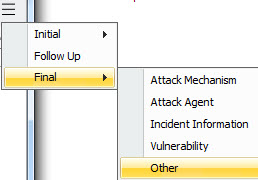
Click the Show more widget and select Final > Other.
The fields on this panel provide miscellaneous ticket resolution and final reporting information.
|
Field |
Description |
|---|---|
|
History |
Selections include: Known Occurrence and Unknown |
|
No. Occurrences |
Numeric value |
|
Last Occurrence Time |
Time selected from a calendar or drop-down options. |
|
Resistance |
Selections include: High, Low, Unknown |
|
Consequence Severity |
Auto-populated from Initial Attributes panel. See Entering Case Attributes. |
|
Sensitivity |
Auto-populated from Initial Security Classification panel. See Entering the Case Security Classifications. |
|
Recorded Data |
Text field allowing entry of up to 4000 characters. |
|
Inspection Results |
Text field allowing entry of up to 4000 characters. |
|
Conclusions |
Text field allowing entry of up to 4000 characters. |