Entering Case Descriptions
-
On the Case Editor, lock the case.
- Click the Initial
 icon.
icon. -
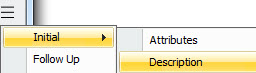
Click the Show more widget and select Initial > Description.
The fields on this panel further describe a case. Enter information as required by your business.
|
Field |
Description |
|---|---|
|
Affected Services |
Text field allowing entry of up to 4000 characters. |
|
Affected Elements |
Text field allowing entry of up to 4000 characters. |
|
Estimated Impact |
Text field allowing entry of up to 4000 characters. |
|
Affected Sites |
Text field allowing entry of up to 4000 characters. |
After saving and closing the case editor, the Recent Comment text box at the bottom of the panel is updated. Information is also entered in the History panel.