License Tracking
The product tracks the status of licenses for features you use, including actors, Console user limits, Command Center user limits, device number limit, actor and asset number limit, and events-per-second limit.
Licenses for the features available to you are installed and configured at setup time. For details about setting up licenses during the installation and configuration process, see the ESMInstallation Guide.
Note: License tracking includes disabled and deleted actors.
The ESM license tracking feature includes actors that are still in the ESM actor model with the status Disabled or Deleted in IDM. ESM’s identity management feature preserves disabled and deleted actors in the actor model to track any unauthorized activity related to disabled or deleted actors.
If you do not want the ESM license tracking feature to evaluate actors with the status Disabled or Deleted in IDM, you can manually remove them from the ESM actor model. However, manually removing disabled or deleted actors also removes the ability for ESM to track unauthorized activity related to these accounts. For details, see Deleting Actors.
License Tracking Notifications
If your feature usage is close to or has exceeded the license agreements for your organization, you see a notification dialog when starting up the Console, for example:
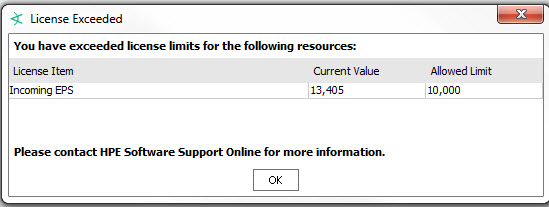
Your access to these features remains in place even if the license limit has been exceeded.
Standard Reports for License Status Tracking
You can check on the status of your ESM feature licenses using the reports and focused reports found under All Reports/ArcSight Administration/ESM/Licensing.
Each report is described in the topic, "ESM Licensing," in the ArcSight Administration and ArcSight System Standard Content Guide.
For details about running reports, see Running and Managing Reports.