Adding Active List (InActiveList) Conditions
Use the Active List selector  to specify an active list that contains the argument for a condition. This condition evaluates whether an item or list of items is in an active list. You can use this to map a field or a global variable in the event schema to a corresponding field in an active list. It does not evaluate items in other non-event schemas (such as cases or assets).
Comparing values in two lists:
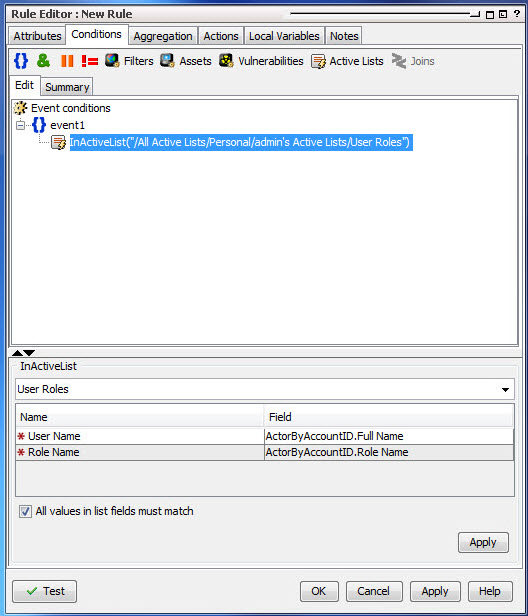
When the InActiveList condition is used to compare values in two lists, an additional option is shown where you can specify whether All values in list field must match.
For example, suppose you have a fields-based multi-mapped active list that has User Name as a key field and accepts entries with multiple roles for the same user in the Role Name field:

Then suppose you set up an Active List (InActiveList) rule condition to compare the value of Role Name to a list type string field, like ActorByAccountID.FullName. If you then get list entries in your active list (for example, user “Samantha Stevens” with roles as both “Administrator” and “Development Lead”), then your rule results in a comparison of two lists:
-
The list of Samantha Steven’s roles
-
The
ActorByAccountID.FullNamelist
-
If All values in list field must match is checked (selected), the Active List condition evaluates to true only if all values in both lists match (that is, all values must be in both lists for the condition to be true).
-
If All values in list field must match is not checked (de-selected), then if any field matches (is in both lists), the condition statement evaluates to true. This is the default behavior for queries.
-
The InActiveList condition evaluates single-value and multi-value attributes. The field you map could possibly return multiple values (for example, a user could have multiple roles). In the case of multi-value attributes, if any one value matches, the condition evaluates to true.
-
A condition that tests for whether all or any values in a list match is only available to specify on in-memory operations (for example, in rules, filters, data monitors).
Note: When using the InActiveList condition, remember the following:
See also Logical Operators, Condition Tree Command Buttons, Condition Tree Context Menu Commands, Common Conditions Editor (CCE), and Adding Conditions.