Using NetApp as an NFS Server
You can use Azure's NetApp service as an NFS server. To request access to the service, see the Azure NetApp Files waitlist submission page. You must wait for an official confirmation email from the Azure NetApp Files team before continuing.
- Creating the NetApp Account
- Setting Up the NetApp Capacity Pool
- Creating and Preparing the Volume
- Configuring and Create the Volumes
- Next Step: Create and Attach the Data Disk to Nodes
Creating the NetApp Account
 To create your NetApp account using the Azure Portal:
- Create a resource of type Azure NetApp Files.
- Choose a name and your subscription for the resource.
- For Resource group, select your Kubernetes resource group where you have your virtual network and subnet for NFS.
- For Location, select your resource group as in Step 3.
- Click Create and wait for account creation.
To create your NetApp account using the Azure Cloud Shell:
- Set your main resource group name to an environment variable:
# RESOURCE_GROUP=<your resource group name>
For example:# RESOURCE_GROUP=srg-demo
- Create the NetApp account by running the following command:
az netappfiles account create -g $RESOURCE_GROUP --name <ACCOUNT_NAME> -l <LOCATION>
For example:#
az netappfiles account create -g $RESOURCE_GROUP --name SrgDemoNetAppAdmin -l westeurope
Parameters:
<ACCOUNT NAME> is your NetApp account name.
<LOCATION> is the same as for AKS
Setting Up the NetApp Capacity Pool
To set up the capacity pool using the Azure Portal:
- In the Azure NetApp Files tab, browse to your NetApp account.
- In Storage Services, select Capacity Pools.
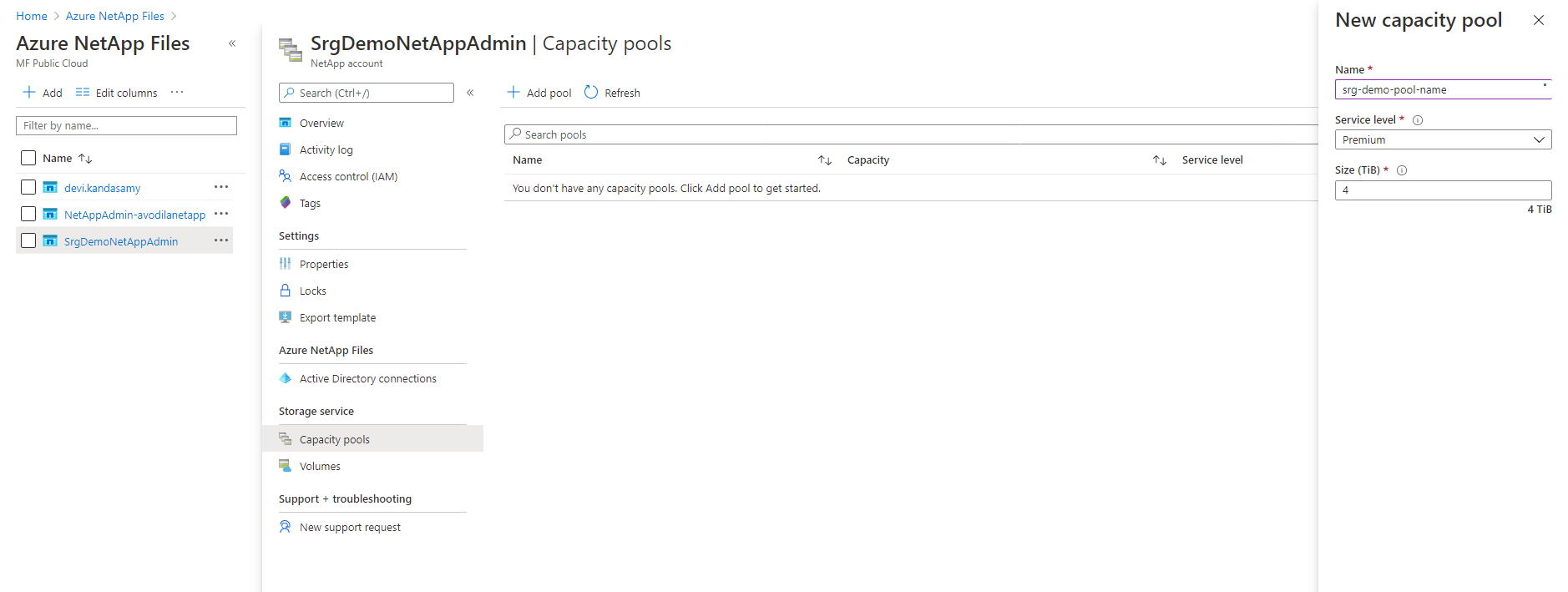
- Click + and enter values for the following:
- Name: enter a name for the pool.
- Service Level: select a service level.
- Pool Size: enter 4 (TB) for the pool size. (This is a service minimum.)
To set up the capacity pool using the Azure Cloud Shell:
- Set your main resource group name to an environment variable:
# RESOURCE_GROUP=<your resource group name>
For example:# RESOURCE_GROUP=srg-demo
- Run the command:
# az netappfiles pool create -g $RESOURCE_GROUP --account-name <ACCOUNT_NAME> --name <POOL_NAME> -l <LOCATION> --size 4 --service-level premium
Parameters:
<POOL_NAME> is your new pool name
<ACCOUNT_NAME> is the NetApp account name specified in previous step
For example:# az netappfiles pool create -g $RESOURCE_GROUP --account-name SrgDemoNetAppAdmin --name srg-demo-pool-name -l westeurope --size 4 --service-level premium
Creating and Preparing the Volume
To create and prepare the volume using the Azure Portal:
- In your NetApp account resource, browse to Storage service.
- Select Volumes.
- Press + Add volume.
- Enter a name for the volume
- Ensure that your volume is in the same virtual network as
aks-virtual-networkandnfs-subnet. - For Subnet, select nfs-subnet.
Microsoft.NetApp/volumes.
- Click Next:Protocol
- Ensure that the Protocol type is NFS and Version is NFSv4.1..
- In Export policy section , select the checkbox for 0.0.0.0/0 Read & Write.
- Enter the file path that will be used to create the export path for the volume
- Click Review + Create at the bottom of the page. If you are satisfied with your settings, click Create.
To create and prepare the volume using the Azure Cloud Shell:
- Set your main resource group name to an environment variable:
# RESOURCE GROUP=<your resource group name>
For example:
# RESOURCE GROUP=srg-demo
- Run the command:
# az netappfiles volume create -g $RESOURCE_GROUP --account-name <ACCOUNT_NAME> --pool-name <POOL_NAME> --name <VOLUME_ROOT> -l <LOCATION> --service-level premium --usage-threshold <VOLUME_SIZE> --file-path <FILE_PATH> --vnet <VIRTUAL_NETWORK> --subnet <NFS_SUBNET_NAME> --protocol-types NFSv4.1 --rule-index <INDEX> --allowed-clients <CLIENT_LIST>
Parameters:
<INDEX> - integer number of nfs creation rule
<ACCOUNT_NAME> is your netApp account name.
<POOL_NAME> is the capacity pool created on the previous step.
<VOLUME_ROOT> is your volume root name.
<LOCATION> is location of your NetApp.
<VOLUME_SIZE> size for NFS volume in GB.
<FILE_PATH> is the path to your volumes.
<VIRTUAL_NETWORK> the virtual network to which your subnets belong.
<NFS_SUBNET_NAME> is your subnet for NFS.
<CLIENT_LIST> - Specification as comma separated strings with IPv4 CIDRs, IPv4 host addresses and host names to access the NFS share. Ensure you include either the range of subnets and separate IP addresses or hostnames along with the jumphost.
For example:
az netappfiles volume create -g $RESOURCE_GROUP --account-name SrgDemoNetAppAdmin --pool-name srg-demo-pool-name --name volumename -l westeurope --service-level premium --usage-threshold 100 --file-path "nfs" --vnet demo-vnet --subnet nfs-subnet --protocol-types NFSv4.1 --allowed-clients 20.120.3.0/24 --rule-index 1
Configuring and Create the Volumes
- Find your
<mount_path_ip>and<mount_path_file_name>by navigating to your volume page. They were confirmed in the previous step after successful creation of the prepared volume. Note both of these parameters for later use.

- Log in to the jump host.
- If not already present, install the NFS client by sudo:
# yum install nfs-utils if not present - Get and unzip the file
cdf-deployer.zip - In the
scriptsfolder, run the following command:# sudo ./createFileStore.sh <mount_path_ip> <mount_path_file_name>
Example:sudo ./createFileStore.sh "10.1.2.4" "/nfs"
Next Step: Create and Attach the Data Disk to Nodes