Stopping the ESM and Intelligence Event Consumers
Applies only when you have ESM or Intelligence in your environment
You will need to stop the ESM and Intelligence consumers after they have read past the offsets that the database has read. Then you must remove older events so the database does not receive duplicates after the upgrade. Although this procedure prevents the database from receiving duplicate events, ESM might receive duplicates which might result in false-positive correlation events. The more quickly that you stop the ESM consumer after it passes the database’s offsets, the less likely ESM will receive a duplicate events. Similarly, Intelligence might receive duplicate events but automatically de-duplicates them.
Complete the following steps to prevent the loss of events during the upgrade. This procedure needs the db_scheduler_offset.csv file that you created in Step 6.
- Log in to a Transformation Hub node. Ensure that you have copied the
db_scheduler_offset.csvscript to this node. - Create an executable shell script file, named
compare-current-offsets.sh, with the following content:#!/bin/bash dof="$1" if [[ -z $dof || ! -f "$dof" ]]; then echo "Database offsets not found: $vof" exit 1 fi NS=$(kubectl get ns | awk '/^arcsight-installer/{print $1}') t="th-arcsight-avro" ig="interset-logstash-es" ec=ESM ic=Intelligence tmp=$(mktemp -u --tmpdir offsets.XXXXX) printf "\nGetting current %s offsets for ESM and Intelligence\n\n" $t kubectl exec -it -n "$NS" th-kafka-0 -- bash -c \ "kafka-consumer-groups --bootstrap-server localhost:9092 --offsets --describe --all-groups" \ | grep "$t\s" \ | sed -re "s/^${ig}/$ic/" \ -e "s/^[[:alnum:]]{8}-[[:alnum:]]{4}-[[:alnum:]]{4}-[[:alnum:]]{4}-[[:alnum:]]{12}/$ec/" \ | awk '{c=$1; p=$3; o=$4; printf( "%s,%s,%s\n", p, o, c );}' \ | sort -n \ > "$tmp" partns=$( cut -d',' -f1 "$tmp" | sort -u) for p in $partns ; do for c in $ec $ic ; do vo=$( awk -v FS="," "/^$p,.*,DB/"'{print $2}' $dof) if [[ -n $vo ]]; then desc="no $c offset data" co=$(awk -v FS="," "/^$p,.*,${c}$/"'{print $2}' "$tmp") if [[ -n $co && $co =~ ^[0-9]+$ ]]; then lead=$(( co - vo )) desc="$c is $(( - lead )) messages behind the db" if [[ $lead -ge 0 ]]; then desc="$c is caught up to the db and is $lead messages ahead" fi fi printf "partition %d: %s\n" "$p" "$desc" fi done ; done rm -f $tmp - Using the CSV file and script that you created previously, run the following command:
./compare-current-offsets.sh db_scheduler_offset.csv
- Monitor the output from the command, which can indicate the following scenarios:
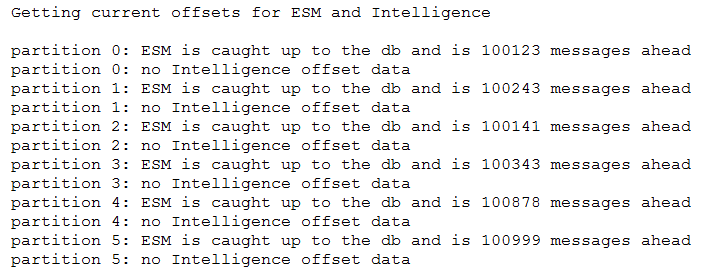
- Whether a consumer has caught up to the database offset. For example, ESM and Intelligence are reading the th-arcsight-avro topic events ahead of the database:
- Whether the database offset is ahead of the consumers reading the th-arcsight-avro topic. For example, ESM and Intelligence have not caught up to the database:
-
Whether a consumer is not reading the th-arcsight-avro topic. For example, when this occurs, the output indicates no offset data:
- (Conditional) When ESM has caught up to the database with no offset data, complete the following steps to stop the ESM consumers:
- (Conditional) When Intelligence has caught up to the database with no offset data, complete the following steps to stop the Intelligence consumers:
- Log in the master node of the cluster.
- Run the following command:
NS=$(kubectl get namespaces | awk '/arcsight-installer/{print $1}') kubectl scale statefulset interset-logstash -n $NS --replicas=0 - Run the following command periodically until you see a response indicating that none of the instances are ready:
kubectl -n $NS get sts interset-logstash
- In the READY column, note the second number, which represents the number of instances. For example,
3. You will need this number for the "Restarting the Database Watchdog Service and the Event Consumers" procedure.
For example, you would want to see a response that indicates 0 out of 3 instances are ready:

This command generates an output file that shows the offsets between the database and the data consumers, such as Intelligence, for all partitions:



If a capability is not reading messages from th-arcsight-avro, you do not need to compare the offsets.