Downloading the ArcSight Platform Installation Files
You can download the installation packages for the products in the ArcSight Platform from the Micro Focus Downloads website. The installation packages include their respective signature files for validating that the downloaded software is authentic and has not been tampered with by a third party.
Micro Focus provides several options for deploying products in your environment. For more information about deploying a product, see the Administrator’s Guide for ArcSight Platform.
Understanding the Files to Download
You can download the following installation packages. You only need one copy of each file, regardless of the products that you intend to deploy. For example, the Transformation Hub-based files are available with the ESM, Intelligence, and Recon software downloads, but you only need to download the files once. The Transformation Hub file set includes the packages for the CDF installer, the ArcSight Platform Installer, and the ArcSight database.
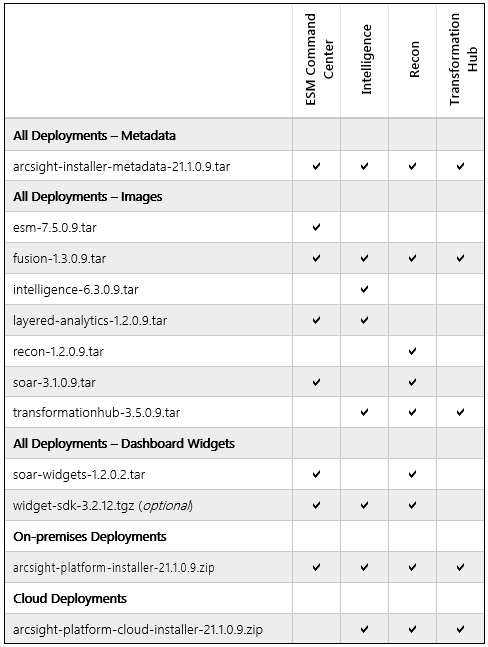
To understand the files that you might need for your ArcSight Platform deployment, review the descriptions in the following table:
| File Type | File Name | Description |
|---|---|---|
| All Deployments - Metadata | arcsight-installer-metadata-21.1.0.9.tar | Contains metadata for deployment of the CDF Management Portal. |
| All Deployments - Images | esm-7.5.0.9.tar | Contains the images for deploying ESM Command Center. |
| fusion-1.3.0.9.tar and arcsight-fusion-1.3.0-license.txt | Contains the images for deploying the Fusion capability. | |
| intelligence-6.3.0.9.tar | Contains the images for deploying Intelligence. | |
| layered-analytics-1.2.0.9.tar | Contains the images for deploying the Layered Analytics capability. | |
| recon-1.2.0.9.tar | Contains the images for deploying the Recon capability. | |
| soar-3.1.0.9.tar and enterprise-security--esm--arcsight-soar-3.1-license.txt | Contains the images for deploying the SOAR capability. | |
| transformationhub-3.5.0.9.tar | Contains the images for deploying Transformation Hub. | |
| All Deployments - Dashboard Widgets | soar-widgets-1.2.0.2.tar | Contains the widgets that display SOAR-based data in the Dashboard. |
| widget-sdk-3.2.5.tgz | Optional Provides the Widget Software Development Kit (the Widget SDK) that enables you to build new widgets or modify existing widgets for deployed applications such as ESM and Intelligence. | |
| On-premises Deployments | arcsight-platform-installer-21.1.0.9.zip |
Contains files for installing the infrastructure where you want to deploy capabilities, including the following content:
You can find this file under Transformation Hub on the Software Downloads page. |
| Cloud Deployments |
arcsight-platform-cloud-installer-21.1.0.9.zip |
Contains the installation files for deploying capabilities to Amazon Web Services and Azure. |
Downloading the Installation Files
To download and verify the signature of the downloaded files:
- Log in to the computer where you want to begin the installation process.
- Change to the directory where you want to download the installer files.
- Download all the necessary product installer files from the Micro Focus Downloads website along with their associated signature files (.sig). Micro Focus provides a digital public key that is used to verify that the software you downloaded from the Micro Focus software entitlement site is indeed from Micro Focus and has not been tampered with by a third party. For more information and instructions on validating the downloaded software, visit the Micro Focus Code Signing site. If you discover a file does not match its corresponding signature (.sig), attempt the download again in case there was a file transfer error. If the problem persists, please contact Micro Focus Customer Support.
- Begin the installation. For more information, see "Using the ArcSight Platform Installer" in the Administrator’s Guide for ArcSight Platform.