Everything on a Single Node—Case Management
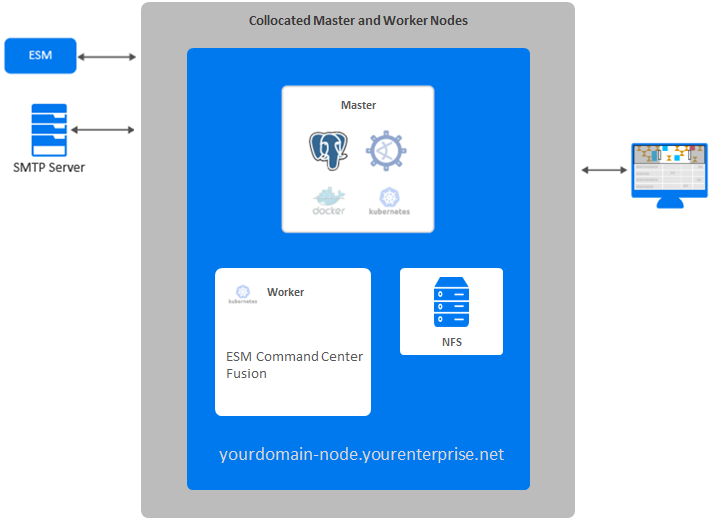
In this scenario, which deploys ESM Command Center on a single node, you have the master and worker node collocated. The Kubernetes cluster for ESM Command Center includes Fusion, which provides ArcSight SOAR, and Transformation Hub.
example-install-config-esm_cmd_center-single-node.yaml config file with the ArcSight Platform Installer. For more information about the yaml files, see Using the Configuration Files in the Administrator's Guide for ArcSight Platform. The configuration in the example file describes a single-node deployment, but you can add more worker nodes to the file.
Diagram of this Scenario
Figure 4. Example deployment of ESM Command Center on a single node
Characteristics of this Scenario
This scenario has the following characteristics:
- The Kubernetes cluster and NFS server are hosted on a single node, which creates a single point of failure. As a result, if you intend to add worker nodes, we do not recommend this configuration for high availability (HA) environments.
- FIPS 140 mode is enabled.
Guidance for Node Configuration
You need a minimum of one physical or VM environment to support master, worker, and NFS server on a single node. If you intend to install ESM Manager on the same machine, install ESM Manager first. ESM Manager uses port 8443, so master-api-ssl-port is set to a different port to avoid a conflict.
The following table provides guidance for deploying ESM Command Center and associatd capabilities on a single node to support a small workload.
| Node Name | Description | RAM | CPU Cores | Disk Space | Ports |
|---|---|---|---|---|---|
| Master Node
|
OMT Management Portal
|
256 GB | 32 | 5 TB | |
| Worker 1 |
ESM Command Center Fusion |
32 GB | 8 | 300 GB |