For the Reports Portal
This release includes the following enhancements and changes for the Reports Portal:
Migration Tool to Bring ArcSight Logger Reports into the ArcSight Platform
Reporting is an essential tool for communicating the state of your network security to internal and external stakeholders. Logger reports (captured views or summaries of events encountered by your system) play an integral role in indicating the overall health of your organization's network.
To help you switch to the ArcSight Platform from ArcSight Logger, we now provide you with a tool to migrate your Logger reports.
Introducing NERC Compliance Reporting for ArcSight Recon
This release introduces compliance reporting for NERC (North American Electric Reliability Corporation), which is essential for owners, operators, and users of bulk power systems in the United States and Canada who must comply with NERC standards. The ArcSight Recon Compliance Pack for NERC includes 16 dashboards that help you monitor the health of your bulk power system and ensure NERC compliance.
Three of these dashboards are overview dashboards that use ESM correlated events to provide a high-level perspective of your system's health and compliance. For example, the NERC Insights dashboard shown below enables you to quickly identify areas in need of action. You can drill into the different widgets, such as Configuration Changes, then determine which assets are out of compliance.
For more information, see Ensuring Compliance with NERC Standards in the User's Guide to the ArcSight Platform CE 24.2.
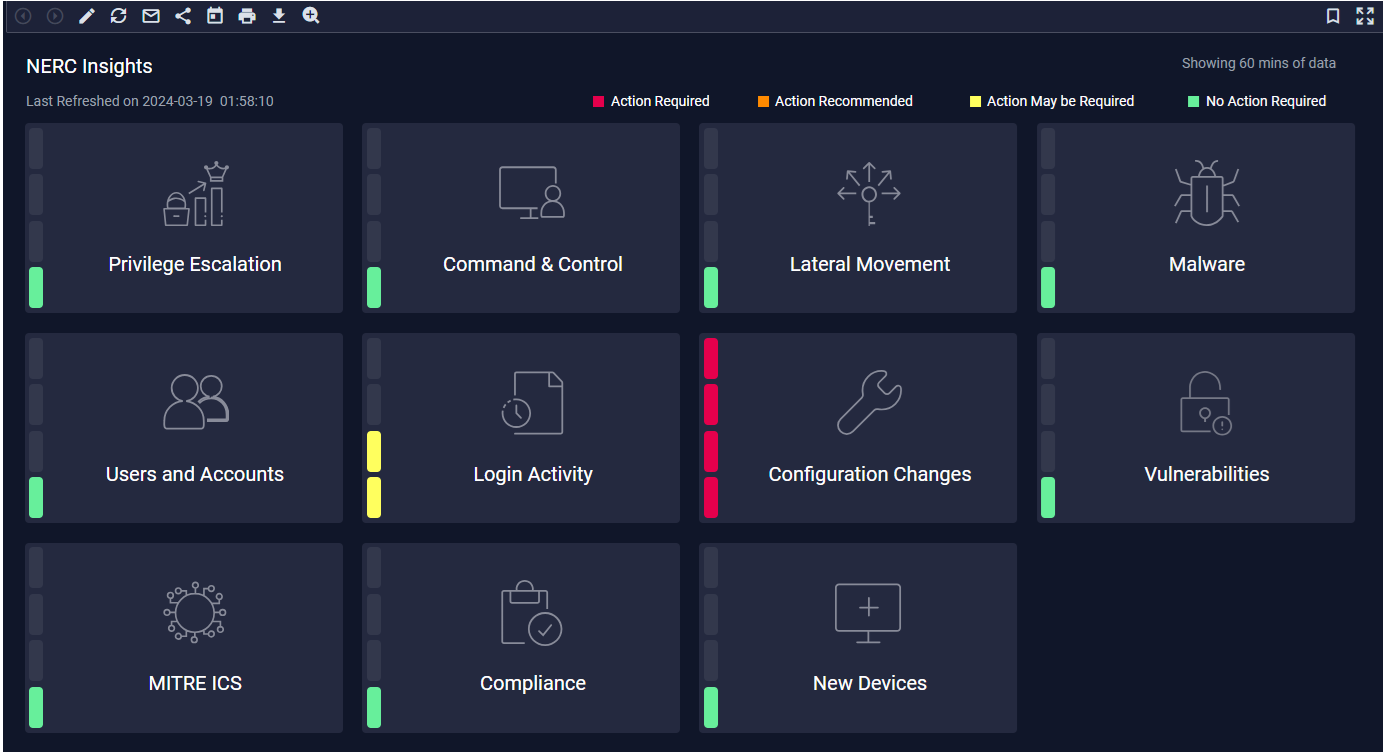
Each of the dashboards below has been organized by their corresponding NERC control number, such as 005.
| Category | Dashboard | Description |
|---|---|---|
|
CIP Overview– Executive Summary |
NERC Compliance Overview |
Provides a color-coded status overview of NERC CIP-related alerts reported in the organization. Click each widget to view a drill-down dashboard with more information about alerts. NERC Compliance Overview refreshes every 5 minutes with real-time data from the ArcSight Forwarding Connector. Note: This dashboard requires ArcSight ESM Unified NERC CIP to populate. |
| NERC Insights |
The NERC Insights dashboard offers a snapshot of the health and compliance status of the organization's infrastructure. Each insight within the dashboard has color coded status to facilitate immediate action to high severity issues. This dashboard is updated every 5 minutes with data collected over the past hour. This dashboard requires correlation events forwarded from ESM to Recon. Note: This dashboard requires ArcSight ESM Unified NERC CIP to populate. |
|
| Real-Time Alerts by CIP ID |
Provides an overview of specific NERC CIPs based on ESM Alerts. To access this dashboard directly from the CIP Overview folder, you must select a specific CIP, such as CIP-010. Real-Time Alerts by CIP ID requires correlation events forwarded from ESM to Recon. Note: This dashboard requires ArcSight ESM Unified NERC CIP to populate. |
|
| CIP-002-6 Cyber Security: BES Cyber System Categorization | New Devices | Helps you track new device activity. |
| CIP-005-7 Cyber Security: Electronic Security Perimeter(s) | Traffic Anomaly | Helps you identify anomalies in network traffic. |
|
CIP-007-6 Cyber Security: System Security Management |
Login Activity Overview |
Provides an overview of login activity. The table shows the details of the event, and each event will take you to the . You can also click and it will take you to the search page and loads the categoryBehavior = /Authentication/Verify query with the same time that the dashboard was run. |
|
Malware Overview |
Helps you track malware activity. |
|
|
User Activity Overview |
Provides an overview of user activity. | |
|
Users and Accounts Overview |
Provides an overview of all the users created and deleted in the last hour. | |
| CIP-008-6 Cyber Security: Incident Reporting and Response Planning |
Attack and Suspicious Activity Overview |
Displays an overall view of the attackers, their techniques, and targets. |
|
Command and Control Overview |
Displays command and control events. You can drill down to this dashboard from the Insights dashboard. |
|
|
Lateral Movement Overview |
Displays lateral movement events which represent the way an attack spreads from an entry point to the rest of the network. For example, by placing malware on a user's computer, a malicious user could attempt to move laterally to infect other computers on the network, to infect internal servers, and so on until they reach their final target. The Lateral Movement Overview dashboard is interactive, so clicking on a specific item on a chart will render the other charts accordingly. |
|
|
MITRE ATT&CK ICS Overview |
Displays an overview of MITRE ATT&CK events including charts that sort events by MITRE ATT&CK technique, tactic, and frequency. This dashboard requires correlation events forwarded from ESM to Recon. Note: Requires ArcSight ESM to populate. |
|
|
Privilege Escalation Overview |
Displays privilege escalation events. This is a drill-down dashboard that can be reached from the NERC Insights dashboard. |
|
|
CIP-010-4 Cyber Security: Configuration Change Management and Vulnerability Assessments |
Configuration Changes Overview |
Provides an overview of configuration changes found on the organization. |
|
Vulnerability Overview |
Provides information to help you track vulnerabilities reported in your enterprise. |