Developing an XML FlexConnector
You can create an XML FlexConnector to recursively read events from XML-based files in a folder. Choose the XML FlexConnector for devices that write event information to XML files, such as vulnerability scanners that produce XML reports.
The following topics are covered:
- XML FlexConnector Development
- XML Tools
- XML Concepts for FlexConnector Development
- Prepare to Write the Parser - Identify Namespace, Nodes, and Tokens
- Create the XML FlexConnector Parser
- Install the FlexConnector
XML FlexConnector Development
Use XML tools to read the XML log files that you are using as your source for your parser. The sections below breakdown parser development, categorization, and XML FlexConnector installation.
XML Tools
You can use various XML query tools to edit XML documents, find information in XML documents, or to extract elements and attributes from XML documents to use in parser creation.
XML query tools include XPath and XQuery, which are available from:
- http://www.w3schools.com/xpath (XPath is a language for finding information in XML documents)
- http://www.w3schools.com/xquery (XQuery is a tool for finding and extracting elements and attributes from XML documents)
These pages contain additional information on using XQuery:
- http://www.stylusstudio.com/xquery_primer.html
- http://www.stylusstudio.com/xquery_flwor.html
- http://www.xqueryfunctions.com/xq/alpha.html (XQuery function library; useful for building expressions)
These are some XML editors:
- http://www.mindfusion.eu/product1.html (XML Viewer)
- http://www.stylusstudio.com/xml_download.html (Stylus Studio XML)
- http://www.altova.com/download-trial.html (Altova XML Spy)
Tools like these are useful for parser creation. Try these or you might other similar tools on the web that you like better.
XML Concepts for FlexConnector Development
The following are some useful XML concepts that will help you develop your XML FlexConnector:
General XML Concepts
These are some concepts that are common to XML files, but that are good for you to keep in mind when you are creating your parser:
The following example of an XML file is annotated to highlight the code that corresponds with these key concepts:
- Root Node
- Leaf Nodes
- Intermediate Nodes
- Attributes
- Text

XML FlexConnector Concepts
These are some concepts that are specific to XML FlexConnector parsers:
Namespace
Use if your XML log file uses explicit namespaces or a default namespace in the header. Using namespaces allows you to differentiate between elements that have the same name in the schema, but actually refer to different content.
Specify those namespaces using these properties:
namespace.count—Specifies the number of namespaces that your XML log file uses; for example,namespace.count=2.namespace.prefix—Specifies the namespace prefix to use; for example,namespace[1].prefix=ac.-
namespace[x].prefix=default—Use when your XML file specifies a namespace but does not use any prefixes in the file. That is, your XML file uses a default namespace. -
namespace.uri—Specifies the Uniform Resource Identifier (URI) for the namespace; for example,namespace[0].uri=http://example.org/2003/08/sdeeFor example:
namespace.count=2

namespace[0].prefix=default
namespace[0].uri=http://www.mycompany.com/ids/2014/09/example

namespace[1].prefix=ac
namespace[1].uri=http://www.yourcompany.com/fds/acfg
Hop Nodes
Optional. Hop nodes are the nodes in the path from the root node to the event triggering node. These nodes are necessary when tokens need to be captured from nodes other than the triggering node or when events pertaining to a particular node need to be grouped in one block. Select nodes other than the trigger node that contain relevant security event information to be hop nodes.
Multiple hop node levels can be defined with each new level of hop nodes defined in reference to the previously defined level. Hop nodes can also reference root nodes directly as variables.
To define hop nodes, use these properties:
hop.node.count—Specifies the number of hop nodes; for example,hop.node.count=1hop.node.name—Specifies the names for the hop nodes; for example,hop.node[0].name=host-
hop.node.expression—Specifies the XPath/XQuery path expressions to select the nodes; for example,hop.node[1].expression=/audits/audit/hosts/hostFor example:
hop.node.count=1
hop.node[0].name=host
hop.node[0].expression=/audits/audit/hosts/host
Trigger Nodes
Mandatory. These are the nodes that trigger events. An XPath/XQuery path expression for a trigger node can be the last defined hop node or the root node if no hop nodes are available.
The number of trigger nodes determines the number of events that are generated using your parser. The parser will generate an event each time the trigger node is discovered in the log file.
To define trigger nodes, use a property like this:
trigger.node.expression=$host/applications/application,$host/
vulnerablities/vulnerability
Token Mappings
Mandatory. In addition to the token properties listed in Token Declarations, you must specify these properties for the XML parser:
-
token[x].expression—Specifies the XPath/XQuery path expression that is traversed to obtain the value for the token. This is a mandatory property.For example,
token[0].expression=audits/audit/startDate -
token[x].node—Specifies the context node (root node, hop node, or trigger node) relative to which the path expression is evaluated. A context node can be a hop node or a root node. If this property is not specified, it defaults to the trigger node.For example,
token[0].node=host
Extra Events
Optional. If you need your FlexConnector to collect different event types for the same trigger node or from different trigger nodes, you can use this property to specify other XQuery configuration files in the current configuration file.
To specify extra events, use these properties:
extraevent.count—Specifies the number of extra events; for example,extraevent.count=2extraevent[x].filename—Specifies the file name of the additional configuration file that this parser should use; for example,extraevent[0].filename=ncircle_xml_file/ncircle_xml_file.xml3.uriextraevent[x].name—Specifies a name to associate with the extra events; for example,extraevent[0].name=/scanner/device/uri/aggregated
Examples of Token Mappings
A token captured from the root node: token[0].expression=audits/audit/startDate
-
A token captured from the hop node 1:
token[2].name=ip
token[2].type=IPAddress
token[2].expression=ip
token[2].node=host -
A token captured from the hop node 2:
token[5].name=protocol
token[5].expression=protocol
token[5].node=vulnref -
A token captured from the trigger node, when
token[x].nodeis specified:token[8].name=name
token[8].expression=name
token[8].node= -
A token captured from the trigger node, when
token[x].nodeis not specified:token[13].name=descr
token[13].expression=description
Prepare to Write the Parser - Identify Namespace, Nodes, and Tokens
Before writing the parser, examine your source XML log files and complete the following tasks:
- Find the Trigger Node - the Most Important Step
- Decide if You Need a Namespace
- Identify Hop Nodes
- Identify Tokens (including attributes and nodes as needed)
Find the Trigger Node - the Most Important Step
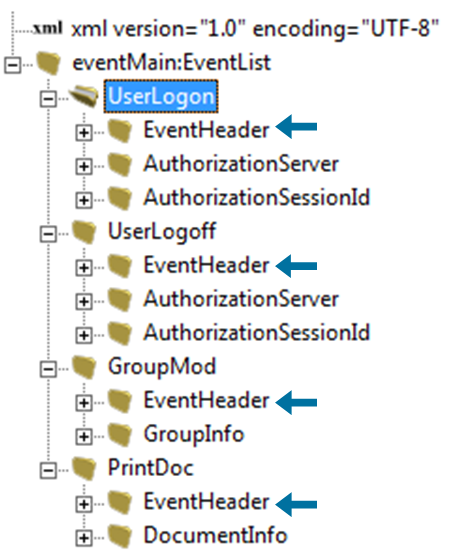
Look at the XML log file and find which node that all events have in common. When you determine this, you can use this node as the trigger node. The trigger node will generate events. In the XML example below, the trigger node identified is EventHeader:
Decide if You Need a Namespace
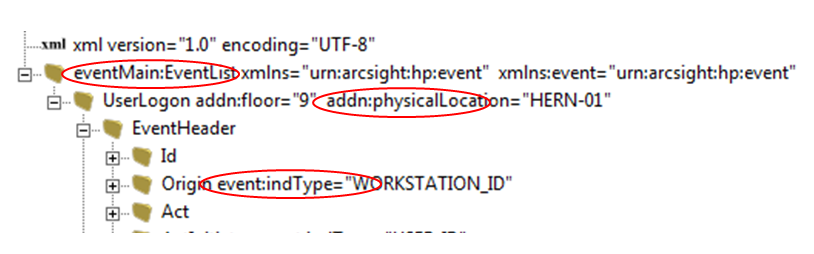
You will need a namespace if a namespace is declared in the header of your XML source file. If you find an element or a node with a colon (:) in its name, the first part of that element or node is its namespace, and must be declared in the parser. See Namespace for more information.
In the following example, elements with colons are circled.
Identify Hop Nodes
Optionally, identify which node or nodes other than the trigger node contain relevant information for security events. See Hop Nodes for details.
In the following example, the trigger node, Attributes, is indicated by an arrow.
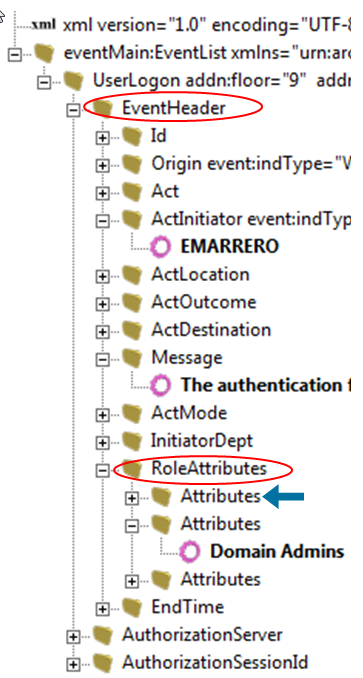
In this example, the trigger node is Attributes, so the hop nodes could be:
hop.node.count=2
hop.node[0].name=header
hop.node[0].expression=//EventHeader
hop.node[1].name=role
hop.node[1].expression=$header//RoleAttributes
You can think of hop nodes as variable declarations for long expression paths. For example, if you have to jump three nodes down before finding the trigger and the information to be parsed, you can declare this a named "constant" path in the hop nodes. You can then use this as a variable for the token expression instead of typing the entire path repeatedly.
Identify Tokens
Identify which information you want to extract from each event. Tokens are attributes or text under any node. See Token Declarations for more information.
In the following example, tokens are identified by arrows.

Create the XML FlexConnector Parser
To create the parser, use the information on namespaces, hop nodes (not used in this example), trigger nodes, and tokens you gathered when you examined the source XML file.
- Parser Development - First Several Lines
- Parser Development Continued - Tokens
- Parser Development Continued - Mappings
- Categorization
- Copy the Parser Into the Folder
Parser Development - First Several Lines
This is an example of the top portion of a parser:
namespace.count=4
namespace[0].prefix=default
namespace[0].uri=urn:arcsight:MF:event
namespace[1].prefix=event
namespace[1].uri=urn:arcsight:MF:event
namespace[2].prefix=addn
namespace[2].uri=urn:arcsight:MF:addn
namespace[3].prefix=eventMain
namespace[3].uri=urn:arcsight:MF:event:main

# Tokenization Section
trigger.node.expression=//EventHeader
additionaldata.enabled=true
token.count=25
Parser Development Continued - Tokens contains examples of tokens, and continues after the line token.count=25.
Parser Development Continued - Tokens
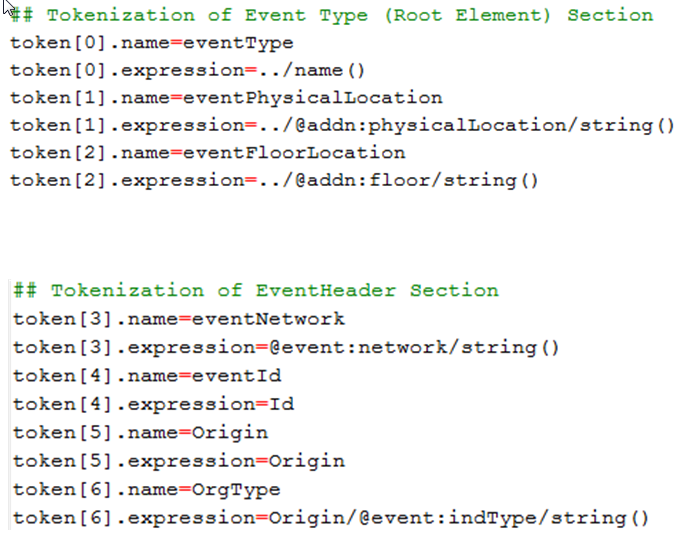
Use the XML tools listed in XML Tools to create expressions for the tokens. All expressions are relative to the trigger node. Expressions are shown in the example below, which is a continuation of the parser stared in the previous section:
Parser Development Continued - Mappings
Map tokens to event fields, and add severity mappings. Note that all unmapped tokens are passed as additional data fields. See the following example:

Note that severity mappings are often overlooked, and are key to event normalization. These mappings are required. See Severity Mapping for details on adding severity mappings.
Categorization
Add categorization to your parser. This section is required. This is an are that is often overlooked, and is important because categorization is used for event normalization. For example:

For more about the possible values, see the "Categories" topic in the Console Help or the ArcSight Console User’s Guide. Also, see Categorizing Events.
Copy the Parser Into the Folder
After you develop the parser file, you must copy it into this location: ARCSIGHT_HOME\current\user\agent\flexagent. This is the required location of the custom parsers you develop for the FlexConnector.
Install the FlexConnector
To install a connector to parse event information presented in standard XML schema, select ArcSight FlexConnector XML File from the list of SmartConnectors to install.
|
Parameter |
Description |
|---|---|
|
Folder |
The absolute path of the directory where log files for the FlexConnector are located. For example:
|
|
Configuration File |
The base name of the configuration file that describes the format of the log file. The suffix
The filename becomes:
|
Run the connector either as a service or standalone.