Parser Properties for a Time-based Database FlexConnector
The following is an example of a time-based Database FlexConnector parser:
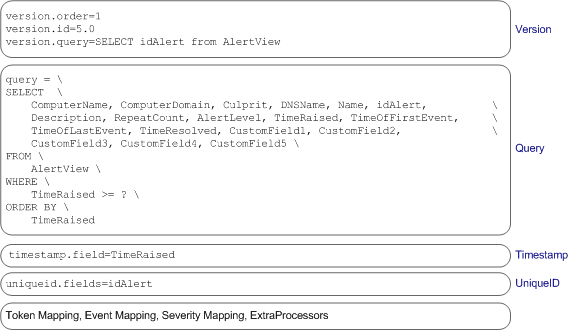
Note: Ensure that queries conform with the schema definition so as to avoid errors such
as case sensitivity. For example, if the database fields are using all uppercase, column names in the queries
and the values in the timestamp.field and the uniqueid.field should use uppercase:
timestamp.field=TIME_STAMP
uniqueid.field=UNIQUE_ID
In addition to the common properties listed in Parser Structure, the following properties need to be configured for time-based database FlexConnectors:
Version
Mandatory. The version properties enable you to define the order in which the parser files will be sequentially processed. If there are multiple parser files there should be one for each version of the database with which the FlexConnector communicates.
Note: If you are not concerned about the connector adjusting to new versions, you can skip the version check by doing the following: set version.order=1 and omit version.query and version.id. Note that this will remove the safeguard of checking the schema version.
-
version.order—Specifies the order in which versions are checked, from the lowest number to the highest; for example, if you have two parser files parserA and parserB and you want to process parserB before parserA, set parserB’sversion.order=1and parserA’sversion.order=2. -
version.query—This property enables you to perform a test query against the database to validate the database version. Specify a unique entity in the database schema that differentiates it from other database versions. For example,version.query=SELECT idAlert from AlertView. -
version.id—If theversion.querysucceeds, thedeviceVersiontoken (described in ArcSight Built-in Event Field Mappings) is set to theversion.id. Typically, you would assign the database version as the value for this property. However, you can assign any integer value. For example, if the product version is 8.1, assignversion.id=8.1.
Query
Mandatory. This property retrieves the rows that were inserted between the last time the query was run and the current time. The query is executed every five seconds, but the frequency can be configured.
For example:
query = \
SELECT  \
    ComputerName, ComputerDomain, Culprit, DNSName, Name, idAlert,\
	Description, RepeatCount, AlertLevel, TimeRaised, TimeOfFirstEvent, \
	TimeOfLastEvent, TimeResolved, CustomField1, CustomField2, \
    CustomField3, CustomField4, CustomField5 \
FROM \
	AlertView \
WHERE \
    TimeRaised >= ? \
ORDER BY \
	TimeRaised
To change the frequency at which the query is executed, set the agent[x].frequency property in ARCSIGHT_HOME\current\user\agent\agent.properties.
All syntactically and semantically correct SQL statements are supported in SELECT queries with the following exception:
-
Only one question mark is supported in a time-based Database FlexConnector query.
Timestamp
Mandatory. Specifies the field to use to determine when to run the next query; for example, for the query specified earlier in this section, you can set the timestamp field to timestamp.field=TimeRaised.
UniqueID
Mandatory. Specifies the fields to use to distinguish rows with the same timestamp field; for example, for the query specified earlier in this section, you can set the unique ID field to uniqueid.fields=idAlert. Use a comma-separated list to specify multiple values for this field.