Parser Properties for an XML FlexConnector
The XML FlexConnector parser builds a tree representation of the XML log file. A root node is at the top of the tree, hop nodes are in between, and trigger nodes are at the bottom (where they generate events). The following is an example of an XML FlexConnector configuration file:
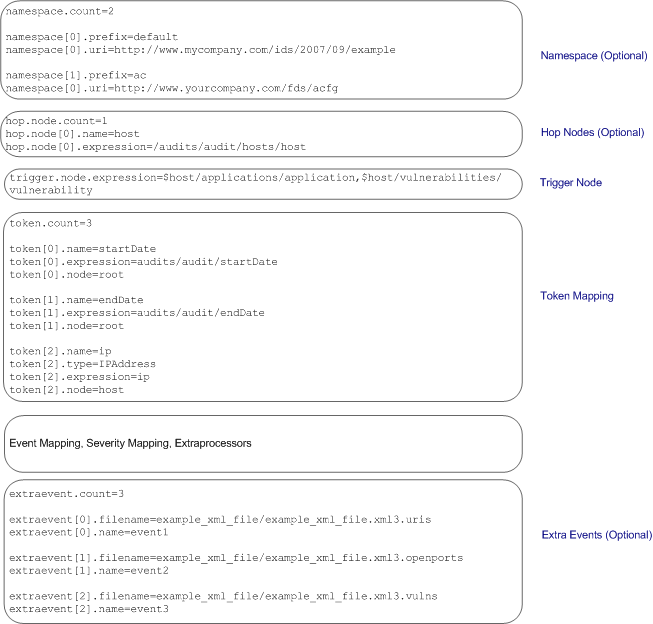
In addition to the common properties listed in Parser Structure, the following sections list the optional and mandatory properties for an XML FlexConnector configuration file:
Note: You can also configure optional properties in the agent.properties file that when configured allow you to control which log files to process in a folder, whether to process the folder and subfolders recursively, and so on. These properties are discussed in Detecting File Processing Latency.
Namespace
Optional. However, if your XML log file uses explicit namespaces or a default namespace, you must specify those namespaces using these properties:
namespace.count—Specifies the number of namespaces that your XML log file uses; for example,namespace.count=2.namespace.prefix—Specifies the namespace prefix to use; for example,namespace[1].prefix=ac.namespace[x].prefix=default—Use when your XML file specifies a namespace but does not use any prefixes in the file. That is, your XML file uses a default namespace.namespace.uri—Specifies the Uniform Resource Identifier (URI) for the namespace; for example,namespace[0].uri=http://example.org/2003/08/sdee
Hop Nodes
Optional. Hop nodes are the nodes in the path from the root node to the event triggering node. These nodes are necessary when tokens need to be captured from nodes other than the triggering node or when events pertaining to a particular node need to be grouped in one block.
Multiple hop node levels can be defined with each new level of hop nodes defined in reference to the previously defined level. Hop nodes can also reference root nodes directly as variables.
To define hop nodes, use these properties:
hop.node.count—Specifies the number of hop nodes; for example,hop.node.count=1hop.node.name—Specifies the names for the hop nodes; for example,hop.node[0].name=hosthop.node.expression—Specifies the XPath/XQuery path expressions to select the nodes; for example,hop.node[1].expression=/audits/audit/hosts/host
Trigger Nodes
Mandatory. These are the nodes that trigger events. An XPath/XQuery path expression for a trigger node can be the last defined hop node or the root node if no hop nodes are available.
To define trigger nodes, use this property:
trigger.node.expression=$host/applications/application
Token Mappings
Mandatory. In addition to the token properties listed in Token Declarations, you must specify these two properties for the XML parser:
-
token[x].expression—Specifies the XPath/XQuery path expression that is traversed to obtain the value for the token. This is a mandatory property. For example,token[0].expression=audits/audit/startDate -
token[x].node—Specifies the context node—root node, hop node, or trigger node—relative to which the path expression is evaluated. A context node can be a hop node or a root node. If this property is not specified, it defaults to the trigger node. For example,token[0].node=host
Examples of Token Mappings
-
A token captured from the root node:
token[0].expression=audits/audit/startDate
-
A token captured from the hop node 1:
token[2].name=ip
token[2].type=IPAddress
token[2].expression=ip
token[2].node=host
-
A token captured from the hop node 2:
token[5].name=protocol
token[5].expression=protocol
token[5].node=vulnref
-
A token captured from the trigger node, when
token[x].nodeis specified:token[8].name=name token[8].expression=name token[8].node=
-
A token captured from the trigger node, when
token[x].nodeis not specified:token[13].name=descr token[13].expression=description
Extra Events
Optional. If you need your FlexConnector to collect different event types for the same trigger node or from different trigger nodes, you can use this property to specify other XQuery configuration files in the current configuration file.
To specify extra events, use these properties:
-
extraevent.count—Specifies the number of extra events; for example,extraevent.count=2 -
extraevent[x].filename—Specifies the file name of the additional configuration file that this parser should use; for example,extraevent[0].filename=ncircle_xml_file/ncircle_xml_file.xml3.uri -
extraevent[x].name—Specifies a name to associate with the extra events; for example,extraevent[0].name=/scanner/device/uri/aggregated