Open topic with navigation
Default Fields
The Logger schema comes with a set of predefined fields. Some of these fields are already indexed for improved search speed and efficiency. You can add custom fields to Logger's schema and index them for field-based search. A field-based search can only use fields in the schema.
Note: The size of each field in the schema is predetermined. If the string you are searching for is longer than the field-length, you should use a STARTSWITH rather than an = search, and include no more than the number of characters in the field size. For more information, see Field-Based Search.
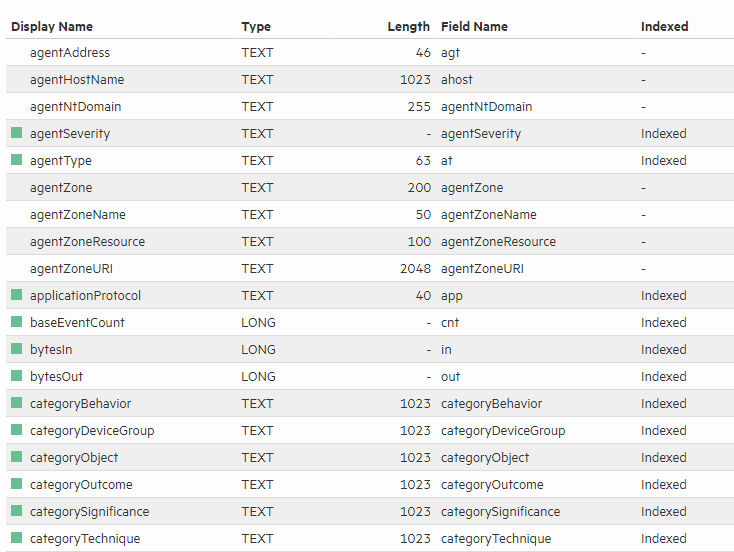
The Default Fields page (Configuration > Search > Default Fields) displays the predefined fields included in the schema. It includes the Display Name, Type, Length, and Field Name for each default field. To view information on existing custom fields, see Custom Fields.
Prerequisites
Users must be assigned to the following User Groups to access this feature:
- Default Logger Rights Group
- Default System Admin Group
See Setting Logger User Permissions for more information.
To view the default schema fields:
-
From the Configuration menu under Search, click Default Fields.
-
The Default Fields page displays the default schema fields. You can sort the fields by clicking the column headers.
Logger displays the Index status of each field in two ways:
- The Indexed column shows indexed and superindexed fields.
- The Display Name field includes a light green icon (
 ) for indexed fields, and a dark green icon (
 ) for superindexed fields. Non-indexed fields have no icon.
 See Also