Open topic with navigation
ESM Destinations
An ESM Destination establishes a trusted connection between Logger and an ArcSight Manager so that you can forward events and alerts in Common Event Format (CEF) from the Logger to the Manager using Logger’s built-in SmartConnector.
The CEF events are already normalized or categorized. For more information about CEF, refer to the document "Implementing ArcSight CEF". For a downloadable copy of this guide, search for "ArcSight Common Event Format (CEF) Guide" in the Micro Focus Security Community.
Logger can forward these types of events to an ArcSight Manager:
- Syslog events to an ArcSight Syslog SmartConnector that is connected to an ArcSight Manager
- Common Event Format (CEF) events directly to an ArcSight Manager using Logger ESM Destinations. An ESM Destination appears as a SmartConnector to an ArcSight Console.
- Events received by file receivers where the type specified is not Other. Such events are forwarded using the ArcSight Streaming SmartConnector.
Maximum ESM Destinations: As many destinations as are allowable on the SmartConnectors you are using. However, for performance reasons, Micro Focus ArcSight recommends that you create no more than two ESM Destinations pointing to a single ArcSight Manager. (One should suffice in most cases.)
Do not use basic aggregation for Logger’s built-in SmartConnector because it is resource intensive. (Basic aggregation is set using the Enable Aggregation (in seconds) field from the ArcSight Console.) Instead, follow these steps on the ArcSight Console to configure field-based aggregation:
- Ensure that Processor > Enable Aggregation (in seconds) is set to Disabled, to disable basic aggregation.
- Right-click the connector and select inspect/edit/.
For additional details about configuring field-based aggregation, refer to the ArcSight SmartConnector User’s Guide.
To setup Logger to forward events to an ArcSight Manager:
-
Copy the server SSL certificate file from an ArcSight Console or other component that is already communicating with the target Manager, and upload the certificate file to Logger, as described in Uploading a Certificate to the Logger:.
If your Logger operates in FIPS mode, a valid and current (non-expired) server SSL certificate file from the ArcSight Manager is required on the Logger; otherwise, the forwarder will not forward events to it.
Note: You cannot import the cacerts file, which is a repository of trusted certificates, to the Logger. Instead, you need to import specific SSL certificate files.
- Create an ESM Destination, as described in To create an ESM Destination:.
-
Create an ESM forwarder that refers to this ESM Destination. (See Forwarders).
ESM Destinations page
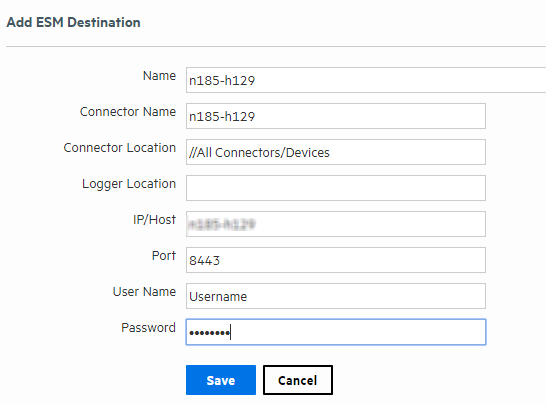
To create an ESM Destination:
Make sure you have loaded the certificate file for ArcSight Manager as described in Uploading a Certificate to the Logger: before adding it as a destination on the Logger. If the certificate file does not exist on the Logger, you will not be able to create an ESM Destination.
- Open the Configuration > Data menu and click ESM Destinations.
- Click Add. The ESM Destinations page is displayed.
-
Enter the following parameters:
|
Parameter
|
Description
|
|
Name
|
The name for this ESM Destination.
|
|
Connector Name
|
The SmartConnector name.
Connector's name is used as an unique identifier in the ESM's system. When creating multiple ESM destinations using the same ESM, make sure to name the connector on each destination differently, even if they are added in different Loggers.
|
|
Connector Location
|
The physical location of the SmartConnector machine. If you do not want to specify a location, enter “None.”
|
|
Logger Location
|
The physical location of the Logger. If you do not want to specify a location, enter “None.”
|
|
IP or Host
|
The ArcSight Manager to which the forwarder will direct events.
Make sure the name or IP address you specify in this field is exactly the name or IP address configured on the ArcSight Manager. If the two names or IP addresses do not match, you will not be able to set up an ESM Destination successfully.
|
|
Port
|
Typically 8443.
|
|
User Name
|
The name of an existing User of the ArcSight Manager with administrator privileges.
|
|
Password
|
The password for the Login user.
This password cannot contain the special characters percent (%), equal to (=), semicolon (;), double quote (“), single quote (‘), less than (<), or greater than (>).
Caution: While ArcSight Manager allows these special characters in passwords, Logger does not. If the ArcSight Manager user’s password contains those characters, you will need to change the password in ArcSight Manager before configuring this password.
|
-
Click Save.
Tip: If you receive the following error when adding a new ESM Destination, make sure the host name you specified in the IP or Host field exactly matches the name configured on the ArcSight Manager.
There was a problem: Failed to add destination
Additionally, if the ArcSight Manager is configured using a host name instead of IP address, make sure you add the ArcSight Manager host name and IP address in the Logger’s hosts file (System Admin > Network > Hosts).
To delete an ESM Destination:
- Open the Configuration > Data menu and click ESM Destinations (or click Alerts and then open the ESM Destinations page if you are deleting an ESM Destination for forwarding Alerts.)
- Locate the ESM Destination that you want to delete and click the Delete icon (
 ) on that row.
- Confirm the deletion by clicking OK, or click Cancel to retain the ESM Destination.