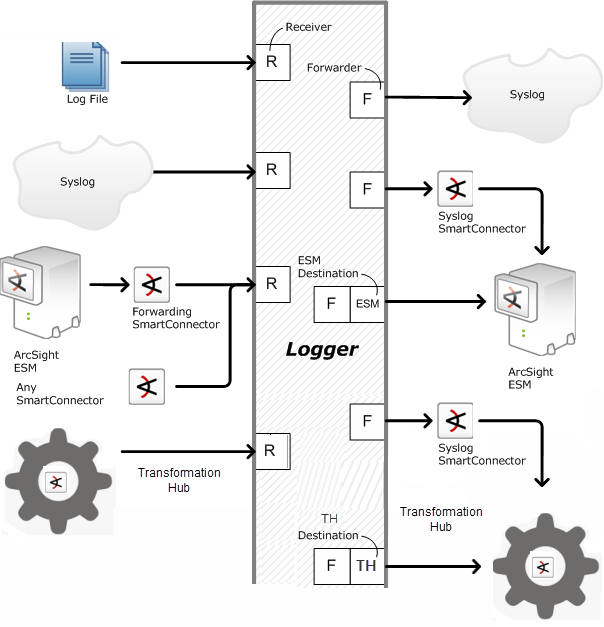
Logger receives events as Common Event Format (CEF) messages, syslog messages, encrypted SmartMessages, or by reading log files. Traditionally, syslog messages are sent using User Datagram Protocol (UDP), but Logger can receive syslog and CEF messages using the more reliable Transmission Control Protocol (TCP) as well. You can also configure the Logger to read event data or log files from a CIFS host.
Logger can also read events from text log files on remote hosts. Each event must include a timestamp. Logger can be configured to poll remote folders for new files matching a filename pattern. Once the events in the new file have been read, Logger can delete the file, rename it, or simply remember that it has been read. Logger can read remote files on network drives using SCP, SFTP, or FTP protocol, or using a previously-established NFS or CIFS mount or, on some Logger Appliance models.
Logger can receive events from SmartConnector, ESM, Transformation Hub, and files.
Logger may also receive events from a Transformation Hub and ArcSight Manager as CEF-formatted syslog messages. These events are forwarded to Logger through a special software component called an ArcSight Forwarding SmartConnector that converts the events into CEF-formatted syslog messages before sending them to Logger.
 See Also