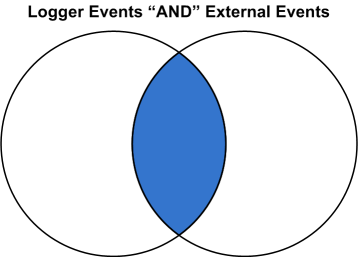
Returns an augmented or filtered set of events based on whether they have identical values in the corresponding fields in an uploaded Lookup file.
Before you can use this operator, you must upload a Lookup file to Logger. You can add a Lookup file by uploading a CSV file from the List Lookup configuration page.
lookup operator, see Enriching Logger Data Through Static Correlation.Synopsis
... | lookup [+/-/*] lookupTableName externalField1 [as loggerField1] [, externalField2 [as loggerField2] ...] [output [ * | externalField1, externalField2... ] ]
The plus sign (+) selects events where the value in the Lookup field (loggerField1, loggerField2) is identical with that in the uploaded Lookup file (externalField1, externalField2). When the output clause is used, it augments the search results with the specified output columns from in the uploaded Lookup file. + is the default lookup operator. If you do not specify +, -, or *, + is used.
When a Lookup field value matches multiple rows in the uploaded Lookup file, only the first matched row is used. Logger displays an alert message indicating that the Lookup field contains multiple matches in the Lookup file, and that only the first match is included.
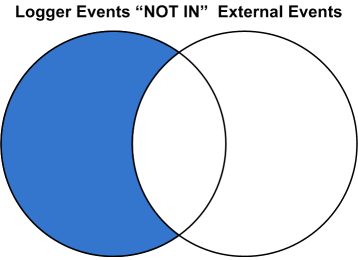
The minus sign (-) selects events where the value in the Lookup field is not in the uploaded Lookup file. When you do a lookup with negation, the results will not display the external fields in the UI fields. The output clause is not applicable for negative lookup. This is because the negative lookup excludes matches from the uploaded lookup file.
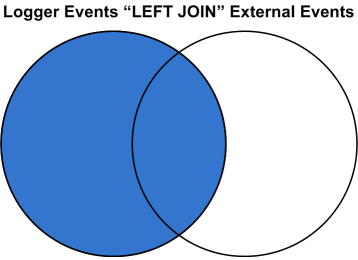
The asterisk (*) includes all events regardless of whether they are in the uploaded Lookup file. (Performs a left-outer join between the Logger events table and the Lookup file.) When the output clause is used, the output fields will be empty (null) for Logger events that do not have a match in the Lookup file.
If +, -, or * is not provided, the default is +.
loggerField1 and loggerField2 are valid field names in Logger search results.
externalField1 and externalField2 are valid column names from the Lookup file.
loggerField1 as externalField1 looks up values between loggerField1 in Logger search results and externalField1 in the uploaded Lookup file.
In the first lookup operator in a search pipeline, loggerField1, must be a valid field name in a Logger event, otherwise, this field can be a Logger field or a search-generated field in the search results from the previous pipeline operator.
loggerField1 as externalField1, loggerField2 as externalField2 performs value lookup on multiple fields between Logger search results and uploaded Lookup file.
[output [ * | externalField1, externalField2...]] if you specify one or more external fields, augments the search results with the indicated fields. If you use output *, all fields from uploaded Lookup file are added. When the output clause is not used, no fields from uploaded Lookup file are added to the search results.
Usage Notes
The lookup operator supports specific date/time formats. Logger event fields can be of three different data types, string, integer, and date/time. The lookup operator converts values in the Lookup fields to a value of the same data type as the corresponding Logger event field.
The lookup operator supports the following formats for date/time fields:
MM/dd/yyyy HH:mm:ss z
MM/dd/yyyy HH:mm:ss
yyyy/MM/dd HH:mm:ss z
dd/MMM/yyyy HH:mm:ss Z
dd MMM yyyy HH:mm:ss z
yyyy-M-d H:mm:ss
yyyy-MM-dd'T'HH:mm:ss
yyyy-MM-dd'T'HH:mm:ssZ
Logger allows about 1GB system memory for all lookup searches. Running multiple lookup searches simultaneously on large lookup tables could use up the 1GB memory. When this limit is reached, some lookup searches may run more slowly or may timeout. If a user starts a lookup search when other lookup searches are running and the memory is full, Logger will display a message that suggests that the user runs the lookup search after the current lookup searches finish and the memory is released.
Choose Lookup fields that have unique values in the uploaded Lookup file. The lookup operation only uses the first row that matches and ignores any subsequent matches. Therefore, it is best to have unique values in the lookup column and avoid having duplicate matches ignored.
As an example, look at the following search.
| lookup testLU deviceVendor output status
where the Lookup file "testLU" contains four rows with same deviceVendor value, "ArcSight", as shown below.
|
deviceVendor |
dept |
org |
|---|---|---|
|
ArcSight |
sales |
Micro Focus |
|
ArcSight |
marketing |
Micro Focus |
|
BlueCoat |
sales |
BlueCoatINC |
|
ArcSight |
engineering |
Micro Focus |
|
ArcSight |
marketing |
ESP |
When the lookup operation finds duplicates in the Lookup field, ("deviceVendor=ArcSight" in testLU and "deviceVendor=ArcSight" in the Logger events table), the search results use only the first entry, "status_testLU=ok" to augment the matching Logger event, while subsequent matches, such as "status_testLU=alert", are NOT used.
Tip: In some rare situations, a blank page may be returned after you upload a Lookup File from the Add Lookup File page. If this happens, refresh the page manually. After the refresh, you are returned to the loading page and the process tries to load the Lookup File again. Since the file was already uploaded, you get an error message. You can safely ignore the error.
The Lookup process automatically determines whether the Lookup file consists of IP addresses, and if so treats them as IP addresses rather than strings. When performing a search using a Lookup file, Logger checks the first ten rows of each Lookup column to determine whether it contains only IP addresses.
If a Lookup column contains only IP addresses in the first ten rows, Logger assumes that the rest of rows in that column contain IP addresses.
For example, if your Lookup column has some things that are not IP addresses in the first ten rows:
Whereas, if your Lookup file has only IP addresses in the first ten rows:
 Example One
The following example looks up events where the sourceAddress comes from the IP address listed in a lookup file named “maliciousIP” under the column named “ip”.
lookup maliciousIP ip as sourceAddress
Example Two
The following example looks up access events with a sourcePort different from the sourcePort in day_x, where day_x is the lookup file generated from the exported Logger events on a day before.
access | lookup - day_x sourcePort