This topic applies to Logger Appliances only.
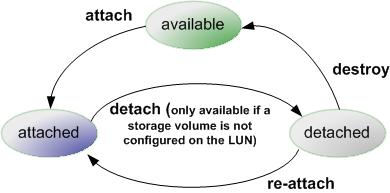
A LUN can be in "available", "attached," or "detached" state, which determines what actions are available within Logger.
The following table summarizes the LUN states and possible actions.
|
Attachment |
Actions |
Description |
|---|---|---|
|
attached |
detach |
Attached LUNs can be accessed by Logger. The “detach” action is only available if a storage volume has not been configured on the LUN. Once a storage volume has been configured, you cannot “detach” the LUN unless you follow the factory reset instructions, described in Restoring Factory Settings. |
|
detached |
re-attach |
When an attached LUN is detached, its data is preserved, but it cannot be accessed by Logger. To make it available again, use the “re-attach” action. The “destroy” action releases the LUN back to the “available” state. When you detach, the only action available immediately is “re-attach”. The “destroy” state takes a few minutes to appear because it takes a few minutes for the LUN to detach on the system. Destroying a LUN puts it into a state in which a subsequent attach will erase any data stored on the LUN. If a LUN is accidentally destroyed, customer support may be able to recover the data, provided there has been no subsequent attempt to attach the LUN. |
Logger can attach to only one LUN at a time for primary storage. You can attach an additional LUN for event archiving, configuration backup, and export.
To attach a LUN:
Click Attach from the top left of the Configuration page. If you do not see the Attach menu option, no LUNs can be attached to the Logger at this time.
Note: You can attach a LUN only if the LUN is in the "Available" status.
The LUN’s Attachment Status will change to “Attached” when the LUN is ready for use.
To detach a LUN:
Click Detach from the top left of the Configuration page. If you do not see the Detach menu option, no LUNs can be detached from the Logger at this time.
Note: You cannot detach a LUN if a storage volume is configured on it.
To re-attach a LUN:
Click Re-attach from the top left of the Configuration page.
If you do not see the Re-attach menu option, no LUNs can be re-attached from the Logger at this time.
To destroy a LUN:
Click Destroy in the top left corner Configuration page.
Caution: Destroying a Logical Unit (LUN) that has been detached, puts that LUN into a state in which a subsequent attach will erase any data stored on the LUN. If a LUN is accidentally destroyed, customer support may be able to recover the data, provided there has been no subsequent attempt to attach the LUN.
 See Also