ArcSight User Behavior Monitoring Use Cases
The ArcSight User Behavior Monitoring (UBM) solution resources are organized in the ESM Console using use case resources. A use case resource provides a way to group and view a set of resources that help address ArcSight a specific security issue or business requirement.
The UBM solution supports the use cases listed in the following table. Open Text recommends configuring the use cases in the order listed below to maximize the reporting information for the downstream use case. For example, configuring the Actor Attribution by IP Address Use Case before the Actor Threat Score Use Case means that the Actor Threat Score Use Case can attribute events to actors using IP addresses.
|
Use Case |
Use Case Purpose |
|
Actor Management Use Case |
The Actor Management use case contains resources designed to show analysts the status of actor resources in ESM. The number of actors, roles, and account IDs monitored can be identified with this use case. In addition, analysts can monitor changes to actor resources, and identify the use of rogue accounts that cannot be tied to any actor in ESM. |
|
Actor Attribution by IP Address Use Case |
The Actor Attribution by IP Address use case associates IP addresses to actors, and allows events from IP addresses to be attributed to the logged in actor, even if no username is present in the event. |
|
Shared Accounts Use Case |
The Shared Accounts use case reports on the usage of accounts that might be in use by more than one individual. The use case can detect when anyone uses an existing known shared account, as well as detect the use of any account by more than one individual. |
|
Actor Threat Score Use Case |
The Actor Threat Score use case provides a method for tracking the level of suspicious activity exhibited by monitored users. Analysts are notified when an actor's suspicious activity exceeds configurable levels. Actors with high threat scores are monitored at a higher level of scrutiny. |
|
Suspicious Activity Use Case |
The Suspicious Activity use case provides resources that can be used to discover and analyze suspicious activity occurring on your network. When triggered, the suspicious activity rules can contribute to the resources of the Actor Threat Score Use Case. |
|
User Activity Monitoring Use Case |
The User Activity Monitoring use case contains resources designed to enable analysts to monitor the activity of users on the network. Many resources break down activity by actors' employee type, department, or other attributes. |
|
Privileged User Monitoring Use Case |
The Privileged User Monitoring use case monitors the usage and authorization of privileged accounts. |
Actor Management Use Case
The Actor Management use case contains resources designed to show analysts the status of actor resources in ESM. The number of actors, roles, and account IDs monitored can be identified with this use case. In addition, analysts can monitor changes to actor resources, and identify the use of rogue accounts that cannot be tied to any actor in ESM.
The Actor Management use case monitors and reports on changes to actor information such as employee type, status, department, roles and account IDs. The Actor Model Import connector dynamically synchronizes information from an Identity Management System to the actors stored in ESM. By monitoring and reporting on the changes to actors, this use case effectively monitors changes to the Identity Management System.
If an account ID is not known by the Identity Management System and therefore not associated with any actors, the account ID is considered to be rogue. For example, if a database administrator creates an account in the database but does not register that account in the Identity Management System, the account ID is rogue. By comparing relevant actor information with events observed on the network, this use case can report when activity is observed from accounts which cannot be correlated to an identity—the activity of rogue accounts.
In addition, the resources provided in the Actor Management use case enable auditors, analysts, and managers to provide the following services:
- Monitor and report on role changes within the Identity Management System including when privileges are added or revoked from an actor
- Monitor and report on role groups including the actors that are assigned to a role
- Monitor and report the number of actors and roles and the breakdown of actors by organizational unit and department
- Generate authorization and role change reports per department for verification by responsible parties—to assist with role attestation
- Monitor and report when actors are added or deleted from the Identity Management System
- Monitor and report when actors are manually changed or deleted on ESM using the ESM Console
- Monitor and report the account IDs, applications and addresses associated with rogue accounts
- Monitor and report both the events that can and cannot be attributed to actors. For events that are attributed to actors, the method of attribution is reported: account ID or IP address.
- Detect patterns with actor attribute modifications, actor role deletions and additions
Configure Resources
Configure the following types of resources for this use case:
Rules
The following rules can be configured for this use case:
Enable the Actor Changes rule if you want to track the activity of rogue accounts—accounts IDs not attributable to any actors. (If enabled, this rule might trigger excessively if there are a lot of account IDs that are not in your actor model.)
If this rule is enabled and rogue account activity is detected, by default the rule invokes the following actions:
- Add to Active List—Adds the rogue account ID into the Actor Changes active list.Set Event Field Actions—Sets the agent severity to medium for the event generated by this rule and attempts to attribute the event to an actor by invoking the Actor Changes global variable.
By default, the other actions of the Actor Changes rule are disabled. You can optionally enable these actions:
- Add to Existing Case—Adds a case to the specified URI. For more information, see .
- Send Notification—If this action is enabled and the rule is triggered, the rule sends a notification to all users assigned to the CERT Team.
Enable the Actor Changes rule if you want to track when an actor resource is deleted using the ESM Console. Manually editing the information stored in actors should be avoided because typically this information is dynamically updated by Actor Model Import connector(s). If this rule is enabled and an actor resource has been deleted, by default the rule invokes the following actions:
- Set Event Field Actions—Sets the agent severity to high for the event generated by this rule.
By default, the other action of the Actor Changes rule is disabled. You can optionally enable this action:
- Send Notification—If this action is enabled and the rule is triggered, the rule sends a notification to all users assigned to the CERT Team. For more information, see .
- Add to Existing Case—Adds a case to the specified URI. For more information, see .
Enable the Actor Changes rule if you want to track when the identity information stored in actors has been manually changed using the ESM Console. Manually editing the information stored in actors should be avoided because typically this information is dynamically updated by Actor Model Import connector(s). This rule is provided to send a notification when someone edits actors manually. If this rule is enabled and ESM audit events indicating actor changes are detected, by default the rule invokes the following action:
- Set Event Field Actions—Sets the agent severity to low for the event generated by this rule.
By default, the following actions of the Actor Changes rule is disabled. You can optionally enable these actions:
Send Notification—If this action is enabled and the rule is triggered, the rule sends a notification to all users assigned to the CERT Team.
Add to Existing Case—Adds a case to the specified URI.
Devices
This use case depends on audit events generated by ESM when actor resources are modified. Any device can contribute to the Actor Changes rule. The Actor Changes rule is triggered by the account activity of rogue accounts from any device.
The Actor Changes and Actor Changes rules are triggered by audit events triggered by ESM.
Verify Configuration
After configuring this use case, verify that ESM is collecting events that indicate that actors are being populated by the Actor Model Import connector(s):
- In the Navigator panel, go to Dashboards.
- Navigate to ArcSight Solutions/UBM/Actor Management/.
- Right-click Actor Changes and select Show Dashboard.
Resources
The following table lists all the resources explicitly assigned to this use case and any dependent resources.
Resources that Support the Actor Management Use Case
Actor Attribution by IP Address Use Case
The Actor Attribution by IP Address use case associates IP addresses to actors, and allows events from IP addresses to be attributed to the logged in actor, even if no username is present in the event.
In addition, the resources provided in the Actor Attribution by IP Address use case enable auditors, analysts, and managers to provide the following services:
- Actor attribution methods cover the following login scenarios:
- Single-user machine—When an actor logs into a single-user machine, the machine’s IP address is associated with actor indefinitely until another actor logs into the same single-user machine. All events that originate from that IP address during that time interval can be attributed to that actor.
- Server machine supporting multiple logins—When an actor logs into a multi-user machine such as a server, these logins are tracked by default for 12 hours. Since multiple users might be logged in concurrently, analysts can attribute events to the set of users who were logged in at a given time, but might not be able to identify the specific actor responsible for the event.
- Monitoring and reporting on server logins based on department, title, role, country or region, source zone, and actor status.
- Global variables that can be used by other resources to associate source and target IP addresses in events with actors. These global variables are used by other use cases.
The soInActorByTargetIP global variable provides the ability to attribute an actor to an event using the event’s target IP address. The soInActorByTargetIP global variable (like the analogous source IP AsoInActorByTargetIP global variable) returns information about the actor such as the UUID, name, employee type, and title.
This use case provides resources that have been developed specially for the Microsoft Windows and UNIX operating systems. Microsoft Windows and UNIX specific configuration instructions are provided in Configure Resources. Please note the following:
- For single-user logins, Microsoft Windows Server 2003 is supported.
- For the server multi-user logins, both Microsoft Windows Server 2003 and Microsoft Windows Server 2008 are supported.
Categorize Assets and Zones
This use case requires categorization of assets and zones into the appropriate UBM Network Domains:
Single-user Machines—Classify the assets or zones that define the single-user machines into one of the following asset categories:
- ArcSight Solutions/UBM/Network Domains/Desktops
- ArcSight Solutions/UBM/Network Domains/Laptops
Server machine supporting multiple logins—Classify the assets or zones that define the server machines into the following asset category: ArcSight Solutions/UBM/Network Domains/Servers
The Source and Destination Subnets for Actor Logins query viewer shows source and destination sub-nets for actor login events. Use the results of this query viewer to determine the appropriate zones to create for your environment and to classify these zones into the appropriate single-user or server asset categories.
Devices
The following types of devices supply events to this use case:
- Operating System
- Intrusion Detection Systems/Intrusion Prevention System
- Identity Management
All the device types listed above can supply events to this use case but the resources will only process events from devices, when the device generates login events that can be attributed to specific actors.
Configure Resources
Configure the following types of resources for this use case:
Active Lists
You might want to customize the following active lists for this use case:
- Populate the Account Exclusions active list with the account IDs which should not be considered when processing events to associate IP addresses to actors. All the entries must be in uppercase. If account ID is listed in the Account Exclusions active list, events associated with that account ID are not processed when associating IP addresses to actors.
- Populate the Excluded Source Machines active list with the source IP addresses which should not be considered when processing events to associate IP addresses to actors. If IP address is listed in the Excluded Source Machines active list, events associated with that IP address are not processed when associating IP addresses to actors.
- Populate the Excluded Target Machines active list with the target IP addressees which should not be considered when processing events to associate IP addresses to actors. If IP address is listed in the Excluded Target Machines active list, events associated with that IP address are not processed when associating IP addresses to actors.
Rules
Configure the following rules for this use case:
- Enable the Actor Logged Into Single-User Windows Machine rule, if you want to track all actor logins into Windows single-user machines. Before enabling the rule, verify that the ESM Manager is receiving events from a Microsoft Windows Server 2003 Domain Controller and that the Audit account logon events policy on the Domain Controller is enabled for at least successful login attempts. After verifying the events, enable the rule. By default all the actions for this rule are enabled.
- Enable the Actor Logged into non-Windows Single-User Machine rule, if you want to track all actor logins into non-Windows single-user machines. By default all the actions for this rule are enabled.
- Enable the Actor Logged into non-Windows Server rule, if you want to track all actor logins into non-Windows server machines. By default all the actions for this rule are enabled.
- Enable the Actor Logged Into Windows Server rule if you want to track all actor logins into Microsoft Windows server machines. In addition, verify that the ESM Manager is receiving events from either a Microsoft Windows Server 2003 or Microsoft Windows Server 2008 Domain Controller and that the Audit logon events policy on the Domain Controller is enabled for successful login attempts. By default all the actions for this rule are enabled.
Session List
Configure the following session list for this use case:
Server Login Sessions—Server logins by specific actors are tracked in the Server Login Sessions session list. If an actor does not log in to a server for 12 hours, the entry for the actor/server combination is removed from the
Filters
Verify that the following filters detect events in your environment that match the expected behavior for each filter:
- Actor Logged into Single-User Windows Machine
- Actor Logged into non-Windows Single User Machine
- Actor Logged into non-Windows Server
- Actor Logged into Windows Server
Verify Configuration
After configuring this use case, verify events are attributable to actors based on the originating IP address by viewing the Actor Changes active channel:
- In the Navigator panel, go to Active Channels.
- Navigate to ArcSight Solutions/UBM/Actor Attribution by IP Address.
- Right-click All ActorAttribution by IP Address -Rule Firings and select Show Active Channel.All rule fire events for this use case should display.
- Right-click Actor Changes and select Show Active Channel.
Only those events that can be attributable to actors based on the originating IP address should display.
Resources
The following table lists all the resources explicitly assigned to this use case and any dependent resources.
Resources that Support the Actor Attribution by IP Address Use Case
|
Resource |
Description |
Type |
URI |
|
Monitor Resources |
|||
|
This active channel shows actor login events to server machines. |
Active Channel |
ArcSight Solutions/UBM/Actor Attribution by IP Address/ |
|
|
This active channel shows all events that can be associated with an actor based on source IP address. |
Active Channel |
ArcSight Solutions/UBM/Actor Attribution by IP Address/ |
|
|
This active channel shows login events that can be associated with an actor, where the actor attribution is done using the source IP address. |
Active Channel |
ArcSight Solutions/UBM/Actor Attribution by IP Address/ |
|
|
This active channel shows all correlation events for the Actor Attribution by IP Address use case. |
Active Channel |
ArcSight Solutions/UBM/Actor Attribution by IP Address/ |
|
|
This query viewer shows source and destination subnets for actor login events. Use the results of this query viewer to determine the appropriate zones to create for your environment and to classify these zones into the appropriate single-user or server asset categories. |
Query Viewer |
ArcSight Solutions/UBM/Actor Attribution by IP Address/ |
|
|
This query viewer displays login events that can be attributable to an actor using account IDs. |
Query Viewer |
ArcSight Solutions/UBM/Actor Attribution by IP Address/ |
|
|
This query viewer shows all actors that are currently logged into server machines. |
Query Viewer |
ArcSight Solutions/UBM/Actor Attribution by IP Address/ |
|
|
This query viewer shows all events that can be associated with an actor, where the actor attribution is done using the target IP address only. |
Query Viewer |
ArcSight Solutions/UBM/Actor Attribution by IP Address/ |
|
|
This query viewer shows all events that can be associated with an actor, where the actor attribution is done using the source IP address only. |
Query Viewer |
ArcSight Solutions/UBM/Actor Attribution by IP Address/ |
|
|
This query viewer returns details of current IP-to-actor associations within the given time frame. |
Query Viewer |
ArcSight Solutions/UBM/Actor Attribution by IP Address/ |
|
|
This report shows details of all actors associated with a specific workstation (single-user machine) IP address within the given time frame. |
Report |
ArcSight Solutions/UBM/Actor Attribution by IP Address/ |
|
|
This report displays actor server logins by country or region. |
Report |
ArcSight Solutions/UBM/Actor Attribution by IP Address/ |
|
|
This report displays servers logged into for various actor department and title combinations. |
Report |
ArcSight Solutions/UBM/Actor Attribution by IP Address/ |
|
|
This query selects all the IP associations for an actor within the given time frame. |
Report |
ArcSight Solutions/UBM/Actor Attribution by IP Address/ |
|
|
This report displays all server logins that have been made by disabled actors. |
Report |
ArcSight Solutions/UBM/Actor Attribution by IP Address/ |
|
|
This report displays common roles across two or more actors that have logged into certain servers. |
Report |
ArcSight Solutions/UBM/Actor Attribution by IP Address/ |
|
|
This report displays roles that are unique to only one actor that has logged into a certain server. |
Report |
ArcSight Solutions/UBM/Actor Attribution by IP Address/ |
|
|
This report shows information about server logins that can be attributed to a specific actor. |
Report |
ArcSight Solutions/UBM/Actor Attribution by IP Address/ |
|
|
This report displays all IP-to-actor associations within the given time frame. |
Report |
ArcSight Solutions/UBM/Actor Attribution by IP Address/ |
|
|
This report shows all actors that can potentially be associated with a server machine for the given time frame. |
Report |
ArcSight Solutions/UBM/Actor Attribution by IP Address/ |
|
|
This report displays actor server logins by department and source zone. |
Report |
ArcSight Solutions/UBM/Actor Attribution by IP Address/ |
|
|
Library - Correlation Resources |
|||
|
This rule triggers when it detects that an actor has logged into a Microsoft Windows single-user machine. |
Rule |
ArcSight Solutions/UBM/Actor Attribution by IP Address/ |
|
|
This rule triggers when it detects that an actor has logged into a Microsoft Windows server machine. |
Rule |
ArcSight Solutions/UBM/Actor Attribution by IP Address/ |
|
|
This rule triggers when an actor logs into a non-Microsoft Windows server machine. |
Rule |
ArcSight Solutions/UBM/Actor Attribution by IP Address/ |
|
|
This rule triggers when it detects that an actor has logged into a non-Microsoft Windows single-user machine. |
Rule |
ArcSight Solutions/UBM/Actor Attribution by IP Address/ |
|
|
Library Resources |
|||
|
This active list maintains a list of account IDs, which when observed in an event, do not need to be considered when associating an IP address to an actor. All the entries must be in uppercase. |
Active List |
ArcSight Solutions/UBM/Actor Attribution by IP Address/ |
|
|
This active list maintains a list of source IP addresses, which when observed in an event, do not need to be considered when associating an IP address to an actor. |
Active List |
ArcSight Solutions/UBM/Actor Attribution by IP Address/ |
|
|
This active list is used by the actor global variables to determine what the Identity Management authenticator is, base on the event, so that an actor can be determined from event information. |
Active List |
ArcSight System/Actor Data Support |
|
|
This active list maintains a list of target IP addresses, which when observed in an event, do not need to be considered when associating an IP address to an actor. |
Active List |
ArcSight Solutions/UBM/Actor Attribution by IP Address/ |
|
|
This is a solutions asset category. |
Asset Category |
ArcSight Solutions/UBM/Network Domains |
|
|
This is a solutions asset category. |
Asset Category |
ArcSight Solutions/UBM/Network Domains |
|
|
This is a solutions asset category. |
Asset Category |
ArcSight Solutions/UBM/Network Domains |
|
|
This global variable returns all the information for an actor, where the event to actor attribution is done using either attacker or target user name fields, or the source IP address. Note: To turn lookups based on the source IP address, in the Parameters tab, do not use the actorByAccountOrSourceIP local variable to lookup the actor, use the UUID field of the ActorByAccountID global variable instead. |
Global Variable |
ArcSight Solutions/UBM/Core Variables/ |
|
|
This global variable returns all the information for an actor, where the event to actor attribution is done using the source IP address. |
Global Variable |
ArcSight Solutions/UBM/Actor Attribution by IP Address/ |
|
|
This global variable maps the account information in an event with an actor. The account information consists of the device vendor and product, and information derived from the attacker or target user name, with preference to the target user name. |
Global Variable |
ArcSight Solutions/UBM/Core Variables/ |
|
|
This global variable returns an actor's UUID, full name, username used, and login type if the actor is associated with a source IP address. |
Global Variable |
ArcSight Solutions/UBM/Actor Attribution by IP Address/ |
|
|
This variable returns a constant string that can be used in Pattern Discovery profiles when it is not required to specify either a Source or a Target event field. |
Global Variable |
ArcSight Solutions/UBM/Core Variables/ |
|
|
This global variable returns all the information about an actor, where the event to actor attribution is done using the target IP address. |
Global Variable |
ArcSight Solutions/UBM/Actor Attribution by IP Address/ |
|
|
This global variable determines which event username field to use. |
Global Variable |
ArcSight Solutions/UBM/Core Variables/ |
|
|
This Actor global variable looks for a UUID in Device Custom String1, and retrieves the Actor with that UUID. |
Global Variable |
ArcSight Solutions/UBM/Core Variables |
|
|
This field set selects the fields appropriate for viewing events that are associated with actor login events to server machines. |
Field Set |
ArcSight Solutions/UBM/Actor Attribution by IP Address/ |
|
|
This field set selects the fields appropriate for viewing correlation events for the Actor Attribution by IP Address use case. |
Field Set |
ArcSight Solutions/UBM/Actor Attribution by IP Address/ |
|
|
This field set selects the fields appropriate for viewing events that are associated with actors based on source IP address. |
Field Set |
ArcSight Solutions/UBM/Core/ |
|
|
This filter selects all actor login events to a Microsoft Windows single-user machines. |
Filter |
ArcSight Solutions/UBM/Actor Attribution by IP Address/ |
|
|
This filter identifies successful logins by both administrative and non-administrative users across a variety of operating systems (Unix, Windows 2003, Windows 2008). |
Filter |
ArcSight Solutions/UBM/User Activity Monitoring/Login Events/ |
|
|
This filter selects events in which the target user name is a system account. |
Filter |
ArcSight Solutions/UBM/My Filters/ |
|
|
This filter selects login events that cannot be attributed to either Microsoft Windows or Unix. |
Filter |
ArcSight Solutions/UBM/User Activity Monitoring/Login Events/ |
|
|
This filter selects events in which the attacker user name is a system account. |
Filter |
ArcSight Solutions/UBM/My Filters/ |
|
|
This filter selects all actor activity to server machines. |
Filter |
ArcSight Solutions/UBM/Actor Attribution by IP Address/ |
|
|
This filter identifies successful login events to Windows 2003 domain controller machines. |
Filter |
ArcSight Solutions/UBM/User Activity Monitoring/Login Events/ |
|
|
This filter identifies Microsoft Windows 2008 events which indicate that a Kerberos authentication ticket was requested. |
Filter |
ArcSight Solutions/UBM/User Activity Monitoring/Login Events/ |
|
|
This filter identifies events where an actor is not already associated with the incoming source IP. This filter is primarily used in the attribution rules. |
Filter |
ArcSight Solutions/UBM/Actor Attribution by IP Address/ |
|
|
This filter selects events that are coming from Unix devices. |
Filter |
ArcSight Solutions/UBM/Core Filters/ |
|
|
This filter identifies actor logins to Microsoft Windows server machines. |
Filter |
ArcSight Solutions/UBM/Actor Attribution by IP Address/ |
|
|
This filter selects events which can not be correlated to an actor based on the attacker or target user name fields. |
Filter |
ArcSight Solutions/UBM/Core Filters/ |
|
|
This filter selects events which can be correlated to an actor based on the attacker or target user name fields. |
Filter |
ArcSight Solutions/UBM/Core Filters/ |
|
|
This filter identifies Microsoft Windows Kerberos Authentication Ticket Request events. These events are generated when a user logs into an Active Directory domain. |
Filter |
ArcSight Solutions/UBM/User Activity Monitoring/Login Events/ |
|
|
This filter identifies events where the target machine is classified as a single-user machine. |
Filter |
ArcSight Solutions/UBM/Actor Attribution by IP Address/ |
|
|
This filter identifies successful login events to Windows 2008 domain controller machines. |
Filter |
ArcSight Solutions/UBM/User Activity Monitoring/Login Events/ |
|
|
This filter identifies events where the source machine is classified as a single-user machine. |
Filter |
ArcSight Solutions/UBM/Actor Attribution by IP Address/ |
|
|
This filter combines the machine and account exclusions conditions. |
Filter |
ArcSight Solutions/UBM/Actor Attribution by IP Address/ |
|
|
This filter selects any attempts at logging into systems. It excludes machine logins into Microsoft Windows systems. |
Filter |
ArcSight Solutions/UBM/User Activity Monitoring/Login Events/ |
|
|
This filter identifies successful login attempts to Unix machines. |
Filter |
ArcSight Solutions/UBM/User Activity Monitoring/Login Events/ |
|
|
This filter identifies all correlation events from rules monitoring logins to servers. |
Filter |
ArcSight Solutions/UBM/Actor Attribution by IP Address/ |
|
|
This filters identified Microsoft Windows events that have a non machine/system user either in the attacker or the target fields. |
Filter |
ArcSight Solutions/UBM/User Activity Monitoring/Login Events/ |
|
|
This filter selects all events that can be associated with an actor, where the actor attribution is done using the source IP address. |
Filter |
ArcSight Solutions/UBM/Actor Attribution by IP Address/ |
|
|
This filter selects all events which do not match the source IP addresses in either the Excluded Source Machines list or the target IP addresses in the Excluded Target Machines list. |
Filter |
ArcSight Solutions/UBM/Actor Attribution by IP Address/ |
|
|
This filter identifies both successful and unsuccessful logins on Windows 2003 domain controller machines. |
Filter |
ArcSight Solutions/UBM/User Activity Monitoring/Login Events/ |
|
|
This filter checks whether any of attacker username, or target username are present in the event. |
Filter |
ArcSight Solutions/UBM/Core Filters/ |
|
|
This filter identifies all events which do not match the account IDs listed in the Account Exclusions list. |
Filter |
ArcSight Solutions/UBM/Actor Attribution by IP Address/ |
|
|
This filter identifies actor login events to non-Microsoft Windows server machines. |
Filter |
ArcSight Solutions/UBM/Actor Attribution by IP Address/ |
|
|
This filter identifies login events to non-Microsoft Windows Operating Systems. |
Filter |
ArcSight Solutions/UBM/Actor Attribution by IP Address/ |
|
|
This filter selects all actor login events to a non-Microsoft Windows single-user machines. |
Filter |
ArcSight Solutions/UBM/Actor Attribution by IP Address/ |
|
|
This filter selects all events in which the device product field is Microsoft Windows. |
Filter |
ArcSight Solutions/UBM/Core Filters/ |
|
|
This filter identifies unsuccessful logins for a valid username on Windows 2003 domain controller machines. |
Filter |
ArcSight Solutions/UBM/User Activity Monitoring/Login Events/ |
|
|
This filter identifies events that have an actor associated with them, where the actor attribution is done using either account IDs or the source IP address. |
Filter |
ArcSight Solutions/UBM/Actor Attribution by IP Address/ |
|
|
This filter selects all events that can be associated with an actor, where the actor attribution is done using the target IP address. |
Filter |
ArcSight Solutions/UBM/Actor Attribution by IP Address/ |
|
|
This profile is used to detect patterns of server login activity across various actor title and department combinations. |
Profile |
ArcSight Solutions/UBM/Actor Attribution by IP Address/ |
|
|
This profile can be used to detect patterns of server login activity across actors. |
Profile |
ArcSight Solutions/UBM/Actor Attribution by IP Address/ |
|
|
This query selects all events that can be associated with an actor, where the actor attribution is done using the target IP address. |
Query |
ArcSight Solutions/UBM/Actor Attribution by IP Address/ |
|
|
This query returns actor server logins by department and source zone. |
Query |
ArcSight Solutions/UBM/Actor Attribution by IP Address/ |
|
|
This query returns all server logins made by disabled actors. |
Query |
ArcSight Solutions/UBM/Actor Attribution by IP Address/ |
|
|
This query selects all events that can be associated with an actor, where the actor attribution is done using the source IP address. |
Query |
ArcSight Solutions/UBM/Actor Attribution by IP Address/ |
|
|
This query shows source and destination subnets for actor login events, where the actor attribution is done using account IDs. Data from this query can be used to determine how to create and classify asset zones into single-user or server asset categories. |
Query |
ArcSight Solutions/UBM/Actor Attribution by IP Address/ |
|
|
This query returns actor server logins by department and title. |
Query |
ArcSight Solutions/UBM/Actor Attribution by IP Address/ |
|
|
This query shows all actors that are currently logged into server machines. |
Query |
ArcSight Solutions/UBM/Actor Attribution by IP Address/ |
|
|
This query selects login events that can be associated with an actor, where the actor attribution is done using either the source or target user names. |
Query |
ArcSight Solutions/UBM/Actor Attribution by IP Address/ |
|
|
This query selects all actors that can potentially be associated on a server machine for the given time frame. |
Query |
ArcSight Solutions/UBM/Actor Attribution by IP Address/ |
|
|
This query returns details of current IP-to-actor associations within the given time frame. |
Query |
ArcSight Solutions/UBM/Actor Attribution by IP Address/ |
|
|
This query selects roles that are unique to only one actor that has logged into a certain server. |
Query |
ArcSight Solutions/UBM/Actor Attribution by IP Address/ |
|
|
This query shows information about server logins that can be attributed to a certain actor. |
Query |
ArcSight Solutions/UBM/Actor Attribution by IP Address/ |
|
|
This query shows common roles across two or more actors that have logged into certain servers. |
Query |
ArcSight Solutions/UBM/Actor Attribution by IP Address/ |
|
|
This query returns actor server logins by country or region. |
Query |
ArcSight Solutions/UBM/Actor Attribution by IP Address/ |
|
|
This query selects all IP-to-actor associations within the given time frame. |
Query |
ArcSight Solutions/UBM/Actor Attribution by IP Address/ |
|
|
This query selects all the IP associations for an actor within the given time frame. |
Query |
ArcSight Solutions/UBM/Actor Attribution by IP Address/ |
|
|
This query returns details of all actors associated with a specific IP address within the given time frame. |
Query |
ArcSight Solutions/UBM/Actor Attribution by IP Address/ |
|
|
This session list tracks the IP addresses that can be associated with actors. Typically, these IP addresses will belong to single-user machines. |
Session List |
ArcSight Solutions/UBM/Actor Attribution by IP Address/ |
|
|
This session list keeps track of all actor logins into server machines. The list has a default expiration time of 12 hours. |
Session List |
ArcSight Solutions/UBM/Actor Attribution by IP Address/ |
|
Shared Accounts Use Case
The Shared Accounts use case reports on the usage of accounts that might be in use by more than one individual. The use case can detect when anyone uses an existing known shared account, as well as detect the use of any account by more than one individual.
In addition, the resources contained in the Shared Accounts use case enables auditors, analysts, and managers to provide the following services:
- Report on the logins to known and detected shared accounts
- Report on actors who use shared accounts
- Report on the IP addresses of machines that are being accessed by shared accounts
- Report on the applications that are being accessed by shared accounts
- Report on the account IDs that are using shared accounts
- Report on actors who log in from two different countries within a short time period
- Report on the departments, job titles, and roles associated with actors using accounts known to be shared or accounts detected to be shared
- Detect patterns of activity that might indicate the use of new shared accounts (not previously known)
- Detect patterns of activity across the usage of shared accounts
The use case reports actors that have used known shared accounts. When an event is collected that indicates a known shared account has been used, the actor attributable to the event is determined in one of the following ways:
- The account ID listed in the login event (Actor By Name)
- The originating IP address (Actor By IP)
UBM recommends that this use case be used in conjunction with the Actor Attribution by IP Address Use Case. Configuring the Actor Attribution by IP Address Use Case provides better reporting on the actors using shared accounts. Many login events do not contain enough information to determine the actor associated with an event from the username but the Actor Attribution by IP Address Use Case provides functionality to determine the associated actor from the originating IP address. For more information, see Actor Attribution by IP Address Use Case.
Devices
All the devices that report logins can supply events to this use case but the resources will only process events from devices, when the device generates events that can be attributed to specific actors.
Configure the Windows Audit Policy
To enable this detection on Microsoft Windows operating systems, please configure the following audit policies:
- For Windows 2003 and earlier—The Audit logon events and Audit account logon events policies must be enabled for both successful and failed login attempts.
- For Windows 2008 and Newer—The Audit logon events policy must be enabled for both successful and failed login attempts.
For more information about enabling policies, see your Microsoft Windows operating system documentation.
Configure Resources
Configure the following types of resources for this use case:
Active Lists
The following active lists might need to be configured for this use case:
- Review the Known Shared Accounts active list and add any additional known shared accounts that you want to monitor. Remove existing entries from the list if they are not applicable to your environment, or if you do not want to receive reports on how or when those entries are used. Note that the Account IDs specified in the active list must be in uppercase and the Applications specified in the active list must match the Device Product field of the events.
- You might want to periodically maintain the Detected Shared Accounts active list. When the Record Account IDs in Use rule detects an account ID is first used by any actor, the rule stores the account ID and associated actor in the Account IDs in Use active list. When the Detect Shared Accounts rule detects that another actor is using the same account ID, it adds an entries for both actors into the Detected Shared Accounts active list. To report on detected shared accounts, the Detected Shared Accountsactive list is queried by the output resources such as reports, query viewers and dashboards.
- Use the Actor Logins to
- All actor/account associations are tracked in the Account IDs in Use active list, so the Account IDs in Use active list grows to contain many entries. If an actor does not use an account for 90 days, the entry for the actor/account association is removed from the Account IDs in Use active list. You might want to adjust the time out period of the Account IDs in Use active list for your organization. You can change the default time-out period of 90 days on the Account IDs in Use active list by editing the TTL Days value in the active list editor.
Filters
Verify that the following filters detect events in your environment that match the expected behavior for each filter:
- All Login Events to Known Shared Accounts
- Failed Logins to Known Shared Accounts
Rules
Enable the following rules if you want to detect when an account ID is being used by two or more actors:
Enable the Record Account IDs in Use rule. By default the rule invokes the following action:
- Set Event Field Actions—Sets the agent severity to medium for the event generated by this rule and attempts to attribute the event to an actor by invoking the ActorByIPOrAccount global variable.
Enable the Detect Shared Accounts rule to detect new shared accounts. By default the rule invokes the following actions:
- Set Event Field Actions—Sets the agent severity to medium for the event generated by this rule and attempts to attribute the event to an actor by invoking the ActorByIPOrAcount global variable.
- Add to Active List—Adds an entry to the Detect Shared Accounts active list, which contains the first actor detected using a shared account, the account ID, UUID and associated application.
By default, the following action of the Detect Shared Accounts rule is disabled. You can optionally enable this action:
- Add to Existing Case—Adds a case to the specified URI.
The following rules can be configured for this use case:
Enable the Login to Shared Account By Actor rule if you want to track the logins into known shared accounts. If this rule is enabled and this activity is detected, by default the rule invokes the following action:
- Set Event Field Actions—Sets the agent severity to medium for the event generated by this rule and attempts to attribute the event to an actor by invoking the AttributableActor global variable.
Enable the Actor Logged in from Two Countries rule if you want to track when an actor has logged in from two countries during a short time period. By default, the following action of the Actor Logged in from Two Countries rule is disabled. You can optionally enable these actions:
- Add to Existing Case—Adds a case to the specified URI. For more information, see
- Set Event Field Actions—Sets the agent severity to high for the event generated by this rule and attempts to attribute the event to an actor by invoking the ActorByAccountID global variable.
Verify Configuration
After configuring this use case, you can check on shared account usage by viewing the following dashboards:
Detect Shared Accounts
Known Shared Account Logins
Known Shared Account Usage
To view a dashboard:
- In the Navigator panel, go to Dashboards.
- Navigate to ArcSight Solutions/UBM/Shared Accounts.
- Right-click the dashboard and select Show Dashboard.
Depending on the dashboard opened, any detected or known shared accounts will display.
Resources
The following table lists all the resources explicitly assigned to this use case and any dependent resources.
Resources that Support the Shared Accounts Use Case
Actor Threat Score Use Case
The Actor Threat Score use case provides a method for tracking the level of suspicious activity exhibited by monitored users. Analysts are notified when an actor's suspicious activity exceeds configurable levels. Actors with high threat scores are monitored at a higher level of scrutiny.
This use case also provides:
- Reports and query viewers that provide additional visibility into the aggregate threat score by department, job title, and country.
- A dashboard and query viewers that show the top activity that increases threat scores.
- The new dashboard, reports and query viewers are based on the following trends:
- Threat Score Contributors
- Weekly Department Threat Score
- Rules that detect and report on manual changes to the Actor Changes active list such as the removal of actors from the list or when the threat score associated with an actor is reduced.
The UBM solution tracks the suspicious behavior of actors using a threat score. The rules provided in the Suspicious Activity Use Case increase the threat score associated with each actor. These threat scores are used by the Actor Threat Score Use Case to report on the suspicious activities of actors.
The cumulative threat score associated with an actor reflects all the suspicious activity associated with all accounts attributed that specific individual, not just the behavior of a single account. For example, if suspicious activity for Jane Doe has already been detected for Jane Doe’s database account resulting in a current threat score of 15, when it is detected that Jane Doe’s Windows account clears an audit log, 5 more points are added to the threat score resulting in a cumulative threat score of 20. When the threat score for an actor reaches 30, the actor is considered malicious. If the Actor Changes rule is enabled and configured, a notification is sent to an analyst and a case is created when an actor’s threat score reaches 30.
The Suspicious Activity Use Case rules feed the threat score of actors. These rules determine the actor attributable to an event, using a global variable.
Each suspicious activity rule takes the actor’s UUID and full name returned from the global variable and populates the following event fields in the generated correlation event:
deviceCustomString1 field with the UUID
deviceCustomString2 field with full name of the actor
Regardless of which global variable the rule invokes to get the attributable actor, the UUID (Universally Unique Identifier) and full name are always placed into the same Device Custom Strings fields of the generated correlation event. The values in the deviceCustomString1 and deviceCustomString2 are available for consumption by the Actor Threat Score Use Case resources. For example, the Threat Score Rule Firings for Actors on the Threat Score List query invokes the ActorByUUID global variable to determine the events associated with actors with suspicious behavior. The ActorByUUID global variable uses the UUID stored in deviceCustomString1 and returns the actor associated with that UUID.
The generated correlation event is populated with an agent severity that corresponds to the threat score associated with rule as specified in the following table. The value to add to the existing actor’s threat score for a specific suspicious activity is stored in the Increase Actor Threat Score active list.
Association Between Agent Severity and Threat Score Increase
|
Agent Severity |
Threat Score Increase |
Result of Rule Trigger |
|
Medium |
+1 |
When a rule with a agent severity of medium is triggered, the rule adds +1 to the threat score of the actor attributed to generating the event. |
|
High |
+5 |
When a rule with a agent severity of high is triggered, the rule adds +5 to the threat score of the actor attributed to generating the event. |
|
Very High |
+25 |
When a rule with a agent severity of very high is triggered, the rule adds +25 to the threat score of the actor attributed to generating the event. |
The Increase Actor Threat Score active list contains the suspicious activity rules that trigger an increase to the threat score and the values that should be added to the actor’s threat score when that suspicious behavior is detected.
The suspicious activity rules generate correlation events and these correlation events trigger the Increase Actor Threat Score and Add Actor to Threat Score List rules:
- The first time suspicious activity is detected for an actor, the
- If suspicious activity has already been detected for an actor, the Increase Actor Threat Score rule adds the threat score associated with the new suspicious activity to the existing threat score associated with an actor and updates the threat score associated with the actor in the Actor Threat Score active list.
The threat score associated with an actor is cumulative and by default always increases. An actor does not age off the Actor Threat Score active list. You can however, manually edit the threat score for an actor. For example, if you have investigated an actor and determined that his behavior is not malicious, you can lower his threat score manually, or remove the actor and threat score from the active list. (For more information, see Customizing the Threat Score Associated with a Suspicious Activity—Optional.) Once the threat score of an actor reaches 500, the Actor Changes rule stops firing and the threat score for the actor stops increasing.
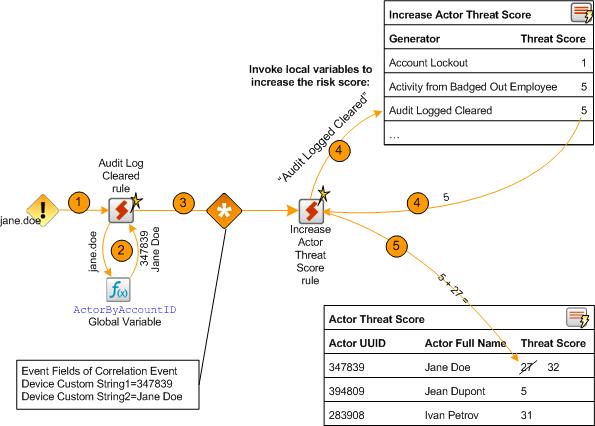
The following steps show an example of how suspicious activity is detected and processed by a rule in the Suspicious Activity Use Case. The steps listed below correspond to the orange numbered arrows located at the top of Threat Score Mechanics:
- One of the suspicious activity rules is triggered. In this example, the AuditLogCleared s rule is triggered when an event indicating an audit log has been detected.
- When the rule is triggered, it invokes either an ActorByX global variable or the AttributableActor global variable to determine the UUID associated with the triggering event, where X is the event field used to determine the UUID. The UUID is a unique identifier that is used as a key to an actor. For example, the AuditLogChanges rule invokes the ActorByAccountID global variable to determine the UUID associated with the Account ID of the triggering event.
- The suspicious activity rule generates a correlation event. The suspicious activity rule populates the following fields in the correlation event:
deviceCustomString1field with the UUIDdeviceCustomString2field with full name of the actor
In this example, a correlation event is generated by the Audit Log Cleared rule.
- Because the actor who generated the event already has a threat score, the Increase Actor Threat Score triggers.
- The rule action takes the new threat score associated with the UUID and updates the Actor Changes active list.
Threat Score Associated with Suspicious Rules and Stored in the Active List
|
Suspicious Activity Rule |
Threat Score |
|
Account Lockout |
1 |
|
Activity from Badged Out Employee |
5 |
|
Activity from Disabled Actor |
5 |
|
Actor Added and Removed From Privileged Group Within a Short Time |
5 |
|
After Hours Building Access by At Risk Actor |
1 |
|
After Hours Database Access by At Risk Actor |
5 |
|
Anonymous Proxy Access |
25 |
|
Audit Log Cleared |
5 |
|
Compromise - Attempt |
5 |
|
Database Brute Force Login Success |
25 |
|
Default Vendor Account Attempt |
5 |
|
Excessive Printing |
1 |
|
Failed Building Access |
5 |
|
Hacker Tool Website Access |
5 |
|
IPC Share Browsing |
1 |
|
Job Hunting |
1 |
|
Large Email to Competition |
5 |
|
Large Email to Public Webmail Servers |
1 |
|
Leak of Company Information |
5 |
|
Leak of Personal Information |
5 |
|
Local Admin Created |
1 |
|
Login to Known Shared Account by Actor |
1 |
|
Multiple Failed Database Access Attempts |
5 |
|
Network Scan |
5 |
|
Non-DBA Added to Oracle DBA Role |
5 |
|
Physical Plus VPN Access |
5 |
|
Printing After Hours |
1 |
|
Printing Confidential Documents |
5 |
|
Printing Suspicious Documents |
5 |
|
Resume Emailed by At Risk Actor |
1 |
|
Role Violation |
1 |
|
Security Software Disabled |
25 |
|
Suspicious Activity by Privileged Actor |
5 |
|
Traffic to Competition |
1 |
|
Traffic to Country of Concern |
1 |
|
Using Different Usernames |
1 |
|
VPN Login from Competition Domain |
5 |
Devices
The following types of devices supply events to this use case:
- Security Information Event Management (SIEM) devices
- Devices listed in the Suspicious Activity Use Case, see Devices
Configure Resources
This use case requires that the desired Suspicious Activity Use Case rules are deployed and enabled. The Actor Threat Score Use Case rules update threat scores of actors when the Suspicious Activity Use Case rule fire.
Configure the following types of resources for this use case:
In addition, consider the following optional configurations for this use case:
Manually Adjusting the Threat Score—Optional
Aging Actors Off the Actor Threat Score Active List—Optional
Customizing the Threat Score Associated with a Suspicious Activity—Optional
Adding Your Suspicious Activity Rules—Optional
Rules
The following rules can be configured for this use case:
Enable the Increase Actor Threat Score rule. This rule is the foundation of this use case and must be enabled.
By default, all the following actions of this rule are enabled:
- Add to Active List—Updates the existing actor’s threat score by adding the threat value associated with the suspicious activity to the existing threat score and saves the new value into the existing entry for that actor in the Actor Threat Score active list.
- Set Event Field Actions—Sets field values for the event generated by this rule.
Enable the Add Actor to Actor Threat Score List rule. This rule is the foundation of this use case and must be enabled.
By default, all the following actions of this rule are enabled:
- Add to Active List—Adds the actor to the Actor Threat Score active list and sets the actor’s threat score to the threat value associated with the suspicious activity.
- Set Event Field Actions—Sets field values for the event generated by this rule.
Enable the Actor Removed from Actor Threat Score rule if you want to track when ESM users remove an actor from the Actor Threat Score active list.
By default, the following action of this rule is enabled:
- Set Event Field Actions—Sets field values for the event generated by this rule.
By default, the following actions of the
Send Notification—Sends a notification to the destinations configured in the CERT Team. For more information, .
Add to Existing Case—Adds a case to the specified URI. For more information, see .
You can add exclusions to the filter referenced by this rule, to prevent this rule from firing for specific ESM users. For more information, see Filters.
Enable the Actor Changes rule if you want to track when the behavior of an individual is considered to be malicious because a threat score greater than 29 is associated with the actor. If this rule is enabled and this activity is detected, by default the rule invokes the following action:
- Send Notification—Sends a notification to the destinations configured in the CERT Team.
By default, the following action of the
- Add to Existing Case—Adds a case to the specified URI.
Enable the Actors Removed from Actor Threat Score rule if you want to track when ESM users reduce a threat score in the Actor Threat Score active list.
By default, the following action of this rule is enabled:
- Set Event Field Actions—Sets field values for the event generated by this rule.
By default, the following actions of the Actor Removed from Threat Score List rule are disabled. You can optionally enable these actions:
- Send Notification—Sends a notification to the destinations configured in the CERT Team.
- Add to Existing Case—Adds a case to the specified URI.
You can add exclusions to the filter reference by this rule, to prevent this rule from firing for specific ESM users. For more information, see Filters.
Filters
The following filters can be configured for this use case:
- Customize the following filters to exclude events for the set of ESM users who are expected to remove or change the threat scores in the Actor Threat Score active list:
- The Actor Threat Score Reduced rule references the Actor Threat Score Updated filter to determine the events processed by the rule.
- The Actor Removed from Actor Threat Score List rule references the Deleted Entry from Actor Threat Score List filter to determine the events processed by the rule.
For example, if the ESM user called admin is expected to remove or change the threat scores in the Actor Threat Score active list, add a condition to the filters to exclude audit events generated by that ESM user.
Trends
Reports and query viewers in this use case are based on the trends listed below. Before enabling these trends, verify that these trends collect the expected events for your environment. In addition, you might want to customize the trend before enabling. For more information, see .
Enable the following trends for this use case:
- Threat Score Contributors
- Weekly Department Threat Score
Manually Adjusting the Threat Score—Optional
The Actor Threat Score active list contains the actors which have been linked to suspicious activity and their associated threat score. This active list is dynamically populated by the
To customize a threat score of an actor in the
- In the Navigator panel, select the Resources tab and the Lists option.
- Expand the ArcSight Solutions/UBM/Actor Threat Score group.
- Right-click the Actor Threat Score active list and select Show Entries.
- Change, add or delete entries:
- Change an existing threat score. Right-click an entry in the Viewer and select Edit.
- To add an actor—Click the Add Entry (
 ) icon.
 - To delete an actor—Right-click an entry in the Viewer and select Delete.
Aging Actors Off the Actor Threat Score Active List—Optional
By default, actors stay on the Actor Threat Score indefinitely and their threat score is always increasing. You can manually decrease the threat score associated with an actor as described in Manually Adjusting the Threat Score—Optional. You can also add default time-out period to the Actor Changes active list by editing the TTL Days value in the active list editor. For example, you could set the TTL for the Actor Changes active list to 30 days and if no suspicious activity is detected for that actor, the actor is removed from the active list. Once the threat score of an actor reaches 500, the Actor Changes rule stops increasing the threat score for the actor. Such actors are phased off the list based on the TTL.
Customizing the Threat Score Associated with a Suspicious Activity—Optional
You can customize the threat scores associated with suspicious activities to reflect your environment. For example, if clearing an audit log is considered very suspicious in your environment, you might want to change the threat score associated with that activity in the Increase Actor Threat Score active list. For a full listing of the default suspicious activity rules and their associated threat score see Threat Score Associated with Suspicious Rules and Stored in the Active List .
To customize a threat score of an actor in the Actor Changes active list:
- In the Navigator panel, select the Resources tab and the Lists option.
- Expand the ArcSight Solutions/UBM/Actor Threat Score group.
- Right-click the Actor Changes active list and select Show Entries.
- Right-click an entry in the Viewer and select Edit.
- Adjust the threat score appropriately.
The threat scores stored in the Increase Actor Threat Score active list (Threat Score Associated with Suspicious Rules and Stored in the Active List ) correspond to the agent severity of correlation events generated by the suspicious activity rules as specified in Association Between Agent Severity and Threat Score Increase.
If you customize the threat score of any of the suspicious activity rules, you should also change the corresponding agent severity of the generated correlation event. For example, if you change the threat score associated with the Account Lockout rule from 1 to 5, ArcSight recommends that you also change the agent severity in the Actions tab of the Account Lockout rule from Medium to High.
Adding Your Suspicious Activity Rules—Optional
If you have custom rules that report suspicious activity in your environment, these rules can also increase the threat score associated with actors. The rule must be able to attribute events to actors. For more information, see Creating Custom Suspicious Activity Rules.
To add a rule to the Increase Actor Threat Score active list:
- In the Navigator panel, select the Resources tab and the Lists option.
- Expand the ArcSight Solutions/UBM/Actor Threat Score group.
- Right-click the Actor Changes active list and select Show Entries.
- To add an entry to the list, click the Add icon in the list header.
- In the Entry editor of the Inspect/Edit panel, enter values for the required fields of the list:
- Generator—Enter the exact name of your suspicious activity rule. The case of the name must also match.
- Threat Score—Enter the appropriate threat score: 1, 5, or 25. The threat score associated with the rule should correspond to the agent severity of the correlation event generated by the rule as described in Association Between Agent Severity and Threat Score Increase.
- Click Add.
Verify Configuration
After configuring this use case and the Suspicious Activity Use Case, verify that the actor threat score information is being populated.
- In the Navigator panel, go to Dashboards.
- Navigate to ArcSight Solutions/UBM/Actor Threat Score/.
- Right-click Actor Threat Score Overview and select Show Dashboard.
Resources
The following table lists all the resources explicitly assigned to this use case and any dependent resources.
Resources that Support the Actor Threat Score Use Case
Suspicious Activity Use Case
The Suspicious Activity use case provides resources that can be used to discover and analyze suspicious activity occurring on your network. When triggered, the suspicious activity rules can contribute to the resources of the Actor Threat Score Use Case.
This use case provides the following:
- Reports, query viewers and dashboards that provide information about suspicious activity and suspicious activity rule firings for actors, departments and job titles
- Pattern Discovery profiles that detect patterns of suspicious activity and rule firings across actors
This use case reports on the following suspicious activity:
- Account Management
- At Risk User Activity
- Traffic from an Area of Concern
- Database Access Attempts
- Email Failures
- General Security Breaches
- Information Leakage
- Network Based Anomaly Detection
- Physical Location Anomalies
- Policy Violations
- Printing
- Role Violations
- Web Interaction
The Suspicious Activity Use Case rules determine the actor attributable to an event, using global variables.
Here are some examples:
- The Account Lockout Rule rule invokes the ActorByTargetName global variable because the triggering account lockout event populates the target user name field with the user name associated with the attributable actor.
- The Audit Log Cleared rule invokes the ActorByAccountID global variable because the triggering audit log cleared event might populate either the attacker or target user name field with the user name associated with the attributable actor.
- The Anonymous Proxy Access might not have the user name, so the AttributableActor global variable attempts to determine the attributable actor using source IP of the login if the account ID is not available.
Each suspicious activity rule takes the actor’s UUID and full name returned from the global variable and populates the following event fields in the generated correlation event:
deviceCustomString1 field with the UUID
deviceCustomString2 field with full name of the actor
Regardless of which global variable the rule invokes to get the attributable actor, the UUID and full name is placed into the deviceCustomString1 and deviceCustomString2 fields of correlation event for consumption by the resources in the Actor Threat Score Use Case. For more information, see Actor Threat Score Use Case.
Account Management
The Suspicious Activity Use Case reports on the following potential misuse of accounts:
- Windows account lockouts—user accounts that have been disabled after too many failed login attempts have occurred
- Account activity from an account that has been disabled
- Account activity from unaccountable user ID—a user ID that not be correlated to an identity
- Use of default vendor accounts
- Creation of a local administrator account on Windows systems
At Risk User Activity
The Suspicious Activity Use Case reports on the following suspicious activity by at-risk identities represented by actors. An at-risk actor represents a user that should be monitored at a higher level of scrutiny, such as:
- Contractors
- Known disgruntled employees
- New hires
- Employees that have given notice
- Actors exhibiting suspicious behavior and therefore listed in the Actor Changes active list
The set of identities that are considered at risk is defined by the filter.
The following suspicious behavior is tracked for at-risk actors:
- After hours building access
- After hours database access
- Information leakage of company information
- Information leakage of personal information
- Printing of resumes
- Emailing resumes
Traffic from an Area of Concern
The Suspicious Activity Use Case monitors network traffic to countries and web sites that might be of a concern to your organization.
Database Access Attempts
The Suspicious Activity Use Case reports on the following suspicious database access attempts:
- A successful brute force login
- Multiple failed logins by the same user targeting a database
Email Failures
The Suspicious Activity Use Case reports on rejected emails and email errors.
General Security Breaches
The Suspicious Activity Use Case reports on breaches of general security practices and policies, such as:
- Clearing of host audit logs
- Password resets without a preceding account lockout
- Same user using different user names
Information Leakage
The Suspicious Activity Use Case monitors for information leakage, such as:
- Suspicious printing activities
- Communications with competition
- Information leakage is when sensitive data is intentionally or accidentally leaked from an organization to an outside target. Sensitive information is whatever your organization considers valuable or confidential, such as personal records, banking information or national secrets.
Network Based Anomaly Detection
The Suspicious Activity Use Case monitors the following network-based activities:
- New hosts added to the network
- Anomalous network traffic
- New services added to machines on the network
- Scans
Physical Location Anomalies
The Suspicious Activity Use Case monitors for physical location anomalies by tracking the badge status of employees and correlating it other factors:
- Reporting internal system use by an identity not physically present in the building.
- Reporting potential compromised VPN accounts—VPN authentications from identities who are physically present in the building.
Policy Violations
The Suspicious Activity Use Case monitors when policy violations occur, such as:
- Windows security software is disabled
- An attempt has been made to browse the Windows IPC system share
Printing
The Suspicious Activity Use Case monitors suspicious printing activities, such as:
- Printing after hours
- Printing suspicious documents
Role Violations
The Suspicious Activity Use Case monitors and reports on role violations involving an identity. A role violation occurs when an identity access systems that belong to a different department or they do not have proper role to access. In addition, authorizations on monitored systems such as privilege grants or assignments to groups can be analyzed for consistency with role information stored in the Identity Management System. For example, if Jane Doe was granted the DBA role on a database system but in the Identity Management System she was not granted this role, this role violation would be reported.
The resources provided in the Suspicious Activity Use Case enables auditors, analysts, and managers to provide the following services:
- Monitor, report, and alert on user access to monitored systems for which they do not have the proper role
- Monitor, report, and alert on user access to monitored systems belonging to a different department
- Detect when roles and privileges assigned on monitored systems do not align with assignments in Identity Management System
- Generate role violation reports for a specific identity, employee type, role, or department
Web Interaction
The Suspicious Activity Use Case monitors the following identity interactions with the web:
- Use of known public proxy servers—This activity could indicate that someone is trying to hide their web surfing activities.
- Interactions with known hacker Web sites—This activity could indicate that someone is trying to engage in malicious activity by downloading hacker tools or accessing hacker-related information.
- Interactions with known public job Web sites— This activity could indicate that someone is trying to either post his resume online or is looking for new job opportunities.
Devices
The following devices can supply events to this use case:
- Intrusion Detection System
- Intrusion Prevention System
- Network Based Anomaly Detection
- Database
- Operating System
- Firewall
- Virtual Private Network
- Vulnerability Assessment
- Identity Management System
- Policy Management
- Network Equipment
- Content Security, Web Filtering
- Physical Security Systems
- Antivirus
- Wireless
- Application
Categorize Assets
This use case requires categorization of monitored assets into the UBM network domains. For more information, see . For example, a role violation is detected if a user in the Human Resources department accesses a server asset categorized as Finance.
This use case contains resources with conditions that check if incoming events involve assets categorized with the asset categories listed in following table. Classify assets appropriately with these categories to trigger the resources during run time.
Asset Categories used by Suspicious Activity Use Case
|
Asset Category |
Configuration |
|
Competition |
Categorize the assets of the competition. You can categorize the competition assets and/or add the competition domains to the Competition Domains active list. For more information, see Active Lists. |
|
Destinations/Anonymous Proxies |
Categorize additional public proxy servers. Events sent via a proxy server could indicate that someone is trying to hide their identity. By default, the following proxy servers are categorized:
|
|
Destinations/Career Sites |
Categorize additional job hunting web sites. By default, the following career web sites are categorized:
|
|
Destinations/Hacker Sites |
Categorize additional hacker tool web sites. By default, the following hacker tool web sites are categorized:
|
|
Destinations/Prohibited Sites-Other |
This category is not explicitly used by UBM solution resources, but can be used to categorize other types of prohibited destinations. |
The Classification Level - Lower to Higher and Classification Level - Higher to Lower filters uses the security level categories, Confidential, Secret, Top Secret. Classify your assets into the appropriate Information Classification/National Security category.
Configure Resources
Configure the following types of resources for this use case:
Active Lists
Configure the active lists listed in the following table for this use case. These active lists are available from the following location:
ArcSight Solutions/UBM/Suspicious Activity
Populate Suspicious Activity Active Lists
|
Active List |
Description |
Configuration |
|
Competition Domains |
This active list is used to define DNS domain names of competitive companies. |
Populate with competition DNS domain names. |
|
Countries of Concern |
This active list contains the country code of countries with whom information exchange might be suspect. |
Add ISO country codes for countries of concern from http://www.iso.org/iso/en/prods-services/iso3166ma/02iso-3166-code-lists/list-en1.html |
|
Default Vendor Accounts |
This active list contains default user accounts that ship with products. |
Optional—By default, this list is populated with default vendor user accounts provided with common applications and operating systems. Add any additional vendor user accounts for applications and operating systems used by your organization. |
|
Disgruntled Actors |
This list contains the full names and UUID of disgruntled identities. The activity of the actors on this list are monitored at a higher level of scrutiny |
Add the UUID and full name of any disgruntled employees. For more information, see . This list should be maintained manually. |
|
New Hire Actors |
This active list contains the full names and UUID of newly hired employees. The activity of the actors on this list are monitored with greater suspicion. |
Optional—This lists is automatically populated when new actors are added to the IDM. You might want you set the time period that a new hire is considered new, by editing the TTL Days value for this active list in the active list editor. |
|
Notice-Given Actors |
This active list contains the full names and UUID of employees who have given notice. The activity of the actors on this list can be monitored with a higher level of scrutiny. |
Add UUID and the full name of employees who have given notice. For more information, see . This list should be maintained manually. |
|
Public Webmail |
This list contains all the DNS domains for public webmail servers, for example gmail.com. This list is used to detect when large emails are sent to those domains, indicating suspicious activity. |
Optional—By default, this list is populated with the set of default public Webmail servers. Add additional public Webmail servers. |
|
Role Violations |
The rule places an actor on the Actor Changes active list when an actor accesses a target system belonging to a department to which they do not belong, and for which they do not have the defined role. The rule triggers the first time an actor/target system combination is detected. Subsequent role violations by the same actor/target system combination are not reported unless a time out period is specified. |
Optional—This is automatically populated with actors by Actor Changes rule. To configure the Actor Changes rule to report subsequent role violations after a specified time period, edit the list and set the one of the TTL fields to a value. |
Filters
Configure the following filters for this use case:
- Suspicious Activity/General Security/Suspicious Activity filter— This filter uses event categorization to determine which events are suspicious and drives the Suspicious Activity use case. To specify additional event types as being suspicious, add additional conditions to this filter.
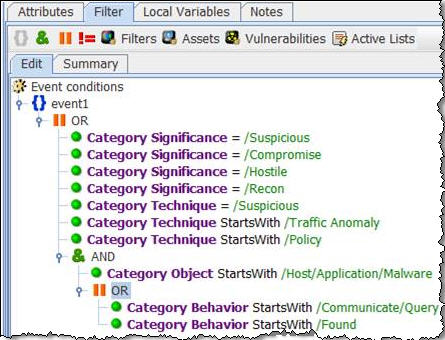
- Suspicious Activity/Role Violations/Role Violations filter—This filter selects events in which an identity accesses a target system belonging to a department to which they do not belong, and for which they do not have the defined role. For example, a role violation is detected if a user in the Human Resources department accesses a server asset categorized as Finance. This is only intended as a template. Configure this filter to match your organization user roles. Add additional conditions as needed.
Rules
By default, all the rules in this use case are disabled. Enable only the rules that are significant for your organization. Each suspicious activity rule contains an action that generates a correlation event and by default these rule actions are enabled.
Trends and Queries
Reports and query viewers in this use case are based on the trends listed below.
Before enabling the trends listed below, verify that these trends collect the expected events for your environment. In addition, you might want to customize the trend before enabling. For more information, see .
Enable the following trends for this use case:
- Threat Score Contributors—This trend is included with the Actor Threat Score Use Case. Several resources in this use case require that this trend be enabled.
- All Actions for Actor—This trend is included with the User Activity Monitoring Use Case. Several resources in this use case require that this trend be enabled.
Creating Custom Suspicious Activity Rules
If you have custom rules that report suspicious activity in your environment, these rules can also increase the threat score associated with actors. The rule must be able to attribute events to actors.
You can create custom suspicious activity rules that report suspicious activity in your environment. The rule must be able to attribute events to actors. In your rule, use one of the global variables (listed in ) to attribute the actor to the suspicious activity.
To create your own rule, you can copy one of the following template rules and customize it for your suspicious activity.
-
Suspicious Activity Template - ActorByAccountID
-
Suspicious Activity Template - AttributableActor
Add the rule to the Increase Actor Threat Score active list with the appropriate threat score. For detailed instructions, see Adding Your Suspicious Activity Rules—Optional.
Verify Configuration
After configuring this use case, verify events are being processed by the suspicious activity rules by viewing the Actor Changes active channel:
- In the Navigator panel, go to Active Channels.
- Navigate to ArcSight Solutions/UBM/Suspicious Activity.
- Right-click Actor Changes and select Show Active Channel.
All rule fire events for this use case should display.
Resources
The following table lists all the resources explicitly assigned to this use case and any dependent resources.
Resources that Support the Suspicious Activity Use Case
|
Resource |
Description |
Type |
URI |
|
Monitor Resources |
|||
|
This active channel shows all suspicious events. |
Active Channel |
ArcSight Solutions/UBM/Suspicious Activity/ |
|
|
This active channel displays events in which an actor accesses a target system for which they do not have the defined role. |
Active Channel |
ArcSight Solutions/UBM/Suspicious Activity/Role Violations/ |
|
|
This active channel shows events in which the actor associated with the attacker or target user name has been disabled. |
Active Channel |
ArcSight Solutions/UBM/Suspicious Activity/Account Management/ |
|
|
This active channel shows correlation events from the Suspicious Activity use case. |
Active Channel |
ArcSight Solutions/UBM/Suspicious Activity/ |
|
|
This active channel shows information leak events. |
Active Channel |
ArcSight Solutions/UBM/Suspicious Activity/Information Leakage/ |
|
|
This active channel shows all activity where the target is a known hacker tool Web site. |
Active Channel |
ArcSight Solutions/UBM/Suspicious Activity/Web/ |
|
|
This active channel shows all activity where the target is a known job hunting Web site. |
Active Channel |
ArcSight Solutions/UBM/Suspicious Activity/Web/ |
|
|
This dashboard shows network-based anomaly detection traffic. |
Dashboard |
ArcSight Solutions/UBM/Suspicious Activity/Network Based Anomaly Detection/ |
|
|
This dashboard shows a composite view of suspicious activity correlation events across actors, departments and job titles. |
Dashboard |
ArcSight Solutions/UBM/Suspicious Activity/General Security/ |
|
|
This dashboard shows events indicating possible information leaks. |
Dashboard |
ArcSight Solutions/UBM/Suspicious Activity/Information Leakage/ |
|
|
This dashboard shows a composite view of suspicious activity across actors, departments and job titles. |
Dashboard |
ArcSight Solutions/UBM/Suspicious Activity/General Security/ |
|
|
This filter shows all leaked files. |
Dashboard |
ArcSight Solutions/UBM/Suspicious Activity/Information Leakage/ |
|
|
This dashboard shows traffic related to information leaks. |
Dashboard |
ArcSight Solutions/UBM/Suspicious Activity/Information Leakage/ |
|
|
This dashboard shows event graphs of role violations by employee type and department. |
Dashboard |
ArcSight Solutions/UBM/Suspicious Activity/Role Violations/ |
|
|
This dashboard shows traffic that violates information classification rules |
Dashboard |
ArcSight Solutions/UBM/Suspicious Activity/Information Leakage/ |
|
|
This dashboard shows email related errors. |
Dashboard |
ArcSight Solutions/UBM/Suspicious Activity/Email/ |
|
|
This dashboard shows events indicating emails to or from a competitor's email DNS domain. |
Dashboard |
ArcSight Solutions/UBM/Suspicious Activity/Information Leakage/ |
|
|
This dashboard shows events that are a concern for many organizations. Examples include traffic to or from countries of concern, possible data leaks, and national security concerns. |
Dashboard |
ArcSight Solutions/UBM/Suspicious Activity/Concerns/ |
|
|
This query viewer shows the top actors by number of UBM suspicious activity correlation events. |
Query Viewer |
ArcSight Solutions/UBM/Suspicious Activity/ |
|
|
This query viewer shows correlation events for UBM suspicious activity rules. |
Query Viewer |
ArcSight Solutions/UBM/Suspicious Activity/ |
|
|
This query viewer shows the top job titles by number of UBM suspicious activity correlation events. |
Query Viewer |
ArcSight Solutions/UBM/Suspicious Activity/ |
|
|
This query viewer shows the top suspicious activity rules by the total number of times each rule triggered. |
Query Viewer |
ArcSight Solutions/UBM/Suspicious Activity/ |
|
|
This query viewer shows the top departments by number of UBM suspicious activity correlation events. |
Query Viewer |
ArcSight Solutions/UBM/Suspicious Activity/ |
|
|
This report details all communication with competitive organizations as defined by the asset categories or the Competition active list. |
Report |
ArcSight Solutions/UBM/Suspicious Activity/Information Leak/ |
|
|
This report shows events indicating that a suspicious document has been transferred. |
Report |
ArcSight Solutions/UBM/Suspicious Activity/Information Leak/ |
|
|
This report shows information about UBM suspicious activity correlation events for the specified actor. |
Report |
ArcSight Solutions/UBM/Suspicious Activity/ |
|
|
This report shows information from events indicating suspicious activity by privileged actors. |
Report |
ArcSight Solutions/UBM/Suspicious Activity/At Risk Users/ |
|
|
This report shows events indicating failed building access. |
Report |
ArcSight Solutions/UBM/Suspicious Activity/Physical/ |
|
|
This report shows a summary chart and detailed table of role violations for the specified department. |
Report |
ArcSight Solutions/UBM/Suspicious Activity/Role Violations/ |
|
|
This report shows events indicating that the specified document has been printed. |
Report |
ArcSight Solutions/UBM/Suspicious Activity/Information Leak/ |
|
|
This report shows a summary chart and detailed table of role violations by target asset role. |
Report |
ArcSight Solutions/UBM/Suspicious Activity/Role Violations/ |
|
|
This report shows privileges granted in Oracle. |
Report |
ArcSight Solutions/UBM/Suspicious Activity/Database/ |
|
|
This report shows a summary chart and detailed table of role violations for the specified target asset role. |
Report |
ArcSight Solutions/UBM/Suspicious Activity/Role Violations/ |
|
|
This report shows the top information leak rules triggered. |
Report |
ArcSight Solutions/UBM/Suspicious Activity/Information Leak/ |
|
|
This report shows all SELECT operations on the dba_users table in Oracle. |
Report |
ArcSight Solutions/UBM/Suspicious Activity/Database/ |
|
|
This report shows all the users who have had auditing disabled. |
Report |
ArcSight Solutions/UBM/Suspicious Activity/Database/ |
|
|
This report shows suspicious events by actors in the Notice Given list. |
Report |
ArcSight Solutions/UBM/Suspicious Activity/At Risk Users/ |
|
|
This report shows suspicious events by actors on the Disgruntled list. |
Report |
ArcSight Solutions/UBM/Suspicious Activity/At Risk Users/ |
|
|
This report shows a summary chart and detailed table of role violations by employee type. |
Report |
ArcSight Solutions/UBM/Suspicious Activity/Role Violations/ |
|
|
This report shows all the new users that have been created within Oracle. |
Report |
ArcSight Solutions/UBM/Suspicious Activity/Database/ |
|
|
This report shows all files that have been emailed. |
Report |
ArcSight Solutions/UBM/Suspicious Activity/Information Leak/ |
|
|
This report shows all updates to the dba_users table in Oracle. |
Report |
ArcSight Solutions/UBM/Suspicious Activity/Database/ |
|
|
This report shows information about UBM suspicious activity correlation events for the specified department. |
Report |
ArcSight Solutions/UBM/Suspicious Activity/ |
|
|
This report shows the actor full name, vendor, product, event name, and count of all suspicious events that can be correlated to an actor belonging to the specified department. |
Report |
ArcSight Solutions/UBM/Suspicious Activity/ |
|
|
This report shows all successful dba role grants by the user who executed the grant. |
Report |
ArcSight Solutions/UBM/Suspicious Activity/Database/ |
|
|
This report shows all failed authentications to databases. |
Report |
ArcSight Solutions/UBM/Suspicious Activity/Database/ |
|
|
This report shows events indicating that a resume was emailed. |
Report |
ArcSight Solutions/UBM/Suspicious Activity/Information Leak/ |
|
|
This report shows all users who have sent a confidential document to a competitor. |
Report |
ArcSight Solutions/UBM/Suspicious Activity/Information Leak/ |
|
|
This report shows all deletions from the audit table. |
Report |
ArcSight Solutions/UBM/Suspicious Activity/Database/ |
|
|
This report shows events indicating that the specified document was transferred. |
Report |
ArcSight Solutions/UBM/Suspicious Activity/Information Leak/ |
|
|
This report shows information from suspicious events attributed to actors having a threat score greater than zero. |
Report |
ArcSight Solutions/UBM/Suspicious Activity/At Risk Users/ |
|
|
This report details all communication with countries of concern as defined by the Countries of Concern active list. |
Report |
ArcSight Solutions/UBM/Suspicious Activity/Information Leak/ |
|
|
This report shows all database tables that have been accessed, and the users accessing them. |
Report |
ArcSight Solutions/UBM/Suspicious Activity/Database/ |
|
|
This report shows events indicating the printing of suspicious documents. |
Report |
ArcSight Solutions/UBM/Suspicious Activity/Printing/ |
|
|
This report shows a summary chart and detailed table of role violations for the specified employee type. |
Report |
ArcSight Solutions/UBM/Suspicious Activity/Role Violations/ |
|
|
This report shows information about UBM suspicious activity correlation events for the specified job title. |
Report |
ArcSight Solutions/UBM/Suspicious Activity/ |
|
|
This report shows events indicating that elevated privileges were granted to a non-privileged actor. |
Report |
ArcSight Solutions/UBM/Suspicious Activity/Role Violations/ |
|
|
This report shows the actor's full name, unique ID, product, event name, and count of all suspicious events that can be correlated to an actor having the specified role. |
Report |
ArcSight Solutions/UBM/Suspicious Activity/ |
|
|
This report shows any user attempting to delete their audit settings directly from the table audit options table. |
Report |
ArcSight Solutions/UBM/Suspicious Activity/Database/ |
|
|
This report shows suspicious events from new hires. |
Report |
ArcSight Solutions/UBM/Suspicious Activity/At Risk Users/ |
|
|
This report shows all successful database authentications. |
Report |
ArcSight Solutions/UBM/Suspicious Activity/Database/ |
|
|
This report shows the actor full name, vendor, product, event name, and count of all suspicious events that can be correlated to an actor having the specified employee type. |
Report |
ArcSight Solutions/UBM/Suspicious Activity/ |
|
|
This report shows information about UBM suspicious activity correlation events for the specified role. |
Report |
ArcSight Solutions/UBM/Suspicious Activity/ |
|
|
This report shows information from events in which the actor associated with the attacker or target user name in the event has been disabled. |
Report |
ArcSight Solutions/UBM/Suspicious Activity/Account Management/ |
|
|
This report shows events indicating after hours database access. |
Report |
ArcSight Solutions/UBM/Suspicious Activity/Database/ |
|
|
This report shows information about UBM suspicious activity correlation events for the specified employee type. |
Report |
ArcSight Solutions/UBM/Suspicious Activity/ |
|
|
This report shows a summary chart and detailed table of role violations by department. |
Report |
ArcSight Solutions/UBM/Suspicious Activity/Role Violations/ |
|
|
This report shows all delete operations to the dba_users table in Oracle. |
Report |
ArcSight Solutions/UBM/Suspicious Activity/Database/ |
|
|
This report shows the sender, relay, and time of rejected email events. |
Report |
ArcSight Solutions/UBM/Suspicious Activity/Email/ |
|
|
This report shows information from all suspicious events that can be correlated to an actor. |
Report |
ArcSight Solutions/UBM/Suspicious Activity/ |
|
|
This report shows events indicating after hours printing activity. |
Report |
ArcSight Solutions/UBM/Suspicious Activity/Printing/ |
|
|
Library - Correlation Resources |
|||
|
This rule detects any document names being printed that match the filter for suspicious documents. |
Rule |
ArcSight Solutions/UBM/Suspicious Activity/Printing/ |
|
|
This rule detects Microsoft Windows account lockout events and adds the target username and associated actor to the Account Lockouts active list. |
Rule |
ArcSight Solutions/UBM/Suspicious Activity/Account Management/ |
|
|
This rule triggers on connections to anonymous proxy servers. This activity could indicate that someone is attempting to access prohibited sites or hide their web surfing activity. |
Rule |
ArcSight Solutions/UBM/Suspicious Activity/Web/ |
|
|
This rule monitors network traffic targeting known hacker Web sites. The servers are assets categorized as Hacker Sites. This activity could indicate that someone is trying to engage in malicious activity by downloading hacker tools or accessing hacker-related information. |
Rule |
ArcSight Solutions/UBM/Suspicious Activity/Web/ |
|
|
This rule triggers on events in which the actor associated with the attacker or target user name in the event has been disabled. |
Rule |
ArcSight Solutions/UBM/Suspicious Activity/Account Management/ |
|
|
This rule triggers on events in which an actor accesses a target system belonging to a department to which they do not belong, and for which they do not have the defined role. |
Rule |
ArcSight Solutions/UBM/Suspicious Activity/Role Violations/ |
|
|
This rule monitors network traffic targeting known public job Web sites. The job sites are assets categorized as Career Sites. This activity could indicate that someone is trying to either post his resume online or is looking for new job opportunities. |
Rule |
ArcSight Solutions/UBM/Suspicious Activity/Web/ |
|
|
This rule looks for after hours building access attempts by high risk actors. |
Rule |
ArcSight Solutions/UBM/Suspicious Activity/At Risk Users/ |
|
|
This rule triggers on events indicating that an Oracle user account was granted the role of dba, but the actor owning the account is not defined as a dba in the actor model. |
Rule |
ArcSight Solutions/UBM/Suspicious Activity/Role Violations/ |
|
|
This rule triggers on login events to known shared accounts. |
Rule |
ArcSight Solutions/UBM/Suspicious Activity/Account Management/ |
|
|
This rule detects failed building access. |
Rule |
ArcSight Solutions/UBM/Suspicious Activity/Physical/ |
|
|
This rule looks for large email messages being sent to public Web mail accounts such as Yahoo. |
Rule |
ArcSight Solutions/UBM/Suspicious Activity/Information Leakage/ |
|
|
This rule detects network activity on an internal network segment even though the employee is not physically present in the building. |
Rule |
ArcSight Solutions/UBM/Suspicious Activity/Physical/ |
|
|
This rule looks for brute force database logins followed by a successful login. |
Rule |
ArcSight Solutions/UBM/Suspicious Activity/Database/ |
|
|
This rule detects possible compromised VPN accounts by looking for VPN authentications from actors that are physically present in the building. |
Rule |
ArcSight Solutions/UBM/Suspicious Activity/Physical/ |
|
|
This rule can be used as a template to add custom suspicious activity rules to your UBM deployment. In this rule, the attributable actor is determined by the ActorByAccountID global variable. Add your condition first before enabling it. |
Rule |
ArcSight Solutions/UBM/Suspicious Activity/ |
|
|
This rule detects people connecting with two different user names. |
Rule |
ArcSight Solutions/UBM/Suspicious Activity/General Security/ |
|
|
This rule triggers when a leak of company information is detected. |
Rule |
ArcSight Solutions/UBM/Suspicious Activity/Information Leakage/ |
|
|
This rule looks for multiple failed logins by the same user targeting a database. |
Rule |
ArcSight Solutions/UBM/Suspicious Activity/Database/ |
|
|
This rule detects database access after hours by at-risk actors. |
Rule |
ArcSight Solutions/UBM/Suspicious Activity/At Risk Users/ |
|
|
This rule triggers if high risk actors send resumes through email. |
Rule |
ArcSight Solutions/UBM/Suspicious Activity/At Risk Users/ |
|
|
This rule identifies the creation of a local administrator account in Microsoft Windows. |
Rule |
ArcSight Solutions/UBM/Suspicious Activity/Account Management/ |
|
|
This rule triggers when network scan events are reported, indicating reconnaissance activity. |
Rule |
ArcSight Solutions/UBM/Suspicious Activity/Network Based Anomaly Detection/ |
|
|
This rule monitors for connections coming from machines classified as belonging to competitors. |
Rule |
ArcSight Solutions/UBM/Suspicious Activity/Information Leakage/ |
|
|
This rule detects emails sent to competitors. |
Rule |
ArcSight Solutions/UBM/Suspicious Activity/Information Leakage/ |
|
|
This rule looks for excessive printing activity. |
Rule |
ArcSight Solutions/UBM/Suspicious Activity/Printing/ |
|
|
This rule monitors for traffic going to countries of concern. Countries of concern can be configured using the Countries of Concern active list. |
Rule |
ArcSight Solutions/UBM/Suspicious Activity/Information Leakage/ |
|
|
This rule can be used as a template to add custom suspicious activity rules to your UBM deployment. In this rule, the attributable actor is determined by the AttributableActor global variable. Add your condition first before enabling it. |
Rule |
ArcSight Solutions/UBM/Suspicious Activity/ |
|
|
This rule detects any attempt to compromise a device from a source that is not listed on a trusted active list. It triggers whenever an event is categorized as attempt and compromise. On the first event, agent severity is set to high, the attacker address is added to the Hostile active list, and the target address is added to the Hit active list. |
Rule |
ArcSight Solutions/UBM/Suspicious Activity/General Security/ |
|
|
This rule triggers on detection of suspicious activity caused by a privileged user. |
Rule |
ArcSight Solutions/UBM/Suspicious Activity/At Risk Users/ |
|
|
This rule triggers on events indicating a VPN login has occurred, and the source IP address belongs to a competitor's domain. |
Rule |
ArcSight Solutions/UBM/Suspicious Activity/Information Leakage/ |
|
|
This rule triggers when a leak of personal information is detected. |
Rule |
ArcSight Solutions/UBM/Suspicious Activity/Information Leakage/ |
|
|
This rule looks for any attempts to browse Microsoft Windows system shares. |
Rule |
ArcSight Solutions/UBM/Suspicious Activity/Policy Violations/ |
|
|
This rule detects any document names being printed that match the filter for confidential documents. |
Rule |
ArcSight Solutions/UBM/Suspicious Activity/Printing/ |
|
|
This rule monitors for traffic going to competitors. |
Rule |
ArcSight Solutions/UBM/Suspicious Activity/Information Leakage/ |
|
|
This rule monitors for the clearing of host audit logs. |
Rule |
ArcSight Solutions/UBM/Suspicious Activity/General Security/ |
|
|
This rule is triggered when a Microsoft Windows security software service has been disabled. |
Rule |
ArcSight Solutions/UBM/Suspicious Activity/Policy Violations/ |
|
|
This rule triggers when a user tries to access a default vendor account. Default vendor account identifiers are maintained in the Default Vendor Accounts active list. |
Rule |
ArcSight Solutions/UBM/Suspicious Activity/Account Management/ |
|
|
This rule detects printing activity after hours. |
Rule |
ArcSight Solutions/UBM/Suspicious Activity/Printing/ |
|
|
Library Resources |
|||
|
This active list maintains a list of actors who have badged into the building. By default, actors expire from the list in 1 day. |
Active List |
ArcSight Solutions/UBM/User Activity Monitoring/Physical Access/ |
|
|
This list contains all the DNS domains for public webmail servers. For example hotmail.com. This list is used to detect when big emails are sent to those domains, being a possible information leak. |
Active List |
ArcSight Solutions/UBM/Suspicious Activity/ |
|
|
This active list contains the country code of countries with whom information exchange might be suspect. |
Active List |
ArcSight Solutions/UBM/Suspicious Activity/ |
|
|
This active list is used to define DNS domain names of competitors, and can be used to detect information leakage to those domains. |
Active List |
ArcSight Solutions/UBM/Suspicious Activity/ |
|
|
This active list contains a list of disgruntled actors. It should be populated with actors who require additional monitoring. |
Active List |
ArcSight Solutions/UBM/Suspicious Activity/ |
|
|
This active list contains a list of suspicious activity rules and their customizable threat scores. When an actor causes one of these rules to trigger, their threat score is increased by the rule's threat score as defined in this list. |
Active List |
ArcSight Solutions/UBM/Actor Threat Score/ |
|
|
This active list contains a list of actors scheduled for termination, which might require a higher level of monitoring. |
Active List |
ArcSight Solutions/UBM/Suspicious Activity/ |
|
|
This active list contains user accounts that might ship as standard accounts with many vendors products. |
Active List |
ArcSight Solutions/UBM/Suspicious Activity/ |
|
|
This active list is used to define user groups with elevated privileges. |
Active List |
ArcSight Solutions/UBM/Privileged User Monitoring/ |
|
|
This active list is used by the actor global variables to determine what the Identity Management authenticator is, base on the event, so that an actor can be determined from event information. |
Active List |
ArcSight System/Actor Data Support |
|
|
This active list contains a list of actors who have accessed systems for which they do not have the correct role or department. Further role violation events will not occur as long as the Actor and Target Asset Group are in this list. |
Active List |
ArcSight Solutions/UBM/Suspicious Activity/ |
|
|
This active list maintains a list of known shared accounts per application. Note that all account IDs must be in uppercase and the Application field must be the same as what appears in the Device Product event field. |
Active List |
ArcSight Solutions/UBM/Shared Accounts/ |
|
|
This active list maintains a list of new hire actors. The default expiration is two weeks from the date the actor is added to the system. |
Active List |
ArcSight Solutions/UBM/Suspicious Activity/ |
|
|
This list maintains a running threat score for actors exhibiting suspicious activity. |
Active List |
ArcSight Solutions/UBM/Actor Threat Score/ |
|
|
This is a solutions asset category. |
Asset Category |
ArcSight Solutions/UBM/Destinations |
|
|
This is a site asset category. |
Asset Category |
Site Asset Categories/Business Impact Analysis/Classification |
|
|
This is a site asset category. |
Asset Category |
Site Asset Categories/Business Impact Analysis/Classification |
|
|
This is a site asset category. |
Asset Category |
Site Asset Categories/Address Spaces |
|
|
This is a solutions asset category. |
Asset Category |
ArcSight Solutions/UBM/Information Classification/National Security |
|
|
This is a solutions asset category. |
Asset Category |
ArcSight Solutions/UBM/Information Classification |
|
|
This is a solutions asset category. |
Asset Category |
ArcSight Solutions/UBM/Destinations |
|
|
This is a solutions asset category. |
Asset Category |
ArcSight Solutions/UBM/Destinations |
|
|
This is a solutions asset category. |
Asset Category |
ArcSight Solutions/UBM |
|
|
This is a solutions asset category. |
Asset Category |
ArcSight Solutions/UBM |
|
|
This data monitor shows the last suspicious activity rules triggered and the actor responsible. |
Data Monitor |
ArcSight Solutions/UBM/Suspicious Activity/ |
|
|
This data monitor shows the top actors exhibiting suspicious activity. |
Data Monitor |
ArcSight Solutions/UBM/Suspicious Activity/General Security/ |
|
|
This data monitor shows the latest traffic flagged as a potential concern for the company. |
Data Monitor |
ArcSight Solutions/UBM/Suspicious Activity/Concern/ |
|
|
This data monitor shows the top information leaks by destination address. |
Data Monitor |
ArcSight Solutions/UBM/Suspicious Activity/Information Leakage/ |
|
|
This data monitor shows new hosts detected on the network. |
Data Monitor |
ArcSight Solutions/UBM/Suspicious Activity/Network Based Anomaly Detection/ |
|
|
This data monitor shows the senders causing the most errors with their email traffic. |
Data Monitor |
ArcSight Solutions/UBM/Suspicious Activity/Email/ |
|
|
This data monitor shows the top departments exhibiting suspicious activity. |
Data Monitor |
ArcSight Solutions/UBM/Suspicious Activity/General Security/ |
|
|
This data monitor shows an event graph of role violations by department and actor along with the asset category of the target system. |
Data Monitor |
ArcSight Solutions/UBM/Suspicious Activity/Role Violations/ |
|
|
This data monitor shows the top information leaks by user. |
Data Monitor |
ArcSight Solutions/UBM/Suspicious Activity/Information Leakage/ |
|
|
This data monitor shows the last ten events classified as information leaks. |
Data Monitor |
ArcSight Solutions/UBM/Suspicious Activity/Information Leakage/ |
|
|
This data monitor shows the top information leaks of company data by user. |
Data Monitor |
ArcSight Solutions/UBM/Suspicious Activity/Information Leakage/ |
|
|
This data monitor shows the latest traffic flagged as a potential concern for the nation state. |
Data Monitor |
ArcSight Solutions/UBM/Suspicious Activity/Concern/ |
|
|
This data monitor shows a graph of information leaks by destination. |
Data Monitor |
ArcSight Solutions/UBM/Suspicious Activity/Information Leakage/ |
|
|
This data monitor shows an event graph of role violations by employee type and actor along with the asset category of the target system. |
Data Monitor |
ArcSight Solutions/UBM/Suspicious Activity/Role Violations/ |
|
|
This data monitor shows the top information leaks of company data by address. |
Data Monitor |
ArcSight Solutions/UBM/Suspicious Activity/Information Leakage/ |
|
|
This data monitor shows a graph of leaked files per user. |
Data Monitor |
ArcSight Solutions/UBM/Suspicious Activity/Information Leakage/ |
|
|
This data monitor shows the top information leaks by address. |
Data Monitor |
ArcSight Solutions/UBM/Suspicious Activity/Information Leakage/ |
|
|
This data monitor shows events indicating emails from a competitor's email DNS domain. |
Data Monitor |
ArcSight Solutions/UBM/Suspicious Activity/Information Leakage/ |
|
|
This data monitor shows the top information leaks by destination user. |
Data Monitor |
ArcSight Solutions/UBM/Suspicious Activity/Information Leakage/ |
|
|
This data monitor shows the top information leaks of personal data by user. |
Data Monitor |
ArcSight Solutions/UBM/Suspicious Activity/Information Leakage/ |
|
|
This data monitor shows the top senders of email to job-related email addresses. |
Data Monitor |
ArcSight Solutions/UBM/Suspicious Activity/Email/ |
|
|
This data monitor shows scanning activity. |
Data Monitor |
ArcSight Solutions/UBM/Suspicious Activity/Network Based Anomaly Detection/ |
|
|
This data monitor shows the recipients causing the most errors with their email traffic. |
Data Monitor |
ArcSight Solutions/UBM/Suspicious Activity/Email/ |
|
|
This data monitor shows new services that were detected on machines. |
Data Monitor |
ArcSight Solutions/UBM/Suspicious Activity/Network Based Anomaly Detection/ |
|
|
This data monitor shows anomalous traffic. |
Data Monitor |
ArcSight Solutions/UBM/Suspicious Activity/Network Based Anomaly Detection/ |
|
|
This data monitor shows all traffic originating from a higher level classification and targeting a lower level classification. |
Data Monitor |
ArcSight Solutions/UBM/Suspicious Activity/Information Leakage/ |
|
|
This data monitor shows the last ten leaks of company data. |
Data Monitor |
ArcSight Solutions/UBM/Suspicious Activity/Information Leakage/ |
|
|
This data monitor shows all traffic originating from a lower level classification and targeting a higher level classification. |
Data Monitor |
ArcSight Solutions/UBM/Suspicious Activity/Information Leakage/ |
|
|
This data monitor shows the top information leaks of personal data by address. |
Data Monitor |
ArcSight Solutions/UBM/Suspicious Activity/Information Leakage/ |
|
|
This data monitor shows the last ten leaks of personal data. |
Data Monitor |
ArcSight Solutions/UBM/Suspicious Activity/Information Leakage/ |
|
|
This data monitor shows events whose source or destination addresses are from a country of concern as specified on the Countries of Concern active list. |
Data Monitor |
ArcSight Solutions/UBM/Suspicious Activity/Concern/ |
|
|
This data monitor shows the top rejected sender addresses. |
Data Monitor |
ArcSight Solutions/UBM/Suspicious Activity/Email/ |
|
|
This data monitor shows a list of the top files that were leaked. |
Data Monitor |
ArcSight Solutions/UBM/Suspicious Activity/Information Leakage/ |
|
|
This data monitor shows the top job titles exhibiting suspicious activity. |
Data Monitor |
ArcSight Solutions/UBM/Suspicious Activity/General Security/ |
|
|
This data monitor shows information leak events. |
Data Monitor |
ArcSight Solutions/UBM/Suspicious Activity/Information Leakage/ |
|
|
This data monitor shows events indicating emails to a competitor's email DNS domain. |
Data Monitor |
ArcSight Solutions/UBM/Suspicious Activity/Information Leakage/ |
|
|
This global variable returns all the information for an actor, where the event to actor attribution is done using either attacker or target user name fields, or the source IP address. Note: To turn lookups based on the source IP address, in the Parameters tab, do not use the actorByAccountOrSourceIP local variable to lookup the actor, use the UUID field of the ActorByAccountID global variable instead. |
Global Variable |
ArcSight Solutions/UBM/Core Variables/ |
|
|
This global variable returns all the information for an actor, where the event to actor attribution is done using the source IP address. |
Global Variable |
ArcSight Solutions/UBM/Actor Attribution by IP Address/ |
|
|
This global variable maps the account information in an event with an actor. The account information consists of the device vendor and product, and information derived from the attacker or target user name, with preference to the target user name. |
Global Variable |
ArcSight Solutions/UBM/Core Variables/ |
|
|
This global variable returns an actor's UUID, full name, username used, and login type if the actor is associated with a source IP address. |
Global Variable |
ArcSight Solutions/UBM/Actor Attribution by IP Address/ |
|
|
This variable maps the account information in an event with an actor. The account information consists of the device vendor, device product, connector address, connector zone, and information derived from the attacker user name. |
Global Variable |
ArcSight Solutions/UBM/Core Variables |
|
|
This variable returns a constant string that can be used in Pattern Discovery profiles when it is not required to specify either a Source or a Target event field. |
Global Variable |
ArcSight Solutions/UBM/Core Variables/ |
|
|
This variable maps the account information in an event with an actor. The account information consists of the device vendor, device product, connector address, connector zone, and information derived from the target user name. |
Global Variable |
ArcSight Solutions/UBM/Core Variables |
|
|
This global variable extracts the authenticator from the event by looking up the Account Authenticators list using event fields. |
Global Variable |
ArcSight Solutions/UBM/Core Variables/ |
|
|
This global variable returns user name in an event from target user name or attacker user name, with preference to the target user name. |
Global Variable |
ArcSight Solutions/UBM/Core Variables/ |
|
|
This global variable extracts group name from the URI of the target asset's asset category, assuming the asset category exists in the Network Domains. |
Global Variable |
ArcSight Solutions/UBM/Suspicious Activity/ |
|
|
This global variable retrieves an actor's threat score based on the UUID provided by the ActorByAccountID global variable. |
Global Variable |
ArcSight Solutions/UBM/Actor Threat Score/ |
|
|
This global variable determines which event username field to use. |
Global Variable |
ArcSight Solutions/UBM/Core Variables/ |
|
|
This Actor global variable looks for a UUID in Device Custom String1, and retrieves the Actor with that UUID. |
Global Variable |
ArcSight Solutions/UBM/Core Variables |
|
|
This field set is used for the active channel showing email traffic. |
Field Set |
ArcSight Solutions/UBM/User Activity Monitoring/By Application/Email/ |
|
|
This field set selects the fields appropriate for viewing events correlated with actor and can be customized for the UBM active channels. |
Field Set |
ArcSight Solutions/UBM/Core/ |
|
|
This field set selects the fields appropriate for viewing events correlated with either account-id or IP address and can be customized for the UBM active channels. |
Field Set |
ArcSight Solutions/UBM/Core/ |
|
|
This field set is used for the Hacker Tool Web Site active channel. |
Field Set |
ArcSight Solutions/UBM/Suspicious Activity/Web/ |
|
|
This field set selects the fields appropriate for viewing events correlated with actor and can be customized for the UBM active channels. |
Field Set |
ArcSight Solutions/UBM/Core/ |
|
|
This field set is used for the Information Leak active channel. |
Field Set |
ArcSight Solutions/UBM/Suspicious Activity/Information Leakage/ |
|
|
This field set is used for the Job Traffic active channel. |
Field Set |
ArcSight Solutions/UBM/Suspicious Activity/Web/ |
|
|
This field set selects the fields appropriate for viewing events in which an actor accessed a target system for which they do not have the defined role. |
Field Set |
ArcSight Solutions/UBM/Suspicious Activity/Role Violations/ |
|
|
This filter selects events that indicate scanning activity. |
Filter |
ArcSight Solutions/UBM/Suspicious Activity/Network Based Anomaly Detection/ |
|
|
This filter selects events attributable to actors having an employee type of contractor. |
Filter |
ArcSight Solutions/UBM/My Filters/Actor Attribute Filters/ |
|
|
This filter identifies successful logins by both administrative and non-administrative users across a variety of operating systems (Unix, Windows 2003, Windows 2008). |
Filter |
ArcSight Solutions/UBM/User Activity Monitoring/Login Events/ |
|
|
This filter selects events indicating that a new service was detected. |
Filter |
ArcSight Solutions/UBM/Suspicious Activity/Network Based Anomaly Detection/ |
|
|
This filter is looking for events coming from inside the company network. |
Filter |
/All Filters/ArcSight Foundation/Common/Network Filters/Boundary Filters |
|
|
This filter selects events indicating improper transmission of company data where the attacker username is not null. |
Filter |
ArcSight Solutions/UBM/Suspicious Activity/Information Leakage/ |
|
|
This filter defines suspicious documents. Add the fileNames of suspicious documents to the condition of this filter to monitor these documents. |
Filter |
ArcSight Solutions/UBM/My Filters/ |
|
|
This filter selects events indicating suspicious activity that merits investigation. |
Filter |
ArcSight Solutions/UBM/Suspicious Activity/General Security/ |
|
|
This filter selects events in which the Device Vendor and Device Product is ArcSight. |
Filter |
ArcSight Solutions/UBM/Core Filters/ |
|
|
This filter selects events indicating proxy traffic. Modify this filter to select events that match your environment if needed. |
Filter |
ArcSight Solutions/UBM/User Activity Monitoring/By Application/Web/ |
|
|
This filter selects traffic analysis events such as those from network based anomaly detection systems. |
Filter |
ArcSight Solutions/UBM/Suspicious Activity/Network Based Anomaly Detection/ |
|
|
This filter selects all events from physical access systems. |
Filter |
ArcSight Solutions/UBM/User Activity Monitoring/By Application/Physical/ |
|
|
This filter selects events which can not be correlated to an actor based on the attacker or target user name fields. |
Filter |
ArcSight Solutions/UBM/Core Filters/ |
|
|
This filter selects events which can be correlated to an actor based on the attacker or target user name fields. |
Filter |
ArcSight Solutions/UBM/Core Filters/ |
|
|
This filter selects events indicating the improper transmission of confidential data where the data was company information. |
Filter |
ArcSight Solutions/UBM/Suspicious Activity/Information Leakage/ |
|
|
This filter selects events indicating the improper transmission of confidential data where the target address is not null. |
Filter |
ArcSight Solutions/UBM/Suspicious Activity/Information Leakage/ |
|
|
This filter shows blocked Web page access reported generally by proxies. |
Filter |
ArcSight Solutions/UBM/User Activity Monitoring/By Application/Web/ |
|
|
This filter selects events indicating the improper transmission of confidential data where the data was personal information. |
Filter |
ArcSight Solutions/UBM/Suspicious Activity/Information Leakage/ |
|
|
This filter selects events in which the actor associated with the attacker or target user name in the event has been disabled. |
Filter |
ArcSight Solutions/UBM/My Filters/Actor Attribute Filters/ |
|
|
This filter selects events indicating emails which were rejected by the email server. |
Filter |
ArcSight Solutions/UBM/User Activity Monitoring/By Application/Email/ |
|
|
This filter selects events in which the attacker user name field is populated. |
Filter |
ArcSight Solutions/UBM/Core Filters/ |
|
|
This filter selects UBM information leak correlation events. |
Filter |
ArcSight Solutions/UBM/Suspicious Activity/Information Leakage/ |
|
|
This filter selects events indicating the improper transmission of confidential data where the attacker username is not null. |
Filter |
ArcSight Solutions/UBM/Suspicious Activity/Information Leakage/ |
|
|
This filter identifies all login events in which a known shared account is being used. For this filter to work correctly, the Known Shared Accounts active list must be populated with all known shared accounts and their associated applications. This filter will identify successful, failed, and attempted logins. |
Filter |
ArcSight Solutions/UBM/Shared Accounts/ |
|
|
This filter selects events that indicate failed email communications. |
Filter |
ArcSight Solutions/UBM/User Activity Monitoring/By Application/Email/ |
|
|
This filter selects all information leak events related to personal information where the attacker address is not null. |
Filter |
ArcSight Solutions/UBM/Suspicious Activity/Information Leakage/ |
|
|
This filter selects events indicating successful email communications. |
Filter |
ArcSight Solutions/UBM/User Activity Monitoring/By Application/Email/ |
|
|
This filter selects events indicating improper transmission of files, where the target address is not null. |
Filter |
ArcSight Solutions/UBM/Suspicious Activity/Information Leakage/ |
|
|
This filter selects events attributable to actors on the New Hire Actors active list. |
Filter |
ArcSight Solutions/UBM/Suspicious Activity/At Risk Users/ |
|
|
This filter selects base events indicating access to hacker tool websites. |
Filter |
ArcSight Solutions/UBM/Suspicious Activity/Web/ |
|
|
This filter identifies unsuccessful login events for a valid username recorded on Microsoft Windows domain controllers. |
Filter |
ArcSight Solutions/UBM/User Activity Monitoring/Login Events/ |
|
|
This filter selects events attributable to actors having a role of dba. |
Filter |
ArcSight Solutions/UBM/My Filters/Actor Attribute Filters/ |
|
|
This filter identifies events that can be attributed to an actor either by virtue of the event user name or the originating IP address. |
Filter |
ArcSight Solutions/UBM/Actor Management/ |
|
|
This filter defines the time period of after hours. Change this filter to adjust the default settings. |
Filter |
ArcSight Solutions/UBM/My Filters/ |
|
|
This filter selects events destined for competitors' domains. |
Filter |
ArcSight Solutions/UBM/Suspicious Activity/Information Leakage/ |
|
|
This filter selects events coming from competitors' domains. |
Filter |
ArcSight Solutions/UBM/Suspicious Activity/Information Leakage/ |
|
|
This filter selects events indicating the improper transmission of confidential data. |
Filter |
ArcSight Solutions/UBM/Suspicious Activity/Information Leakage/ |
|
|
This filter selects events indicating emails going to public webmail servers such as AOL, Yahoo, or Hotmail. |
Filter |
ArcSight Solutions/UBM/Suspicious Activity/Email/ |
|
|
This filter identifies all login events in which the outcome was not a definite success, in other words either a failure or an attempt. |
Filter |
ArcSight Solutions/UBM/User Activity Monitoring/Login Events/ |
|
|
This filter shows traffic from a higher classification level to a lower level. |
Filter |
ArcSight Solutions/UBM/Suspicious Activity/Information Leakage/ |
|
|
This filter selects internal monitoring events involving data monitor resources. |
Filter |
ArcSight Solutions/UBM/Core Filters/ |
|
|
This filter defines confidential documents. Add the fileNames of confidential documents to the condition of this filter to monitor these documents. |
Filter |
ArcSight Solutions/UBM/My Filters/ |
|
|
This filter selects all building access events, such as a user badging into a building. |
Filter |
ArcSight Solutions/UBM/User Activity Monitoring/By Application/Physical/ |
|
|
This filter looks for traffic that might indicate possible job hunting activity, including both base events and triggers rules. |
Filter |
ArcSight Solutions/UBM/Suspicious Activity/Web/ |
|
|
This filter selects events indicating the improper transmission of confidential data where the target username is not null. |
Filter |
ArcSight Solutions/UBM/Suspicious Activity/Information Leakage/ |
|
|
This filter selects events attributable to actors having a privileged role such as administrator or dba. |
Filter |
ArcSight Solutions/UBM/Privileged User Monitoring/ |
|
|
This filter selects successful building access events. |
Filter |
ArcSight Solutions/UBM/User Activity Monitoring/By Application/Physical/ |
|
|
This filter monitors emails being sent to addresses of the form jobs@ or similar forms. |
Filter |
ArcSight Solutions/UBM/Suspicious Activity/Email/ |
|
|
This filter selects events indicating printing activity. |
Filter |
ArcSight Solutions/UBM/User Activity Monitoring/By Application/Printing/ |
|
|
This filter selects events indicating that a user has attempted to delete their audit settings directly from the table audit options table. |
Filter |
ArcSight Solutions/UBM/Suspicious Activity/Database/ |
|
|
This filter selects events in which the actor associated with the attacker or target user name in the event has been disabled. |
Filter |
ArcSight Solutions/UBM/My Filters/Actor Attribute Filters/ |
|
|
This filter selects events indicating printing activity. |
Filter |
ArcSight Solutions/UBM/User Activity Monitoring/By Application/Printing/ |
|
|
This filter selects events indicating traffic to or from competitors' domains. |
Filter |
ArcSight Solutions/UBM/Suspicious Activity/Information Leakage/ |
|
|
This filter selects events in which the target user name field is not populated. |
Filter |
ArcSight Solutions/UBM/Core Filters/ |
|
|
This filter selects events indicating emails sent to a competitor's email DNS domain. |
Filter |
ArcSight Solutions/UBM/Suspicious Activity/Information Leakage/ |
|
|
This filter selects events in which an actor accesses a target system belonging to a department to which they do not belong, and for which they do not have a defined role. |
Filter |
ArcSight Solutions/UBM/Suspicious Activity/Role Violations/ |
|
|
This filter selects events in which the target user name is a system account. |
Filter |
ArcSight Solutions/UBM/My Filters/ |
|
|
This filter defines the event that is generated if a Microsoft Windows user account gets locked out. |
Filter |
ArcSight Solutions/UBM/Suspicious Activity/Account Management/ |
|
|
This filter selects events in which the attacker user name is a system account. |
Filter |
ArcSight Solutions/UBM/My Filters/ |
|
|
This filter selects events indicating emails from a competitor's email DNS domain. |
Filter |
ArcSight Solutions/UBM/Suspicious Activity/Information Leakage/ |
|
|
This filter identifies Microsoft Windows 2008 events which indicate that a Kerberos authentication ticket was requested. |
Filter |
ArcSight Solutions/UBM/User Activity Monitoring/Login Events/ |
|
|
This filter selects all information leak events related to personal information where attacker username is not null. |
Filter |
ArcSight Solutions/UBM/Suspicious Activity/Information Leakage/ |
|
|
This filter selects events indicating the improper transmission of confidential data where the attacker address is not null. |
Filter |
ArcSight Solutions/UBM/Suspicious Activity/Information Leakage/ |
|
|
This filter selects events indicating the improper transmission of confidential data where the data included company information and the attacker address was not null. |
Filter |
ArcSight Solutions/UBM/Suspicious Activity/Information Leakage/ |
|
|
This filter selects traffic that is of concern to nation states. For example, such traffic might include export control violations and terrorist threats. |
Filter |
ArcSight Solutions/UBM/Suspicious Activity/Concern/ |
|
|
This filter identifies Microsoft Windows Kerberos Authentication Ticket Request events. These events are generated when a user logs into an Active Directory domain. |
Filter |
ArcSight Solutions/UBM/User Activity Monitoring/Login Events/ |
|
|
This filter selects all deletions from the audit table. |
Filter |
ArcSight Solutions/UBM/Suspicious Activity/Database/ |
|
|
This filter selects events in which the Device Vendor and Device Product is not ArcSight. |
Filter |
ArcSight Solutions/UBM/Core Filters/ |
|
|
This filter identifies Windows 2003 events that indicate a user has added to a domain local, global or universal security group. These groups are defined in the Privileged User Roles active list. |
Filter |
ArcSight Solutions/UBM/Privileged User Monitoring/ |
|
|
This filter selects events indicating an Oracle user account was given the role of dba. |
Filter |
ArcSight Solutions/UBM/User Activity Monitoring/Authorization Changes/ |
|
|
This filter detects printing events in which the documents being printed looks like resumes. |
Filter |
ArcSight Solutions/UBM/Suspicious Activity/Printing/ |
|
|
This filter selects any attempts at logging into systems. It excludes machine logins into Microsoft Windows systems. |
Filter |
ArcSight Solutions/UBM/User Activity Monitoring/Login Events/ |
|
|
This filter selects events indicating that a new host was detected on the network. |
Filter |
ArcSight Solutions/UBM/Suspicious Activity/Network Based Anomaly Detection/ |
|
|
This filter identifies successful login attempts to Unix machines. |
Filter |
ArcSight Solutions/UBM/User Activity Monitoring/Login Events/ |
|
|
This filter selects events indicating suspicious activity from actors whose threat score is greater than zero. |
Filter |
ArcSight Solutions/UBM/Suspicious Activity/At Risk Users/ |
|
|
This filters identified Microsoft Windows events that have a non machine/system user either in the attacker or the target fields. |
Filter |
ArcSight Solutions/UBM/User Activity Monitoring/Login Events/ |
|
|
This filter selects events indicating anomalous network connections. |
Filter |
ArcSight Solutions/UBM/Suspicious Activity/Network Based Anomaly Detection/ |
|
|
This filter identifies both successful and unsuccessful logins on Windows 2003 domain controller machines. |
Filter |
ArcSight Solutions/UBM/User Activity Monitoring/Login Events/ |
|
|
This filter selects rule trigger events that contribute to the Actor Threat Score. |
Filter |
ArcSight Solutions/UBM/Actor Threat Score/ |
|
|
This filter selects events involving users having an employee status type of Part Time. |
Filter |
ArcSight Solutions/UBM/My Filters/Actor Attribute Filters/ |
|
|
This filter selects events indicating the improper transmission of files where the attacker username is not null. |
Filter |
ArcSight Solutions/UBM/Suspicious Activity/Information Leakage/ |
|
|
This filter identifies Windows 2008 events that indicate a user is added to a domain local, global or universal security group. These groups are defined in the Privileged User Roles active list. |
Filter |
ArcSight Solutions/UBM/Privileged User Monitoring/ |
|
|
This filter excludes internal ArcSight events. |
Filter |
ArcSight Solutions/UBM/Core Filters/ |
|
|
This filter selects events which can not be correlated to an actor based on the attacker or target user name fields, or by the attacker address field. |
Filter |
ArcSight Solutions/UBM/Core Filters/ |
|
|
This filter selects events indicating emails to or from a competitor's email DNS domain. |
Filter |
ArcSight Solutions/UBM/Suspicious Activity/Information Leakage/ |
|
|
This filter selects events indicating the improper transmission of confidential data where the file name is not null. |
Filter |
ArcSight Solutions/UBM/Suspicious Activity/Information Leakage/ |
|
|
This filter selects events whose source or destination addresses are from a country of concern as specified on the Countries of Concern active list. |
Filter |
ArcSight Solutions/UBM/Suspicious Activity/Concern/ |
|
|
This filter's conditions define the types of actors who might be considered at risk, and who should be monitored at a higher level of scrutiny. |
Filter |
ArcSight Solutions/UBM/Suspicious Activity/At Risk Users/ |
|
|
This filter selects events indicating a Windows object was added to a privileged group. Privileged groups are defined in the Privileged User Groups active list. |
Filter |
ArcSight Solutions/UBM/Privileged User Monitoring/ |
|
|
This filter selects events indicating that a host audit log was cleared. |
Filter |
ArcSight Solutions/UBM/Suspicious Activity/General Security/ |
|
|
This filter identifies successful login events to Windows 2003 domain controller machines. |
Filter |
ArcSight Solutions/UBM/User Activity Monitoring/Login Events/ |
|
|
This filter shows traffic from a lower classification level to a higher level. |
Filter |
ArcSight Solutions/UBM/Suspicious Activity/Information Leakage/ |
|
|
This filter selects events in which an actor can be attributed to an event either by username or by source IP. |
Filter |
ArcSight Solutions/UBM/Core Filters/ |
|
|
This filter selects database authentication events. |
Filter |
ArcSight Solutions/UBM/User Activity Monitoring/By Application/Database/ |
|
|
This filter selects events indicating suspicious activity from an actor with a privileged role. |
Filter |
ArcSight Solutions/UBM/Suspicious Activity/At Risk Users/ |
|
|
This filter checks whether any of attacker address, attacker username, or target username are present in the event. |
Filter |
ArcSight Solutions/UBM/Core Filters/ |
|
|
This filter checks if an actor can be associated with the source IP address of the event. |
Filter |
ArcSight Solutions/UBM/Core Filters/ |
|
|
This filter selects UBM suspicious activity correlation events. |
Filter |
ArcSight Solutions/UBM/Suspicious Activity/ |
|
|
This filter selects ArcSight ESM internally generated events. |
Filter |
ArcSight Solutions/UBM/Core Filters/ |
|
|
This filter selects failed building access events. |
Filter |
ArcSight Solutions/UBM/Suspicious Activity/Physical/ |
|
|
This filter selects events indicating proxy traffic. The filter conditions are written considering the categorization of known proxy events. |
Filter |
ArcSight Solutions/UBM/User Activity Monitoring/By Application/Web/ |
|
|
This filter selects suspicious events that are a concern for many organizations. For example, such events might include accessing forbidden Web sites, leaking data, and performing job searches. |
Filter |
ArcSight Solutions/UBM/Suspicious Activity/Concern/ |
|
|
This filter looks for large emails going to Public Webmail servers. |
Filter |
ArcSight Solutions/UBM/Suspicious Activity/Email/ |
|
|
This filter selects events attributable to actors on the Disgruntled Actors active list. |
Filter |
ArcSight Solutions/UBM/Suspicious Activity/At Risk Users/ |
|
|
This filter checks whether any of attacker username, or target username are present in the event. |
Filter |
ArcSight Solutions/UBM/Core Filters/ |
|
|
This filter selects events that indicate printing activity occurring after hours. |
Filter |
ArcSight Solutions/UBM/Suspicious Activity/Printing/ |
|
|
This filter identifies unsuccessful logins for a valid username on Windows 2008 domain controller machines. |
Filter |
ArcSight Solutions/UBM/User Activity Monitoring/Login Events/ |
|
|
This filter identifies events from Actors whose threat score is greater than 0. |
Filter |
ArcSight Solutions/UBM/Suspicious Activity/At Risk Users/ |
|
|
This filter selects all events in which the device product field is Microsoft Windows. |
Filter |
ArcSight Solutions/UBM/Core Filters/ |
|
|
This filter identifies unsuccessful logins for a valid username on Windows 2003 domain controller machines. |
Filter |
ArcSight Solutions/UBM/User Activity Monitoring/Login Events/ |
|
|
This filter selects all building egress events, such as a user badging out of a building. |
Filter |
ArcSight Solutions/UBM/User Activity Monitoring/By Application/Physical/ |
|
|
This profile helps detect patterns of suspicious activity across actors. |
Profile |
ArcSight Solutions/UBM/Suspicious Activity/ |
|
|
This profile detects patterns of suspicious activity rules triggered across actors. |
Profile |
ArcSight Solutions/UBM/Suspicious Activity/ |
|
|
This query returns all failed authentications to databases. |
Query |
ArcSight Solutions/UBM/Suspicious Activity/Database/ |
|
|
This query selects information about the actor, target host, device and count of events in which the user does not have the proper role to access assets belonging to the specified category. |
Query |
ArcSight Solutions/UBM/Suspicious Activity/Role Violations/ |
|
|
This query returns events indicating that a resume was emailed. |
Query |
ArcSight Solutions/UBM/Suspicious Activity/Email/ |
|
|
This query selects information about the actor, target asset, device and count of events in which the user does not have the proper role to access the asset for actors belonging to the specified employee type. |
Query |
ArcSight Solutions/UBM/Suspicious Activity/Role Violations/ |
|
|
This query returns events indicating that an Oracle account belonging to a non-dba actor was given the role of dba. |
Query |
ArcSight Solutions/UBM/Suspicious Activity/Role Violations/ |
|
|
This query returns the actor's full name, target asset categories, and the number of role violations for the specified employee type. |
Query |
ArcSight Solutions/UBM/Suspicious Activity/Role Violations/ |
|
|
This query returns all the users for whom auditing has been disabled. |
Query |
ArcSight Solutions/UBM/Suspicious Activity/Database/ |
|
|
This query returns privileges granted in Oracle. |
Query |
ArcSight Solutions/UBM/Suspicious Activity/Database/ |
|
|
This query gets the top actors by number of UBM suspicious activity correlation events. |
Query |
ArcSight Solutions/UBM/Suspicious Activity/ |
|
|
This query returns the new users that have been created within Oracle. |
Query |
ArcSight Solutions/UBM/Suspicious Activity/Database/ |
|
|
This query selects the actor's full name, unique ID, vendor, product, event name, and count of all events that can be correlated to an actor having the specified role. |
Query |
ArcSight Solutions/UBM/Suspicious Activity/ |
|
|
This query returns the top information leak rules triggered. |
Query |
ArcSight Solutions/UBM/Suspicious Activity/Information Leakage/ |
|
|
This query selects correlation events for UBM suspicious activity rules. |
Query |
ArcSight Solutions/UBM/Suspicious Activity/ |
|
|
This query returns events indicating after-hours printing activity. |
Query |
ArcSight Solutions/UBM/Suspicious Activity/Printing/ |
|
|
This query gets information about UBM suspicious activity correlation events for the specified role. |
Query |
ArcSight Solutions/UBM/Suspicious Activity/ |
|
|
This query gets the top job titles by number of UBM suspicious activity correlation events. |
Query |
ArcSight Solutions/UBM/Suspicious Activity/ |
|
|
This query returns the sender, relay, and time of rejected email events. |
Query |
ArcSight Solutions/UBM/Suspicious Activity/Email/ |
|
|
This query selects information from suspicious events attributed to actors having a threat score greater than zero. |
Query |
ArcSight Solutions/UBM/Suspicious Activity/At Risk Users/ |
|
|
This query selects all DELETE operations on the dba_users table in Oracle. |
Query |
ArcSight Solutions/UBM/Suspicious Activity/Database/ |
|
|
This query gets aggregated information about events that might be attributable to actors. |
Query |
ArcSight Solutions/UBM/User Activity Monitoring/Overview/ |
|
|
This query selects information from all suspicious events that can be correlated to an actor. |
Query |
ArcSight Solutions/UBM/Suspicious Activity/ |
|
|
This query returns information from events in which the actor associated with the attacker or target user name in the event has been disabled. |
Query |
ArcSight Solutions/UBM/Suspicious Activity/Account Management/ |
|
|
This query selects the actor's full name, unique ID, vendor, product, event name, and count of all suspicious events that can be correlated to an actor having the specified employee type. |
Query |
ArcSight Solutions/UBM/Suspicious Activity/ |
|
|
This query gets information about UBM suspicious activity correlation events for the specified job title. |
Query |
ArcSight Solutions/UBM/Suspicious Activity/ |
|
|
This query returns all files that have been emailed. |
Query |
ArcSight Solutions/UBM/Suspicious Activity/Information Leakage/ |
|
|
This query identifies the top rules that contribute to actor threat scores, by the total number of times each rule triggered. |
Query |
ArcSight Solutions/UBM/Actor Threat Score/ |
|
|
This query selects information regarding the actor, target asset and count of events in which the user does not have the proper role to access the asset. |
Query |
ArcSight Solutions/UBM/Suspicious Activity/Role Violations/ |
|
|
This query returns events indicating printing of suspicious documents. |
Query |
ArcSight Solutions/UBM/Suspicious Activity/Printing/ |
|
|
This query selects the actor's employee type, target asset categories, and count of events in which the user does not have the proper role to access the asset. |
Query |
ArcSight Solutions/UBM/Suspicious Activity/Role Violations/ |
|
|
This query selects the actor's department, target asset categories, and count of events in which the user does not have the proper role to access the asset. |
Query |
ArcSight Solutions/UBM/Suspicious Activity/Role Violations/ |
|
|
This query gets the top departments by number of UBM suspicious activity correlation events. |
Query |
ArcSight Solutions/UBM/Suspicious Activity/ |
|
|
This query returns all database tables that have been accessed and the users accessing them. |
Query |
ArcSight Solutions/UBM/Suspicious Activity/Database/ |
|
|
This query selects suspicious events from actors on the New Hire active list. |
Query |
ArcSight Solutions/UBM/Suspicious Activity/At Risk Users/ |
|
|
This query returns events indicating failed building access. |
Query |
ArcSight Solutions/UBM/Suspicious Activity/Physical/ |
|
|
This query selects information regarding the actor, target asset and count of events in which the user does not have the proper role to access the asset. |
Query |
ArcSight Solutions/UBM/Suspicious Activity/Role Violations/ |
|
|
This query returns the actor's full name, target asset categories, and number of role violations for the specified department. |
Query |
ArcSight Solutions/UBM/Suspicious Activity/Role Violations/ |
|
|
This query selects information regarding the actor, target asset, device and count of events in which the user does not have the proper role to access the asset for actors belonging to the specified department. |
Query |
ArcSight Solutions/UBM/Suspicious Activity/Role Violations/ |
|
|
This report shows all deletions from the audit table. |
Query |
ArcSight Solutions/UBM/Suspicious Activity/Database/ |
|
|
This query gets information about UBM suspicious activity correlation events for the specified actor. |
Query |
ArcSight Solutions/UBM/Suspicious Activity/ |
|
|
This query selects any user attempting to delete their audit settings directly from the table audit options table. |
Query |
ArcSight Solutions/UBM/Suspicious Activity/Database/ |
|
|
This query selects suspicious events by actors on the Notice Given list. |
Query |
ArcSight Solutions/UBM/Suspicious Activity/At Risk Users/ |
|
|
This query returns the number of role violations per user and target asset for the specified target asset category. |
Query |
ArcSight Solutions/UBM/Suspicious Activity/Role Violations/ |
|
|
This query selects target asset categories, target host name and count of events in which the user does not have the proper role to access the asset. |
Query |
ArcSight Solutions/UBM/Suspicious Activity/Role Violations/ |
|
|
This query returns all successful dba role grants by the user who executed the grant. |
Query |
ArcSight Solutions/UBM/Suspicious Activity/Database/ |
|
|
This query returns all SELECT operations on the dba_users table in Oracle. |
Query |
ArcSight Solutions/UBM/Suspicious Activity/Database/ |
|
|
This query gets information about UBM suspicious activity correlation events for the specified employee type. |
Query |
ArcSight Solutions/UBM/Suspicious Activity/ |
|
|
This query returns all updates to the dba_users table in Oracle. |
Query |
ArcSight Solutions/UBM/Suspicious Activity/Database/ |
|
|
This query selects events indicating after hours database access. |
Query |
ArcSight Solutions/UBM/Suspicious Activity/Database/ |
|
|
This query gets aggregated information about correlation events for rules that contribute to an actor's threat score. |
Query |
ArcSight Solutions/UBM/Actor Threat Score/ |
|
|
This query returns events indicating that the specified document has been printed. |
Query |
ArcSight Solutions/UBM/Suspicious Activity/Information Leakage/ |
|
|
This query selects suspicious events by actors on the Disgruntled list. |
Query |
ArcSight Solutions/UBM/Suspicious Activity/At Risk Users/ |
|
|
This query returns information from events indicating suspicious activity from an actor having a privileged role. |
Query |
ArcSight Solutions/UBM/Suspicious Activity/At Risk Users/ |
|
|
This query returns events indicating that the specified document was transferred. |
Query |
ArcSight Solutions/UBM/Suspicious Activity/Information Leakage/ |
|
|
This query selects information regarding the actor, target asset and count of events in which the user does not have the proper role to access the asset. |
Query |
ArcSight Solutions/UBM/Suspicious Activity/Role Violations/ |
|
|
This query returns all communication with competitive organizations as defined by the asset categories or the Competition active list. |
Query |
ArcSight Solutions/UBM/Suspicious Activity/Information Leakage/ |
|
|
This query returns events indicating that a suspicious document has been transferred. |
Query |
ArcSight Solutions/UBM/Suspicious Activity/Information Leakage/ |
|
|
This query returns all communication with countries of concern as defined by the Countries of Concern active list. |
Query |
ArcSight Solutions/UBM/Suspicious Activity/Information Leakage/ |
|
|
This query gets information about UBM suspicious activity correlation events for the specified department. |
Query |
ArcSight Solutions/UBM/Suspicious Activity/ |
|
|
This query returns events indicating that an account belonging to a non-privileged actor was added to a privileged NT security group. |
Query |
ArcSight Solutions/UBM/Suspicious Activity/Role Violations/ |
|
|
This query returns all successful database authentications. |
Query |
ArcSight Solutions/UBM/Suspicious Activity/Database/ |
|
|
This query selects the actor full name, unique ID, vendor, product, event name, and count of all suspicious events that can be correlated to an actor belonging to the specified department. |
Query |
ArcSight Solutions/UBM/Suspicious Activity/ |
|
|
This query returns users who have sent a confidential document to a competitor. |
Query |
ArcSight Solutions/UBM/Suspicious Activity/Information Leakage/ |
|
|
This session list tracks the IP addresses that can be associated with actors. Typically, these IP addresses will belong to single-user machines. |
Session List |
ArcSight Solutions/UBM/Actor Attribution by IP Address/ |
|
|
This hourly trend collects aggregated information about events that might be attributable to actors. |
Trend |
ArcSight Solutions/UBM/User Activity Monitoring/ |
|
|
This trend captures a summary of all rules that trigger and contribute to the threat scores of actors. |
Trend |
ArcSight Solutions/UBM/Actor Threat Score/ |
|
User Activity Monitoring Use Case
The User Activity Monitoring use case contains resources designed to enable analysts to monitor the activity of users on the network. Many resources break down activity by actors' employee type, department, or other attributes.
By correlating events to an actor and its attributes, analysts, auditors, and managers can monitor and generate activity reports on a per department/employee type/role basis. For example, using this resources in the use case, the following reports can be generated:
- A report showing all the events that were correlated with users that are in the Engineering department.
- A report showing all the events that were correlated with users that are contractors.
- A report showing all the events that were correlated with users that have a role of administrator.
- A report showing all the all activity for a specific actor.
The use case distinguishes between server login activity, application login activity, and activity within applications so that they can be reported on and tracked separately.
The resources provided in the User Activity Reporting use case enable analysts, auditors, and managers to provide the following services:
- Monitoring and reporting on all activity that can be correlated to a specific actor
- Resources that monitor actor activity are based on the All Actions for Actor trend. This trend collects aggregated information about events which might be attributable to actors.
- Monitoring and reporting on all activity on a per department, role, or employee type basis
- Visualizing login activity to applications and servers by department, role, and employee type
- Creating reports to model activity by department, role, and employee type
- Monitoring and reporting on failed/successful login activity by department, role, employee type
- Comparing hourly login activity for a particular actor to the averages for a particular role
- Monitoring and reporting on printing and email activity by actor
- Monitoring and reporting on short term and long term proxy usage
- Reports and query viewers that monitor short term and long term proxy usage are based on the Weekly Proxy Activity and Proxy Activity trends.
- Monitoring and reporting on the physical access of actors (both entering and exiting buildings)
- Reports and query viewers that monitor building access and egress (exiting) events are based on the Building Access and Egress trend.
Configure Resources
Configure the following types of resources for this use case:
Active List
Configure the active list listed in the following table. This active list is available from the following location:
ArcSight Solutions/UBM/User Activity Monitoring
Populate User Activity Monitoring Active List
|
Active List |
Description |
Configuration |
|
My DNS Domains |
This active list is used to define the DNS domain names which are owned by the organization. |
Configure with all the case sensitive variations of the email DNS domain names used in your organization, for example:
|
Filters
Configure the following filters for this use case:
- Authorization Changes/Oracle User Added to DBA Role filter—Configure this filter to reflect your environment. Add any additional Oracle administrator roles for the filter to track. By default, the role of DBA is specified. To specify an additional role, add an additional File Name condition.
- User Investigation/All Events from Actor filter—Specify the Full Name of the actor you want to track as defined by the Full Name attribute of the actor.
Verify that the following filters detect appropriate proxy events in your environment:
- Proxy Traffic
- Successful Web Page Access
Rules
The following rules can be configured for this use case:
- Enable the Add Actor to Badged In List rule if you want to track building access.
By default, all the following actions of this rule are enabled:
- Add to Active List—Adds the actor to the Badged In Actors active list.
- Set Event Field Actions—Sets field values for the event generated by this rule.
Enable the Actor Changes rule if you want to track building egress.
By default, all the following actions of this rule are enabled:
- Remove From Active List—Removes the actor to the Badged In Actors active list.
- Set Event Field Actions—Sets field values for the event generated by this rule.
Enable the Add to Daily Active and Remove from Pending Stale rule if you want to track stale accounts.
By default, all the following actions of this rule are enabled:
- Add to Active List—Adds the actor to the Daily Active Accounts active list.
- Remove from Active List—Removes the actor to the Pending Stale Accounts active list.
- Set Event Field Actions—Sets field values for the event generated by this rule.
Enable the Add to Pending Stale rule if you want to track stale accounts.
By default, all the following actions of this rule are enabled:
- Add to Active List—Adds the actor to the Actor Changes active list.
- Set Event Field Actions—Sets field values for the event generated by this rule.
Enable the Stale Account Detected rule if you want to track stale accounts.
By default, all the following actions of this rule are enabled:
- Add to Active List—Adds the actor to the Actor Changes active list.
- Set Event Field Actions—Sets field values for the event generated by this rule.
Trends
Reports and query viewers in this use case are based on the trends listed below. Before enabling these trends, verify that these trends collect the expected events for your environment. In addition, you might want to customize the trend before enabling.
Enable the following trends to track proxy activity:
-
Weekly Proxy Activity
-
Proxy Activity
Enable the All Actions for Actor trend to track events that might be attributable to actors. Enable the Building Access and Egress trend to track building access and egress (exit) events.
Build FlexConnector(s) for Physical Access Devices
The UBM solution contains use cases that make use of feeds from physical access systems, such as badge readers. This process is only required if you want to activate the UBM solution content that leverages feeds from physical access systems. If you do not complete this process, the content that leverages feeds from physical access systems will remain dormant.
To enable these use cases, develop a FlexConnector according to the instructions in the ArcSight FlexConnector Developer’s Guide with the following field mappings to map the key event data into the ArcSight event schema:
|
ArcSight Field |
Physical Access System Value |
|
deviceEventClassId |
Unique value for event type used for categorization |
|
deviceReceiptTime |
Access Time |
|
destinationUserId |
Users badge Id |
|
deviceCustomString1 |
Location Accessed / Building |
Use the following event categories for the following event types:
|
Event type |
Object |
Behavior |
Technique |
Device Group |
Outcome |
Significance |
|
Successful building access |
/Location |
/Authentication/Verify |
|
/Physical Access System |
/Success |
/Normal |
|
Building access rejected |
/Location |
/Authentication/Verify |
|
/Physical Access System |
/Failure |
/Information/Warning |
|
Badge-out (someone is leaving a building) [not all badge reader systems support this] |
/Location |
/Access/Stop |
|
/Physical Access System |
/Success |
/Normal |
|
Account created/deleted/modified - [Success assumed; in case of a failure, the Outcome needs to reflect that and the significance is /Informational/Error] |
/Actor/User |
/Authentication/ [Add|Delete|Modify |
|
/Physical Access System |
/Success |
/Informational |
|
Giving someone access to another room/building - [Success assumed; in case of a failure, the Outcome needs to reflect that and the significance is /Informational/Error] |
/Actor/User |
/Authorization/Modify |
|
/Physical Access System |
/Success |
/Informational |
|
Granting access to a room/building for an entire group of users |
/Actor/Group |
/Authorization/Modify |
|
/Physical Access System |
/Success |
/Informational |
You can add more user context to the events generated by your badge reader by creating a connector event mappings file. For more information, see ArcSight FlexConnector Developer’s Guide.
In addition, an entry for the badge ID must be added to the Account Attributes table for each actor. An entry for the FlexConnector must be also added to the Account Authenticators active list with the badge system as the authenticator.
Devices
The following device types can supply events to this use case:
- Intrusion Detection System
- Intrusion Prevention System
- Network Based Anomaly Detection
- Database
- Operating Systems
- Firewalls
- Virtual Private Networks
- Vulnerability Assessment
- Identity Management System
- Policy Management
- Network Equipment
- Content Security, Web Filtering
- Antivirus
- Wireless
- Application
Resources
The following table lists all the resources explicitly assigned to this use case and any dependent resources.
Resources that Support the User Activity Monitoring Use Case
|
Resource |
Description |
Type |
URI |
|
Monitor Resources |
|||
|
This active channel shows events attributable to actors having an employee type of contractor. |
Active Channel |
ArcSight Solutions/UBM/User Activity Monitoring/By User Attribute/ |
|
|
This active channel shows events attributable to actors having an employee type of Full Time. |
Active Channel |
ArcSight Solutions/UBM/User Activity Monitoring/By User Attribute/ |
|
|
This active channel shows events generated by physical access systems. |
Active Channel |
ArcSight Solutions/UBM/User Activity Monitoring/By Application/Physical/ |
|
|
This active channel shows all database activity. |
Active Channel |
ArcSight Solutions/UBM/User Activity Monitoring/By Application/Database/ |
|
|
This filter selects events attributable to actors having a role of dba. |
Active Channel |
ArcSight Solutions/UBM/User Activity Monitoring/By User Attribute/ |
|
|
This active channel shows events attributable to actors having an employee type of Full Time. |
Active Channel |
ArcSight Solutions/UBM/User Activity Monitoring/By User Attribute/ |
|
|
This active channel shows login events to servers and applications. |
Active Channel |
ArcSight Solutions/UBM/User Activity Monitoring/Login Events/ |
|
|
This active channel shows events generated due to email traffic. |
Active Channel |
ArcSight Solutions/UBM/User Activity Monitoring/By Application/Email/ |
|
|
This active channel shows events generated due to proxy traffic. |
Active Channel |
ArcSight Solutions/UBM/User Activity Monitoring/By Application/Web/ |
|
|
This active channel shows all printing activity. |
Active Channel |
ArcSight Solutions/UBM/User Activity Monitoring/By Application/Printing/ |
|
|
This active channel shows all events that can be correlated to a specific actor. |
Active Channel |
ArcSight Solutions/UBM/User Activity Monitoring/User Investigation/ |
|
|
This dashboard shows all printing activity. |
Dashboard |
ArcSight Solutions/UBM/User Activity Monitoring/By Application/Printing/ |
|
|
This dashboard shows event graphs of login activity to applications and servers by employee type. |
Dashboard |
ArcSight Solutions/UBM/User Activity Monitoring/Login Events/ |
|
|
This dashboard shows the top entities involved in email traffic. |
Dashboard |
ArcSight Solutions/UBM/User Activity Monitoring/By Application/Email/ |
|
|
This dashboard shows various pieces of information about proxy traffic. |
Dashboard |
ArcSight Solutions/UBM/User Activity Monitoring/By Application/Web/ |
|
|
This dashboard shows information regarding actors that are currently badged in. |
Dashboard |
ArcSight Solutions/UBM/User Activity Monitoring/By Application/Physical/ |
|
|
This dashboard shows information related to email relays. |
Dashboard |
ArcSight Solutions/UBM/User Activity Monitoring/By Application/Email/ |
|
|
This dashboard summarizes user authorization changes, such as group membership and privilege assignments in operating systems and applications. |
Dashboard |
ArcSight Solutions/UBM/User Activity Monitoring/Authorization Changes/ |
|
|
This dashboard shows bandwidth usage information for actors. |
Dashboard |
ArcSight Solutions/UBM/User Activity Monitoring/By Application/Web/ |
|
|
This dashboard shows event graphs of login activity to applications and servers by department. |
Dashboard |
ArcSight Solutions/UBM/User Activity Monitoring/Login Events/ |
|
|
This dashboard shows email traffic graphs. |
Dashboard |
ArcSight Solutions/UBM/User Activity Monitoring/By Application/Email/ |
|
|
This dashboard shows database related activity. |
Dashboard |
ArcSight Solutions/UBM/User Activity Monitoring/By Application/Database/ |
|
|
This query viewer shows all events that can be attributed to any actor in the system. |
Query Viewer |
ArcSight Solutions/UBM/User Activity Monitoring/ |
|
|
This query viewer shows the top countries that have the most number of successful building access events. |
Query Viewer |
ArcSight Solutions/UBM/User Activity Monitoring/By Application/Physical/ |
|
|
This query viewer shows a list of pending stale account IDs with the associated actor and device information. |
Query Viewer |
ArcSight Solutions/UBM/User Activity Monitoring/Stale Accounts/ |
|
|
This query viewer shows those websites that were accessed by few actors. |
Query Viewer |
ArcSight Solutions/UBM/User Activity Monitoring/By Application/Web/ |
|
|
This query viewer shows websites accessed by actors who were derived from the base events by virtue of their account IDs. |
Query Viewer |
ArcSight Solutions/UBM/User Activity Monitoring/By Application/Web/ |
|
|
This query viewer shows a list of stale account IDs with the associated actor and device information. |
Query Viewer |
ArcSight Solutions/UBM/User Activity Monitoring/Stale Accounts/ |
|
|
This query viewer shows the total number of currently badged in actors. |
Query Viewer |
ArcSight Solutions/UBM/User Activity Monitoring/By Application/Physical/ |
|
|
This query viewer shows relevant actor base attribute information for those actors that are currently badged in. |
Query Viewer |
ArcSight Solutions/UBM/User Activity Monitoring/By Application/Physical/ |
|
|
This query viewer shows the top actors that have the most number of bytes downloaded via proxy servers. The actors are derived by virtue of the event source IP address. |
Query Viewer |
ArcSight Solutions/UBM/User Activity Monitoring/By Application/Web/ |
|
|
This query viewer shows the top departments that have the most number of successful building access events. |
Query Viewer |
ArcSight Solutions/UBM/User Activity Monitoring/By Application/Physical/ |
|
|
This query viewer shows the top actors that have the most number of bytes uploaded via proxy servers. The actors are derived from by virtue of the event source IP address. |
Query Viewer |
ArcSight Solutions/UBM/User Activity Monitoring/By Application/Web/ |
|
|
This query viewer shows the top actors that have the most number of bytes uploaded via proxy servers. The actors are derived by virtue of their account IDs. |
Query Viewer |
ArcSight Solutions/UBM/User Activity Monitoring/By Application/Web/ |
|
|
This query viewer shows websites accessed by actors who were derived from the base events by virtue of the event source IP address. |
Query Viewer |
ArcSight Solutions/UBM/User Activity Monitoring/By Application/Web/ |
|
|
This query viewer shows the top actors that have the most number of bytes downloaded via proxy servers. The actors are derived by virtue of their account IDs. |
Query Viewer |
ArcSight Solutions/UBM/User Activity Monitoring/By Application/Web/ |
|
|
This query viewer shows the top roles that have the most number of successful building access events. For a role to be selected at least two actors must have the same role. |
Query Viewer |
ArcSight Solutions/UBM/User Activity Monitoring/By Application/Physical/ |
|
|
This query viewer shows those actors that have the most number of successful building access events. |
Query Viewer |
ArcSight Solutions/UBM/User Activity Monitoring/By Application/Physical/ |
|
|
This query viewer shows a list of pending stale account IDs with the associated actor and device information. |
Query Viewer |
ArcSight Solutions/UBM/User Activity Monitoring/Stale Accounts/ |
|
|
This query viewer shows the top locations that have the most number of successful building access events. |
Query Viewer |
ArcSight Solutions/UBM/User Activity Monitoring/By Application/Physical/ |
|
|
This report shows a stacked bar chart of successful server logins by user for a given employee type. A table is also included. Enter the employee type parameter at runtime to restrict the report to users of a certain employee type, such as Full Time. |
Report |
ArcSight Solutions/UBM/User Activity Monitoring/Login Events/ |
|
|
This report shows printing volume in pages by user. |
Report |
ArcSight Solutions/UBM/User Activity Monitoring/By Application/Printing/ |
|
|
This report shows the top actors by number of events and data transferred that have requests blocked by proxy servers. The actors are derived by virtue of their account IDs. |
Report |
ArcSight Solutions/UBM/User Activity Monitoring/By Application/Web/ |
|
|
This report shows the top email senders based on the size of emails sent. |
Report |
ArcSight Solutions/UBM/User Activity Monitoring/By Application/Email/ |
|
|
This report shows a stacked bar chart of server logins by user for a given role. A table is also included. Enter the role parameter at runtime to restrict the report to users with a certain role, such as Developers. |
Report |
ArcSight Solutions/UBM/User Activity Monitoring/Login Events/ |
|
|
This report shows a count of building access and egress events per hour over the past day. |
Report |
ArcSight Solutions/UBM/User Activity Monitoring/By Application/Physical/ |
|
|
This report shows all the websites visited by the specific actor over the past month. |
Report |
ArcSight Solutions/UBM/User Activity Monitoring/By Application/Web/ |
|
|
This query selects the top actors by number of events and data transferred that have requests blocked by proxy servers. The actors are derived by virtue of the event source IP address. |
Report |
ArcSight Solutions/UBM/User Activity Monitoring/By Application/Web/ |
|
|
This report shows a stacked bar chart of failed server logins by user for a given department. A table is also included. Enter the department parameter at runtime to restrict the report to users in a certain department, such as Engineering. |
Report |
ArcSight Solutions/UBM/User Activity Monitoring/Login Events/ |
|
|
This report shows the top email recipients based on number of emails received. |
Report |
ArcSight Solutions/UBM/User Activity Monitoring/By Application/Email/ |
|
|
This report shows the top accessed web sites by data transferred. |
Report |
ArcSight Solutions/UBM/User Activity Monitoring/By Application/Web/ |
|
|
This report shows the asset categories, vendors, and applications accessed by employees of each employee type. |
Report |
ArcSight Solutions/UBM/User Activity Monitoring/By Attribute/ |
|
|
This report shows a stacked bar chart of failed server logins by user for a given employee type. A table is also included. Enter the employee type parameter at runtime to restrict the report to users of a certain employee type, such as Full Time. |
Report |
ArcSight Solutions/UBM/User Activity Monitoring/Login Events/ |
|
|
This report shows a stacked bar chart of successful application logins by user for a given employee type. A table is also included. Enter the employee type parameter at runtime to restrict the report to users of a certain employee type, such as Full Time. |
Report |
ArcSight Solutions/UBM/User Activity Monitoring/Login Events/ |
|
|
This report shows the top accessed websites by number of events. |
Report |
ArcSight Solutions/UBM/User Activity Monitoring/By Application/Web/ |
|
|
This report shows activity related to su or sudo on UNIX machines. The attackerUser is trying to execute code with the privileges of the targetUser. |
Report |
ArcSight Solutions/UBM/User Activity Monitoring/By Application/OS/ |
|
|
This report shows the asset categories, vendors, and applications accessed by employees of each combination of roles. |
Report |
ArcSight Solutions/UBM/User Activity Monitoring/By Attribute/ |
|
|
This report shows the actor full name, vendor, product, event name, and count of all events that can be correlated to an actor having the specified employee type. |
Report |
ArcSight Solutions/UBM/User Activity Monitoring/By Attribute/ |
|
|
This report shows a stacked bar chart of failed application logins by user for a given department. A table is also included. Enter the department parameter at runtime to restrict the report to users in a certain department, such as Engineering. |
Report |
ArcSight Solutions/UBM/User Activity Monitoring/Login Events/ |
|
|
This report shows a count of cases per operational impact and stage. |
Report |
ArcSight Solutions/UBM/User Activity Monitoring/ |
|
|
This report shows all cases in the UBM case group. |
Report |
ArcSight Solutions/UBM/User Activity Monitoring/ |
|
|
This report shows the top users accessing web pages by data transferred. |
Report |
ArcSight Solutions/UBM/User Activity Monitoring/By Application/Web/ |
|
|
This report shows all events that can be attributed to any actor in the system. |
Report |
ArcSight Solutions/UBM/User Activity Monitoring/ |
|
|
This report shows a summary of all activity that can be attributed to the specified actor. |
Report |
ArcSight Solutions/UBM/User Activity Monitoring/User Investigation/ |
|
|
This report shows a stacked bar chart of failed application logins by user for a given role. A table is also included. Enter the role parameter at runtime to restrict the report to users with a certain role, such as Developers. |
Report |
ArcSight Solutions/UBM/User Activity Monitoring/Login Events/ |
|
|
This report shows all the websites visited by the specific actor over the past day. |
Report |
ArcSight Solutions/UBM/User Activity Monitoring/By Application/Web/ |
|
|
This report shows building access and egress events for the specified actor. |
Report |
ArcSight Solutions/UBM/User Activity Monitoring/By Application/Physical/ |
|
|
This report shows the rules that trigger the most in the UBM solution. |
Report |
ArcSight Solutions/UBM/User Activity Monitoring/ |
|
|
This report shows a stacked bar chart of successful server logins by user for a given department. A table is also included. Enter the department parameter at runtime to restrict the report to users in a certain department, such as Engineering. |
Report |
ArcSight Solutions/UBM/User Activity Monitoring/Login Events/ |
|
|
This report shows the current status of all open UBM cases |
Report |
ArcSight Solutions/UBM/User Activity Monitoring/ |
|
|
This report shows a stacked bar chart of successful application logins by user for a given department. A table is also included. Enter the department parameter at runtime to restrict the report to users in a certain department, such as Engineering. |
Report |
ArcSight Solutions/UBM/User Activity Monitoring/Login Events/ |
|
|
This report shows the actor full name, vendor, product, event name, and count of all events that can be correlated to an actor belonging to the specified department. |
Report |
ArcSight Solutions/UBM/User Activity Monitoring/By Attribute/ |
|
|
This report shows the top email senders based on the number of emails sent. |
Report |
ArcSight Solutions/UBM/User Activity Monitoring/By Application/Email/ |
|
|
This report shows the top websites blocked by proxy servers by data transferred. |
Report |
ArcSight Solutions/UBM/User Activity Monitoring/By Application/Web/ |
|
|
This report shows the top email recipients based on the size of emails received. |
Report |
ArcSight Solutions/UBM/User Activity Monitoring/By Application/Email/ |
|
|
This report shows a stacked bar chart of successful application logins by user for a given role. A table is also included. Enter the role parameter at runtime to restrict the report to users with a certain role, such as Developers. |
Report |
ArcSight Solutions/UBM/User Activity Monitoring/Login Events/ |
|
|
This report shows the asset categories, vendors, and applications accessed by employees in each department. |
Report |
ArcSight Solutions/UBM/User Activity Monitoring/By Attribute/ |
|
|
This report shows building access and egress events for the specified department. |
Report |
ArcSight Solutions/UBM/User Activity Monitoring/By Application/Physical/ |
|
|
This report shows the actor full name, vendor, product, event name, and count of all events that can be correlated to an actor having the specified role. |
Report |
ArcSight Solutions/UBM/User Activity Monitoring/By Attribute/ |
|
|
This report shows the top users accessing web pages by number of events |
Report |
ArcSight Solutions/UBM/User Activity Monitoring/By Application/Web/ |
|
|
This report shows all printing activity for the specified actor. |
Report |
ArcSight Solutions/UBM/User Activity Monitoring/User Investigation/ |
|
|
This report shows a stacked bar chart of failed application logins by user for a given employee type. A table is also included. Enter the employee type parameter at runtime to restrict the report to users of a certain employee type, such as Full Time. |
Report |
ArcSight Solutions/UBM/User Activity Monitoring/Login Events/ |
|
|
This report shows events indicating authorization changes within applications. The events are limited to actors within the specified department. |
Report |
ArcSight Solutions/UBM/User Activity Monitoring/Authorization Changes/ |
|
|
This report shows successful building access events. |
Report |
ArcSight Solutions/UBM/User Activity Monitoring/By Application/Physical/ |
|
|
This report shows events indicating authorization changes within applications. |
Report |
ArcSight Solutions/UBM/User Activity Monitoring/Authorization Changes/ |
|
|
This report shows a stacked bar chart of failed server logins by user for a given role. A table is also included. Enter the role parameter at runtime to restrict the report to users with a certain role, such as Developers. |
Report |
ArcSight Solutions/UBM/User Activity Monitoring/Login Events/ |
|
|
This report shows printing volume in bytes by user. |
Report |
ArcSight Solutions/UBM/User Activity Monitoring/By Application/Printing/ |
|
|
This report compares a given user's login activity to servers and applications compared to a given role. |
Report |
ArcSight Solutions/UBM/User Activity Monitoring/Login Events/ |
|
|
This report shows the accessed URLs for a specified period of time. |
Report |
ArcSight Solutions/UBM/User Activity Monitoring/By Application/Web/ |
|
|
This report shows the largest emails that have been sent. |
Report |
ArcSight Solutions/UBM/User Activity Monitoring/By Application/Email/ |
|
|
This report shows the top websites blocked by proxy servers by the number of requests blocked. |
Report |
ArcSight Solutions/UBM/User Activity Monitoring/By Application/Web/ |
|
|
This report shows a count of building access and egress events per day over the past week. |
Report |
ArcSight Solutions/UBM/User Activity Monitoring/By Application/Physical/ |
|
|
This report shows the accounts on the Stale Accounts active list. |
Report |
ArcSight Solutions/UBM/User Activity Monitoring/Stale Accounts/ |
|
|
This report shows events indicating after hours building access. |
Report |
ArcSight Solutions/UBM/User Activity Monitoring/By Application/Physical/ |
|
|
Library - Correlation Resources |
|||
|
This rule detects when someone leaves a building and removes the actor's full name from the badged in actors active list. |
Rule |
ArcSight Solutions/UBM/User Activity Monitoring/Physical Access/ |
|
|
This rule detects successful building access and adds the actor's full name to the badged in actors active list |
Rule |
ArcSight Solutions/UBM/User Activity Monitoring/Physical Access/ |
|
|
This rule triggers when an account expires off of the Daily Active Accounts active list, indicating it has not been logged into in 24 hours since the previous login. The rule adds the account information to the Pending Stale Accounts active list. |
Rule |
ArcSight Solutions/UBM/User Activity Monitoring/Stale Accounts/ |
|
|
This rule triggers when a user successfully authenticates to an application, and adds pertinent information from the event to the Daily Active Accounts active list. It will not trigger if a user is already in the list. |
Rule |
ArcSight Solutions/UBM/User Activity Monitoring/Stale Accounts/ |
|
|
This rule triggers on events indicating that a user has expired from the Pending Stale Accounts active list, indicating the account has not been used in 6 months. The rule adds the account information to the Stale Accounts active list. |
Rule |
ArcSight Solutions/UBM/User Activity Monitoring/Stale Accounts/ |
|
|
Library Resources |
|||
|
This active list defines the DNS domain names which are owned by the organization. |
Active List |
ArcSight Solutions/UBM/User Activity Monitoring/ |
|
|
This active list maintains a list of actors who have badged into the building. By default, actors expire from the list in 1 day. |
Active List |
ArcSight Solutions/UBM/User Activity Monitoring/Physical Access/ |
|
|
This active list is used by the actor global variables to determine what the Identity Management authenticator is, base on the event, so that an actor can be determined from event information. |
Active List |
ArcSight System/Actor Data Support |
|
|
This active list maintains relevant information about accounts that have not been used since they expired off of the Daily Active Accounts active list. Accounts will remain in this list for 6 months unless the account is used, when it will be removed from the list. |
Active List |
ArcSight Solutions/UBM/User Activity Monitoring/ |
|
|
This active list contains the accounts that have expired off of the Pending Stale Accounts active list, indicating they have not been used in over 6 months. |
Active List |
ArcSight Solutions/UBM/User Activity Monitoring/ |
|
|
This active list keeps a list of relevant information about actors with active accounts. The default expiration is one day. |
Active List |
ArcSight Solutions/UBM/User Activity Monitoring/ |
|
|
This is a solutions asset category. |
Asset Category |
ArcSight Solutions/UBM/Network Domains |
|
|
This is a solutions asset category. |
Asset Category |
ArcSight Solutions/UBM |
|
|
This data monitor shows the last users printing resumes. |
Data Monitor |
ArcSight Solutions/UBM/User Activity Monitoring/By Application/Printing/ |
|
|
This data monitor shows an event graph of server logins grouped by the actors departments. |
Data Monitor |
ArcSight Solutions/UBM/User Activity Monitoring/Login Events/ |
|
|
This data monitor shows the top recipients of outbound email. |
Data Monitor |
ArcSight Solutions/UBM/User Activity Monitoring/By Application/Email/ |
|
|
This data monitor shows the users with the most printing activity. |
Data Monitor |
ArcSight Solutions/UBM/User Activity Monitoring/By Application/Printing/ |
|
|
This data monitor shows outbound email traffic. |
Data Monitor |
ArcSight Solutions/UBM/User Activity Monitoring/By Application/Email/ |
|
|
This data monitor shows the top actors sending emails to external addresses. |
Data Monitor |
ArcSight Solutions/UBM/User Activity Monitoring/By Application/Email/ |
|
|
This data monitor shows the top Web pages blocked by proxies. |
Data Monitor |
ArcSight Solutions/UBM/User Activity Monitoring/By Application/Web/ |
|
|
This data monitor shows a graph of database table access. |
Data Monitor |
ArcSight Solutions/UBM/User Activity Monitoring/By Application/Database/ |
|
|
This data monitor shows the top 10 relays that were used by for sending incoming email. |
Data Monitor |
ArcSight Solutions/UBM/User Activity Monitoring/By Application/Email/ |
|
|
This data monitor creates an event graph of events indicating a specific privilege was added or revoked. The application, privilege, and actor are included in the graph. |
Data Monitor |
ArcSight Solutions/UBM/User Activity Monitoring/Authorization Changes/ |
|
|
This data monitor shows inbound email traffic. |
Data Monitor |
ArcSight Solutions/UBM/User Activity Monitoring/By Application/Email/ |
|
|
This data monitor shows the actors with the most traffic registered by proxies. |
Data Monitor |
ArcSight Solutions/UBM/User Activity Monitoring/By Application/Web/ |
|
|
This data monitor creates an event graph of events indicating a user group membership change within an application. The application, group, and actor are included in the graph. |
Data Monitor |
ArcSight Solutions/UBM/User Activity Monitoring/Authorization Changes/ |
|
|
This data monitor shows the last users that printed after hours. |
Data Monitor |
ArcSight Solutions/UBM/User Activity Monitoring/By Application/Printing/ |
|
|
This data monitor shows an event graph of application logins from users and their departments. |
Data Monitor |
ArcSight Solutions/UBM/User Activity Monitoring/Login Events/ |
|
|
This data monitor shows the top 10 relays that were used by for sending outgoing email. |
Data Monitor |
ArcSight Solutions/UBM/User Activity Monitoring/By Application/Email/ |
|
|
This data monitor shows the top actors receiving inbound email. |
Data Monitor |
ArcSight Solutions/UBM/User Activity Monitoring/By Application/Email/ |
|
|
This data monitor shows an event graph of server logins from users and their employee type. |
Data Monitor |
ArcSight Solutions/UBM/User Activity Monitoring/Login Events/ |
|
|
This data monitor shows the top accessed Web pages. |
Data Monitor |
ArcSight Solutions/UBM/User Activity Monitoring/By Application/Web/ |
|
|
This data monitor shows a graph of database machine access. |
Data Monitor |
ArcSight Solutions/UBM/User Activity Monitoring/By Application/Database/ |
|
|
This data monitor shows an event graph of application logins from users and their employee type. |
Data Monitor |
ArcSight Solutions/UBM/User Activity Monitoring/Login Events/ |
|
|
This data monitor shows the top senders of inbound email traffic. |
Data Monitor |
ArcSight Solutions/UBM/User Activity Monitoring/By Application/Email/ |
|
|
This data monitor shows the top actors blocked by proxies. |
Data Monitor |
ArcSight Solutions/UBM/User Activity Monitoring/By Application/Web/ |
|
|
This global variable returns all the information for an actor, where the event to actor attribution is done using either attacker or target user name fields, or the source IP address. Note: To turn lookups based on the source IP address, in the Parameters tab, do not use the actorByAccountOrSourceIP local variable to lookup the actor, use the UUID field of the ActorByAccountID global variable instead. |
Global Variable |
ArcSight Solutions/UBM/Core Variables/ |
|
|
This global variable extracts the authenticator from the event by looking up the Account Authenticators list using event fields. |
Global Variable |
ArcSight Solutions/UBM/Core Variables/ |
|
|
This global variable returns all the information for an actor, where the event to actor attribution is done using the source IP address. |
Global Variable |
ArcSight Solutions/UBM/Actor Attribution by IP Address/ |
|
|
This global variable returns user name in an event from target user name or attacker user name, with preference to the target user name. |
Global Variable |
ArcSight Solutions/UBM/Core Variables/ |
|
|
This global variable maps the account information in an event with an actor. The account information consists of the device vendor and product, and information derived from the attacker or target user name, with preference to the target user name. |
Global Variable |
ArcSight Solutions/UBM/Core Variables/ |
|
|
This global variable returns an actor's UUID, full name, username used, and login type if the actor is associated with a source IP address. |
Global Variable |
ArcSight Solutions/UBM/Actor Attribution by IP Address/ |
|
|
This global variable returns whether a successful badge in or badge out event occurred for physical access events. |
Global Variable |
ArcSight Solutions/UBM/User Activity Monitoring/ |
|
|
This variable returns a constant string that can be used in Pattern Discovery profiles when it is not required to specify either a Source or a Target event field. |
Global Variable |
ArcSight Solutions/UBM/Core Variables/ |
|
|
This variable maps the account information in an event with an actor. The account information consists of the device vendor, device product, connector address, connector zone, and information derived from the attacker user name. |
Global Variable |
ArcSight Solutions/UBM/Core Variables |
|
|
This global variable determines which event username field to use. |
Global Variable |
ArcSight Solutions/UBM/Core Variables/ |
|
|
This variable maps the account information in an event with an actor. The account information consists of the device vendor, device product, connector address, connector zone, and information derived from the target user name. |
Global Variable |
ArcSight Solutions/UBM/Core Variables |
|
|
This field set selects the fields appropriate for viewing events indicating user group membership changes within an application. |
Field Set |
ArcSight Solutions/UBM/User Activity Monitoring/Authorization Changes/ |
|
|
This field set selects the fields appropriate for viewing physical access system events correlated with actor. |
Field Set |
ArcSight Solutions/UBM/User Activity Monitoring/By Application/Physical/ |
|
|
This field set is used for the active channel showing email traffic. |
Field Set |
ArcSight Solutions/UBM/User Activity Monitoring/By Application/Email/ |
|
|
This field set selects the fields appropriate for viewing events correlated with actor and can be customized for the UBM active channels. |
Field Set |
ArcSight Solutions/UBM/Core/ |
|
|
This field set is used for the printing activity active channel. |
Field Set |
ArcSight Solutions/UBM/User Activity Monitoring/By Application/Print/ |
|
|
This field set selects the fields appropriate for viewing events indicating a specific privilege was added or revoked. |
Field Set |
ArcSight Solutions/UBM/User Activity Monitoring/Authorization Changes/ |
|
|
This field set is used for the active channel showing proxy traffic. |
Field Set |
ArcSight Solutions/UBM/User Activity Monitoring/By Application/Web/ |
|
|
This field set selects the fields appropriate for viewing database activity. |
Field Set |
ArcSight Solutions/UBM/User Activity Monitoring/By Application/Database/ |
|
|
This filter selects events attributable to actors having an employee type of contractor. |
Filter |
ArcSight Solutions/UBM/My Filters/Actor Attribute Filters/ |
|
|
This filter identifies successful logins by both administrative and non-administrative users across a variety of operating systems (Unix, Windows 2003, Windows 2008). |
Filter |
ArcSight Solutions/UBM/User Activity Monitoring/Login Events/ |
|
|
This filter selects events in which the target user name is a system account. |
Filter |
ArcSight Solutions/UBM/My Filters/ |
|
|
This filter identifies events where an actor can be attributed to the event as well and both the attacker and target addresses are present. |
Filter |
ArcSight Solutions/UBM/User Activity Monitoring/ |
|
|
This filter selects login events that cannot be attributed to either Microsoft Windows or Unix. |
Filter |
ArcSight Solutions/UBM/User Activity Monitoring/Login Events/ |
|
|
This filter selects events indicating an actor has expired from the Daily Active Accounts active list. This means that the actor has not logged in within 24 hours of their last login. |
Filter |
ArcSight Solutions/UBM/User Activity Monitoring/Stale Accounts/ |
|
|
This filter selects events in which the attacker user name is a system account. |
Filter |
ArcSight Solutions/UBM/My Filters/ |
|
|
This filter selects events in which the Device Vendor and Device Product is ArcSight. |
Filter |
ArcSight Solutions/UBM/Core Filters/ |
|
|
This filter selects events indicating email traffic from internal domains to external domains. |
Filter |
ArcSight Solutions/UBM/User Activity Monitoring/By Application/Email/ |
|
|
This filter identifies Microsoft Windows 2008 events which indicate that a Kerberos authentication ticket was requested. |
Filter |
ArcSight Solutions/UBM/User Activity Monitoring/Login Events/ |
|
|
This filter selects events indicating successful logins to servers. |
Filter |
ArcSight Solutions/UBM/User Activity Monitoring/Login Events/ |
|
|
This filter selects events indicating proxy traffic. Modify this filter to select events that match your environment if needed. |
Filter |
ArcSight Solutions/UBM/User Activity Monitoring/By Application/Web/ |
|
|
This filter selects events which can not be correlated to an actor based on the attacker or target user name fields. |
Filter |
ArcSight Solutions/UBM/Core Filters/ |
|
|
This filter selects events indicating email traffic from external domains to internal domains. |
Filter |
ArcSight Solutions/UBM/User Activity Monitoring/By Application/Email/ |
|
|
This filter selects all events from physical access systems. |
Filter |
ArcSight Solutions/UBM/User Activity Monitoring/By Application/Physical/ |
|
|
This filter selects events which can be correlated to an actor based on the attacker or target user name fields. |
Filter |
ArcSight Solutions/UBM/Core Filters/ |
|
|
This filter identifies Microsoft Windows Kerberos Authentication Ticket Request events. These events are generated when a user logs into an Active Directory domain. |
Filter |
ArcSight Solutions/UBM/User Activity Monitoring/Login Events/ |
|
|
This filter selects events in which the Device Vendor and Device Product is not ArcSight. |
Filter |
ArcSight Solutions/UBM/Core Filters/ |
|
|
This filter selects all events that can be attributed to the actor specified in the filter conditions. |
Filter |
ArcSight Solutions/UBM/User Activity Monitoring/User Investigation/ |
|
|
This filter selects all failed database authentications. |
Filter |
ArcSight Solutions/UBM/User Activity Monitoring/By Application/Database/ |
|
|
This filter selects events indicating that new rights were assigned to a user. |
Filter |
ArcSight Solutions/UBM/User Activity Monitoring/Authorization Changes/ |
|
|
This filter selects events indicating that someone is executing a su or executing a command under another user account (sudo) |
Filter |
ArcSight Solutions/UBM/User Activity Monitoring/By Application/OS/ |
|
|
This filter shows blocked Web page access reported generally by proxies. |
Filter |
ArcSight Solutions/UBM/User Activity Monitoring/By Application/Web/ |
|
|
This filter selects events indicating emails which were rejected by the email server. |
Filter |
ArcSight Solutions/UBM/User Activity Monitoring/By Application/Email/ |
|
|
This filter excludes events in which both the attacker and target user name are system or admin accounts, or one is a system account and the other is NULL. |
Filter |
ArcSight Solutions/UBM/Core Filters/ |
|
|
This filter selects events indicating an Oracle user account was given the role of dba. |
Filter |
ArcSight Solutions/UBM/User Activity Monitoring/Authorization Changes/ |
|
|
This filter detects printing events in which the documents being printed looks like resumes. |
Filter |
ArcSight Solutions/UBM/Suspicious Activity/Printing/ |
|
|
This filter selects events in which the attacker user name field is populated. |
Filter |
ArcSight Solutions/UBM/Core Filters/ |
|
|
This filter selects any attempts at logging into systems. It excludes machine logins into Microsoft Windows systems. |
Filter |
ArcSight Solutions/UBM/User Activity Monitoring/Login Events/ |
|
|
This filter identifies successful login attempts to Unix machines. |
Filter |
ArcSight Solutions/UBM/User Activity Monitoring/Login Events/ |
|
|
This filter selects events indicating successful logins to servers where the actor can be derived from the event. |
Filter |
ArcSight Solutions/UBM/User Activity Monitoring/Login Events/ |
|
|
This filter selects events indicating successful application logouts. |
Filter |
ArcSight Solutions/UBM/User Activity Monitoring/Login Events/ |
|
|
This filter selects successful building egress events. |
Filter |
ArcSight Solutions/UBM/User Activity Monitoring/By Application/Physical/ |
|
|
This filters identified Microsoft Windows events that have a non machine/system user either in the attacker or the target fields. |
Filter |
ArcSight Solutions/UBM/User Activity Monitoring/Login Events/ |
|
|
This filter selects events that indicate failed email communications. |
Filter |
ArcSight Solutions/UBM/User Activity Monitoring/By Application/Email/ |
|
|
This filter selects events indicating successful email communications. |
Filter |
ArcSight Solutions/UBM/User Activity Monitoring/By Application/Email/ |
|
|
This filter selects events indicating a Windows object was added to or removed from a security enabled group. |
Filter |
ArcSight Solutions/UBM/User Activity Monitoring/Authorization Changes/ |
|
|
This filter identifies unsuccessful login events for a valid username recorded on Microsoft Windows domain controllers. |
Filter |
ArcSight Solutions/UBM/User Activity Monitoring/Login Events/ |
|
|
This filter selects events attributable to actors having a role of dba. |
Filter |
ArcSight Solutions/UBM/My Filters/Actor Attribute Filters/ |
|
|
This filter identifies both successful and unsuccessful logins on Windows 2003 domain controller machines. |
Filter |
ArcSight Solutions/UBM/User Activity Monitoring/Login Events/ |
|
|
This filter selects events involving users having an employee status type of Part Time. |
Filter |
ArcSight Solutions/UBM/My Filters/Actor Attribute Filters/ |
|
|
This filter defines the time period of after hours. Change this filter to adjust the default settings. |
Filter |
ArcSight Solutions/UBM/My Filters/ |
|
|
This filter selects events indicating a specific privilege was added or revoked. |
Filter |
ArcSight Solutions/UBM/User Activity Monitoring/Authorization Changes/ |
|
|
This filter excludes internal ArcSight events. |
Filter |
ArcSight Solutions/UBM/Core Filters/ |
|
|
This filter selects events indicating login failures to applications. |
Filter |
ArcSight Solutions/UBM/User Activity Monitoring/Login Events/ |
|
|
This filter identifies all login events in which the outcome was not a definite success, in other words either a failure or an attempt. |
Filter |
ArcSight Solutions/UBM/User Activity Monitoring/Login Events/ |
|
|
This filter selects all database activity. |
Filter |
ArcSight Solutions/UBM/User Activity Monitoring/By Application/Database/ |
|
|
This filter selects all events indicating that a user failed authentication. |
Filter |
ArcSight Solutions/UBM/User Activity Monitoring/Login Events/ |
|
|
This filter selects events indicating that a user has expired from the Pending Stale Accounts active list, indicating the account has not been used in 6 months. |
Filter |
ArcSight Solutions/UBM/User Activity Monitoring/Stale Accounts/ |
|
|
This filter selects events indicating successful logins to applications. |
Filter |
ArcSight Solutions/UBM/User Activity Monitoring/Login Events/ |
|
|
This filter selects internal monitoring events involving data monitor resources. |
Filter |
ArcSight Solutions/UBM/Core Filters/ |
|
|
This filter identifies successful login events to Windows 2003 domain controller machines. |
Filter |
ArcSight Solutions/UBM/User Activity Monitoring/Login Events/ |
|
|
This filter identifies successful Web page access reported by proxy servers. Modify this filter to select events that match your environment if needed. |
Filter |
ArcSight Solutions/UBM/User Activity Monitoring/By Application/Web/ |
|
|
This filter selects events that are coming from Unix devices. |
Filter |
ArcSight Solutions/UBM/Core Filters/ |
|
|
This filter selects events indicating that user rights were removed. |
Filter |
ArcSight Solutions/UBM/User Activity Monitoring/Authorization Changes/ |
|
|
This filter shows successful print jobs. |
Filter |
ArcSight Solutions/UBM/User Activity Monitoring/By Application/Printing/ |
|
|
This filter selects all building access events, such as a user badging into a building. |
Filter |
ArcSight Solutions/UBM/User Activity Monitoring/By Application/Physical/ |
|
|
This filter selects events attributable to actors having an employee type of Full Time. |
Filter |
ArcSight Solutions/UBM/My Filters/Actor Attribute Filters/ |
|
|
This filter selects database authentication events. |
Filter |
ArcSight Solutions/UBM/User Activity Monitoring/By Application/Database/ |
|
|
This filter looks at access patterns of tables in a database. |
Filter |
ArcSight Solutions/UBM/User Activity Monitoring/By Application/Database/ |
|
|
This filter identifies successful login events to Windows 2008 domain controller machines. |
Filter |
ArcSight Solutions/UBM/User Activity Monitoring/Login Events/ |
|
|
This filter checks whether any of attacker address, attacker username, or target username are present in the event. |
Filter |
ArcSight Solutions/UBM/Core Filters/ |
|
|
This filter selects events in which the attacker and target user names are both populated, and with differing values. |
Filter |
ArcSight Solutions/UBM/User Activity Monitoring/ |
|
|
This filter selects events indicating login failures to servers. |
Filter |
ArcSight Solutions/UBM/User Activity Monitoring/Login Events/ |
|
|
This filter selects events indicating successful server logouts. |
Filter |
ArcSight Solutions/UBM/User Activity Monitoring/Login Events/ |
|
|
This filter selects events indicating a user group membership change within an application. |
Filter |
ArcSight Solutions/UBM/User Activity Monitoring/Authorization Changes/ |
|
|
This filter selects successful building access events. |
Filter |
ArcSight Solutions/UBM/User Activity Monitoring/By Application/Physical/ |
|
|
This filter selects ArcSight ESM internally generated events. |
Filter |
ArcSight Solutions/UBM/Core Filters/ |
|
|
This filter selects events indicating successful logins to servers where the target user name can be correlated to an actor. |
Filter |
ArcSight Solutions/UBM/User Activity Monitoring/Login Events/ |
|
|
This filter selects events indicating proxy traffic. The filter conditions are written considering the categorization of known proxy events. |
Filter |
ArcSight Solutions/UBM/User Activity Monitoring/By Application/Web/ |
|
|
This filter selects events indicating printing activity. |
Filter |
ArcSight Solutions/UBM/User Activity Monitoring/By Application/Printing/ |
|
|
This filter checks whether any of attacker username, or target username are present in the event. |
Filter |
ArcSight Solutions/UBM/Core Filters/ |
|
|
This filter selects events indicating successful access of databases. |
Filter |
ArcSight Solutions/UBM/User Activity Monitoring/By Application/Database/ |
|
|
This filter selects events indicating printing activity. |
Filter |
ArcSight Solutions/UBM/User Activity Monitoring/By Application/Printing/ |
|
|
This filter selects events that indicate printing activity occurring after hours. |
Filter |
ArcSight Solutions/UBM/Suspicious Activity/Printing/ |
|
|
This filter identifies unsuccessful logins for a valid username on Windows 2008 domain controller machines. |
Filter |
ArcSight Solutions/UBM/User Activity Monitoring/Login Events/ |
|
|
This filter selects events in which the target user name field is not populated. |
Filter |
ArcSight Solutions/UBM/Core Filters/ |
|
|
This filter selects all events in which the device product field is Microsoft Windows. |
Filter |
ArcSight Solutions/UBM/Core Filters/ |
|
|
This filter identifies unsuccessful logins for a valid username on Windows 2003 domain controller machines. |
Filter |
ArcSight Solutions/UBM/User Activity Monitoring/Login Events/ |
|
|
This filter selects all building egress events, such as a user badging out of a building. |
Filter |
ArcSight Solutions/UBM/User Activity Monitoring/By Application/Physical/ |
|
|
This pattern discovery profile identifies patterns in user login activity. By default, patterns will be identified when the same set of two or more target IP addresses are logged into by two or more different users. |
Profile |
ArcSight Solutions/UBM/User Activity Monitoring/ |
|
|
This pattern discovery profile identifies patterns in URL browsing activity. By default, patterns will be identified when the same set of two or more URLs are visited by two or more different users. Snapshots generated by this profile will show the percentage of events that occur in the same sequence. The events processed by this profile must match the Proxy Traffic filter. |
Profile |
ArcSight Solutions/UBM/User Activity Monitoring/ |
|
|
This pattern discovery profile identifies patterns in user activity. By default, patterns will be identified when the same set of two or more events are seen from two or more different users. |
Profile |
ArcSight Solutions/UBM/User Activity Monitoring/ |
|
|
This pattern discovery profile identifies patterns in failed login activity. By default, patterns will be identified when the same set of two or more accounts have failed logins from two or more different machines. |
Profile |
ArcSight Solutions/UBM/User Activity Monitoring/ |
|
|
This pattern discovery profile identifies patterns in user activity. By default, patterns will be identified when the same users are seen communicating across two or more different attacker and target address pairs. |
Profile |
ArcSight Solutions/UBM/User Activity Monitoring/ |
|
|
This pattern discovery profile identifies patterns in successful application login activity. By default, patterns will be identified when the same set of two or more accounts have successful logins to two or more different applications. |
Profile |
ArcSight Solutions/UBM/User Activity Monitoring/ |
|
|
This pattern discovery profile identifies patterns in user login activity. By default, patterns will be identified when the same set of two or more target hostnames are successful logged into by two or more different users. |
Profile |
ArcSight Solutions/UBM/User Activity Monitoring/ |
|
|
This pattern discovery profile identifies patterns in URL browsing activity. By default, patterns will be identified when the same set of two or more URLs on a given server are visited by two or more different users. The events processed by this profile must match the Proxy Traffic filter. |
Profile |
ArcSight Solutions/UBM/User Activity Monitoring/ |
|
|
This pattern discovery profile identifies patterns in user activity. By default, patterns will be identified when the same set of two or more events are seen from two or more groupings of differing attacker and target user names. This might happen, for example, when administrators make the same modifications to multiple user accounts. The events processed by this profile must have a username present. |
Profile |
ArcSight Solutions/UBM/User Activity Monitoring/ |
|
|
This query selects all events that can be attributed to any actor in the system. |
Query |
ArcSight Solutions/UBM/User Activity Monitoring/Overview/ |
|
|
This query selects events indicating after hours building access. |
Query |
ArcSight Solutions/UBM/User Activity Monitoring/By Application/Physical/ |
|
|
This query selects the actor's full name, device product, and count from events indicating a failed login to a server by an actor having the specified employee type. |
Query |
ArcSight Solutions/UBM/User Activity Monitoring/Login Events/ |
|
|
This query selects the top actors by number of events that have requests blocked by proxy servers. The actors are derived by virtue of their account IDs. |
Query |
ArcSight Solutions/UBM/User Activity Monitoring/By Application/Web/ |
|
|
This query shows all the physical access activity for the specified department. |
Query |
ArcSight Solutions/UBM/User Activity Monitoring/By Application/Physical/ |
|
|
This query selects the top actors that have the most number of bytes downloaded via proxy servers. The actors are derived by virtue of the event source IP address. |
Query |
ArcSight Solutions/UBM/User Activity Monitoring/By Application/Web/ |
|
|
This query selects the top actors by data transferred that have requests blocked by proxy servers. The actors are derived by virtue of the event source IP address. |
Query |
ArcSight Solutions/UBM/User Activity Monitoring/By Application/Web/ |
|
|
This query selects the top email recipients based on the number of emails received. |
Query |
ArcSight Solutions/UBM/User Activity Monitoring/By Application/Email/ |
|
|
This query selects information from events attributable to the specified actor. |
Query |
ArcSight Solutions/UBM/User Activity Monitoring/User Investigation/ |
|
|
This query captures the total number of building access and egress events. |
Query |
ArcSight Solutions/UBM/User Activity Monitoring/By Application/Physical/ |
|
|
This query selects information from events indicating a user group membership change within an application. |
Query |
ArcSight Solutions/UBM/User Activity Monitoring/Authorization Changes/ |
|
|
This query selects printing activity for the specified actor. |
Query |
ArcSight Solutions/UBM/User Activity Monitoring/User Investigation/ |
|
|
This query selects information needed to capture aggregated proxy usage over the short term. |
Query |
ArcSight Solutions/UBM/User Activity Monitoring/By Application/Web/ |
|
|
This query selects the actor's full name, device product, and count from events indicating a successful login to an application by an actor having the specified employee type. |
Query |
ArcSight Solutions/UBM/User Activity Monitoring/Login Events/ |
|
|
This query selects the top actors by data transferred that have requests blocked by proxy servers. The actors are derived by virtue of their account IDs. |
Query |
ArcSight Solutions/UBM/User Activity Monitoring/By Application/Web/ |
|
|
This query retrieves a list of stale account IDs with the associated actor and device information. |
Query |
ArcSight Solutions/UBM/User Activity Monitoring/Stale Accounts/ |
|
|
This query selects those actors that have the most number of successful building access events. |
Query |
ArcSight Solutions/UBM/User Activity Monitoring/By Application/Physical/ |
|
|
This query selects the top email senders based on the size of emails sent. |
Query |
ArcSight Solutions/UBM/User Activity Monitoring/By Application/Email/ |
|
|
This query selects the top accessed web sites by data transferred. |
Query |
ArcSight Solutions/UBM/User Activity Monitoring/By Application/Web/ |
|
|
This query selects the top blocked websites by number of events. |
Query |
ArcSight Solutions/UBM/User Activity Monitoring/By Application/Web/ |
|
|
This query selects the actor's full name, device product, and count from events indicating a successful login to a server by an actor having the specified role. |
Query |
ArcSight Solutions/UBM/User Activity Monitoring/Login Events/ |
|
|
This query selects the actor's full name, device product, and count from events indicating a failed login to an application by an actor in the specified role. |
Query |
ArcSight Solutions/UBM/User Activity Monitoring/Login Events/ |
|
|
This query selects the top actors that have the most number of bytes uploaded via proxy servers. The actors are derived by virtue of their account IDs. |
Query |
ArcSight Solutions/UBM/User Activity Monitoring/By Application/Web/ |
|
|
This query selects the actor's full name, device product, and count from events indicating a failed login to an application by an actor having the specified employee type. |
Query |
ArcSight Solutions/UBM/User Activity Monitoring/Login Events/ |
|
|
This query selects the open UBM cases. |
Query |
ArcSight Solutions/UBM/User Activity Monitoring/Overview/ |
|
|
This query selects the actor's full name, device product, and count from events indicating a successful login to an application by an actor in the specified department. |
Query |
ArcSight Solutions/UBM/User Activity Monitoring/Login Events/ |
|
|
This query selects the actor full name, vendor, product, event name, and count of all events that can be correlated to an actor having the specified role. |
Query |
ArcSight Solutions/UBM/User Activity Monitoring/By User Attribute/ |
|
|
This query selects the top actors by number of events that have requests blocked by proxy servers. The actors are derived by virtue of the event source IP address. |
Query |
ArcSight Solutions/UBM/User Activity Monitoring/By Application/Web/ |
|
|
This query selects successful building access events per hour over the past day. |
Query |
ArcSight Solutions/UBM/User Activity Monitoring/By Application/Physical/ |
|
|
This query captures the total number of building egress events per day over the past week. |
Query |
ArcSight Solutions/UBM/User Activity Monitoring/By Application/Physical/ |
|
|
This query selects information from events indicating a specific privilege was added or revoked. The search is limited to actors in the specified department. |
Query |
ArcSight Solutions/UBM/User Activity Monitoring/Authorization Changes/ |
|
|
This query selects the actor's full name, device product, and count from events indicating a successful login to a server by an actor having the specified employee type. |
Query |
ArcSight Solutions/UBM/User Activity Monitoring/Login Events/ |
|
|
This query selects the actor full name, vendor, product, event name, and count of all events that can be correlated to an actor having the specified employee type. |
Query |
ArcSight Solutions/UBM/User Activity Monitoring/By User Attribute/ |
|
|
This report shows the largest emails that have been sent. |
Query |
ArcSight Solutions/UBM/User Activity Monitoring/By Application/Email/ |
|
|
This query selects all the websites visited by the specific actor over the past month. |
Query |
ArcSight Solutions/UBM/User Activity Monitoring/By Application/Web/ |
|
|
This query gets aggregated information about events that might be attributable to actors. |
Query |
ArcSight Solutions/UBM/User Activity Monitoring/Overview/ |
|
|
This query selects the top blocked web pages by data transferred. |
Query |
ArcSight Solutions/UBM/User Activity Monitoring/By Application/Web/ |
|
|
This query selects the rules that trigger the most in the UBM solution. |
Query |
ArcSight Solutions/UBM/User Activity Monitoring/Overview/ |
|
|
This query selects printing volume in pages by user. |
Query |
ArcSight Solutions/UBM/User Activity Monitoring/By Application/Printing/ |
|
|
This query selects the top accessed web pages by data transferred. |
Query |
ArcSight Solutions/UBM/User Activity Monitoring/By Application/Web/ |
|
|
This query selects the actor's full name, device product, and count from events indicating a successful login to a server by an actor in the specified department. |
Query |
ArcSight Solutions/UBM/User Activity Monitoring/Login Events/ |
|
|
This query selects all activity related to su or sudo on UNIX machines. The attackerUser is trying to execute code with the privileges of the targetUser. |
Query |
ArcSight Solutions/UBM/User Activity Monitoring/By Application/OS/ |
|
|
This query captures the total number of building egress events per hour over the past day. |
Query |
ArcSight Solutions/UBM/User Activity Monitoring/By Application/Physical/ |
|
|
This query shows all the physical access activity for the specified actor. |
Query |
ArcSight Solutions/UBM/User Activity Monitoring/By Application/Physical/ |
|
|
This query selects the top actors that have the most number of bytes downloaded via proxy servers. The actors are derived by virtue of their account IDs. |
Query |
ArcSight Solutions/UBM/User Activity Monitoring/By Application/Web/ |
|
|
This query selects the top email recipients based on the size of emails received. |
Query |
ArcSight Solutions/UBM/User Activity Monitoring/By Application/Email/ |
|
|
This query selects the top accessed web pages by number of events. |
Query |
ArcSight Solutions/UBM/User Activity Monitoring/By Application/Web/ |
|
|
This query selects the application and count of events attributable to the specified actor. |
Query |
ArcSight Solutions/UBM/User Activity Monitoring/User Investigation/ |
|
|
This query identifies those websites that were accessed by less than three actors by default. To change the default number of actors, modify the Group By conditions in the query. |
Query |
ArcSight Solutions/UBM/User Activity Monitoring/By Application/Web/ |
|
|
This query selects the application and count of all events that can be correlated to an actor belonging to the specified department. |
Query |
ArcSight Solutions/UBM/User Activity Monitoring/By User Attribute/ |
|
|
This query selects the top email senders based on the number of emails sent. |
Query |
ArcSight Solutions/UBM/User Activity Monitoring/By Application/Email/ |
|
|
This query selects websites accessed by actors who were derived from the base events by virtue of the event source IP address. |
Query |
ArcSight Solutions/UBM/User Activity Monitoring/By Application/Web/ |
|
|
This query selects the top actors that have the most number of bytes uploaded via proxy servers. The actors are derived from by virtue of the event source IP address. |
Query |
ArcSight Solutions/UBM/User Activity Monitoring/By Application/Web/ |
|
|
This query shows relevant actor base attribute information for those actors that are currently badged in. |
Query |
ArcSight Solutions/UBM/User Activity Monitoring/By Application/Physical/ |
|
|
This query selects the device product, hour, and count from events indicating a successful application login by the specified actor. |
Query |
ArcSight Solutions/UBM/User Activity Monitoring/Login Events/ |
|
|
This query selects information from events indicating a specific privilege was added or revoked. The search is limited to actors having the specified employee type. |
Query |
ArcSight Solutions/UBM/User Activity Monitoring/Authorization Changes/ |
|
|
This query selects information from events indicating a specific privilege was added or revoked. |
Query |
ArcSight Solutions/UBM/User Activity Monitoring/Authorization Changes/ |
|
|
This query selects the top blocked websites by data transferred. |
Query |
ArcSight Solutions/UBM/User Activity Monitoring/By Application/Web/ |
|
|
This query identifies websites accessed by actors who were derived from the base events by virtue of their account IDs. |
Query |
ArcSight Solutions/UBM/User Activity Monitoring/By Application/Web/ |
|
|
This report shows successful building access events. |
Query |
ArcSight Solutions/UBM/User Activity Monitoring/By Application/Physical/ |
|
|
This query selects the vendor, product, and target asset network domain from events which can be correlated to an actor. The actor's employee type is also selected. |
Query |
ArcSight Solutions/UBM/User Activity Monitoring/By User Attribute/ |
|
|
This query selects information from events indicating a user group membership change within an application. The search is limited to actors within the specified department. |
Query |
ArcSight Solutions/UBM/User Activity Monitoring/Authorization Changes/ |
|
|
This query selects information needed to capture aggregated proxy usage over a week. |
Query |
ArcSight Solutions/UBM/User Activity Monitoring/By Application/Web/ |
|
|
This query selects the vendor, product, and target asset network domain from events which can be correlated to an actor. The actor's department is also selected. |
Query |
ArcSight Solutions/UBM/User Activity Monitoring/By User Attribute/ |
|
|
This query retrieves a list of pending stale account IDs with the associated actor and device information. |
Query |
ArcSight Solutions/UBM/User Activity Monitoring/Stale Accounts/ |
|
|
This query selects the top locations that have the most number of successful building access events. |
Query |
ArcSight Solutions/UBM/User Activity Monitoring/By Application/Physical/ |
|
|
This query selects all the websites visited by the specific actor over the past day. |
Query |
ArcSight Solutions/UBM/User Activity Monitoring/By Application/Web/ |
|
|
This query selects the actor's full name, device product, and count from events indicating a failed login to an application by an actor in the specified department. |
Query |
ArcSight Solutions/UBM/User Activity Monitoring/Login Events/ |
|
|
This query selects the actor's full name, device product, and count from events indicating a failed login to a server by an actor in the specified department. |
Query |
ArcSight Solutions/UBM/User Activity Monitoring/Login Events/ |
|
|
This query selects the top departments that have the most number of successful building access events. |
Query |
ArcSight Solutions/UBM/User Activity Monitoring/By Application/Physical/ |
|
|
This query selects the actor's unique id, device product, hour, and count from events indicating a successful login by an actor having the specified role. |
Query |
ArcSight Solutions/UBM/User Activity Monitoring/Login Events/ |
|
|
This query selects the actor's full name, device product, and count from events indicating a successful login to an application by an actor having the specified role. |
Query |
ArcSight Solutions/UBM/User Activity Monitoring/Login Events/ |
|
|
This query selects the actor full name, vendor, product, event name, and count of all events that can be correlated to an actor belonging to the specified department. |
Query |
ArcSight Solutions/UBM/User Activity Monitoring/By User Attribute/ |
|
|
This query selects the vendor, product, and target asset network domain from events which can be correlated to an actor. The actor's role is also selected. |
Query |
ArcSight Solutions/UBM/User Activity Monitoring/By User Attribute/ |
|
|
This query selects the top users accessing websites by data transferred. |
Query |
ArcSight Solutions/UBM/User Activity Monitoring/By Application/Web/ |
|
|
This query selects the top accessed web sites by number of events. |
Query |
ArcSight Solutions/UBM/User Activity Monitoring/By Application/Web/ |
|
|
This query selects the top roles that have the most number of successful building access events. For a role to be selected at least two actors must have the same role. |
Query |
ArcSight Solutions/UBM/User Activity Monitoring/By Application/Physical/ |
|
|
This query selects successful building access events per day over the past week. |
Query |
ArcSight Solutions/UBM/User Activity Monitoring/By Application/Physical/ |
|
|
This query selects the actor's full name, device product, and count from events indicating a failed login to a server by an actor having the specified employee type. |
Query |
ArcSight Solutions/UBM/User Activity Monitoring/Login Events/ |
|
|
This query selects the top users accessing websites by number of events. |
Query |
ArcSight Solutions/UBM/User Activity Monitoring/By Application/Web/ |
|
|
This query selects the server name, hour, and count from events indicating a successful application login by the specified actor. |
Query |
ArcSight Solutions/UBM/User Activity Monitoring/Login Events/ |
|
|
This query selects cases per operational impact and stage. |
Query |
ArcSight Solutions/UBM/User Activity Monitoring/Overview/ |
|
|
This query selects the top countries that have the most number of successful building access events. |
Query |
ArcSight Solutions/UBM/User Activity Monitoring/By Application/Physical/ |
|
|
This query selects the top blocked web pages by number of events. |
Query |
ArcSight Solutions/UBM/User Activity Monitoring/By Application/Web/ |
|
|
This query selects printing volume in bytes by actor. |
Query |
ArcSight Solutions/UBM/User Activity Monitoring/By Application/Printing/ |
|
|
This query selects the actor's unique id, device product, hour, and count from events indicating a successful login to a server by an actor having the specified role. |
Query |
ArcSight Solutions/UBM/User Activity Monitoring/Login Events/ |
|
|
This query selects the application and count of all events that can be correlated to an actor having the specified employee type. |
Query |
ArcSight Solutions/UBM/User Activity Monitoring/By User Attribute/ |
|
|
This query retrieves a list of pending stale account IDs with the associated actor and device information. |
Query |
ArcSight Solutions/UBM/User Activity Monitoring/Stale Accounts/ |
|
|
This query selects the accessed URLs and the number of times they were accessed. |
Query |
ArcSight Solutions/UBM/User Activity Monitoring/By Application/Web/ |
|
|
This query selects the total number of currently badged in actors. |
Query |
ArcSight Solutions/UBM/User Activity Monitoring/By Application/Physical/ |
|
|
This query selects all cases in the UBM case group. |
Query |
ArcSight Solutions/UBM/User Activity Monitoring/Overview/ |
|
|
This session list tracks the IP addresses that can be associated with actors. Typically, these IP addresses will belong to single-user machines. |
Session List |
ArcSight Solutions/UBM/Actor Attribution by IP Address/ |
|
|
This weekly trend collects information needed to capture aggregated proxy usage. |
Trend |
ArcSight Solutions/UBM/User Activity Monitoring/ |
|
|
This hourly trend collects information needed to capture aggregated proxy usage. |
Trend |
ArcSight Solutions/UBM/User Activity Monitoring/ |
|
|
This hourly trend captures the total number of building access and egress events. |
Trend |
ArcSight Solutions/UBM/User Activity Monitoring/ |
|
|
This hourly trend collects aggregated information about events that might be attributable to actors. |
Trend |
ArcSight Solutions/UBM/User Activity Monitoring/ |
|
Privileged User Monitoring Use Case
The Privileged User Monitoring use case monitors the usage and authorization of privileged accounts.
The resources provided in the Privileged User Monitoring use case enable auditors, analysts, and managers to provide the following services:
- Monitor and report when actors are added or removed from a privileged group
- Monitor and report when actors are added and then removed from a privileged group in a short amount of time
- Monitor and report on activity of privileged users by role, employee type, and department
- Monitor and report on failed or successful privileged user login events by actor, department, and role
- Monitor and report on the suspicious activity of privileged accounts
- Monitor and report on rule firings for privileged actors, departments and job titles
- Detect patterns of activity across privileged role additions and deletions
- Detect patterns of privileged user activity across actors
- Report on the suspicious activity and rule firings of privileged actors/users. These reports and query viewers are based on the Actor Changes and Actor Changes trends.
-Events from devices
-Internal events indicating a manual change to an actor using the ESM Console
-Internal events indicating a change to an actor by the Actor Model Import connector
Devices
The following devices can supply events to this use case:
- Operating System
- Intrusion Detection System/Intrusion Prevention System
- Application
All devices listed above can supply events to this use case but the resources will only process events from devices, when the device generates events that can be attributed to specific actors.
Configure Resources
Configure the following types of resources for this use case:
Active Lists
The following active lists should be configured for this use case:
- Configure the Privileged User Roles active list with privileged user groups used in your organization, such as Enterprise Admins and Domain Admins. Enter the group names exactly as specified in Active Directory. This list should be maintained.
- Optional—Configure the Time To Live (TTL) for the Actor Added to Privileged Group active list to a period of time that is considered suspicious for an account to be added and then quickly removed in your organization. For example, if it is suspicious for an account to be added and removed from a privileged group within 2 days, set the TTL value of the list to 2 days.
Rules
The following rules should be enabled for this use case:
Enable the Actor Added to Privileged Group rule for this use case. By default, this rule invokes the following action:
- Set Event Field Actions—Sets field values for the event generated by this rule.
By default, the following action of this rule is disabled. You can optionally enable this action:
- Add to Existing Case—If this action is enabled and the rule is triggered, the rule adds a case to the specified URI. For more information, see .
Enable the Monitor Actor Added to Privileged Group rule for this use case. By default this rule invokes the following actions:
- Set Event Field Actions—Sets field values for the event generated by this rule.
- Add to Active List—Add the UUID, Full Name, and Privileged Group to the Actor Changes active list.
Enable the Actor Removed From Privileged Group rule for this use case. By default, this rule invokes the following action:
- Set Event Field Actions—Sets field values for the event generated by this rule.
By default, the following action of this rule is disabled. You can optionally enable this action:
- Add to Existing Case—If this action is enabled and the rule is triggered, the rule adds a case to the specified URI. For more information, see .
The following rule can be enabled for this use case:
Enable the Actor Added and Removed From Privileged Group Within Short Time rule if you want to track when an actor has been added and then removed in a short amount of time. By default, this rule invokes the following actions:
- Set Event Field Actions—Sets field values for the event generated by this rule.
- Remove from Active List—Remove the entry for the actor from the Actor Changes active list.
By default, the following action of this rule is disabled. You can optionally enable this action:
- Add to Existing Case—If this action is enabled and the rule is triggered, the rule adds a case to the specified URI. For more information, see .
Filters
Verify that the following filters detect events in your environment when an account is added or removed from a group:
-
Actor Added to Privileged Group
-
Actor Removed from Privileged Group
Trends and Queries
Reports and query viewers in this use case are based on the following trends:
- Privileged User Actions— Enable this trend for this use case. This trend depends on the All Actions for Actor trend being enabled.
- Actor Changes— Enable this trend for this use case. This trend depends on the Threat Score Contributors trend being enabled.
- Threat Score Contributors for Privileged Users—This trend is included with the Actor Threat Score Use Case. Several resources in this use case require that this trend be enabled.
Before enabling the Threat Score Contributors trend, customize the following queries to reflect the privileged roles used in your environment:
- Threat Score Rule Firings for Privileged Users - Trend
- Threat Score Rule Firings for Non-Privileged Users
All Actions for Actor—This trend is included with the User Activity Monitoring Use Case. Several resources in this use case require that this trend be enabled. Before enabling the Actor Changes trend, customize the query to reflect the privileged roles used in your environment.
Before enabling these trends, verify that these trends collect the expected events for your environment. In addition, you might want to customize the trends before enabling.
Verify Configuration
Verify that actors with privileged roles are detected:
- In the Navigator panel, go to Dashboards.
- Navigate to
ArcSight Solutions/UBM/Privileged User Monitoring/. - Right-click Privileged User Summary and select Show Dashboard.
Resources
The following table lists all the resources explicitly assigned to this use case and any dependent resources.
Resources that Support the Privileged User Monitoring Use Case