6 Uninstalling the integration components
Uninstalling the integration components involves the following steps:
-
-
Remove from all sites
For every site that the Content Manager Governance and Compliance app is added to, it must be removed.
You can either do this manually, navigating to each site, to site contents, and then removing the Content Manager Governance and Compliance app, or you can use PowerShell to automate removal.
See the Remove Content Manager app from all sites and site collections in a web application section for an example script. This script will write a list of all locations that the app was removed from.
-
Remove from the corporate app catalog
-
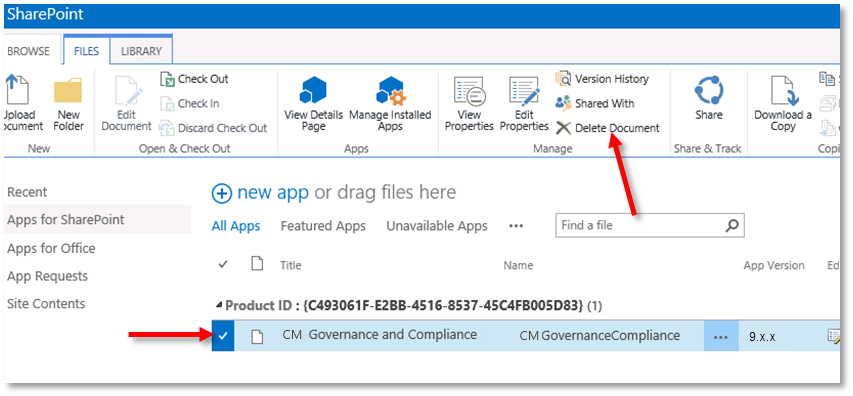
Navigate to the app catalog in use, select the app and delete it.
-
Ensure that the app has been removed from the first and second stage recycle bins. From the app catalog navigate to Site Settings.
-
Click the Recycle bin link under Site Collection Administration.
If the recycle bin contains an instance of the app, either select it and use the Delete Selection or simply use the Empty Recycle Bin link.
-
Click Deleted from end user Recycle Bin link.
If the recycle bin contains an instance of the app, select it and use the Delete Selection.
-
-
-
Remove the Content Manager Components
The removal of Content Manager SharePoint components must be performed on every server in the Content Manager farm.
-
Uninstallation
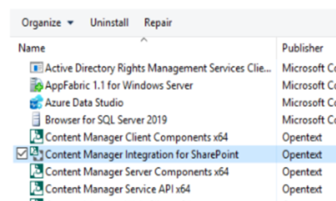
The removal of the components installed on the Content Manager workgroup server can be instigated through the machine Add or remove programs feature.
Select the Content Manager Integration for SharePoint entry in the Add or remove programs and click the Uninstall button.
-
Manual removal of remaining files
In some cases, there will be files remaining after the installation has completed.
To remove them, navigate to the installation directory. By default this is:
[Program Files]\Micro Focus\Content Manager\Content Manager SharePoint IntegrationDelete this directory to remove all remaining files.
-
Remove any shared Content Manager farms
Any shared Content Manager farms created must be manually removed. See the Removing a shared Content Manager farm section for details.
-