Move
This option moves files specified in each of the entries you select to a new a location specified by the Data Owner.
- In the Description field, specify the purpose of the move operation and click Next.
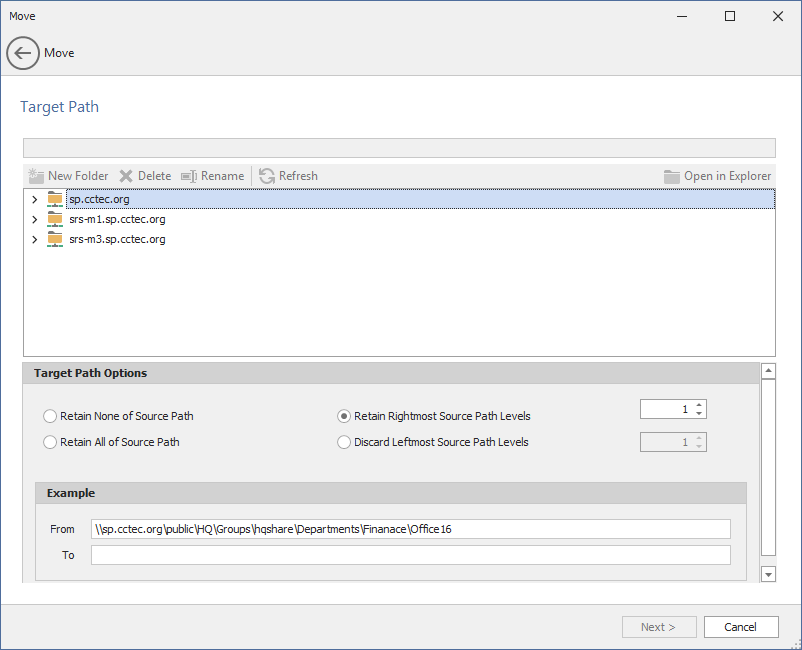
- In the upper pane, browse to specify the location where the files will be moved.
- In the Target Path Options region, select one of the following:
- Retain None of Source Path: Moves files to the specified location without creating any subdirectories to store the moved files.
- Retain Rightmost Source Path Levels: This option moves the files to a location according to the number of levels you specify.
- Retain All of Source Path: This option moves the files to a subdirectory in the specified folder using a duplicate path where the files are stored.
- Discard Leftmost Source Path Levels: This option moves files to a subdirectory in the specified folder, based on the path where the files are stored, and the specified levels in the leftmost portion of the file path that you discard.
- Click Next.
- (Optional) If you want an email notification sent to someone once the files have been moved, specify the recipients and the email message in the fields provided.
- Click Submit.
For example, if you were moving files from the following location:
\\sp.cctec.org\Public\HQ\HQSHARE\Finance\Data
to
\\sp.cctec.org\Public\HQ\HQSHARE\Finance\Data\Gnance
The moved files would be located in the Gnance folder where other files might be located.
For example, if you were moving files from the following location:
\\sp.cctec.org\Public\HQ\HQSHARE\Finance\Data
to
\\sp.cctec.org\Public\HQ\HQSHARE\Finance\Data\Gnance
and you select Retain Rightmost Source Path Levels and specify 1,
the files would be moved to a new folder one level deeper in the path. The name of the new folder comes from the folder name one level higher in the current file path. So the files would be moved to:
\\sp.cctec.org\Public\HQ\HQSHARE\Finance\Data\Gnance\Data
For example, if you were moving files from the following location:
\\sp.cctec.org\Public\HQ\HQSHARE\Finance\Data
to
\\sp.cctec.org\Public\HQ\HQSHARE\Finance\Data\Gnance
the files would be moved to:
\\sp.cctec.org\Public\HQ\HQSHARE\Finance\Data\Gnance\sp.cctec.org\Public\HQ\HQSHARE\Finance\Data\
For example, if you were moving files from the following location:
\\sp.cctec.org\Public\HQ\HQSHARE\Finance\Data
to
\\sp.cctec.org\Public\HQ\HQSHARE\Finance\Data\Gnance
and you select Discard Leftmost Source Path Levels and specify 2,
the files would be moved to:
\\sp.cctec.org\Public\HQ\HQSHARE\Finance\Data\Gnance\HQ\HQSHARE\Finance\Data\
The fields in the Example region will specify where files will be moved according to the options you select.