Global Statistics Configuration
The default configuration of the GSR Collector forces it to behave in a manner consistent with legacy versions of the product. However, it is not optimal for most deployments.
The GSR Collector can be scoped by file system and directory service parameters.
File System Configuration Settings for the GSR Collector 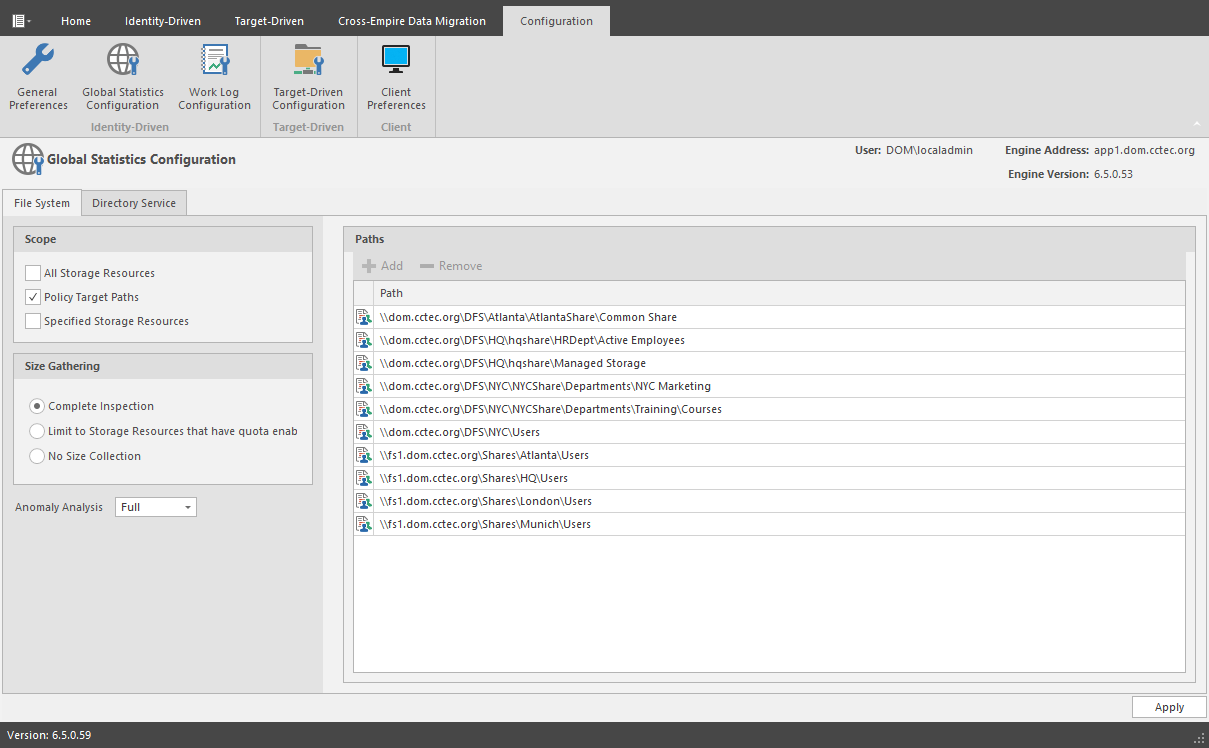
File System Tab
Scope: The file system scope provides the means for you to determine which shares should be scanned by the GSR Collector. The file system scopes are:
- All Storage Resources: This is the default option and mutually exclusive of Policy Target Paths and Specified Storage Resources. This will cause the GSR Collector to scan the root of all shares that appear in Storage Resources for size and anomaly data. This can take a significant amount of time to complete depending on the share type, contents, and the chosen Size Gathering option. In large environments, this is not the recommended configuration.
- Policy Target Paths: This option can be checked separately or combined with Specified Storage Resources for greater flexibility. This will cause the GSR Collector to only scan paths defined as policy target paths for size and anomaly data. After you have your storage managed by policy, use this option to limit the scope and provide meaningful size and anomaly analysis data for the storage resources that matter most.
- Specified Storage Resources: This option can be checked separately or combined with Policy Target Paths for greater flexibility. This will cause the GSR Collector to only scan paths defined by you for size and anomaly data. When running the GSR Collector for the first time, this option serves as the best choice because it allows you to target specific paths and storage resources.
Size Gathering: The size gathering options allow you to control the method by which aggregate size data for global statistics and policy-based path redistribution is collected.
- Complete Inspection: This is the default option. To collect size data, folders are checked for quota. If quota is determined to be supported by the hosting server and the folder has a quota, FSRM is queried to obtain the relevant data. In the case where the folder does not have a quota managed by FSRM or it simply has no quota at all, the folder is traversed to collect size data of all files.
- Limit to Storage Resources that have quota enabled: If quota is determined to be supported by the hosting server and the folder has a quota, FSRM is queried to obtain the relevant data. The folder must have a quota set to eliminate brute force enumeration to collect size data.
- No Size Collection: No size data collection is attempted.
Anomaly Analysis: The file system anomaly analysis provides the means for you to determine the level of anomaly analysis. The options are:
- None: Anomaly analysis will not be performed.
- Simple: This is the default option and sufficient for most purposes. The following anomalies are reported:
- Attribute Value Missing: The respective path attribute (e.g. home folder) does not have a value.
- Path Missing On Disk: The respective path attribute value cannot be found on disk.
- Path Validation Issue: Attempting to retrieve or verify the existence of the respective path attribute value failed.
- Name Mismatch: The respective leaf path value does not match the object’s name value.
- Path Mismatch: The respective path attribute value does not match the last known managed path database entry.
- DS Path Duplicate Value: Two or more objects have been detected that contain the same path for the respective path attribute.
- DS Path Crosstalk Parent: The object’s respective path attribute has been detected as being the parent of another object’s path attribute.
- DS Path Crosstalk Child: The object’s respective path attribute has been detected as being the subordinate of another object’s path attribute.
- Orphan Path Candidate: The path is directly subordinate to a path at which other DS-associated paths have been found, but has not been detected as being associated with any DS object via a path attribute.
- Full: Reports additional policy related anomalies.
- Policy Not Found: The respective auxiliary policy attribute entry references an auxiliary policy that was not found in the database.
- Policy Object Not Managed: Effective policy calculations indicate that a policy is effective for the respective object and path type, but the object is not known to be managed.
- Policy Mismatch: The respective path is indicated as being managed in the database, but the policy under which it is currently managed does not match what effective policy calculation indicates it should be.
- Policy Validation: An error occurred while attempting to calculate effective policy for the object and respective path type.
Directory Service Tab
Container Scope: The directory service container scope provides the means for you to determine which containers should be enumerated by the GSR Collector for Anomaly Analysis, Global Statistics, and History. The container scopes are:
- All Containers: This is the default option and mutually exclusive of Policy Associated Objects and Specified Containers. This will cause the GSR Collector to enumerate all object types specified by the Object Scope for size and anomaly data.
- Policy Associated Objects: This option can be checked separately or combined with Specified Containers for greater flexibility. This will cause the GSR Collector to only enumerate and evaluate objects that are associated to policies. After you have your objects managed by policy, use this option to limit the scope and provide meaningful anomaly analysis data for the objects that matter most.
- Specified Containers: This option can be checked separately or combined with Policy Associated Objects for greater flexibility. This will cause the GSR Collector to only enumerate and evaluate objects defined by you for size and anomaly data. When running the GSR Collector for the first time, this option serves as the best choice because it allows you to target specific objects for analysis.
The containers specified in the container scope are searched recursively for object types configured in the Object Scope.
Object Scope: The directory service object scope provides the means for you to determine which object types and path types should be enumerated by the GSR Collector for Anomaly Analysis, Global Statistics, and History. The object scopes and path types are:
- Users
- Home Folder
- Profile Path
- Remote Desktop Services Home Folder
- Remote Desktop Services Profile Path
- Auxiliary (ccx-FSFAuxiliaryStorage)
- Groups – Collaborative managed path (ccx-FSFManagedPath)
- Containers – Collaborative managed path (ccx-FSFManagedPath)
GSR Collector Configuration Scenarios
Configuration scenarios for the GSR Collector are detailed in the sections below.
All Storage Resources + Complete Inspection
This default configuration will cause the GSR Collector to enumerate all shares found in Storage Resources. During the enumeration, child folders at the root of shares are inspected for anomaly analysis and checked to determine if they have a quota applied to them via File Server Resource Manager (FSRM). If they have a quota, FSRM is queried to obtain it. In the case where a server hosting a share does not support quota (e.g. FSRM is not installed, the server is a NAS device) a brute force enumeration of the child directories is performed to collect size data for statistics and policy-based storage redistribution. Depending on the number of directories and their contents, this is a time consuming and resource intensive operation. While it ensures that all of the available shares are scanned, it is not the most efficient use of the GSR Collector.
All Storage Resources + Limited to Storage Resources that Have Quota Enabled
This configuration will cause the GSR Collector to enumerate all shares found in Storage Resources. During the enumeration, child folders at the root of shares are inspected for anomaly analysis and checked to determine if they have a quota applied to them via FSRM. If they have a quota, FSRM is queried to obtain it. This configuration is more efficient than Complete Inspection. However, if you have folders that do not have quota, there will be size data missing from Global Statistics and Policy-based Path Redistribution that would skew your results.
All Storage Resources + No Size Collection
This configuration will cause the GSR Collector to skip enumeration of all shares found in Storage Resources for size related data. If Global Statistics are not needed on a regular basis or you have a need for finer granularity in your historical data, this option may be best suited for your goals. However, if you choose this option, there will be no size data to drive Global Statistics and Policy-based Path Redistribution.