Work Log Configuration
This page lets you establish the Work Log Database Settings in the Admin Client. For detailed procedures, see Establishing the Work Log Database Settings in the Admin Client.
Work Log Configuration Page 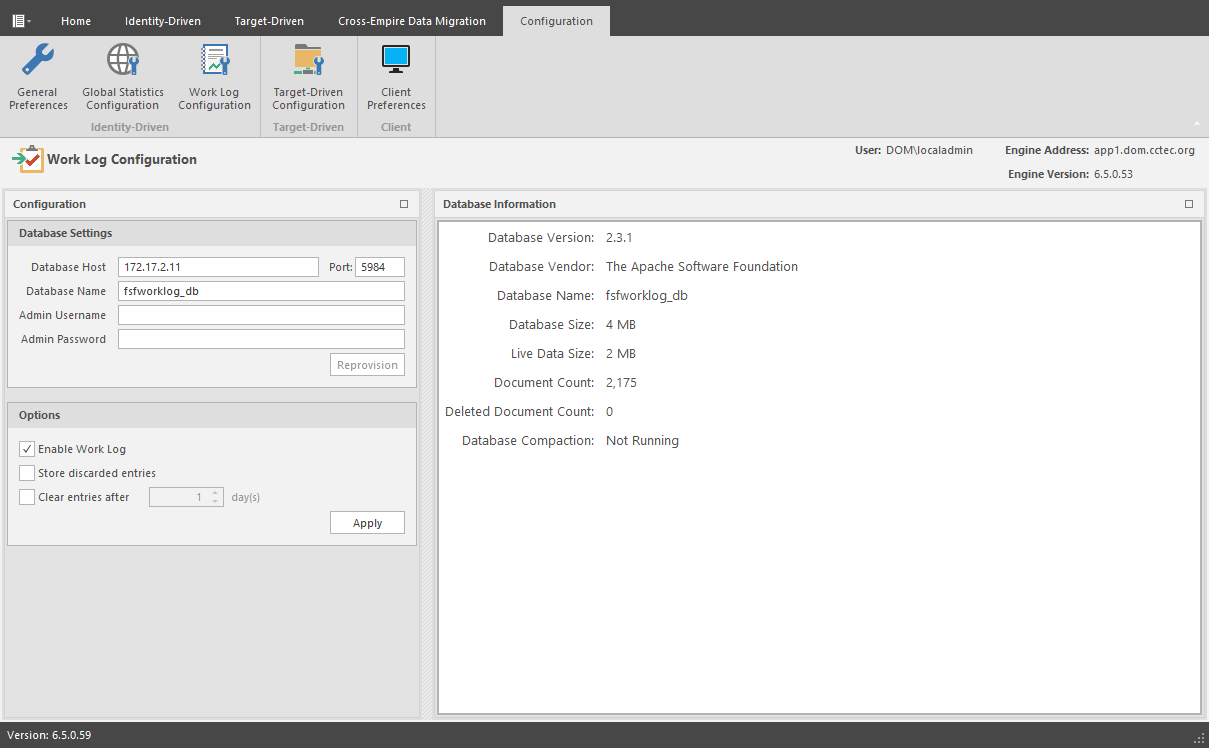
Database Settings: Fields in this region are specific to the CouchDB database.
For information on setting up the CouchDB database, see Installing CouchDB.
Database Host: Specifies the IP address or DNS hostname of the server hosting the CouchDB database.
Port: Specifies the port number utilized by the CouchDB database.
The default number is 5984.
Database Name: The established name for the CouchDB database instance for the Work Log.
Admin Username: The administrator username you established when you installed the CouchDB database.
Admin Password: The password you established when you installed the CouchDB database.
Reprovision: Once you have entered the username and password, clicking this button re-provisions the user and database for the Work Log.
Options: Fields in this region are specific to the File Dynamics Work Log.
Enable Work Log: Once this option is selected, events will be recorded as entries in the Work Log.
Store Discarded Entries: Store Work Log entries for events where no action is ultimately taken, such as a user created outside the scope of any policy.
Clear Entries After: Select this option to specify the number of days before an entry is cleared. Once cleared the entry will not be listed in the Work Log.
Apply: Click to apply the settings in the Options region.