Security Notification Policy
A discussion of fields and settings specific to a Security Notification policy follows.
Security Notification Policy Page 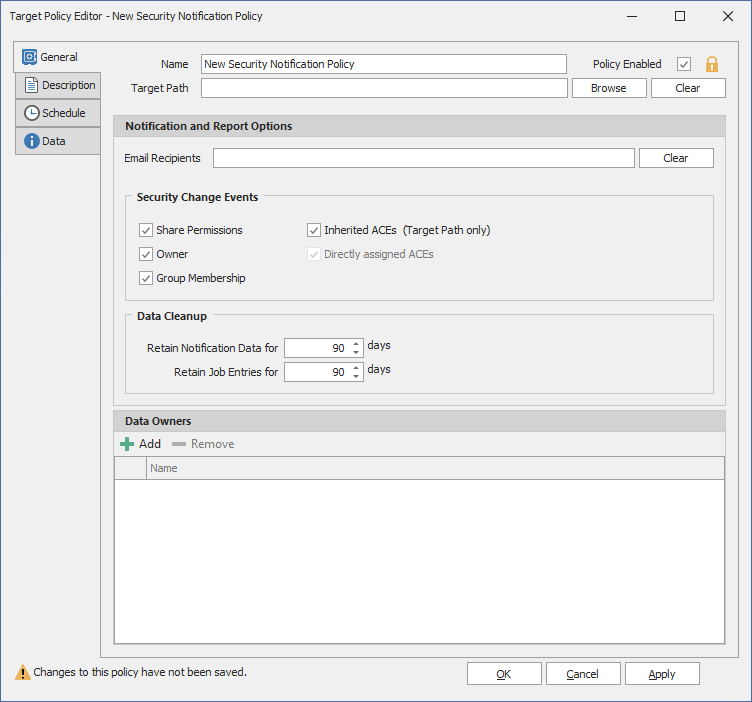
General Tab
Name: Use this field to specify a name for the Security Notification policy.
Target Path: Indicates the folder or share that will be analyzed for access permission changes.
Browse: Click to access the File System Browser where you can select the folder or share for the Security Notification policy.
Clear: Click to clear the path specified in the Target field.
Email Recipients: Specify the email addresses of each user you want notified when access permissions to the selected folder or share are changed. Email addresses can be separated by a comma, semicolon, or a space.
Clear: Click to clear the email addresses specified in the Email Recipients field.
Security Change Events: This region displays options for notifications. For example, if the Group Membership check box were selected, data owners would be notified whenever there was a change to a group that has access to the target path.
Data Cleanup: Options for specifying how long you want scan job information to remain in the database.
Retain Notification Data for: Lets you specify how long the Security Notification data will remain in the database.
Retain Job Entries for: Lets you specify how long you want scan job information to remain in the database. If you do not select the check box, the scan job stays in the database indefinitely.
Data Owners: This region lets you specify the data owners for the target path. The data owners will receive security notifications based on changes to the selected options in the Security Change Events region.
Description Tab
The Description box indicates when the policy was created. It also lets you write notes pertaining to the policy.
Schedule Tab
Displays the schedule for the Security Notification policy.
Data Tab
This page displays the properties of the CouchDB database.