Identity Systems
File Reporter OES allows you to enable multiple eDirectory trees as identity systems.
The Primary Identity System is defined when licensing the product.

Add: Click to add an additional identity system
Delete: Click to delete selected identity systems. (Does not apply to the primary licensed Identity System.)
IMPORTANT: Deleting an Identity System also deletes any associated data including Scan Targets, Scan Policy Paths, Report Definition Target Paths, and all file system metadata and permissions scan data.
Set Default Server for eDirectory: Click to update the default IP address or hostname for accessing the selected eDirectory identity system.
Reset Proxy Account Password: Click to reset the password for the associated proxy account of the selected Identity System.
Refresh: Click to refresh the list and status of the configured Identity Systems.
Enabling Additional Identity Systems
To add additional identity systems:
-
Select Identity Systems in the Configuration menu.
-
Click Add.
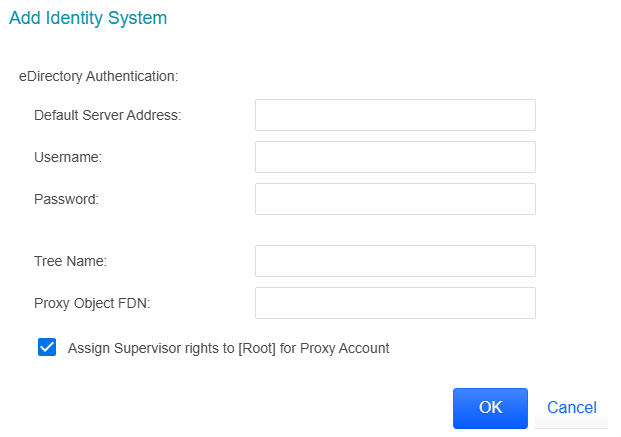
Default Server Address: Specify the IP address of a server in the eDirectory tree.
Username: Use typeless FDN format naming to specify an administrator name.
Password: Specify the administrator password.
Tree Name: Specify the name of the eDirectory tree.
Proxy Object FDN: Use typeless FDN format naming to specify a name for the proxy object that you are creating.
For example,
srsoesproxy.systemAssign Supervisor rights to [Root] for Proxy Account: Leaving this check box selected enables File Reporter OES to scan all volumes in the directory tree.
If you deselect this option, the File Reporter OES proxy account must be assigned Supervisor permissions to the servers with network storage to be scanned as well as read permissions to all objects in the eDirectory tree.
IMPORTANT: When this option is deselected, storage resources may not build properly. We recommend that this option remain selected.
-
Complete the fields and click OK.
-
(Optional) Repeat these steps to add additional eDirectory identity systems.
