Assigned NTFS Permissions Report
The Assigned NTFS Permissions report indicates the assigned Microsoft file system user permissions for all folders and subfolders from a specified path.
-
Select Report Definitions in the Reports menu.
-
Click Add.
-
Enter a descriptive Name for the report definition in the text field.
-
Select the Assigned NTFS Permissions option and click OK.
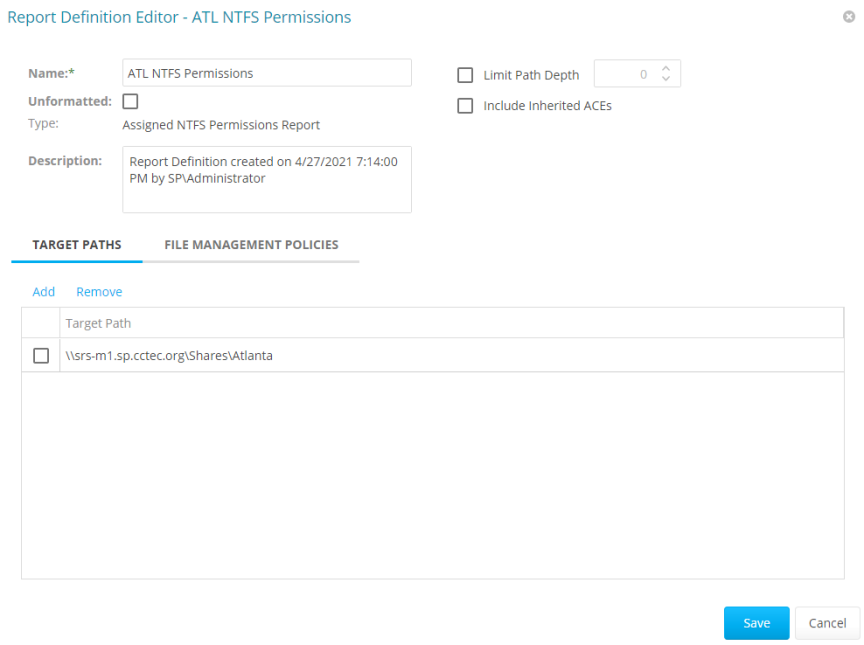
-
(Conditional) To limit the scope of the report to a set depth in the file structure, check the Limit Path Depth box and specify the depth level (e.g., if you specify 3, the report lists the file contents of all file paths in the specified target paths up to 3 levels in the file structure). If you do not specify a path depth, File Reporter will report on all levels of the specified target path.
-
(Conditional) If you don’t want the report to include inherited Access Control Entries (ACEs), uncheck the Include Inherited ACEs box.
-
Click Add in the Target Paths tab.
-
Check the box to specify each file path to include in the report and click OK.
-
Click Save.
-
Generate the report as either a Preview report or a Stored report — see Preview Reports and Stored Reports for details.
