Duplicate File Report
Generate a report that locates duplicate versions of stored files in order to delete them as part of best network storage practices.
NOTE: This Duplicate File report option compares filenames and other metadata. File Reporter offers a more advanced Duplicate File report generated through content hash comparisons — see Content Hash Duplicate File Reports for more details.
-
Select Report Definitions in the Reports menu.
-
Click Add.
-
Enter a descriptive Name for the report definition in the text field.
-
Select the Duplicate File option and click OK.
-
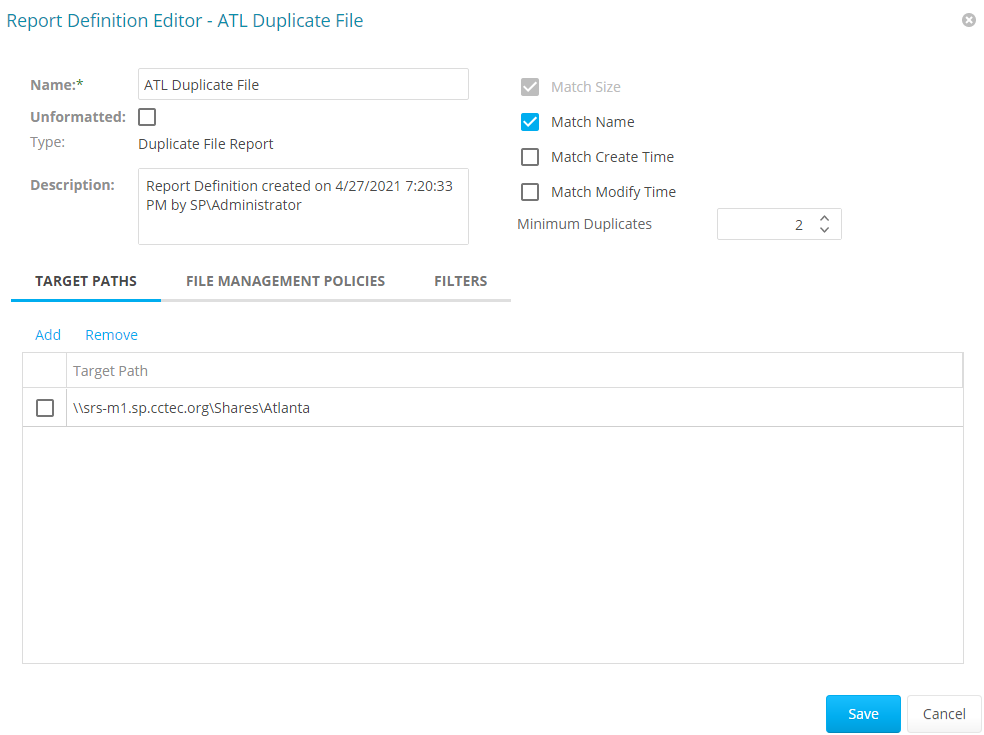
Check the relevant boxes and enter the Minimum Duplicates limit to specify the reporting parameters. The more check boxes you select, the more likely it is that File Reporter can identify definitive duplicate files.
-
Match Size: Reported files must have duplicate file sizes. This option cannot be deselected.
-
Match Name: Reported files must have duplicate names with other files.
-
Match Create Time: Reported files must have duplicate file creation times with other files.
-
Match Modify Time: Reported files must have duplicate file modification times with other files.
-
Minimum Duplicates: Specifies the minimum number of duplicate files to include in the report, according to the parameters selected above.
-
-
Check the box to specify each file path to include in the report and click OK.
-
(Optional) Click the Filters tab to set filters for the report — see Built-in Report Filtering for details.
-
Click Save.
-
Generate the report as either a Preview report or a Stored report — see Preview Reports and Stored Reports for details.
-
(Optional) Click a specific duplicate file name in the report to generate a detailed report on it.