What is ScanCentral DAST?
Fortify ScanCentral DAST is a dynamic application security testing tool that is comprised of the Fortify WebInspect sensor service and other supporting technologies that you can use in conjunction with Fortify Software Security Center.
The following diagram illustrates the Fortify ScanCentral DAST architecture.
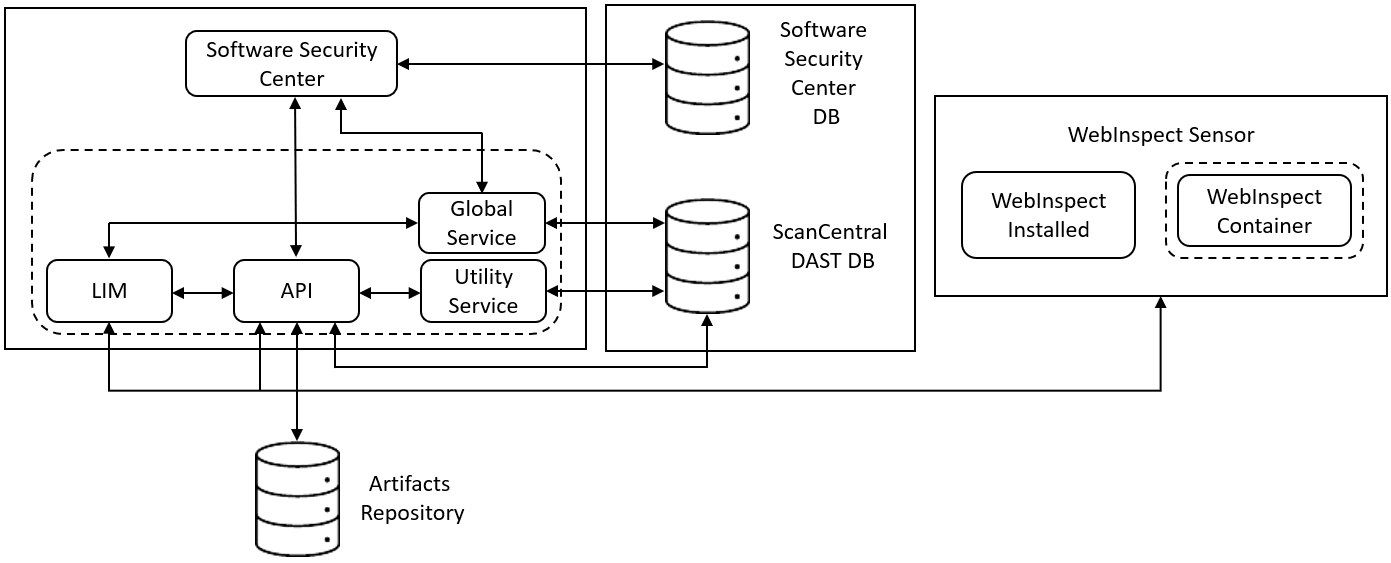
The following paragraphs describe these components in more detail.
Note: The version numbers included in the image names in this document are accurate at the time of publication. However, Docker images may be updated between releases. Refer to the Read Me file accompanying the image for information about the specific version.
Software Security Center
The Fortify Software Security Center user interface (UI) provides a way to view the DAST scans list, sensors list, sensor pools, settings, scan schedules, and scan results. You can also access the DAST Settings Configuration wizard from the UI.
ScanCentral DAST communicates with Fortify Software Security Center by way of the Software Security Center Rest API.
ScanCentral DAST retrieves Application and Version information and user permissions from the Fortify Software Security Center database. ScanCentral DAST uploads scans for triage to the database as FPR files.
LIM
The License and Infrastructure Manager (LIM) Docker image provides the licensing service for the ScanCentral DAST components. For more information about the LIM, see the Micro Focus Fortify License and Infrastructure Manager Installation and Usage Guide.
Note: The architecture diagram shows a LIM Docker container. However, you may use a LIM that is installed on an IIS server.
ScanCentral DAST API
The ScanCentral DAST REST API Docker image provides communication between the sensor and the ScanCentral DAST database. It also communicates with the LIM for licensing, and Fortify Software Security Center. It communicates with the Utility Service for Postman validation.
Optionally, it communicates with a configured artifacts repository to retrieve referenced artifacts to use in a scan.
The Windows image name is scancentral-dast-api:23.1. The Linux image name is scancentral-dast-api:23.1.ubi.8.
ScanCentral DAST Utility Service
The ScanCentral DAST Utility Service is the Fortify WebInspect image. However, it runs in a restricted mode and handles lightweight executable utilities without regard to whether a sensor is running and available. It provides support for Postman scans, creates scan settings, and imports scans to the DAST database.
The Windows image name is webinspect:23.1 and the container name is scancentral-dast-utilityservice. The Linux image name is dast-scanner:23.1.ubi.8.
Important! Before you can run the Windows version of the DAST Utility Service container, you must install Microsoft update KB4561608 on the host machine. For more information, see https://support.microsoft.com/en-us/topic/june-9-2020-kb4561608-os-build-17763-1282-437af506-e3ef-a8a1-09e7-26cc94e509c7.
ScanCentral DAST Global Service
The ScanCentral DAST Global Service Docker image does the following:
-
Communicates with the LIM to acquire a license
-
Starts scans (including scheduled scans), manages scan prioritization, and builds the site tree for completed scans
-
Communicates with the DAST database to insert, update, and select messages for the system, including scan statistics from the sensor
-
Imports scan results to the Fortify Software Security Center database
-
Performs additional background tasks, such as message queuing and processing deny intervals
Note: The ScanCentral DAST Global Service uses SmartUpdate to obtain the most recent SecureBase updates.
The Windows image name is scancentral-dast-globalservice:23.1. The Linux image name is scancentral-dast-globalservice:23.1.ubi.8.
ScanCentral DAST Database
The database stores configuration settings for ScanCentral DAST, as well as dynamic scan settings and dynamic scans. The DAST REST API and Global Service connect to the database on start up to retrieve configuration settings. The Utility Service imports scans to the DAST database.
WebInspect Sensor
The Fortify WebInspect sensor is a Docker image, Windows or Linux, or a Windows computer with both Fortify WebInspect and the ScanCentral DAST sensor service installed.
The Windows Docker image includes the full version of Fortify WebInspect 23.1.0 software. The Linux Docker image is available for the Red Hat Linux distribution and is comprised of the following components:
-
wi application for scan logic (also called a scanner)
-
Database for scan data
-
WebInspect script engine (WISE) for JavaScript execution and Web Macro Recorder macro playbacks
-
2FA server to synchronize two-factor authentication requests (used only if the scan is configured to playback a two-factor authentication login macro)
The sensor does the following:
-
Starts and runs scans
-
Reports scan statistics to the DAST database by way of the API; the Global Service retrieves and processes statistics from the database
-
Uploads the scan to the API