Editing Velocity Templates for Bug Tracker Plugins
To edit the Velocity template for a bug tracker plugin:
-
On the Fortify header, select ADMINISTRATION.
-
In the left panel of the ADMINISTRATION page, select Templates, and then select Bug Filing.
-
In the table on the right, click the template group for the bug tracker plugin you use.
The row expands to display details for the pre-configured Velocity templates that are mapped to the description and summary fields that the plugin provides.
-
Click EDIT.

-
To the right of the mapped field you want to modify, click the Edit field icon.
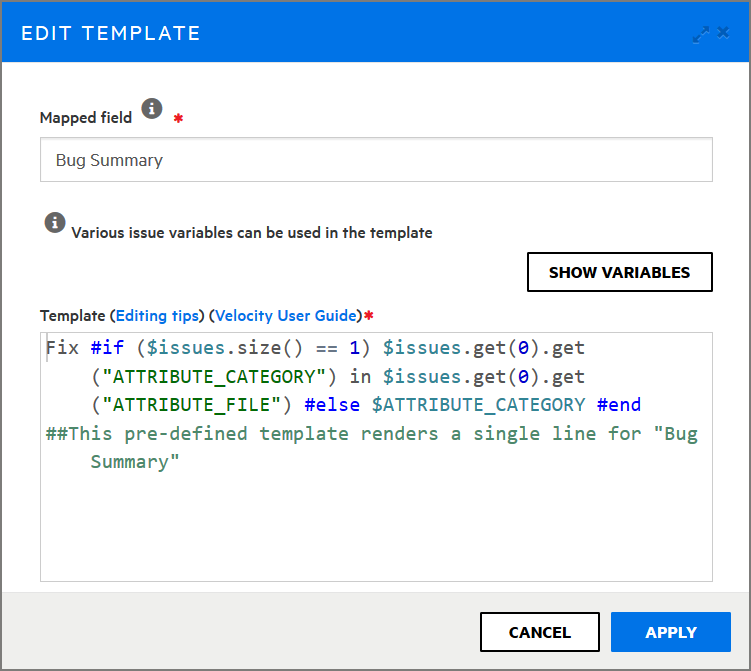
The EDIT TEMPLATE dialog box opens.
-
To see useful tips on how to edit the template, click Editing tips.To access detailed instructions on how to modify the template, click the Velocity User Guide link. This takes you to the Apache Velocity Project website. To see a list of all available variables, click SHOW VARIABLES.
- Make any necessary changes to the content in the Mapped field and Template boxes.
-
Click APPLY.
- Click SAVE.
The details displayed for the bug tracker plugin now include your changes.
See Also
Velocity Templates for Bug Filing