Searching Issues
You can create search queries to refine the list of issues displayed for an application version.
To create a query to search issues:
-
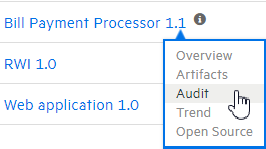
In the application version summary table on the Dashboard, move your cursor to the application version of interest, and then select Audit.

-
In the Search Issues box, type a search query using the following syntax. To indicate the type of comparison to perform, wrap search terms with delimiters.
Comparison Description contains Searches for a term without any special qualifying delimiters equals Searches for an exact match if the term is enclosed in quotation marks ( "")number range Uses standard mathematical syntax, such as “
(” and “)” for exclusive range and “[” and “]” for inclusive range where(2,4]means greater than two less than or equal to fournot equal Excludes issues specified by the string by preceding the string with an exclamation character (
!) Example:file:!Main.javareturns all issues that are not inMain.javaNote: To see example search strings, click the Syntax Guide link.
You can further qualify your search terms with modifiers using the syntax
modifier:<search_term>. (See Search Modifiers.)Note: If an application version is assigned a date-type custom tag, and you want to search for issues based on that tag, use one of the following formats:
-
To search for date tags that have no value set:
<DateCustomTag>: <none>
-
To search for date tags that have a (any) date set:
<DateCustomTag>:!<none>
-
To search for date tags with a specific date:
<DateCustomTag>: yyyy-mm-dd
A search string can contain multiple modifiers and search terms. If you specify more than one modifier, Fortify Software Security Center returns only issues that match all of the modified search terms. For example,
file:ApplicationContext.java category:SQL Injectionreturns only SQL injection issues found inApplicationContext.java.If you use the same modifier more than once in a search string, then the search terms qualified by those modifiers are treated as an OR comparison. For example,
file:ApplicationContext.java category:SQL Injection category:Cross-Site Scriptingreturns SQL injection issues and cross-site scripting issues found inApplicationContext.java.For complex searches, you can also insert the
ANDor theORkeyword between your search queries. Note thatANDandORoperations have the same priority in searches. -
-
Click Find.
Fortify Software Security Center lists all issues that match your search string.
-
To return to the complete issues list, clear the text in the search box.
See Also
Filtering Issues for Display on the OVERVIEW and AUDIT Pages