OpenText ScanCentral SAST components
The following diagram illustrates a OpenText™ ScanCentral SAST environment.
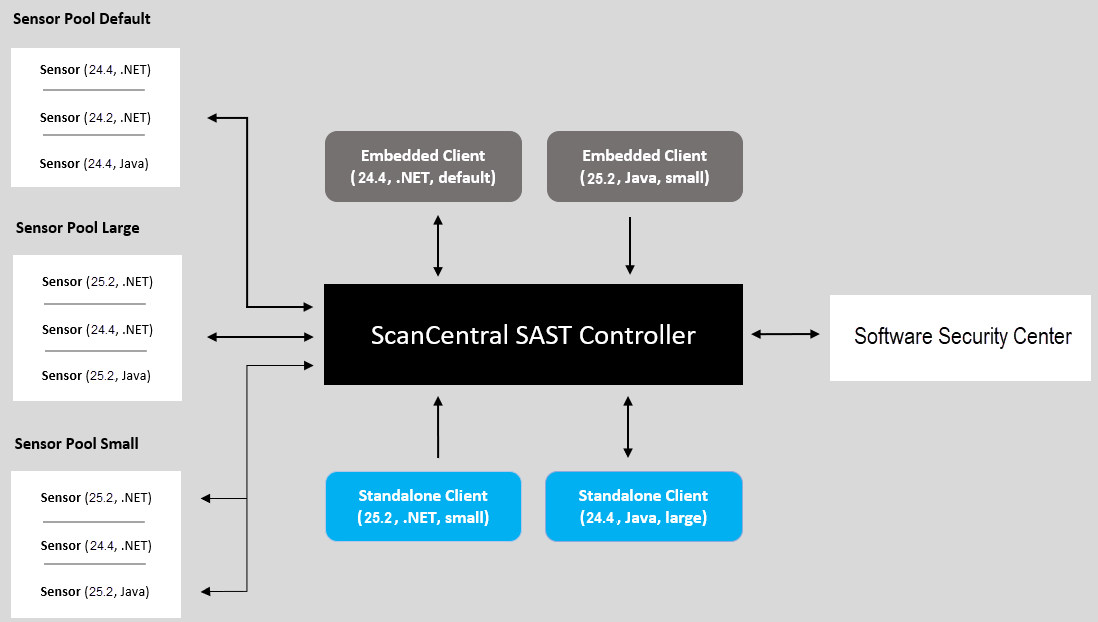
A OpenText™ ScanCentral SAST deployment includes the following three components:
The minimum deployment requires three physical or virtual machines: a Controller, a sensor, and a client. An OpenText™ Fortify Software Security Center server is optional.
- Fortify ScanCentral SAST Controller—A standalone web application that receives project packages with translation and scan instructions (or OpenText SAST mobile build sessions (MBS) and scan instructions from Fortify ScanCentral SAST clients), routes the information to sensors, and (optionally) uploads scan results (FPR files) to Fortify Software Security Center. For more detail, see About the Fortify ScanCentral SAST Controller.
-
Fortify ScanCentral SAST sensors—A distributed network of computers set up to receive scan requests and analyze code using OpenText SAST. A sensor accepts either a mobile build session (MBS) file and performs a scan, or it accepts a project package that contains sources and dependencies, which it translates and scans. For more information, see About Fortify ScanCentral SAST sensors.
To scan code, sensors must belong to a sensor pool. A sensor pool consists of one or more sensors, grouped based on any criteria, which you can then target for scan requests. For example, you can create a sensor pool that consists of machines with a lot of physical memory to use for scan requests that require a lot of memory. If you do not specifically add a sensor to a sensor pool, it is automatically assigned to the default sensor pool.
- Fortify ScanCentral SAST client— On a build machine, clients can generate packages for remote translation and scan independent of OpenText SAST. Clients can also be run on a build machine on which OpenText SAST translates code and generates mobile build sessions (MBS). The translated source code, along with optional and required data, such as custom rules and OpenText SAST command-line options, are uploaded to the Controller for analysis. For more information, see About Fortify ScanCentral SAST clients.
To successfully deploy Fortify ScanCentral SAST, complete the following tasks in the order listed:
-
(Recommended, but not required) Deploy a (or connect to an existing) Fortify Software Security Center instance
For more information, see Working with Fortify Software Security Center.
- Install the Fortify ScanCentral SAST Controller
- Install Fortify ScanCentral SAST sensors
- Install Fortify ScanCentral SAST clients
The following sections provide instructions for completing these tasks. For information about hardware and software requirements for these components, see System requirements.