Deleting attributes and attribute values
If an attribute or attribute value is no longer of use, you can often delete it from the Application Security database, even if it is currently associated with one or more application versions. Doing so removes all traces of the attribute or attribute value from the system.
Deleting attributes
To delete an attribute from the Application Security database:
On the header, select Administration.
On the navigation pane, expand Templates, and then select Attributes.
If an attribute cannot be deleted, its check box appears dimmed, and you cannot select it for deletion.
To see an explanation of why you cannot delete an attribute, point to the check box. The attribute is either system-defined, or it is user-defined and specified as non-deletable.
Select the check boxes for the attributes you want to delete, and then click DELETE.
To confirm that you want to permanently remove the attribute from the system, click OK.
Deleting attribute values
To delete an attribute value:
On the header, select Administration.
On the navigation pane, expand Templates, and then select Attributes.
Click to expand the row for the attribute that has one or more values that you want to delete.
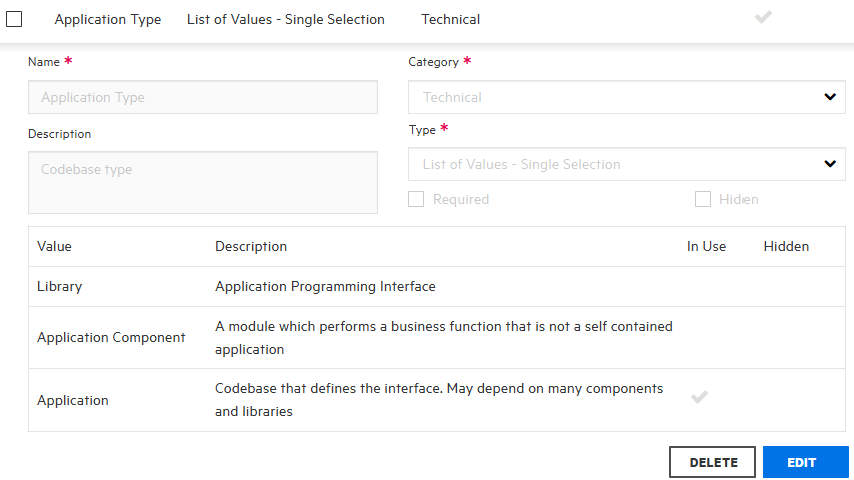
The In Use column indicates which values are currently used with one or more application versions.
Click EDIT.
To confirm you want to edit the attribute, click OK.
Click the Delete button
 for the value you want to delete.
You can delete some attribute values, even if they are currently in use by one or more application versions. However, you cannot delete:
Values for system-defined list-type attributes that are in use
Values for system-defined attributes other than list type
Values that are both in use and that belong to a dynamic scan type attribute
Values for user-defined attributes designated as non-deletable that are in use
Application Security removes the value without prompting you for confirmation. If you decide that you prefer not to delete the value, click CANCEL to restore it.
See Also