Editing the default data retention policy
When you first enable the data retention policy, OpenText recommends that you leave the policy properties set to the maximum allowed values for a time to allow individual application versions to opt-out of the policy before the policy dictates to begin removing artifacts. You can edit the default data retention policy based on your requirements.
Purging artifacts under the default data retention policy depends on the following two rules.
Rule 1—Number of artifacts > Maximum number of unpurged artifacts AND Artifacts Age > Minimum Age of the artifacts
Rule 2—Age > Maximum Age AND Number of artifacts > Minimum number of unpurged artifacts
Data retention policy guidelines are evaluated for each analysis type and artifacts must satisfy at least one of the rules to be eligible for purging. If none of the rules are satisfied, the artifacts are retained regardless of the maximum artifact count or age that you specify.
To edit the default data retention policy:
Sign in as an Administrator and select Administration.
On the navigation pane, expand Policies, and then select Data Retention Policy.
On the Data Retention page, next to Default data retention policy click the Edit Policy button
 .
.In the Edit Policy dialog box, configure the data retention policy settings based on your requirements.
Consider the following scenario:
An application version contains 12 artifacts, has a data retention policy enabled, and the default data retention policy is set with the following values:
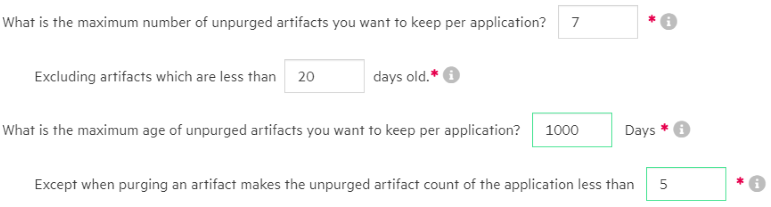
The following diagram shows how artifacts become eligible for purging under the default data retention policy for this scenario.
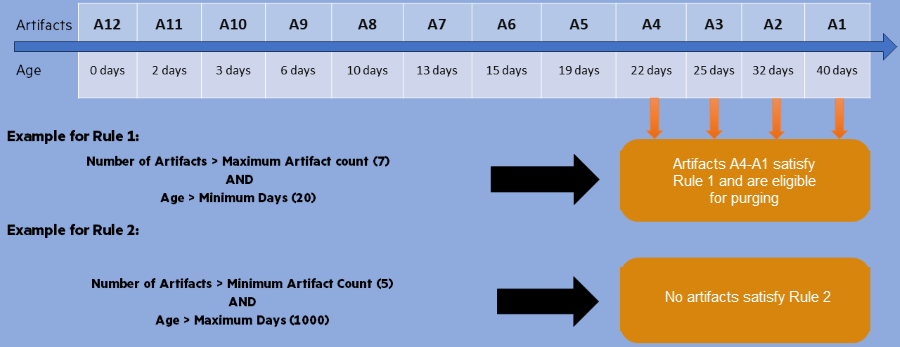
Application Security purges the artifacts that satisfy at least one rule. Application Security purges artifacts A1 to A4.
Click SAVE.