Logging in to Application Security
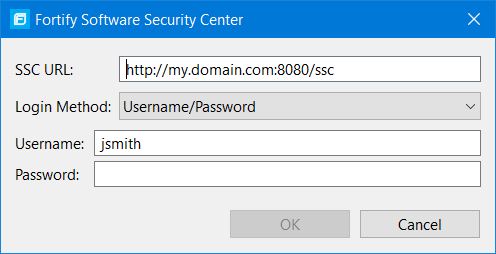
The first time you perform an operation that requires a connection to Application Security such as uploading analysis results or performing a collaborative audit, you are prompted to log in.
To log in to Application Security:
- If you have not configured a connection to Application Security, in the SSC URL box, type the server web address.
-
From the Login Method list, select the login method set up for you in Application Security.
-
Depending on the selected login method, do one of the following:
Login method Procedure Username/Password Type your Application Security user name and password.
Authentication Token In the Token box, specify the encoded value of a Application Security authentication token of type ToolsConnectToken.
For instructions about how to create an authentication token, see the OpenText™ Application Security User Guide.
X.509 SSO - Click Browse to the right of Certificate.
- In the Browser for Certificate dialog box, locate the p12 package with the certificate, and then click Open.
- Type the password if required.
- Click OK to connect to Application Security.