Creating a folder
You can create a new folder so that you can display a group of issues you have filtered to the folder. Folders must have unique names.
If this functionality is restricted to administrator users, and you are not an administrator, you cannot create folders.
To create a new folder:
-
Select Tools > Project Configuration.
-
Select the Folders tab.
The Folders pane on the left lists the folders for the filter set selected in the Folder for Filter Set list. Fields on the right show the name, color, and description of the selected folder.
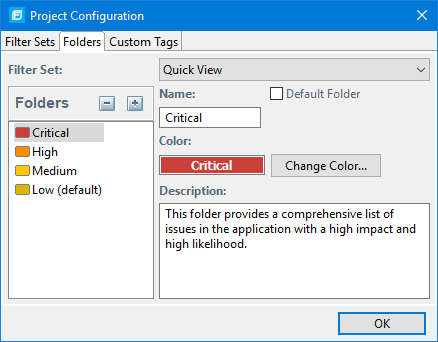
-
To associate the folder with an existing filter set, select the filter set from the Filter Set list.
Select (All Folders) to create a new folder in the issue template without associating it with a specific filter set. You can associate the folder with an existing filter set later.
Selecting a filter set updates the Folders list to display the folders that are associated with the selected filter set.
-
To add a folder:
-
Next to Folders, click the Add Folder button
 .
.The Add Folder dialog box opens.
If you have created folders in other filter sets, the Add New Folder to Filter Set dialog box opens. Click Create New.
-
Type a unique name for the new folder, and then select a folder color.
-
Click OK.
The folder is added to the bottom of the folder list.
-
- In the Description box, type a description for the new folder.
-
To change the tab position of the folder on the Issues view, drag the folder up or down in the Folders list.
The top position is on the left and the bottom position is on the right.
- To put all issues that do not match a folder filter into this folder, select the Default Folder check box.
- Click OK.
The folder is displayed as a tab with the other folders. If you selected default, all issues that do not match a folder filter are displayed. The new folder is added to the issue template for the audit project.
To display issues in this folder, create a folder filter that targets the new folder. For more information, see Creating a Filter from the Issues View and Creating a Filter from the Issue Auditing View.