Suppressing issues
You can suppress issues that are either fixed or that you do not plan to fix. Suppression marks the issue and all future discoveries of this issue as suppressed. As such, it is a semi-permanent marking of a vulnerability.
To suppress an issue, do one of the following:
- In the Static Analysis Results view, select the issue, and then, on the Audit tab in the Issue Auditing view, click the Suppress button
 .
. -
In the Static Analysis Results view, right-click the issue, and then click Suppress Issue.
You can select and suppress multiple issues at the same time.
To review results that have been suppressed, select Show Suppressed Issues from the View Menu button on the Static Analysis Results toolbar.
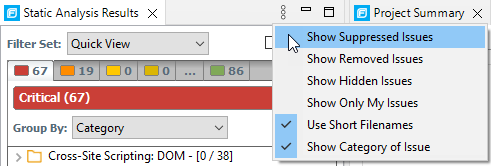
To unsuppress an issue, first display the suppressed issues, and then do one of the following:
- In the Static Analysis Results view, select the suppressed issue, and then, on the Audit tab in the Issue Auditing view, click the Unsuppress button
 .
. -
Right-click the issue in the Static Analysis Results view, and then select Unsuppress Issue.
You can select and unsuppress multiple issues at the same time.