Integrating with Fortify Software Security Center
You need to configure a connection to Fortify Software Security Center to upload your analysis results to Fortify Software Security Center whether you analyze your code with a local installation of OpenText SAST or if you use ScanCentral SAST.
To configure a connection to Fortify Software Security Center:
Select Tools > Fortify > Analysis Settings.
Select the Server Configuration tab.
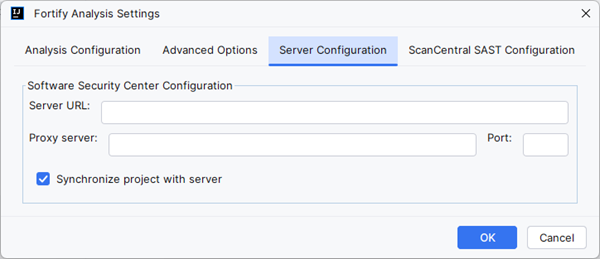
In the Server URL box, specify the URL for your Fortify Software Security Center server.
If required, specify a proxy server and port number.
If you specify proxy information, exclude the protocol from the proxy server (for example,
some.secureproxy.com). You must specify a proxy port number for the proxy server.Each time you scan your code locally, the Fortify Analysis Plugin automatically uploads your changes to an application version on Fortify Software Security Center by default. To turn synchronization off, clear the Synchronize project with server check box.
This synchronization helps facilitate collaborative auditing and enables you to synchronize any source code changes each time you rescan the project.
Automatic synchronization requires that you specify an application version that already exists in Fortify Software Security Center. If the application version does not exist in Fortify Software Security Center, you must first create it. For instructions, see the OpenText™ Fortify Software Security Center User Guide.
- Click OK.
See Also
Uploading Analysis Results to Fortify Software Security Center