Configuring advanced local scan options
Use the advanced scan options to activate or deactivate quick scan mode and customize OpenText SAST translation and scan command-line options. To configure these settings, you must provide the location of a locally installed OpenText SAST. You can specify the location of OpenText SAST on the Security Content Management page.
To change the advanced translation and scan options:
-
From the Fortify extension menu, select Options.
-
In the left pane, select Project Configuration.
-
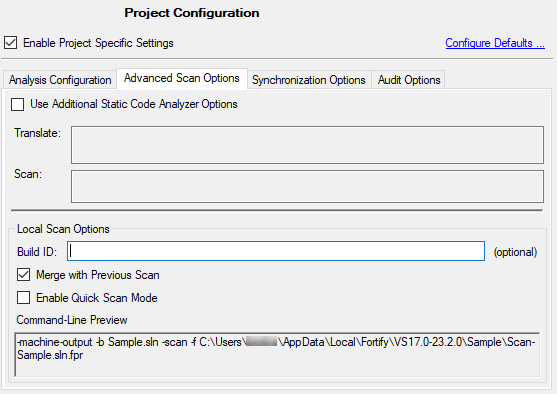
Select the Advanced Scan Options tab.
-
Specify the scope of the advanced scan options by doing one of the following:
-
To configure the options for the projects in the open solution only, select Enable Project Specific Settings.
-
To change the default scan options for all projects scanned from this Visual Studio instance, click Configure Defaults.
-
-
Select the Use Additional Static Code Analyzer Options check box and type OpenText SAST command‑line options for either the translation or scan phase.
These options are also included in a ScanCentral SAST analysis.
For detailed information about the available OpenText SAST options and the proper syntax, see the OpenText™ Static Application Security Testing User Guide.
Under Local Scan Options, the Command-Line Preview box shows the complete OpenText SAST scan command line.
-
(Optional) In the Build ID box, type a build ID for the scan.
The default build ID is the name of the project or solution.
-
To deactivate merging the results of the next scan you run with results from the previous scan, clear the Merge with Previous Scan check box.
By default, when you rescan a project from Visual Studio, the scan merges results from the previous scan with the results from the new scan. This enables you to see specifically which issues have been fixed and which issues were introduced since the earlier scan.
-
To perform a quick scan, select the Enable Quick Scan Mode check box.
For information about quick scans, see About Quick Scan Mode.
- Click OK to save the advanced scan options.