About Privilege Escalation Scans
Privilege escalation vulnerabilities result from programming errors or design flaws that grant an attacker elevated access to an application and its data. Fortify WebInspect can detect privilege escalation vulnerabilities by conducting either a low-privilege or unauthenticated crawl followed by a high-privilege crawl and audit in the same scan. Fortify WebInspect includes a Privilege Escalation policy as well as privilege escalation checks that can be enabled in other policies, including custom policies. In Guided Scan, Fortify WebInspect automatically detects when you have selected a policy with privilege escalation checks enabled, and prompts you for the required login macro(s).
Two Modes of Privilege Escalation Scans
Fortify WebInspect can perform privilege escalation scans in two modes, determined by the number of login macros you use:
-
Authenticated Mode – This mode uses two login macros: one for low-privilege access and one for high-privilege access. In this mode, a low-privilege crawl is followed by a high-privilege crawl and audit. You can perform this type of scan using Guided Scan. For more information, see Running a Guided Scan.
-
Unauthenticated Mode – This mode uses only a high-privilege login macro. In this mode, the low-privilege crawl is actually an unauthenticated crawl. Any privilege escalation detected during this scan is moving from unauthenticated to high privilege. You can perform this type of scan using Guided Scan (and providing only a high-privilege login macro) or the Basic Scan wizard. For more information, see Running a Basic Scan (Web Site Scan).
What to Expect During the Scan
When conducting a scan with privilege escalation checks enabled, Fortify WebInspect first performs a low-privilege crawl of the site. During this crawl, the Site view is not populated with the hierarchical structure of the Web site. Nor are vulnerabilities populated in the Summary pane. However, you can confirm that the scan is actively working by clicking the Scan Log tab in the Summary pane. You will see messages in the log indicating the "Scan Start" time and the "LowPrivilegeCrawlStart" time. When the low-privilege crawl of the site is complete, the high-privilege crawl and audit phase of the scan occurs. During this phase, the Site view will be populated and any vulnerabilities found will appear in the Summary pane. For more information, see Summary Pane.
Regex Patterns Used to Identify Restricted Pages
If your site includes restricted pages that are blocked using text such as “Forbidden,” “Restricted,” or “Access Denied,” the Privilege Escalation check includes a regex pattern that determines that these pages are forbidden for the current user. Therefore, these pages are not identified as being vulnerable for privilege escalation. However, if your site uses other privilege restriction text that does not match the built-in regex pattern, you must modify the regex to include your own text patterns. Otherwise, the Privilege Escalation check may generate false positives for those pages.
Modifying Regex for Privilege Restriction Patterns
-
Click Edit > Default Scan Settings.
The Default Settings window appears.
-
Select Attack Exclusions in the Audit Settings group.
-
Click Audit Inputs Editor….
The Audit Inputs Editor appears.
-
Select Check Inputs.
-
Select check 11388 Privilege Escalation.
The Privilege Restriction Patterns appear in the right pane. By default, the pattern is as follows:
‘forbidden|restricted|access\sdenied|(?:operation\snot\s(?:allowed|permitted|authorized))|(?:you\s(?:do\snot|don’t)\shave\s(?:access|permission|authorization))|(?:you\s(?:are\snot|aren’t)\s(?:allowed|permitted|authorized))’ -
Using regex syntax, add any new forbidden action words that are used in your site.
-
Click OK to save the revised Check Inputs.
-
Click OK to close the Default Settings window.
Effect of Crawler Limiting Settings on Privilege Escalation Scans
Fortify WebInspect audits each parameter value during a scan. Therefore, a Privilege Escalation scan is sensitive to settings that limit the crawler, such as:
-
Limit maximum single URL hits to
-
Include parameters in hit count
-
Limit maximum Web form submission to
-
Perform redundant page detection
For example, if you set “Limit maximum single URL hits to” 1 and the site contains links such as:
		   index.php?id=2
		   index.php?id=1
		   index.php?id=3
then during the high-privilege scan, Fortify WebInspect finds “index.php?id=1” and during the low-privilege scan, it finds “index.php?id=3”. In this scenario, Fortify WebInspect will mark “index.php?id=1” with a Privilege Escalation vulnerability. This vulnerability will be a false positive.
For more information, see Scan Settings: General.
Effect of Parameters with Random Numbers on Privilege Escalation Scans
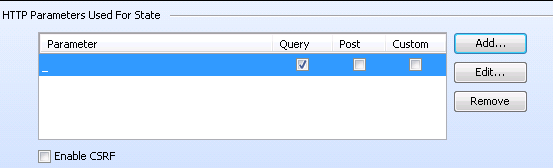
If the site contains parameters with random numbers, you can add the parameter to the list of HTTP Parameters Used For State to exclude such sessions from audit and reduce the number of false positives.
For example, for the following parameter:
		   index.php?_=1440601463586
		   index.php?_=1440601465662
		   index.php?_=1440601466365
you would add the parameter to the list of HTTP Parameters Used For State as shown below:
For more information, see Scan Settings: HTTP Parsing.
See Also
Running a Basic Scan (Web Site Scan)