2.8 UMC Ports
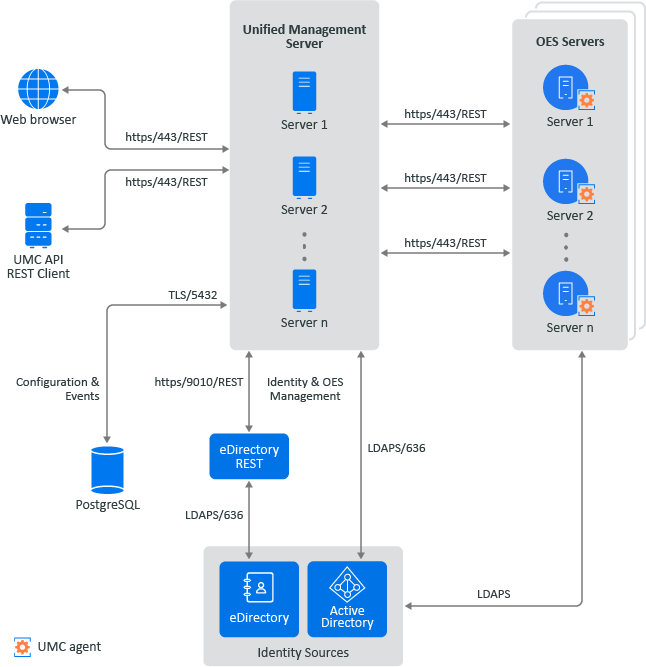
Figure 2-2 Port Diagram for UMC
|
Tasks |
Port |
Description |
|---|---|---|
|
Login |
443 |
The UMC server can be accessed from any web browser-enabled device. Using the UMC REST APIs, you can create a customized interface to access the UMC server. |
|
Manage OES services |
443 |
The UMC server (OES or non-OES server) manages the OES services. Load Balancer: Multiple UMC servers can be deployed and configured to work in conjunction with a load balancer. This load-balancing configuration enhances the availability and reliability of OES services. |
|
UMC Agents |
443 |
The servers hosting OES services act as agents for the UMC server, managing the services. |
|
Database |
5432 |
PostgreSQL is the default database used for UMC, storing configuration details and events. |
|
Identity Sources |
9010 / 636 |
Identity and OES management are performed by the eDirectory REST server or the Active Directory server. |