31.1 How to access print manager dashboard?
Access the print manager dashboard to manage print services such as printers, pools, and banners:
-
Log in to UMC with your credentials, then click
-
In Print manager, search and select a print manager.
-
Click
 > .
> . -
The Dashboard view
 displays general information and includes three tabs: , , and .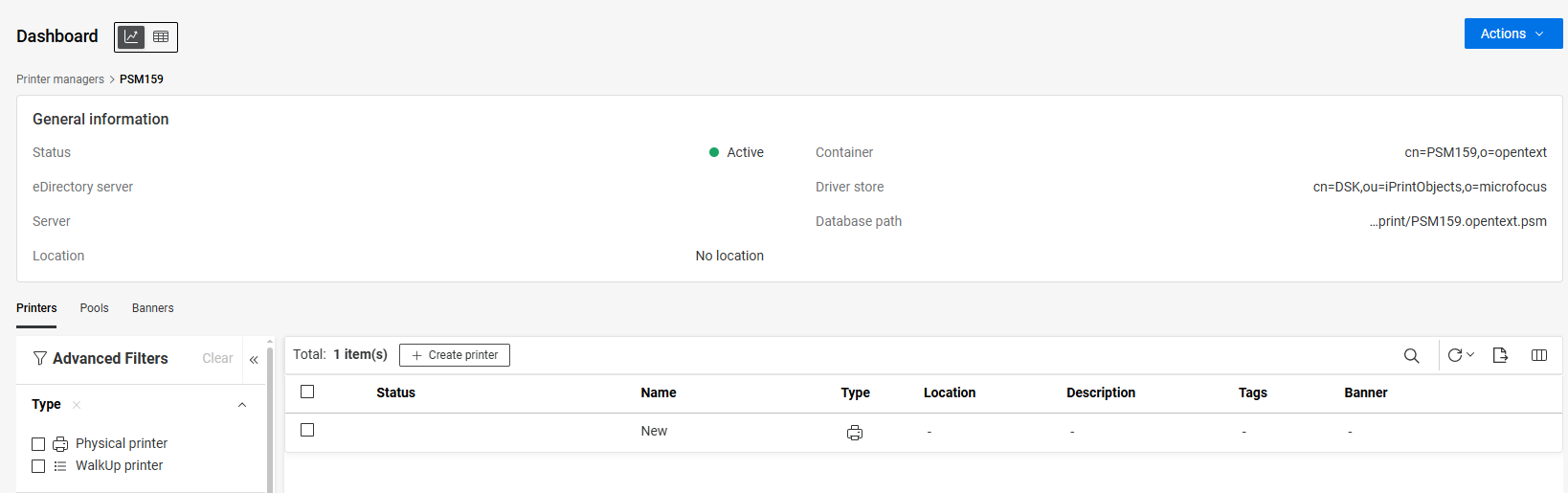
-
Status: Displays the current status of the print manager (Active or Down).
-
Server: Identifies the server by either its IP address or DNS name.
-
Location: Indicates the physical location of the print manager.
-
Container: Specifies the eDirectory container where the print manager reference is stored.
-
Driver store: Displays the name of driver store.
-
Database path: Specifies the full directory path and filename where the print manager database is stored.
-
Description: Provides a brief summary of the print Manager.
-
Version: Displays the version of the print manager.
-
-
Use to refine results by status, container, driver store, location, and additional criteria.