Windowing syntax is supplied for backward compatibility only. We
recommend that you do not use it when creating new applications.
Your COBOL system provides some support for ACUCOBOL windowing syntax
that enables you to draw lines and boxes on the terminal screen, and create
virtual terminal windows on a physical terminal. All ACCEPT and DISPLAY
statements then act within the current window (except for ACCEPT format 1, 2,
or 3 statements, DISPLAY format 1 statements, and DISPLAY WINDOW/LINE/BOX
statements). The syntax also enables underlying displays to be kept and
restored.
Your COBOL system includes the following syntax to support
windowing:
- BEFORE TIME phrase in ACCEPT statement
Format 5 of the ACCEPT statement has the BEFORE TIME phrase, which
enables you to specify a timeout period. If the user does not enter data during
this period, the statement is teminated automatically.
- DISPLAY WINDOW
DISPLAY WINDOW creates a terminal window (a rectangular region of
the screen) and makes it the current window. This is like a virtual terminal,
in which screen positions used by subsequent ACCEPT/DISPLAY statements are
relative to the top left corner of the window.
- DISPLAY LINE
DISPLAY LINE enables you to draw lines on the terminal (real or
virtual). The best mode available on the terminal is used automatically. Used
with the DISPLAY BOX statement, the DISPLAY LINE statement enables you to draw
forms on the terminal.
- DISPLAY BOX
DISPLAY BOX enables you to draw boxes on the terminal. The best mode
available on the terminal is used automatically. Used with the DISPLAY LINE
statement, the DISPLAY BOX statement enables you to draw forms on the terminal.
- CLOSE WINDOW
CLOSE WINDOW removes a window. If you specify the window as being a
POP-UP window, the underlying display can be restored.
In order to use the windowing syntax, you must use the
PREPROCESS"WINDOW1" Compiler directive.
You can specify this directive in one of two ways.
- In your source file use the following line:
$SET preprocess"window1"
- From the command line include the PREPROCESS"WINDOW1" directive:
The PREPROCESS "WINDOW1" directive must be the last Compiler directive
apart from NOERRQ, AUTOCLOSE or COLOR. If an error is encountered, the Compiler
asks if you wish to continue, and waits for your response. In order to disable
this function, you must specify the NOERRQ directive after PREPROCESS
"WINDOW1".
The following sections give details of the windowing syntax enabled by
the PREPROCESS "WINDOW1" directive.
The ACCEPT Statement
Format 5 of the ACCEPT statement as described in your
Language
Reference includes the phrase
Format:
BEFORE TIME time-out
General Rules:
- The BEFORE TIME phrase allows you to automatically terminate an
ACCEPT statement after a certain amount of time has passed. The timeout value
specifies the time to wait in hundredths of a second. For example, "BEFORE TIME
500" specifies a timer value of 5 seconds.
- The user must enter data to the ACCEPT statement before the
timer elapses. As soon as the user starts entering data, the timer is canceled
and the user may take as much time as desired to complete the entry. If the
user does not enter any data before the timer elapses, then the ACCEPT
statement terminates.
The CLOSE WINDOW Statement
The CLOSE WINDOW statement closes the current video terminal
window.
Format:
CLOSE WINDOW window-save-area
Syntax Rules:
- window-save-area must be an
elementary data item described with a PIC X(10) clause. It must have been the
object of a POP-UP AREA phrase in a DISPLAY WINDOW statement.
General Rules:
- The CLOSE WINDOW statement is used to remove popup windows
created by the POP-UP AREA option of the DISPLAY WINDOW statement.
- window-save-area must have been the
object of a POP-UP phrase of a DISPLAY WINDOW statement that has been executed
in this run unit. Furthermore, since that execution, it must not have been the
object of a CLOSE WINDOW statement, nor can it have been modified by any other
statement. Violation of these rules causes undefined results.
- The CLOSE WINDOW statement restores the contents of the
terminal screen that was in the active window when the corresponding DISPLAY
WINDOW statement executed. In other words, the window that was created by that
DISPLAY WINDOW statement is removed from the screen and replaced by the
contents of the screen which were under that popup window.
- The window that was active when the corresponding DISPLAY
WINDOW statement executed becomes the active window, thereby becoming the top
window and overlaying any other windows that might be present.
- The current window is selected by closing windows identified by
their respective window-save-area data items, as in
the following example:
If five popup windows are created,
a, b,
c, d and
e in that order:
- If d is closed,
c becomes current.
- If b is then closed,
a becomes current.
- If e is subsequently closed,
c becomes current again.
The DISPLAY Statement
This section explains COBOL windowing, which provides three
additional formats of the DISPLAY verb for creating windows and drawing lines
and boxes. Other formats are described in your Language
Reference.
General Format:
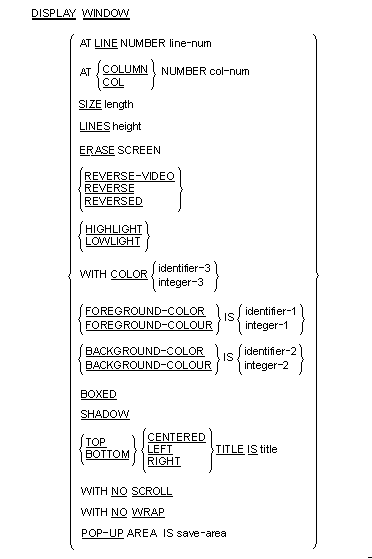
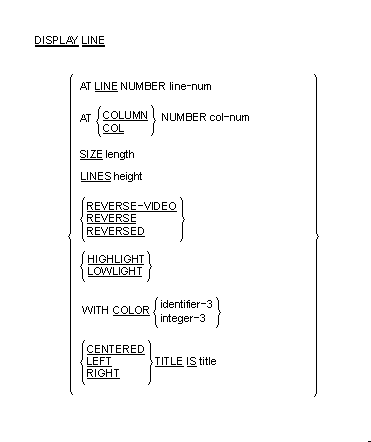
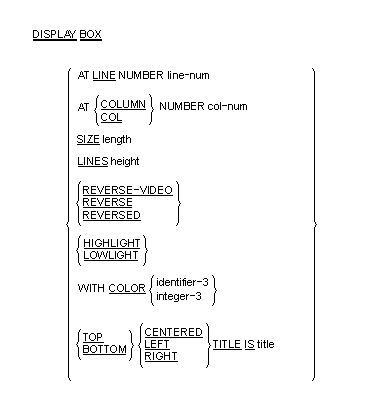
Syntax Rules:
- line-num is a numeric literal or
data item that specifies the line position on the terminal screen. It must be a
non-negative integer.
- col-num is a numeric literal or data
item that specifies the column position on the terminal screen. It must be a
non-negative integer.
- length is a numeric literal or data
item that specifies the window-width, line-width or box-width in character
positions. It must be a non-negative integer.
- height is a numeric literal or data
item that specifies the number of lines in the window, line or box. It must be
a non-negative integer.
- title is a non-numeric literal or
alphanumeric data item.
- save-area is an elementary data item
described by a PIC X(10) clause.
- COLUMN and COL are equivalent.
- REVERSE and REVERSED and REVERSE-VIDEO are equivalent.
- The COLOR phrase is supported only when the preprocessor
directive COLOR is used. This adds support for existing non-Micro Focus syntax.
- Exactly one of the SIZE or LINES phrases must be specified for
a Format 2 DISPLAY statement.
- identifier-1,
identifier-2, integer-1
and integer-2 must take a value in the range 0
through 7 as follows:
| 0 |
black |
| 1 |
blue |
| 2 |
green |
| 3 |
cyan |
| 4 |
red |
| 5 |
magenta |
| 6 |
brown or yellow |
| 7 |
white |
- identifier-3 and
integer-3 must take a value which is obtained by
adding together the appropriate values from the following:
| Color |
Foreground |
Background |
| Black |
1 |
32 |
| Blue |
2 |
64 |
| Green |
3 |
96 |
| Cyan |
4 |
128 |
| Red |
5 |
160 |
| Magenta |
6 |
192 |
| Brown |
7 |
224 |
| White |
8 |
256 |
Note: The foreground color values for use with the COLOR clause
are different from the standard Micro Focus color values for FOREGROUND-COLOR,
BACKGROUND-COLOR and so on.
In addition you can specify the following video attributes
with the following values:
| Reverse video |
1024 |
| Low intensity |
2048 |
| High intensity |
4096 |
| Underline |
8192 |
| Blink |
16384 |
- If a COLOR phrase is present at the same time as
FOREGROUND-COLOR and/or BACKGROUND-COLOR, then the colors defined in the COLOR
clause are ignored, but any non-color attributes are actioned (where
appropriate).
General Rules:
- The LINE and COLUMN phrases must specify a line or column on
the physical screen.
- On color systems, both the settings given in COLOR or
FOREGROUND-COLOR and BACKGROUND-COLOR and other attribute settings (for example
blink) are used. On monochrome systems, all color information supplied is
ignored, and only other attribute settings used.
- Not all combinations of attributes are supported on all
systems. For example, on a standard DOS PC, set to monochrome mode, REVERSE and
UNDERLINE are mutually exclusive - only one of these attributes is actioned.
- The DISPLAY WINDOW statement creates and makes current a
terminal window. The terminal window is a rectangular region of your screen.
Any ACCEPT or DISPLAY statements (apart from another DISPLAY WINDOW/LINE/BOX or
a Format 1, 2 or 3 ACCEPT or Format 1 DISPLAY as described in your
Language
Reference) affect only the current window.
Furthermore, line and column numbers for all ACCEPT and DISPLAY statements
(apart from another DISPLAY WINDOW/LINE/BOX or a Format 1, 2 or 3 ACCEPT or
Format 1 DISPLAY as described in your
Language
Reference) are computed from the upper left-hand
corner of the current window. That is, the current window defines a virtual
terminal screen which occupies some area of your physical screen.
- The initial window is set to the entire screen.
- The only way to change the current window is with another
DISPLAY WINDOW statement or with the CLOSE WINDOW statement.
- The LINE NUMBER phrase sets the top line of the window. Line
number one refers to the top line of the screen. Line numbers are relative to
the screen, and not to the current window.
- If the LINE NUMBER phrase is not specified, is specified as
zero, or is off the physical screen, the top line of the screen is used.
- The COLUMN NUMBER phrase sets the left-most column of the
window. Column number one refers to the left side of the screen. Column numbers
are relative to the screen, and not to the current window.
- If the COLUMN NUMBER phrase is not specified, is specified as
zero, or is off the physical screen, column number one is used.
- The SIZE phrase sets the number of columns the window contains.
If this causes the window to extend past the right edge of the screen, the
window's width extends off the screen.
- If the SIZE phrase is not specified or is specified as zero,
the window extends to the right edge of the screen.
- The LINES phrase sets the number of rows the window contains.
If this causes the window to extend past the bottom of the screen, the window
extends off the screen.
- If the LINES phrase is not specified or is specified as zero,
the window extends to the bottom edge of the screen.
- When the ERASE phrase is specified, the window is cleared
immediately after it is created. Otherwise the window's contents are not
changed. Clearing a window sets it to spaces.
- The BOXED phrase causes a box to be drawn around the new
window. The box is drawn outside the window. Any portions of the box that lie
off the screen are not drawn.
- The terminal's line drawing set is used to draw the box. If the
terminal does not have a line drawing set, equivalent ASCII characters are
used. If the POP-UP phrase is also specified, the box overlays any other boxes
on the screen. If this phrase is not specified, the box drawn is attached to
any other boxes it intersects. When a boxed non-popup window intersects a boxed
popup window, if the popup window is created first, when it is closed the
points where the two window boxes intersected is not redrawn. That is,
intersection characters remain even though there is no longer an intersection.
- The ERASE phrase is implied by the BOXED phrase.
- The REVERSED phrase exchanges the window's foreground and
background colors. This affects every ACCEPT and DISPLAY statement in the new
window.
- The REVERSED phrase implies the ERASE phrase. This usually
causes the entire window to be set to reverse video spaces when it is initially
created.
- The SHADOW phrase causes the window to appear to float over the
screen giving a three-dimensional effect.
- If the color value for either foreground or background is set
to 0 in the COLOR field, then the corresponding color of the default system
attribute is used.
- The TITLE phrase causes the title to be printed in the window's
border. This has its effect only if the BOXED phrase is also specified.
- Titles can be placed in one of six positions in the border
region: top left, top center, top right, bottom left, bottom center and bottom
right. If TOP or BOTTOM is not specified, TOP is used. If LEFT, CENTERED or
RIGHT is not specified, CENTERED is used.
- The NO SCROLL phrase is treated as documentary only; the
Windows preprocessor displays a message confirming this.
- The NO WRAP phrase is treated as documentary only; the Windows
preprocessor displays a message confirming this.
- The POP-UP AREA phrase causes your COBOL system to save system
information prior to creating the new window. This information can be used by
the CLOSE WINDOW statement to subsequently remove the new window and restore
the underlying windows. This gives a popup window.
- The save-area data item is filled in
with system information. This data item must not be subsequently modified in
any way or results are undefined. It can be referenced in a CLOSE WINDOW
statement to restore an earlier window to the screen and re-establish that
window as the current window.
- The DISPLAY LINE statement enables you to draw vertical and
horizontal lines in a machine- and terminal-independent manner. The lines are
drawn using the best mode available on the display device. Used together with
the DISPLAY BOX statement, this provides the ability to draw forms on your
screen. The DISPLAY LINE statement does not affect the positioning of full
screen ACCEPT and DISPLAY statements.
- Lines are drawn so that when they intersect other lines on the
screen, the appropriate intersection character is used. This is done so that
when the end of a line intersects another line, the appropriate corner or
three-way intersection is used.
- If the SIZE phrase is specified, the line drawn is horizontal.
The value of length gives the size of the line in
screen columns. If the LINES phrase is used instead, the line drawn is a
vertical line and height describes the number of
screen rows to use.
- Lines never wrap around or cause scrolling. If the LINES or
SIZE phrase would cause the line to leave the current window, the line is
truncated at the edge of the window. If LINES or SIZE is zero, no line is
drawn.
- The value of line-num gives the
starting row of the line. The value of col-num gives
the starting column. Lines are always drawn to the right or downward as
appropriate. line-num and
col-num must specify a position that is contained in
the current window.
- If the LINE NUMBER or COLUMN NUMBER phrases specify a point
outside the physical screen, that is, line-num = 0
or 24 (or your screen's maximum), or col-num = 0 or
> 80, no line is drawn.
- The TITLE phrase has effect only when drawing horizontal lines.
When specified, title-string is printed in part of
the line.
- The title can be printed near the right side, near the left
side or in the center of the line depending on the RIGHT, LEFT or CENTERED
phrase specified. If none is specified, CENTERED is used.
- The REVERSE phrase exchanges the foreground and background
color of the line.
- The DISPLAY BOX statement enables you to draw a box in a
machine- and terminal-independent manner. The boxes are drawn using the best
mode available on the display device. If the lines used in drawing a box
intersect other lines already present on the screen, the appropriate
intersection characters are used. The DISPLAY BOX statement does not affect the
positioning of full screen ACCEPT and DISPLAY statements.
- The location of the box is specified by providing the location
of the upper-left corner. The size of the box is specified by providing a
height and a width.
- If the LINE NUMBER or COLUMN NUMBER phrases specify a point
outside the physical screen no box is drawn.
- The SIZE phrase specifies the width of the box. The LINES
phrase specifies its height. If the SIZE phrase is not specified, or zero, or
such that the box would extend beyond the physical screen or the edge of the
window, the box extends to the right edge of the current window. If the LINES
phrase is not specified, or zero, or such that the box would extend beyond the
physical screen, the box extends to the bottom of the current window.
- The REVERSE phrase operates in the same manner as it does for a
DISPLAY WINDOW statement.
- The TITLE phrase operates in the same manner as it does for the
DISPLAY WINDOW statement.
- This feature is not guaranteed to be intermediate code compatible, so
you might need to recompile your source code between product releases.
-
When using the ACCEPT or DISPLAY statements with this
windowing syntax, you must include the AT LINE NUMBER syntax (see your
Language Reference) or items do not appear in the windows.
-
You should not use COPY REPLACING or REPLACE statements.
- The windowing syntax is supported only for fixed format COBOL source.
-
The following reserved words have been introduced by the
windowing syntax, so you should avoid specifying them as user-defined words:
- BOX
- BOXED
- CENTERED
- COLOR (if COLOR directive used)
- POP-UP
- SCROLL
- SHADOW
- WINDOW
- WRAP
- You should use only the ACCEPT and DISPLAY statements documented in
your Language Reference with this windowing syntax.
-
When using windowing syntax, the ANS85 Compiler directive is
implied. You must not unset this directive either explicitly or implicitly.
This includes the setting of directives which affect syntax and other language
behavior, for example, RM, MS and DG.
- Alphanumeric literals must not be continued over the end of any line
which includes a windowing statement.
- Some syntax errors, for example, spelling PROCEDURE DIVISION
incorrectly, are flagged, but might result in spurious error messages for
following source lines.
- Windowing syntax errors are serious errors, but are flagged in the
form:
xnnn-P*******
-
Column 73 must not be used within source programs which use
windowing syntax, as this column is always treated as being set to a space
character.
- The Compiler asks if you wish to continue after any error occurs. You
can disable this function by using the NOERRQ directive.
If no error occurred, or if an error occurred but you replied "no"
to the question "do you wish to continue", the Compiler returns a zero error
return code.
- Each of the following statements must appear on a line by itself:
- DISPLAY WINDOW
- DISPLAY BOX
- DISPLAY LINE
- CLOSE WINDOW
- EXIT PROGRAM
- The windowing subsystem is initialized automatically upon
encountering the first windowing statement.
-
If an application switches between using windowing syntax and
other types of Accept/Display syntax, it must close down the windowing system
completely before starting to use other types of Accept/Display syntax;
otherwise the ACCEPT and DISPLAY statements may not have the desired effects.
You can create a subroutine to explicitly close the windowing system
by compiling the following subprogram:
$set preprocess "window1" autoclose
 procedure division
 para-1.
     exit program.
You then call this subprogram before switching to another type of
Accept/Display syntax. The AUTOCLOSE preprocessor directive causes the EXIT
PROGRAM statement to close down the windowing system before exiting the
subprogram. The windowing subsystem is reinitialized upon encountering another
windowing statement. Each time the windowing subsystem initializes, the
background screen and contents are redisplayed.
-
You should not mix calls to Panels and to windowing syntax
within the same run unit.
- When a window is active, or has been active in the run unit, use of
the DISPLAY SPACES UPON CRT statement clears the window to spaces but leaves
attributes unchanged.
- Directives that affect the copyfile should not be used; for example,
COPYEXT, COPYLBR, FOLD-COPY-NAME.
- Environment variables that effect copyfile handling should not be
used; for example, COBCPY.
- The syntax:
COPY filename OF library
is not supported.
The following errors might be encountered during preprocessing.
Unexpected numeric literal:
Unexpected alphanumeric literal:
Unsupported keyword or noiseword:
Unrecognized clause to DISPLAY
WINDOW:
Unrecognized clause to DISPLAY
LINE:
Unrecognized clause to DISPLAY BOX:
Unrecognized clause to ACCEPT FROM
SCREEN:
This keyword has already been used:
This keyword conflicts with
another:
This reserved word is used
incorrectly:
Wrongly formed or ordered clause with
keyword:
Error during preprocessing - no further
details
Unknown COPY file specified
WINDOW1 preprocessor cannot handle free
format
SCROLL/WRAP clause processed as
comment
The edit/compile/debug loop returns to an incorrect line within your
source program after returning an error.
When the first windowing statement in your program is encountered the
screen is redisplayed. This is expected behavior and does not affect your
program in any way.
$set preprocess(window1)
 working-storage section.
 78 note-height  value 16.
 78 note-width  value 41.
 78 no-of-chars  value note-height * note-width.
 01 note-window  pic x(10).
 01 dummy    pic x.
 01 note-data value all "- wallpaper ".
   03 note-char pic x occurs no-of-chars.
 screen section.
 01 input-data highlight.
   03 line 4 column 6 value " Accept and Display positions ".
   03 line 5 column 6 value " are relative to the top left ".
   03 line 6 column 6 value " corner of the window. ".
   03    pic x using dummy.
 01 note-screen  pic x(no-of-chars)
               using note-data prompt " " reverse-video.
 procedure division.
* Put a blank window on the screen with a border and title
      display window, line 2, column 38, lines note-height,
          size note-width, boxed, erase, reverse
* Define a reference for this window so that it can be
* removed and the previous display restored
          pop-up area is note-window
          bottom right title "Press Enter to remove window"
* Fill the window with the contents of note-screen
      display note-screen
      display input-data
      accept input-data
      close window note-window.
Copyright © 2009 Micro Focus (IP) Ltd. All rights reserved.