
Figure 6-1: Passing Data Through COM Automation
COM Automation defines a set of data types for communication between COM clients and servers. This chapter explains how COBOL data types are mapped on to COM data types.
COM Automation defines its own data types for passing data from one COM object to another. OO COBOL converts automatically between COBOL data types and COM data types when sending or receiving COM messages, as shown in the diagram below:
Figure 6-1: Passing Data Through COM Automation
OO COBOL COM component provides support for the following types of data:
OLESafeArray and OLEVariant are complex data types which are passed into OO COBOL as instances of OO COBOL classes OLESafeArray and OLEVariant. The other data types are converted directly into equivalent COBOL data types.
When you send COBOL data to COM objects, it is coerced into appropriate COM data types. Similarly, when a COBOL program receives data from an COM object, it is coerced to a COBOL type. The table below defines the conversions which happen when data is passed to or from an OO COBOL program through a COM component:
| COM data type | COBOL data type | Description |
|---|---|---|
| VT_I8 |
|
8-byte integer |
| VT_I2 |
|
2 byte integer |
| VT_I4 |
|
4 byte integer |
| VT_DISPATCH | OBJECT REFERENCE - instance of COMBase (it is the receiving program's responsibility to finalize the object reference when it is no longer needed) | COM object handle. See the section Object References. |
| VT_R4 | COMP-1 | 4 byte floating point |
| VT_R8 | COMP-2 | 8 byte floating point |
| VT_DATE | COMP-2 | Binary format date - see Microsoft COM documentation for details. |
| VT_CY | COMP-3 | Currency. |
| VT_BOOL | PIC X(2) COMP-5 | Boolean value |
| SafeArray
The COM data type for a SafeArray is VT_ARRAY ORed with VT_datatype, where VT_datatype is any of the data types supported by SafeArray. |
OBJECT REFERENCE - Instance of COMSafeArray | n-dimensional fixed size array. See the section SafeArrays. |
| VT_VARIANT passed into an OO COBOL method | OBJECT REFERENCE - Instance of OLEVariant | Variant data. Contains type information as well as data. A Variant
can contain any one of the other data types in this table. See the section
Variant.
Note: This only applies to variants passed to a method when it is invoked. An invoked method cannot return a VT_VARIANT. |
Converted to one of the following, depending on the contents of the
Variant:
|
OBJECT REFERENCE - Instance of OLEVariant returned from an OO COBOL method | This applies when an OO COBOL method invoked through COM component attempts to return an instance of OLEVariant. The contents of the variant data type are returned instead. |
| VT_BSTR | PIC X(n) or as an instance of
CharacterArray
The run-time system converts automatically using one of these two types depending on whether the COBOL data item being used is declared as PIC X(n) or OBJECT REFERENCE. |
Length prefixed string |
COM components use a numeric code to identify each of these different data types - for example, to store type information in the VARIANT data type. These numeric codes are all defined as level-78 data items in copyfile mfole.cpy. You can find this copyfile in directory base\source.
Whenever an OO COBOL program is passed an COM object, the run-time system converts the COM handle (a VT_DISPATCH) into a proxy OO COBOL handle (an OBJECT REFERENCE). The proxy object is an instance of olebase.You can use the OO COBOL handle to send messages to the COM object, or pass the handle to another COM object as a parameter.
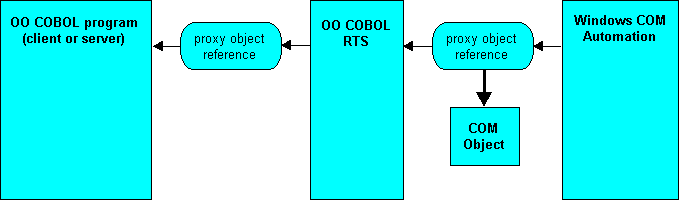
Figure 6-2: Conversion of VT_DISPATCH to a Proxy Reference
When you send an object handle to another COM object the run-time system attempts to convert it according to the following rules:
You can find out the class of an object handle by sending the "getClass" message to olesup. The result returned is the object handle of the class; you can find out what class that is by comparing it to the class names you have declared in the Class-Control paragraph of your program. For example:
 class-control.
      CharacterArray is class "chararry"
      olesup is class "olesup"
      SafeArray is class "olesafea"
      OLEVariant is class "olevar"
      ...
      .
 working-storage section.
    01 anObject               object reference.
    01 aClass                 object reference.
    ...
  procedure division.
      ...
      invoke olesup "getClass" using by value anObject
                               returning aClass
      if aClass = CharacterArray
          display "a CharacterArray"
      else
          if aClass = olebase
              display "A COM object"
          else
              if aClass = SafeArray
                  display "a SafeArray"
              else
                  if aClass = OLEVariant
                      display "a Variant"
                  else
                      display "Not supported by COM " &
                              "Automation"
                  end-if
              end-if
          end-if
      end-if
      ...
An OLE Variant is a COM data type which wraps up a piece of data, together with information about the type of the data. Variants have many uses in COM programming, for example:
All the elements in a SafeArray have to be the same size. If you create a SafeArray to handle Variants, then each element in the array can be a different type, wrapped inside a Variant.
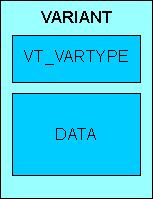
Figure 6-3: An OLEVariant Wraps up Type Information and Data
Copyfile mfole.cpy defines a new COBOL data type, VARIANT, which defines a data structure for holding OLE Variants. This copyfile also defines a set of level-78 data items, defining the values which correspond to the different data types a VARIANT can hold. The following example code checks the VARIANT-vartype field of a VARIANT data item, and compares it to level-78 data items from mfole.cpy to find out if the variant contains an integer or a string.
 working-storage section.
 COPY "MFOLE.CPY".
 01 aVariant         usage VARIANT.
 01 vtype            pic x(2) comp-5.
 ...
 procedure division.
     ...
*> VARIANT-vartype is a field of VARIANT data items containing
*> type information
     move VARIANT-vartype of aVariant to vType
     evaluate vType
        when VT-I2
            display "2-byte integer"
        when VT-I4
             display "4-byte integer"
        when VT-BSTR
             display "String"
        when other
             display "some other type"
     end-evaluate
OO COBOL COM component support provides an OLEVariant class to enable you to receive and pass VARIANT data. The OLEVariant class has methods for accessing VARIANT data which contain strings or object references as native OO COBOL data types. To handle other types of VARIANT data, you need to declare your own VARIANT data item, and read the data from the OLEVariant object into the data item.
You might be wondering why an OLEVariant class is needed when you can represent the structure of a VARIANT data item directly in COBOL, using the VARIANT type definition provided in mfole.cpy. The reason is that COM Component uses a set of Windows API functions to allocate, manipulate and deallocate VARIANTs, and that the OLEVariant class provides a simple interface from COBOL to these functions.
This chapter lists some, but not all, of the methods in the OLEVariant class. For the full list of OLEVariant methods, see the COM Automation Class Library in the Net Express help. From the Net Express toolbar, click Help > Help Topics. Then, on the Contents tab, click Reference > OO COBOL > OO Class Library Reference > COM Automation Class Library. Then double-click OLEVariant.
The objects.app project, in folder Examples\Net Express IDE\comdemos\objects, demonstrates the use of Variants, SafeArrays and other objects. The readme file (readme.txt) in that folder describes how to run the sample program.
Note: Full documentation on the OLEVariant data type is in the Microsoft Platform SDK Help. The Microsoft Platform SDK is supplied with Net Express.
Any OO COBOL class which is going to use OLEVariants must declare OO COBOL class OLEVariant in the Class-Control paragraph, and copy mfole.cpy into Working-Storage:
 class-control.
     ...
    class OleVariant is class "olevar".
     ...

 working-storage section.
 copy "mfole.cpy".
 ...
Copyfile mfole.cpy contains COBOL type definitions for data structures you need when working with OLEVariant.
The way you initialize the data in an OLEVariant instance depends on the type of data you are storing. You can put numeric data directly into a VARIANT data item, and use that to initialize an OLEVariant instance. Strings are stored as OLE BSTRINGS, which are created using a Windows API call, and COM Objects must be stored using their VT_DISPATCH reference, not the OO COBOL proxy reference available to an OO COBOL program. The OLEVariant class provides methods which create the BSTRING for you, and which automatically map a proxy reference back to its VT_DISPATCH before storing it.
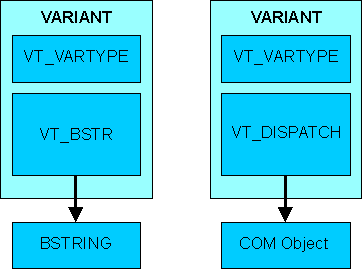
Figure 6-4: Windows Variants for Strings and Objects
There are two alternative methods for creating OLEVariant objects, depending on whether you are creating an OLEVariant to hold either a string or a COM object, or an OLEVariant to hold one of the other variant data types.
To create an OLEVariant instance to hold a string or OLEVariant object:
To create an OLEVariant instance to hold any type of data:
The following example shows the creation of two OLEVariants, one to store strings, and the other to store four-byte integers:
 working-storage section.
 copy "mfole.cpy".
 01 aCharArray           object reference.
 01 aVariantinstance     object reference.
 01 variantinstance1     object reference.
 01 variantinstance2     object reference.
 01 vType                pic 9(4) comp-5.
 01 strLength            pic x(4) comp-5.
 01 winStatus            pic x(4) comp-5.
 01 aNumber              pic s9(9) comp-5.
 01 aString              pic x(12) value "I'm a string".
 01 vData2               VARIANT.
 01 vDataDisplay         VARIANT.
 ...
 procedure division.
     ...
*>---Create an OLEVariant instance and store a string in
*>   it. First, create an empty variant instance
     invoke OLEVariant "new" returning variantInstance1
*>---Set the string data.
     move length of aString to strLength
     invoke variantInstance1 "setString" using
                                         by value strLength
                                     by reference aString
                                        returning winStatus
     ...
*>---Create an OLEVariant instance and store a 4-byte
*>   integer.
     move vt-I4 to variant-vartype of vData2
     move 99 to variant-vt-i4 of vData2
     invoke OLEVariant "newWithData" using vData2
                                 returning variantInstance2
     ...
To read data from an OLEVariant instance:
For any other data-type, you can read the data directly from the appropriate field in the VARIANT data item.
An alternative method for getting the type is to use send the "getType" message to the OLEVariant instance. See the COM Component Class Library Reference in the online help for more information.
The following example code shows you how to read data from a VARIANT data item:
 working-storage section.
 copy "mfole.cpy".
 01 aCharArray           object reference.
 01 aVariantinstance     object reference.
 01 strLength            pic x(4) comp-5.
 01 winStatus            pic x(4) comp-5.
 01 aNumber              pic s9(9) comp-5.
 01 vDataDisplay         VARIANT.
 ...
 procedure division.
     ...
     evaluate variant-vartype of vDataDisplay
                                       *> What data-type?
      when vt-bstr
             *> These constants are declared in MFOLE.CPY
         invoke aVariantInstance "getCharArray"
                               using aCharArray
                           returning winStatus
         invoke aCharArray "display"
      when vt-I2
         move variant-vt-i2 of vDataDisplay to aNumber
         display aNumber
      when vt-I4
         move variant-vt-i4 of vDataDisplay to aNumber
         display aNumber
      when other
         display "Not a string or two or four-byte integer"
     end-evaluate
     ...
An OLE SafeArray is a fixed n-dimension array which can safely be passed across process boundaries. COM provides an API for manipulating SafeArrays, which enables you to create them, destroy them, and manipulate the data which they contain. You can manipulate SafeArrays from OO COBOL, through the OleSafeArray class, which is provided as part of OO COBOL COM component support.
The index of the first element position in a given dimension is given by that dimension's lower-bound. The lower-bound of a dimension can be defined as any arbitrary integer value when the SafeArray is defined. For example, the diagram below illustrates a two-dimensional SafeArray, of 6 by 7 elements. If the lower-bound of dimensions 1 and 2 is set as zero, the address of the red-colored cell is 2, 1. If the lower-bound of dimensions 1 and 2 is set as one, the address of the red-colored cell is 3, 2.
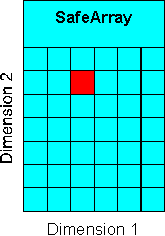
Figure 6-5: A Two-dimensional SafeArray
This chapter does not list all of the methods in the OLESafeArray class. For the full list of OLESafeArray methods, see the COM Component Class Library in the Net Express help. Click Help on the Net Express Help Topics menu, then click Reference, OO Class Library, on the Contents tab, then click the shortcut button for the Class Library Reference.
The objects.app project, in the folder Examples\Net Express IDE\comdemos\objects, demonstrates the use of Variants, SafeArrays and other objects. The readme file (readme.txt) in that folder describes how to run the sample program.
Any OO COBOL class which is going to use SafeArrays must declare OO COBOL class OleSafeArray in the Class-Control paragraph, and copy olesafea.cpy into Working-Storage:
 class-control.
     ...
     class OleSafeArray is class "olesafea".
     ...

 working-storage section.
 copy "olesafea.cpy".
 ...
Before creating a SafeArray, you need to set up the following information:
SafeArrays can have any number of dimensions from 1 upwards.
The boundaries are defined as a lower-bound - the index of the first element in the array, and the number of elements in the dimension. Use a table of data items of type SAFEARRAYBOUND to declare the boundaries of each data item. This data type is defined in copyfile olesafea.cpy.
SafeArrays are homogeneous - all the data stored in it must be of the same type - although you can create a SafeArray of variants, in which case each you can use variant objects to store different types. The different data types you can store in a SafeArray are identified as level-78 data items in copyfile olesafea.cpy.
To create a SafeArray:
invoke OleSafeArray "new" using by value vType
                         by value dimensions
                     by reference saBounds(1)
                        returning aSafeArray
where the parameters are:
| Parameter | COBOL Data type | Description |
|---|---|---|
| dimensions | pic x(4) comp-5 | The number of dimensions of the SafeArray |
| saBounds | SAFEARRAYBOUND occurs n. | Where n is the number of dimensions in
the SafeArray (the value of dimensions).
Data items of type SAFEARRAYBOUND hve two elements: llBounds and cElements, enabling you to set the lower-bound of the dimension and the number of elements in the dimension. |
| vType | PIC X(4) COMP-5 | Set to the type of data you want to store in the SafeArray.
The differerent COM data types are defined as level-78s in copyfile olesafea.cpy. |
The following example sets up a 2-dimensional SafeArray, of 3 by 2 elements.
 program-id. tplolec.
 object section.
 class-control.
     OleSafeArray is class "olesafea"
     .
 working-storage section.
 copy "mfole.cpy".
 copy "olesafea.cpy".
 01 saBound              SAFEARRAYBOUND occurs 2.
 01 intSafeArray         object reference.
 01 varType              pic 9(4) comp-5.
 01 dimensions           pic x(4) comp-5.
 procedure division.
*>---Set up the data type as a 4-byte integer. VT-I4
*>   is the COM data type for an integer, defined in
*>   MFOLE.CPY.
     move VT-I4 to varType
*>---Set the array up as 2-dimensional
     move 2 to dimensions
*>---Define this as a 3 by 2 array,with lower bounds
*>   of 0. (The lower bound is the index of the first
*>   element in a dimension)
     move 3 to cElements of saBound(1) *>cElements is
                                       *>a subitem of
                                       *>type SAFEARRAY,
                                       *>for setting
                                       *>dimension size
     move 0 to llBound of saBound(1)   *>llBound is
                                       *>a subitem of
                                       *>type SAFEARRAY,
                                       *>for setting
                                       *>dimension
                                       *> lower bounds
     move 2 to cElements of saBound(2)
     move 0 to llBound of saBound(2)
     invoke ComSafeArray "new" using
                           by value varType
                           by value dimensions
                           by reference saBound(1)
                           returning intSafeArray
You can interrogate a ComSafeArray instance representing a SafeArray to find out the following information:
These methods also return a Windows status-code, with a non-zero result indicating that the operation failed. For example, if you attempted to get the size of a non-existent dimension.
All data is returned in PIC X(4) COMP-5. You need this information whenever you need to handle a SafeArray of unknown size passed to your program from somewhere else.
The following example code shows a SafeArray being interrogated for the number of dimensions, and the size of the first dimension.
 working-storage section.
 ...
 01 dimensions           pic x(4) comp-5.
 01 dimensionSize        pic x(4) comp-5.
 01 intSafeArray         object reference.
 01 lBound               pic x(4) comp-5.
 01 uBound               pic x(4) comp-5.
 01 hResult              pic x(4) comp-5.
 01 varType              pic x(4) comp-5.
 ...
 procedure division.
 ...
*>---Get the number of dimensions of the array
      invoke intSafeArray "getDim" returning dimensions
      ...
      move 1 to dimensions
*>---hResult is the Windows status code returned when the
*>   SafeArray is queried. Zero indicates success, non-zero
*>   indicates failure. Error codes are defined in copyfile
*>   MFOLE.CPY, as level-78 data items.
     invoke intSafeArray "getLBound"
                                   using by value dimensions
                                         by reference lBound
                               returning hResult
     invoke intSafeArray "getUBound"
                                   using by value dimensions
                                         by reference uBound
                               returning hResult
*>---Calculate the dimension size
     subtract lBound from uBound
     add 1 to uBound giving dimensionSize
*>---Find out the type of data in the array
     invoke intSafeArray "getVarType" returning varType
     ...
The OLESafeArray class provides different methods for reading and writing individual elements depending on the type of data stored:
With both these methods, the string length is passed BY VALUE in a PIC X(4) COMP-5 data item.
All the "get" versions of these methods check that the element you are accessing is of the correct type and return an error code if it isn't.
The "getElement" copies the data of the specified element to an area of memory for you. You provide the method with a POINTER; it is your responsibility to ensure that the POINTER points to a large enough data item to receive the data. The "putElement" method copies data from the area pointed to by a POINTER which you pass it. You can find out how big the elements of a SafeArray are by using the "getElementSize" method.
All these methods look very similar, requiring you to pass in a table of indices to specify the individual element you want, a data item for the actual data (a POINTER in the case of the "getElement" and "putElement" methods) and return an error-code. The methods for accessing strings also require you to pass a PIC X(4) COMP-5 data item BY VALUE for the string length.
The following example shows code to store numeric data in a 3 by 2 SafeArray using the "putElement" method, and to retrieve strings from a SafeArray of type VT_BSTR using "getCharArray":
 working-storage section.
 copy "olesafea.cpy".
 01 saBound              SAFEARRAYBOUND occurs 2.
 01 intSafeArray         object reference.
 01 strSafeArray         object reference.
 01 iIndex               pic x(4) comp-5 occurs 2.
 01 hIndex               pic x(4) comp-5.
 01 vIndex               pic x(4) comp-5.
 01 iValue               pic x(4) comp-5.
 01 hResult              pic x(4) comp-5.
 01 theData              POINTER.
 ...
 procedure division.
     ...
     move 9 to iValue
     move 10 to strLength
     set theData to address of iValue *> "putElement" reads
                             *> data from an address pointer
     perform varying hIndex from 0 by 1 until hIndex = 3
         perform varying vIndex from 0 by 1 until vIndex = 2
             move hIndex to iIndex(1)
             move vIndex to iIndex(2)
             invoke intSafeArray "putElement"
                                             using iIndex(1)
                                          by value theData
                                         returning hResult
             subtract 1 from iValue
         end-perform
     end-perform
     ...
     perform varying hIndex from 0 by 1 until hIndex = 3
        perform varying vIndex from 0 by 1 until vIndex = 2
           move hIndex to iIndex(1)
           move vIndex to iIndex(2)
           invoke strSafeArray "getCharArray"
                                           using iIndex(1)
                                                 aCharArray
                                       returning hResult
           invoke aCharArray "display"
        end-perform
        display " "
    end-perform
You can get direct access to the memory holding the data structure for the Windows SafeArray wrapped by an instance of OLESafeArray. Only do this if you are familiar with the internal structure of SafeArrays.
To get direct access:
See the Help reference topics OLESafeArray Method accessData and OLESafeArray Method UnaccessData, available from the OLESafeArray topic for more information.
Copyright © 2006 Micro Focus (IP) Ltd. All rights reserved.