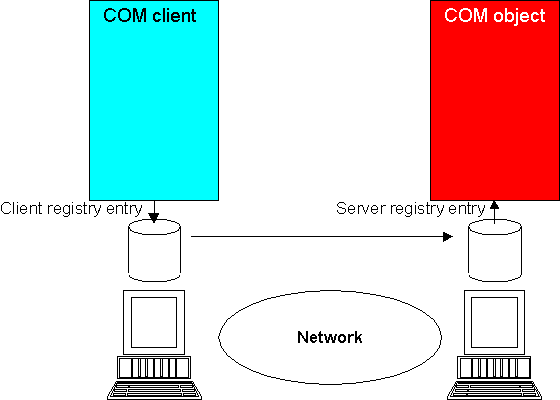
Figure 5-1: Locating a Remote COM Object
This chapter discusses the Distrubuted Common Object Model (DCOM) and how to use it to distrubute COM components.
DCOM (Distributed Common Object Model) enables you to distribute COM clients and objects across different machines on a network. You can run any OO COBOL COM object across a network by providing the right registry information on the client and server machines. The registry entry for the client machine enables it to find the remote machine where the server exists.
Figure 5-1: Locating a Remote COM Object
You need to generate two .reg files for your COM object; one to register it on client machines, and one to register it on the remote server machine. The Net Express Class Wizard does this for you if you specify that an Automation server class is remote when you create it; however, you often develop a COM object as a local server, and then redeploy it as a remote server when you have finished.
See the Help topic To generate a COM registry file for more information.
Use the client registry file to register the server on all the client machines you want to have access to it. Use the server registry file to register the server on the server machine. You also need to install either Net Express or reUZE Server on your server machine.
Windows NT security can occasionally cause some problems in starting, running and accessing distributed servers. This section lists the main points you should check when using DCOM and Windows NT:
DCOM enforces these rules. You can set up the values for each server using the Microsoft DCOMCNFG utility. To test that everything is working, use custom launch and access permissions, add "Everyone" to each list, and use a client within the same domain as the server. Then refine your security.
You can choose one of the following:
| The interactive user | The server is launched under the account of the user currently logged in to the server. For multiple use servers, only one server need be launched. The server has automatic access to the screen. |
| The launching user | The server is launched under the machine account that the client application is running under. For multiple use servers, a server is launched under each new client login. |
| A specified user | The server is launched under a particular user account. For multiple use servers, only one server need be launched. |
See Microsoft documentation for more information about security issues.
Copyright © 2006 Micro Focus (IP) Ltd. All rights reserved.